
MSBA-161 · Lesson 2 of 12 · 25 min
Repository permissions and roles
▶ Video coming soon A video version of this lesson is on the way.
At the Thursday session on March 4, Rosa put a question on the boardroom screen that nobody could answer with confidence: "Who can change the TrailCheck website today?" The organization had grown over the winter. Some people had been added to repositories directly when something was urgent, a few teams had been given access, and the base permission had been changed once and changed back. The aim of the session was to understand exactly how GitHub decides what one person may do in one repository, and then to run Tidewater's first access review.
Permissions belong to repositories
An organization role, covered in lesson 1, says what someone can do to the organization as a whole. A repository role says what someone can do inside one repository: read it, comment on it, push to it, merge into it, change its settings. Repository roles are given to people in three ways: through the organization's base permission, which every member has on every repository; through teams that have been given access to the repository; and directly, to an individual member or an outside collaborator. GitHub combines these sources, and the person gets the highest level any of them gives.
The five repository roles
Organization repositories have five built-in roles, each including everything in the role below it.
| Role | Intended for | Adds the ability to |
|---|---|---|
| Read | People who need to view or discuss the work | View and clone the code, open and comment on issues and pull requests, view releases |
| Triage | People who manage issues without writing code | Apply labels, close and reopen issues and pull requests, assign them, apply milestones, request reviews, mark duplicates |
| Write | Active contributors | Push to branches, merge pull requests, create and edit labels and milestones, approve pull requests that need reviews, run workflows, create releases |
| Maintain | People who manage the repository without sensitive access | Edit the description and topics, manage merge settings and GitHub Pages publishing, enable wikis, manage some repository features |
| Admin | People who own the repository | Manage access for people and teams, change settings and visibility, manage branch protection and rulesets, webhooks and deploy keys, archive, transfer or delete the repository |
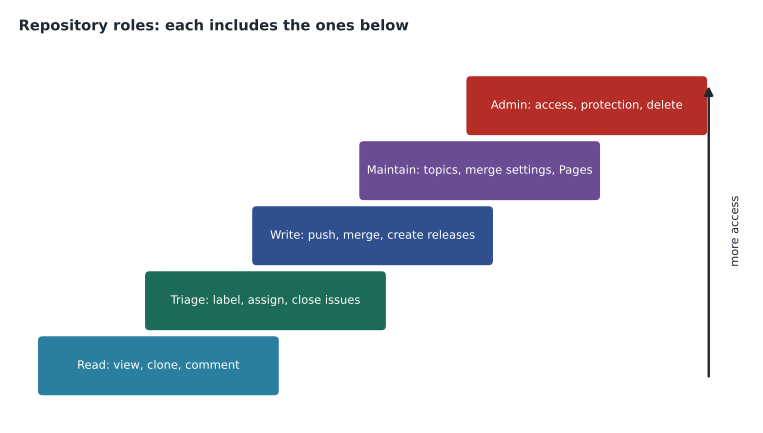
Two of the roles are easy to confuse with their neighbors. Triage exists for people who look after the issue list but should not change content, such as a volunteer coordinator who sorts incoming reports. They can label, assign and close issues, but they cannot push a commit or create new labels. Maintain exists for someone who runs a repository day to day without holding the most sensitive powers: they can change the description, topics, merge settings and Pages settings, but they cannot change who has access, edit branch protection or rulesets, or delete the repository. Those remain with Admin.
Worked problem
Which role fits?
Assign the lowest suitable role in the trailcheck repository to each of: a summer editor who should read the code and comment on pull requests; a volunteer coordinator who sorts trail reports into labels; Lena, the summer developer who will open and merge pull requests; and Priya, who will manage branch protection.
Show solution
- The summer editor only reads and comments, so Read is enough.
- Sorting reports needs labels and closing but no pushing, which is exactly Triage.
- Lena needs to push branches and merge pull requests, so she needs Write.
- Managing branch protection is an Admin power; Maintain cannot change protection rules.
Answer: Read for the summer editor, Triage for the coordinator, Write for Lena and Admin for Priya.
How the sources combine
When a person has access to a repository from more than one source, GitHub gives them the highest of the levels, never the lowest and never a total. If the base permission is Read, a team gives Write and an individual grant gives Triage, the person has Write. Access cannot be reduced below the base permission by anything else: if the base permission were Write, there would be no way to make one member Read-only in one repository, short of removing them from the organization. That is one more reason to keep the base permission low.
| Source of access | How it is set | Example for Owen in trailcheck |
|---|---|---|
| Base permission | Organization member privileges | Read |
| Team: all-staff | Repository access for the team | None for trailcheck |
| Team: editors | Repository access for the team | Triage, so he can sort website issues |
| Direct grant | Repository settings, Collaborators and teams | None |
| Effective role | Highest of the above | Triage |
Worked problem
Effective permissions
The base permission is Read. Dmitri is in the web team, which has Write on trailcheck, and was also given Admin directly on trailcheck last autumn to fix a domain setting. Grace is in the editors team, which has Triage on trailcheck. What are their effective roles, and what should the access review change?
Show solution
- Dmitri's sources are Read (base), Write (team) and Admin (direct). The highest is Admin, so he is effectively an administrator.
- The domain fix is finished, and an administrator can change protection rules, so the direct Admin grant is no longer needed.
- Removing the direct grant leaves Write from the web team, which is what his job needs.
- Grace's sources are Read (base) and Triage (team); her effective role is Triage, which matches her job.
Answer: Dmitri is effectively Admin and should drop to Write by removing the old direct grant; Grace stays at Triage.
Where to see and change access
A repository's Collaborators and teams page (under the Access section of its settings) lists every team and individual with access and the role each has, and lets an administrator add or remove them. A team's own page lists the repositories it can reach. An organization owner can open a member's page to see every repository the member can access and why, which is the quickest way to answer a question like Rosa's. People with read access can also see which rulesets apply to a branch, but only administrators see the full list of who has access.
When an organization member invites someone who is not yet in the organization to a repository, the person becomes an outside collaborator; organization owners can restrict who may do that. Tidewater allows only owners to add outside collaborators, so the partner publisher's editor was added by Rosa, to the style-guide repository only, with Write access.
Repositories in personal accounts
A repository owned by a personal account works more simply. It has one owner, the account holder, who has full control. The owner can invite collaborators, who can push, merge and manage issues, but there is only one collaborator level; the five roles exist only in organization repositories. Collaborators cannot change settings, add other collaborators or delete the repository. This is fine for a hobby project, but it is a weak fit for a company, because it offers no Triage or Maintain level, no teams and no organization-wide settings. Malik's original trail-report format began in his personal account, and lesson 12 follows its move into an organization.
| Personal repository | Organization repository |
|---|---|
| One owner with full control | Owners, admins and other roles |
| Collaborators all have the same access | Five roles: Read, Triage, Write, Maintain, Admin |
| No teams | Teams with nesting and maintainers |
| Settings only by the owner | Settings by admins, defaults by organization owners |
Custom repository roles and fine-grained access
On GitHub Enterprise Cloud, organization owners can create custom repository roles that start from one of the built-in roles and add specific permissions, for example a role based on Triage that can also manage GitHub Pages settings, or one based on Write that can also manage webhooks. Custom roles are not available on the Free and Team plans, which Tidewater uses, so the team stays with the five built-in roles. It is still useful to know that they exist, because the GH-900 exam expects you to recognize the idea.
Access does not only come from people. Deploy keys are SSH keys attached to one repository, used by a server to pull or push without a person's account; they can be read-only or read-write. GitHub Apps receive their own fine-grained permissions when installed, which lesson 6 covers. Personal access tokens act on behalf of a person with whatever access that person has, limited by the token's scopes; GitHub recommends fine-grained personal access tokens, which can be limited to particular repositories and permissions and given an expiry date, and organizations can require approval before such tokens can reach their resources.
Visibility and roles are different questions
Visibility, covered in MSBA-160, answers who can see a repository; roles answer who can change it. The two interact in ways that surprise newcomers. In a public repository, anyone on the internet can read the code, open issues, comment and fork it, so the Read role adds little for ordinary visitors; the roles that matter are Triage and above. In a private repository, nobody without a role can see anything at all, so even Read is a real grant. In an internal repository, available in enterprises, every enterprise member gets Read automatically. Changing a repository from private to public therefore changes who can read it, but does not change who can push: the same roles still control writing.
Two further points come up in practice. First, archiving a repository makes it read-only for everyone, including administrators, until it is unarchived; it is the right way to retire a finished project without deleting its history. Second, roles do not stop someone from copying what they can already read. Anyone with Read on a repository can clone it, so a low role limits changes, not disclosure. When something must not be seen by a person, the answer is not to give them access to that repository at all, which is why Tidewater keeps the unpublished trail notes in a repository that the partner publisher's editor cannot reach.
Worked problem
Who can do what after a visibility change?
The style-guide repository is private. The partner editor is an outside collaborator with Write; the base permission is Read. Grace decides to make the repository public so other small publishers can learn from it. What changes for a stranger on the internet, for staff, and for the partner editor?
Show solution
- A stranger previously could not see the repository at all; after the change they can read it, open issues and fork it, but still cannot push.
- Staff had Read through the base permission and keep it; nothing changes for them.
- The partner editor keeps Write, because roles are not affected by visibility.
- Before the change, Grace should check the history for anything that should not become public, because every past commit becomes readable.
Answer: Only reading opens up: strangers can now read, comment and fork; staff and the partner editor keep the same roles.
The principle of least privilege
The idea that runs through every choice in this lesson is least privilege: each person or system gets the lowest access that lets them do their work, for as long as they need it. It limits the damage a mistake can do, it limits what an attacker gains from a stolen account, and it makes the question "who can change this?" easy to answer. In GitHub, least privilege looks like a low base permission, access through teams rather than individuals, Write instead of Admin for most contributors, outside collaborators instead of members for temporary helpers, read-only deploy keys where possible, and tokens with expiry dates.
Running an access review
An access review is a regular check that the access people have still matches what they need. Rosa scheduled one every three months and wrote down the steps so anyone could repeat them.
| Step | What to check | Tidewater finding in March |
|---|---|---|
| 1 | List organization owners | Two owners, as intended |
| 2 | List outside collaborators | One expired contractor from 2026, removed |
| 3 | For each repository, list direct grants to individuals | Dmitri's old Admin grant on trailcheck, removed |
| 4 | Compare team memberships with current jobs | A former editor still in editors, removed |
| 5 | Check deploy keys and app installations | One read-write deploy key changed to read-only |
| 6 | Record the review and the changes | Noted in an issue in the admin repository |
Worked problem
How much did the review change?
Before the review, 9 people had Write or higher on trailcheck. The review removed the former editor (who had Write through the editors team, since an earlier change), the expired contractor (Write as an outside collaborator), and lowered Dmitri from Admin to Write. How many people have Write or higher afterward, and how many administrators were removed?
Show solution
- Two people lost access entirely: the former editor and the contractor.
- 9 - 2 = 7 people still have Write or higher.
- Dmitri still has Write, so he is counted among the 7; only his Admin level was removed.
- One administrator was removed (Dmitri's direct Admin grant).
Answer: 7 people keep Write or higher, and the number of administrators fell by one.
Owen pointed out the change in the answer to Rosa's first question. Before the review, the honest answer to "who can change the website?" was "nine people, one of whom can also change the protection rules." Afterward it was "the web team and Priya", which anyone could check on the team page.
Common mistakes
MistakeExpecting a lower team role to override a higher base permission.
InsteadGitHub always gives the highest level from any source; keep the base permission low.
MistakeGiving Admin to anyone who needs to merge.
InsteadWrite is enough to merge; keep Admin for people who manage access and protection.
MistakeUsing Maintain to let someone edit branch protection.
InsteadOnly Admin can manage branch protection and rulesets.
MistakeLeaving direct grants in place after an urgent fix.
InsteadRemove temporary access and review direct grants regularly.
Summary and key terms
- Repository roles come from the base permission, teams and direct grants; the effective role is the highest of them.
- The five roles are Read, Triage, Write, Maintain and Admin, each including the ones below.
- Triage manages issues without pushing; Maintain manages the repository without access, protection or deletion powers.
- Personal repositories have one owner and collaborators with a single access level.
- Custom repository roles are an Enterprise Cloud feature; deploy keys, apps and tokens are other kinds of access.
- Least privilege and regular access reviews keep access matched to need.
- Repository role
- The level of access a person or team has to one repository.
- Triage
- A role that can manage issues and pull requests without write access to the code.
- Maintain
- A role that can manage a repository's settings except access, protection and deletion.
- Effective permission
- The highest access a person has from all sources combined.
- Deploy key
- An SSH key attached to one repository for use by a server.
- Fine-grained personal access token
- A token limited to chosen repositories, permissions and an expiry date.
- Least privilege
- Giving each person or system only the access they need, for as long as they need it.
Practice problems
Work each problem on paper first, then reveal the answer to check.
A person has Read from the base permission and Write from a team. What is their effective role?
Show answer
Write, the highest of the two.
Which is the lowest role that can create a release?
Show answer
Write.
On which plan can owners create custom repository roles?
Show answer
GitHub Enterprise Cloud.
Lesson quiz · 5 questions
Score 60% or more to complete this lesson.
Create a free account to save your progress, take quizzes and earn a certificate.