
MSBA-161 · Lesson 1 of 12 · 22 min
Organizations and teams
▶ Video coming soon A video version of this lesson is on the way.
Tidewater Trail Guides finished its first winter on GitHub with three busy repositories, a release project and a habit of reviewing every change. In late February the managing editor, Grace Achterberg, made a decision that changed how the company would use the tools: the spring edition of Coastal Day Hikes would be the last one written only by staff. From now on, outside contributors would help maintain an open trail-report format, a partner publisher in northern New England would borrow the house style guide, and two summer staff would join the editors. That meant more people, more repositories and more risk. So the Monday Git lunches came back in a new format on March 1, 2027, twice a week this time, on Mondays and Thursdays, with Rosa Delgado leading the administration sessions and Priya Nair the technical ones. Owen Tremblay, the editor turned content-operations lead, had also moved his GH-900 exam to late April so he could finish this second course first.
The first session was about the container that holds everything else: the organization. MSBA-160 introduced organizations as shared accounts that own repositories and grant people access. This lesson looks at how an organization is actually run: its settings, the people in it, and the teams that make access manageable as a group grows.
What an organization owns and controls
An organization is a shared account. Nobody signs in to it; people sign in with their own personal accounts and the organization gives them a role. What the organization owns is everything shared: repositories, projects, packages, teams, GitHub Apps it has installed, settings, billing, and the security configuration that applies across its repositories. If a member leaves, the repositories stay with the organization, which is the main reason a company should never keep its work in one employee's personal account.
The organization's settings pages are visible only to owners and to people with specific administrative roles. They are grouped into areas that the GH-900 exam expects you to recognize: the organization profile, member privileges, billing and plans, authentication security (such as requiring two-factor authentication), code security settings, third-party access (GitHub Apps and OAuth apps), repository defaults (such as the default branch name), rulesets, Copilot policies, and the audit log, a record of who did what in the organization.
| Settings area | What it controls | Tidewater example |
|---|---|---|
| Profile | Name, description, website, verified domains, profile README | tidewater-guides with a verified company domain |
| Member privileges | Base permission, who can create repositories, forking of private repositories | Base permission set to Read |
| Authentication security | Requiring two-factor authentication | 2FA required for every member and outside collaborator |
| Billing and plans | Plan, seats, payment, spending limits | Team plan, billed monthly |
| Teams | Groups of members and their access | editors, web, all-staff |
| Third-party access | Which apps may read organization data | Only approved apps |
| Code security | Security features turned on by default | Dependabot alerts on for all repositories |
| Copilot | Whether and how members may use Copilot | Allowed for the web team only |
| Audit log | Events such as members added, settings changed | Reviewed by Rosa each month |
Organization roles
Every person connected to an organization has an organization role. Most people are members, the default non-administrative role. A small number are owners, who have complete administrative control, including the power to delete the organization. GitHub recommends having at least two owners, so the organization is never stranded if one person is unavailable, and keeping the group small, because an owner can change any setting and see every repository.
Between those two, GitHub provides several narrower roles so that people can do one administrative job without full ownership. A billing manager can see and change billing and payment details but not repositories or members. A moderator can block and unblock people who are not members, set temporary interaction limits on public repositories and hide comments, which is useful for a busy open-source project. A security manager can see security alerts across the organization, manage security settings and read every repository. A GitHub App manager can manage the settings of apps the organization has registered. People who need access to particular repositories but are not part of the organization, such as a consultant or a partner, can be added as outside collaborators; they do not count as members and see only the repositories they are given. On GitHub Enterprise Cloud, owners can also create custom organization roles that grant a chosen set of permissions, such as viewing the audit log.
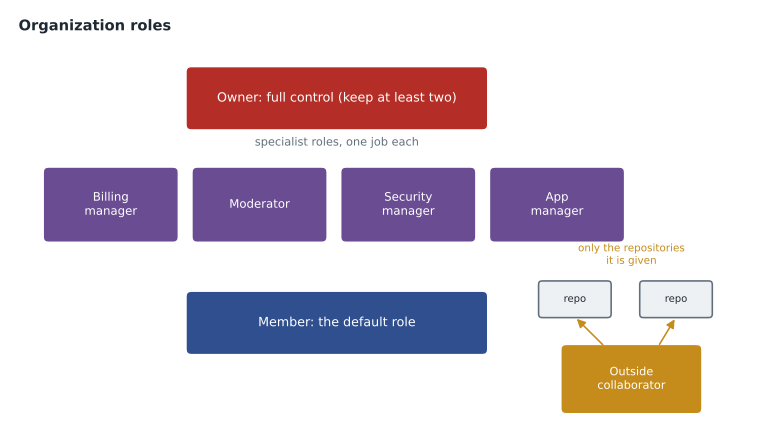
| Role | Can do | Cannot do | At Tidewater |
|---|---|---|---|
| Owner | Everything, including deleting the organization | Nothing is restricted | Rosa and Priya |
| Member | Create repositories (if allowed), join teams, work in repositories they can access | Change organization settings | Owner, Grace, editors, developers |
| Billing manager | Manage payment details and invoices | See private repositories through this role | The finance officer |
| Moderator | Block non-members, limit interactions, hide comments | Change repository settings | Malik, for the public trail-report repository |
| Security manager | See security alerts, manage security settings, read all repositories | Write code through this role | Priya (also an owner), later a second person |
| Outside collaborator | Work in the repositories they are added to | See the organization's other repositories or teams | The partner publisher's editor |
Member privileges and the base permission
Two settings decide what an ordinary member can do before anyone has given them anything specific. The first is the base permission, the access every member has to every repository in the organization. It can be No permission, Read, Write or Admin. A low base permission is the safer default: members see what they need through teams, and nobody can change a repository just by being in the organization. Rosa set the base permission to Read, so every staff member can read every internal repository and learn from it, but nobody can push to one unless a team gives them write access. MSBA-160 lesson 4 used a similar idea; lesson 2 of this course works out exactly how base permissions combine with team and individual access.
The second group of settings controls repository creation and forking. Owners can allow members to create public repositories, private repositories, both or neither, and can allow or block forking of private repositories. Tidewater allowed members to create private repositories, because editors sometimes need a scratch space, but not public ones, because anything public represents the company. Forking of private repositories was turned off, so private text could not be copied into personal accounts.
Worked problem
Choosing member privileges
Tidewater has 18 staff, 6 of whom use GitHub daily. It wants everyone to be able to read the style guide and the trail notes, only the web team to change the website, and nothing published by accident. Which base permission and creation settings fit?
Show solution
- Everyone needs to read, so the base permission should be at least Read.
- Write as the base permission would let all 18 people push to the website repository, which breaks the second requirement, so Read is the right level.
- The web team gets Write on trailcheck through a team, not through the base permission.
- Public repository creation is turned off for members, so nothing can be published by accident; private creation stays on for scratch work.
- Forking private repositories into personal accounts is turned off to keep unpublished text inside the organization.
Answer: Base permission Read; private repository creation allowed, public creation off; private forking off; write access granted through teams.
Inviting and removing people
An owner adds someone to the organization by inviting their GitHub username or email address. The person receives an invitation and becomes a member when they accept. If the organization requires two-factor authentication, people without it cannot accept until they turn it on, and existing members who switch it off are removed automatically. When someone leaves, an owner removes them from the organization; their personal account continues to exist, but they lose access to every private repository. If the person later returns within a few months, GitHub can restore their previous team memberships and access. Rosa wrote a short checklist for leavers: remove the person from the organization, check whether they were the only maintainer of any team, review any deploy keys or tokens they created, and look at the audit log for the week before they left.
Teams
Giving access person by person becomes unmanageable quickly. A team is a named group of organization members that can be given access to repositories, mentioned in comments and asked for reviews as a group. When someone joins the editors, Rosa adds them to the editors team, and they immediately get every repository access the team has. When they move to another role, removing them from the team removes the access. Teams are also how CODEOWNERS files and review requests usually name people: @tidewater-guides/editors rather than a list of individuals.
Teams have a visibility. A visible team can be seen and mentioned by every member of the organization. A secret team can be seen only by its own members and by organization owners, which is useful for a sensitive group, such as one handling a security incident; secret teams cannot be nested. Each team has team maintainers, members who can add and remove people from the team and change its name and description without being organization owners. That lets Grace look after the editors team herself.
Teams can be nested: a child team sits inside a parent team and inherits the parent's repository access, and a mention of the parent team notifies the members of the child teams too. Nesting reflects a company's structure without repeating settings. Tidewater created an all-staff parent team with Read access to the style guide, and two child teams, editors and web, each with extra access of its own. Larger organizations can also connect teams to groups in an identity provider so that membership is kept in step automatically, a feature of GitHub Enterprise Cloud covered in the administration courses.
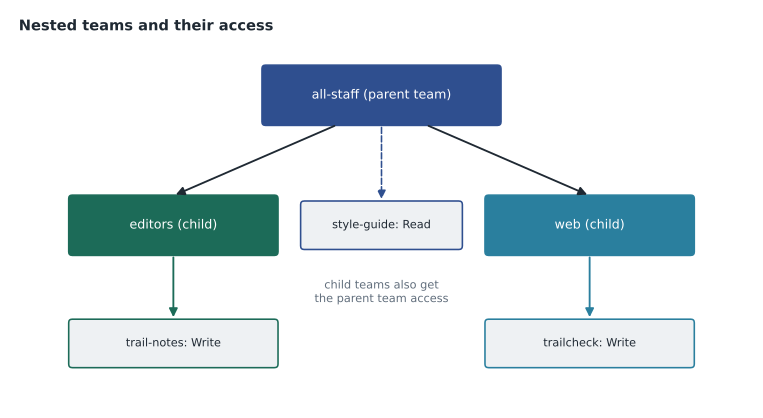
| Team | Parent | Members | Repository access |
|---|---|---|---|
| all-staff | None | Everyone who uses GitHub | style-guide: Read |
| editors | all-staff | Grace, Owen, two editors, summer editor | trail-notes: Write; style-guide: Write (inherited Read raised) |
| web | all-staff | Priya, Dmitri Kovac, Lena (summer) | trailcheck: Write; trail-notes: Read (from base) |
| maintainers-trail-report | None | Malik, Priya, Owen | open-trail-report: Maintain |
Teams in daily work
Teams appear throughout GitHub, not just in settings. Typing @tidewater-guides/web in a comment notifies everyone on the web team. Requesting a review from a team puts the request on every member's list, and organizations can turn on code review assignment for a team so that GitHub automatically picks one or two members to review, spreading the work fairly instead of everyone receiving every request. A team's page shows its members, its child teams and the repositories it can reach, which makes it a quick way to answer the question "who can change this?" during an access review.
Worked problem
How many people receive a mention?
The all-staff team has 4 direct members who are not in any child team. The editors child team has 5 members and the web child team has 3. Owen types @tidewater-guides/all-staff in a discussion. How many people are notified, assuming nobody is in two teams?
Show solution
- A mention of a parent team also notifies the members of its child teams.
- Direct members of all-staff: 4.
- Members of editors and web: 5 + 3 = 8.
- Total notified: 4 + 8 = 12.
Answer: 12 people are notified: the 4 direct members plus the 8 in the two child teams.
The organization profile
An organization has a public profile page at github.com followed by its name. Owners can add a description, a website and a location, pin up to six repositories, and verify a domain by adding a DNS record, which shows a verified badge and lets owners restrict email notifications to company addresses. An organization can also show a profile README: a README.md file in a public repository named .github, inside a folder called profile, appears at the top of the organization's page for everyone. A separate private repository called .github-private can hold a README shown only to members. Owen wrote Tidewater's public profile README with a short description of the company, a link to TrailCheck, and an invitation for volunteers to report trail conditions. Lesson 5 shows how the same .github repository also provides default community health files for every repository in the organization.
Security settings that start at the organization
Several protections are easiest to apply once, at the organization level, rather than repository by repository. Requiring two-factor authentication for everyone is the most important. Organizations can also set default code security configurations that turn on features such as Dependabot alerts and secret scanning for new repositories, decide which GitHub Apps and OAuth apps may access organization data (lesson 6), and on the paid plans create organization-wide rulesets that protect the main branch of many repositories at once (lesson 3). The audit log records events such as members joining, repositories changing visibility and settings being edited, and owners can search it by person, action or date. On GitHub Enterprise Cloud the log can be streamed to a security information system for long-term storage.
Rosa also looked at privacy. GitHub stores what people write in issues and comments, so the team agreed never to paste readers' personal details, such as phone numbers or home addresses from correction letters, into issues. In the United States that kind of personal information is covered by privacy law, and keeping it out of the repositories is simpler than controlling who can see it later.
Maine has its own laws on data breaches and on internet providers' handling of customer data, and several US states have broad consumer privacy laws. Tidewater does not need a lawyer to decide the simplest rule: the content of a correction goes in GitHub, the identity of the person who sent it does not.
Common mistakes
MistakeKeeping company repositories in an employee's personal account.
InsteadCreate an organization so repositories belong to the company and survive staff changes.
MistakeMaking most staff organization owners so they can fix things themselves.
InsteadKeep owners to a small number, at least two, and use team maintainers and specialist roles for everyday jobs.
MistakeSetting the base permission to Write so nobody is ever blocked.
InsteadUse a low base permission and grant Write through teams.
MistakeAdding a contractor as a full member to give them one repository.
InsteadAdd them as an outside collaborator on that repository only.
Summary and key terms
- An organization owns shared repositories, teams, apps, settings and billing; people use their own personal accounts.
- Owners have full control; billing managers, moderators, security managers and app managers each do one job; members are the default.
- Outside collaborators reach only the repositories they are added to.
- The base permission sets every member's minimum access to all repositories; a low base with team access is safer.
- Teams group members, can be visible or secret, have team maintainers, and can be nested so child teams inherit access.
- The organization profile, verified domains, required 2FA, default security settings and the audit log are managed at the organization level.
- Organization owner
- A person with complete administrative control of an organization.
- Outside collaborator
- Someone with access to specific repositories who is not a member of the organization.
- Base permission
- The access every organization member has to every repository by default.
- Team
- A named group of members that can be given repository access, mentioned and asked for reviews.
- Team maintainer
- A team member who can manage the team's membership and details.
- Nested team
- A child team that inherits the repository access of its parent team.
- Audit log
- A searchable record of actions taken in an organization.
Practice problems
Work each problem on paper first, then reveal the answer to check.
Which team visibility hides a team from members who are not in it?
Show answer
Secret.
Where does an organization's public profile README live?
Show answer
In profile/README.md inside a public repository named .github.
How many organization owners does GitHub recommend at minimum?
Show answer
Two.
Lesson quiz · 5 questions
Score 60% or more to complete this lesson.
Create a free account to save your progress, take quizzes and earn a certificate.