
MSBA-161 · Lesson 4 of 12 · 19 min
Markdown and documentation
▶ Video coming soon A video version of this lesson is on the way.
Tidewater's editors had been writing Markdown since November, but mostly the basics: headings, paragraphs, bold text and the occasional list. At the March 11 session Grace brought a problem that the basics could not solve. The partner publisher who would borrow the style guide had asked for "proper documentation": how the guide was organized, how to propose a change, what the color and map conventions were, and a diagram of the review process. "We have all of that in people's heads and in old emails," Grace said. "Where should it live, and how do we make it readable?" The session covered the parts of GitHub Flavored Markdown that turn a text file into real documentation, and the places on GitHub where documentation can live.
GitHub Flavored Markdown
Markdown is a plain-text format in which simple symbols mark structure: a number sign starts a heading, asterisks mark emphasis, a hyphen starts a list item. Files stay readable as plain text, work well with Git because every change is a visible line, and are rendered as formatted pages on GitHub. GitHub Flavored Markdown (GFM) is the version GitHub uses everywhere Markdown appears: README and other .md files, issues, pull requests, comments, discussions, wikis and gists. It extends standard Markdown with tables, task lists, strikethrough, automatic links and several GitHub-specific features.
| You type | GitHub shows |
|---|---|
| # Title, ## Section, ### Subsection | Headings of three levels |
| **bold**, _italic_, ~~struck~~ | Bold, italic and struck-through text |
| - item or 1. item | Bulleted or numbered lists |
| - [ ] task and - [x] done | A task list with check boxes |
| [link text](docs/review.md) | A link, here relative to the current file |
|  | An image with alternative text |
| `inline code` | Code in a fixed-width font |
| > quoted text | A block quotation |
| @priya-nair, #42, @tidewater-guides/editors | A mention, a link to issue 42, a team mention |
| :hiking_boot: | An emoji from its short code |
Structure: headings, lists and tables
Headings are the backbone of a long document. GitHub builds an outline from them automatically: on any rendered Markdown file, an outline button lists every heading so readers can jump to a section, and each heading gets an anchor link that can be shared, such as review-process.md#who-approves. That makes consistent, descriptive headings more useful than clever ones. Lists should be used for steps and options, and tables for anything with rows and columns. A table is written with pipes between cells and a row of hyphens under the header; colons in that row set the alignment.
| Map element  | Color on page  | Meaning              |
|--------------|:--------------:|----------------------|
| Solid line   | Dark green     | Maintained trail     |
| Dashed line  | Dark green     | Unmaintained path    |
| Blue circle  | Blue           | Water access         |
| Red triangle | Red            | Hazard, see notes    |
Code, links and images
Code and commands go in fenced code blocks: three backticks on a line before and after. Writing a language name after the opening backticks, such as yaml or bash, turns on syntax highlighting. Short code in a sentence uses single backticks. Links can be absolute web addresses or relative links to other files in the repository, such as docs/review.md; relative links keep working when the repository is cloned, forked or moved to another organization, so GitHub recommends them for links inside a repository. Images use the same syntax as links with an exclamation mark in front, and the text in square brackets becomes the image's alternative text, read aloud by screen readers. Every image in Tidewater's documentation gets alternative text that describes what it shows, because some readers of the guide use screen readers and because the text is searchable.
GitHub also creates links automatically. Typing #42 links to issue or pull request 42, a commit hash links to that commit, and pasting a link to a range of lines in a file, a permalink, shows a snippet of those lines in a comment. Mentions with @ notify the person or team. These references are what make documentation in a repository feel connected: a decision in the style guide can link to the discussion where it was agreed and the pull request where it was applied.
Alerts, footnotes and collapsed sections
Several GitHub additions help a reader see what matters. Alerts are block quotations with a type on their first line, and GitHub shows each with an icon and color. There are five types: NOTE for useful background, TIP for helpful advice, IMPORTANT for information needed to succeed, WARNING for something that needs immediate attention to avoid problems, and CAUTION for the possible negative consequences of an action. They work best used sparingly; a page with an alert in every section has no emphasis left.
> [!NOTE]
> Map conventions follow the 2026 edition of the style guide.
> Older guidebooks may use different symbols.

> [!WARNING]
> Tide times in examples are illustrative. Always use the official
> tide table for the date of the hike.

The route was resurveyed in 2026.[^1]

[^1]: Survey by Malik Osei, recorded in issue #57.

<details>
<summary>Old map conventions (before 2025)</summary>

Red dashed lines marked seasonal paths.

</details>
Footnotes are written with a caret and a label in square brackets, and the note itself appears at the bottom of the rendered page with a link back. Collapsed sections use the HTML details and summary elements: the summary line is shown, and the content opens when clicked. Tidewater uses them for long reference material that most readers do not need, such as retired conventions.
Diagrams and mathematics
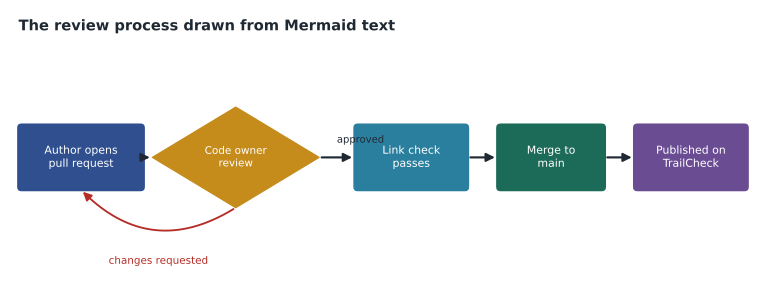
GitHub renders some text formats as pictures. A fenced code block marked mermaid is drawn as a Mermaid diagram, a flowchart, sequence diagram, timeline or several other kinds, from a short text description. Because the diagram is text, a change to it shows up in a diff and goes through review like any other edit. Grace asked for exactly that for the review process. GitHub also renders mathematical expressions written in LaTeX syntax between dollar-sign delimiters or in a block marked math, and can display maps from GeoJSON and TopoJSON code blocks and 3D models from STL files, which the TrailCheck team uses to preview trail outlines in pull requests.
```mermaid
flowchart LR
    A[Author opens pull request] --> B{Code owner review}
    B -- changes requested --> A
    B -- approved --> C[Link check passes]
    C --> D[Merge to main]
    D --> E[Published on TrailCheck]
```
Where documentation can live
GitHub offers several homes for documentation, and choosing well matters more than formatting. MSBA-160 compared them briefly; here is the fuller picture the team used to decide.
| Home | Best for | Reviewed through pull requests? | Tidewater use |
|---|---|---|---|
| README.md | What the repository is and how to start | Yes | Every repository |
| docs folder of Markdown files | Longer documentation that changes with the content | Yes | style-guide/docs: the full guide |
| Wiki | Loosely structured pages that many people edit | No, edits go straight in | Retired; moved into docs |
| GitHub Pages site | Polished public documentation built from Markdown | Yes, from a branch or workflow | The public style-guide site |
| Gist | Sharing a single snippet or short note | No | A one-file checklist shared with the partner |
| Discussions | Questions and answers that build up over time | No | How-do-I questions from contributors |
The key distinction is whether a change is reviewed. Files in the repository, including a docs folder and the source of a Pages site, change through commits and pull requests, so the same review rules that protect the content protect the documentation. A wiki is a separate Git repository attached to the main one; editing a page in the browser saves it immediately, and anyone with the right access can do so. That is convenient for informal notes and risky for anything people rely on. Tidewater had started a wiki in December; at this session Owen moved its six pages into style-guide/docs, where every edit would go through Grace.
A gist is a small, shareable snippet: one or more files with their own history and their own link. Gists can be public, which makes them discoverable and searchable, or secret, which means unlisted rather than private: anyone with the link can see a secret gist. That distinction appears on the GH-900 exam and in practice. Owen used a secret gist to share a checklist with the partner editor, and Rosa reminded him never to put anything confidential in one.
What every README should answer
The README is the page most people read first and often the only one, so the team agreed on the questions every Tidewater README must answer, in this order. A newcomer should be able to read it in two minutes and know whether they are in the right place and what to do next. Longer explanations belong in the docs folder, linked from the README.
| Question | Where it goes in the README | style-guide example |
|---|---|---|
| What is this? | First sentence under the title | The house style for Tidewater guidebooks and TrailCheck |
| Who is it for? | Second sentence | Editors, authors and partner publishers |
| How do I use it? | A short Getting started section | Read docs/start.md, then the chapter on maps |
| How do I propose a change? | A Contributing section linking to CONTRIBUTING.md | Open an issue or a pull request |
| Who looks after it? | A Maintainers line | @tidewater-guides/editors |
| What may I do with it? | A license line linking to the LICENSE file | Shared under a Creative Commons license |
Grace added one rule of her own: a README must never say "coming soon". Either the thing exists and the README links to it, or it is tracked in an issue and the README does not mention it. Pages that promise future sections are the first to go stale, and stale pages teach readers to stop trusting the documentation.
Docs as code
Treating documentation with the same tools and discipline as code is often called docs as code: write it in plain text, keep it next to what it describes, review it in pull requests, check it automatically, and publish it from the repository. The automatic checks are what make it work at scale. TrailCheck already ran a link checker on every pull request; Priya added a Markdown linter to style-guide, which flags problems such as skipped heading levels and images without alternative text. Because the guide lives in a repository, the partner publisher can also fork it, adapt it to their house style, and propose improvements back.
Worked problem
Planning the style guide documentation
The style guide has 14 pages: a start page, 9 pages of rules, 3 reference tables and a page describing the review process. The partner wants a public site. Which homes should each part use?
Show solution
- The start page becomes README.md, so it appears on the repository's front page.
- The 9 rule pages and 3 reference tables go in a docs folder as Markdown files, so every change is reviewed.
- The review process page uses a Mermaid diagram so the picture is reviewed as text.
- GitHub Pages publishes the docs folder as a public site for the partner and readers.
- Questions from the partner go to Discussions, and settled answers are moved into the docs.
Answer: README for the start, 13 Markdown pages in docs (rules, tables and process), Pages to publish, Discussions for questions.
Writing documentation people read
Formatting does not rescue unclear writing, so Grace set out the editorial rules that applied to documentation as much as to the guidebooks. Start every page with one or two sentences saying what it is for and who it is for. Put the most common task first. Use headings that a reader would search for, such as "How to propose a new trail", rather than "Process". Write steps as numbered lists, one action per step. Show an example before the rule it illustrates. Keep each page short enough to read in a few minutes, and link rather than repeat. Date anything that will go out of date, such as fees or tide-table sources. And preview the rendered page before asking for review, because a table with a missing pipe looks fine in the editor and broken on the page.
Common mistakes
MistakeUsing absolute links between files in the same repository.
InsteadUse relative links so they keep working in forks, clones and moved repositories.
MistakeLeaving images without alternative text.
InsteadDescribe what each image shows in the square brackets.
MistakeKeeping important rules in a wiki that anyone can edit without review.
InsteadKeep documentation people rely on in repository files reviewed through pull requests.
MistakeTreating a secret gist as private.
InsteadSecret gists are unlisted; anyone with the link can view them.
Summary and key terms
- GitHub Flavored Markdown is used in files, issues, pull requests, comments, discussions, wikis and gists.
- Headings build an outline and anchors; tables, task lists and fenced code blocks give structure.
- Relative links, alternative text, mentions, issue references and permalinks connect documentation to the work.
- Alerts (NOTE, TIP, IMPORTANT, WARNING, CAUTION), footnotes and collapsed sections help readers see what matters.
- Mermaid diagrams, mathematics and maps are rendered from text, so they can be reviewed like any change.
- README files, docs folders and Pages sites are reviewed through pull requests; wikis and gists are not.
- GitHub Flavored Markdown
- The version of Markdown GitHub uses, with tables, task lists and other extensions.
- Relative link
- A link to another file given as a path from the current file.
- Alert
- A highlighted block quotation of type NOTE, TIP, IMPORTANT, WARNING or CAUTION.
- Mermaid
- A text format for diagrams that GitHub renders as pictures.
- Wiki
- A set of pages attached to a repository, edited directly rather than through pull requests.
- Secret gist
- An unlisted gist that anyone with its link can view.
- Docs as code
- Writing, reviewing, checking and publishing documentation with the same tools as code.
Practice problems
Work each problem on paper first, then reveal the answer to check.
Which Markdown creates a check box in a task list?
Show answer
- [ ] followed by the task text.
How many alert types does GitHub support?
Show answer
Five: NOTE, TIP, IMPORTANT, WARNING and CAUTION.
Why are relative links preferred inside a repository?
Show answer
They keep working when the repository is cloned, forked or moved.
Lesson quiz · 5 questions
Score 60% or more to complete this lesson.
Create a free account to save your progress, take quizzes and earn a certificate.