
MSBA-150 · Lesson 8 of 12 · 20 min
Dimensions
▶ Video coming soon A video version of this lesson is on the way.
Bettina's most frequent question at the old company was some version of "Is Café 2 actually making money?" Answering it took Callum two days of spreadsheet work each quarter, splitting shared costs by hand. In Business Central the answer comes from dimensions: tags attached to entries that let any amount be analyzed by café, department, project, campaign or any other category the business cares about. This lesson covers how dimensions are designed and set up, how defaults keep them consistent, how rules stop wrong combinations, and how mistakes are corrected after posting.
What a dimension is
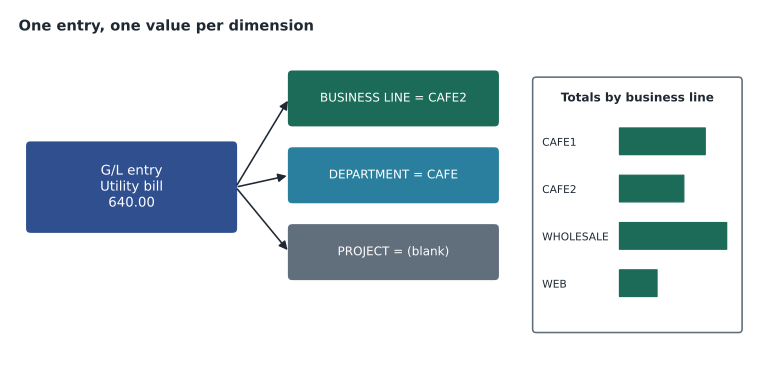
A dimension is a category for analysis, such as BUSINESS LINE or DEPARTMENT. Each dimension has dimension values, such as CAFE1, CAFE2, WHOLESALE and WEB for BUSINESS LINE. When an entry is posted, it can carry one value for each dimension. A sales invoice line might carry BUSINESS LINE = WHOLESALE and SALESPERSON = JLP; a utility bill might carry BUSINESS LINE = CAFE2 and DEPARTMENT = CAFE.
Dimensions are the alternative to building analysis into the chart of accounts. A company that tracks five business lines across 40 expense accounts would need 200 accounts without dimensions; with a dimension it needs 40 accounts and five dimension values, and new business lines can be added without touching the chart. Lesson 7 drew the line: accounts for statutory distinctions, dimensions for management analysis.
Global and shortcut dimensions
A company can define as many dimensions as it needs, but two levels get special treatment. Global dimensions (two of them) are stored directly on ledger entries and master records, so they can be used as filters almost everywhere, including on chart of accounts and trial balance pages and in many reports. Shortcut dimensions (up to eight, of which the first two are the global dimensions) appear as columns on journal and document lines, so users can type values directly without opening the dimensions page. Any further dimensions are still available through the Dimensions action on a line or header.
| Level | How many | Where it helps | Corbel & Finch choice |
|---|---|---|---|
| Global dimension 1 | 1 | Filters on entries, accounts and many reports | BUSINESS LINE |
| Global dimension 2 | 1 | Same as above | DEPARTMENT |
| Shortcut dimensions 3 to 8 | Up to 6 more | Columns on journal and document lines | CAMPAIGN, SALESPERSON, ORIGIN |
| Other dimensions | Unlimited | Available through the Dimensions page on any line | PROJECT |
Global and shortcut dimensions are chosen on General Ledger Setup. Global dimensions can be changed later with the Change Global Dimensions feature, which updates the global dimension fields on existing entries, but it takes time on a large database and is best done rarely and outside working hours. The choice of global dimensions is therefore one of the decisions consultants make carefully at setup: pick the two dimensions that the business filters by most.
All the values a posted entry carries are stored together as a dimension set, a combination of dimension values identified by a number. Entries with the same combination share the same set, which keeps storage efficient and makes analysis fast.
Default dimensions
Asking users to type dimension values on every line invites mistakes. Default dimensions fill them in automatically. A default dimension is attached to a master record, such as a customer, vendor, item, G/L account, resource, bank account or employee, and is copied to documents and journal lines that use that record.
Each default dimension has a value posting rule that controls how strict it is:
| Value posting | Meaning | Example |
|---|---|---|
| (blank) | Suggest the value; users may change or remove it | Item MUG-ROAST suggests BUSINESS LINE = CAFE1 |
| Code Mandatory | Some value must be present when posting | Every expense account requires a DEPARTMENT |
| Same Code | The value must be exactly the default value | Café 2's utility vendor always posts BUSINESS LINE = CAFE2 |
| No Code | The dimension must be blank | Balance-sheet accounts never carry CAMPAIGN |
Default dimensions can also be set for a whole account type rather than one record, for example a default for all customers, all vendors or all G/L accounts. Corbel & Finch used this to make DEPARTMENT Code Mandatory for all G/L accounts in the expense range, by setting it on each expense account through a configuration package, and to make CAMPAIGN No Code on all balance-sheet accounts.
Default dimension priorities
A sales invoice line for an item to a customer can inherit defaults from both the customer and the item. If both have a value for the same dimension, which wins? Default dimension priorities decide. Priorities are set per source code, which identifies the kind of transaction (for example SALES for sales documents, PURCHASES for purchase documents, GENJNL for general journals), and each table that can supply defaults is given a priority number, where 1 is the highest. If two tables have the same priority, or no priority is set, Business Central uses the most recently applied value, which can be unpredictable, so consultants set priorities deliberately.
Worked problem
Customer or item?
Café 1 is set up as an internal customer for wholesale-priced transfers with default BUSINESS LINE = CAFE1. A merchandise item, a branded grinder, has default BUSINESS LINE = WEB, because it is mostly sold online. A sales invoice to Café 1 includes the grinder. Callum wants the business line of the customer to win on sales documents. How should priorities be set?
Show solution
- Open Default Dimension Priorities and choose the SALES source code.
- Give the Customer table priority 1 and the Item table priority 2.
- On the invoice line, Business Central now takes BUSINESS LINE = CAFE1 from the customer.
- Check: other dimensions that only the item supplies (for example ORIGIN) still come from the item.
Answer: For source code SALES, Customer = 1 and Item = 2, so the customer's CAFE1 overrides the item's WEB on that line.
Blocking dimension combinations
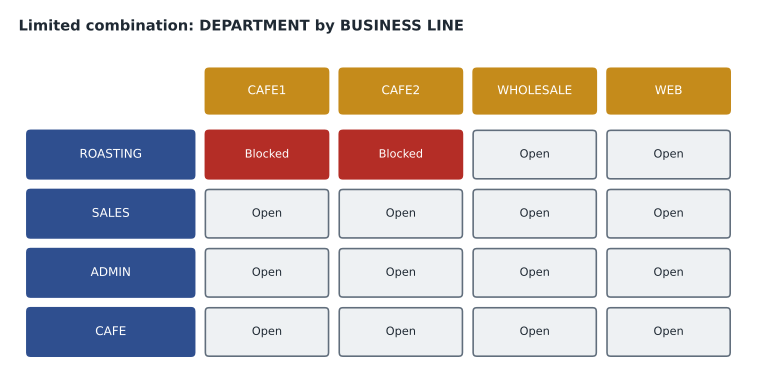
Some combinations make no sense and should never be posted, such as DEPARTMENT = ROASTING with BUSINESS LINE = CAFE2, because the cafés do not roast. The Dimension Combinations page shows a matrix of dimensions and lets an administrator mark a pair of dimensions as Limited or Blocked. Blocked means the two dimensions can never be used together on an entry. Limited means some combinations of their values are blocked: the administrator opens the pair and blocks specific value combinations, such as ROASTING with CAFE1 and CAFE2. Individual dimension values can also be blocked entirely, for example a campaign that has ended, so that nobody posts to it by mistake.
Correcting dimensions after posting
Even with defaults and rules, entries sometimes post with the wrong dimension values, and the mistake is often found weeks later in a report. Because posted entries cannot be edited, older versions required reversing and reposting the whole transaction. The Dimension Correction feature now lets authorized users correct dimension values on posted general ledger entries without changing amounts or accounts. A user selects the entries (for example from the G/L entries list or Find entries), opens a dimension correction, sets the new values, previews the effect and runs it. Business Central records the correction with its history, so the audit trail shows the original values, the corrected values and who made the change. Analysis views are updated to reflect the change.
Dimension correction has limits worth knowing: it changes G/L entries, not the related subledger entries such as customer or item ledger entries; administrators can restrict which dimensions and periods may be corrected, so that closed and reported periods stay as they were; and some dimension combinations still apply as validation rules. Callum practiced it in the sandbox on 14 test café supply invoices that had been posted to CAFE1 instead of CAFE2.
Using dimensions in analysis
Dimensions pay off in reporting. Global dimension filters work directly on the Chart of Accounts and trial balance pages, so Bettina can filter the income statement accounts to BUSINESS LINE = CAFE2 and see Café 2's results in seconds. Analysis views (lesson 11) summarize G/L entries by up to four dimensions at a time for fast matrix reporting, and financial reports (formerly account schedules) can use dimension filters in their row and column definitions. Budgets in Business Central can also be entered by dimension, so actual-to-budget comparisons work by café or department.
| Question from Bettina | Dimension filter or view |
|---|---|
| Is Café 2 making money? | Income statement with BUSINESS LINE = CAFE2 |
| What did the summer cold-brew campaign cost and earn? | G/L entries with CAMPAIGN = COLDBREW26 |
| Which origins sell best wholesale? | Analysis view on sales accounts by ORIGIN and BUSINESS LINE |
| How are admin costs trending? | Analysis by DEPARTMENT = ADMIN by month |
Designing a dimension structure
Dimensions are easy to create and hard to tidy up later, so Noor ran a short design session before anything was set up. She asked Bettina and Callum four questions about every proposed dimension: Who will use reports by this dimension? How often? Is it already captured somewhere else, such as on locations, salespeople or customers? Will people be able to fill it in correctly without thinking? Several ideas fell away. A dimension for SIZE (bag size) was dropped because the item already carries that information through its unit of measure and variants. A dimension for EMPLOYEE was dropped because payroll runs in a separate service.
| Dimension | Values | Kept? | Reason |
|---|---|---|---|
| BUSINESS LINE | CAFE1, CAFE2, WHOLESALE, WEB | Yes, global 1 | The main management question |
| DEPARTMENT | ROASTING, SALES, ADMIN, CAFE | Yes, global 2 | Cost control by department |
| CAMPAIGN | One value per marketing campaign | Yes, shortcut | Campaign results |
| SALESPERSON | One per sales rep | Yes, shortcut | Commission and performance |
| ORIGIN | ETHIOPIA, COLOMBIA, GUATEMALA, and others | Yes, shortcut | Sales and margin by coffee origin |
| SIZE | Bag sizes | No | Already on units of measure |
| EMPLOYEE | One per person | No | Payroll is outside Business Central |
Dimension values can also be organized for totals. Each value has a dimension value type: Standard values receive postings, while Heading, Total, Begin-Total and End-Total values build structure in reports, just as the chart of accounts uses totaling lines. Corbel & Finch added a Begin-Total and End-Total around CAFE1 and CAFE2 called ALL CAFES, so that reports show each café and then both cafés together without a formula.
Worked problem
Budgeting by dimension
Bettina sets a 2027 revenue budget of 420,000 dollars for wholesale and 310,000 dollars for each café. How can Business Central compare actual results with these budgets?
Show solution
- Create a G/L budget named 2027 and choose BUSINESS LINE as one of its budget dimensions.
- Enter monthly amounts on the revenue accounts for WHOLESALE, CAFE1 and CAFE2, or import them from Excel.
- In a financial report, add a column for budget amounts using the 2027 budget, next to the actual column, and a variance column calculated as actual minus budget.
- Run the report with BUSINESS LINE filters, or use the ALL CAFES total value, to compare each line and the cafés together.
Answer: A G/L budget with BUSINESS LINE as a budget dimension, compared with actuals in a financial report with actual, budget and variance columns.
Callum also wrote a one-page dimension guide for staff: which dimensions appear on which documents, where the defaults come from, and the two cases where users must choose a value themselves, namely CAMPAIGN on marketing expenses and BUSINESS LINE on shared supplies.
Dimensions on master data and documents
Dimensions appear in three places users will meet every day. On master data cards, the Dimensions action shows the record's default dimensions. On document headers, such as a sales order, dimensions apply to the whole document and are copied to the lines, where they can be changed line by line if the rules allow. On journal lines, shortcut dimension columns let users type values directly, and the Dimensions action opens the full set. When a header dimension is changed after lines exist, Business Central asks whether to update the lines too, which prevents a common mismatch between header and lines.
Callum's practical tip for staff was to look at the dimension columns before posting anything unusual. Defaults handle the routine cases, but a one-off purchase for both cafés, or a campaign expense, needs a person to choose the right value.
Common mistakes
MistakeCreating accounts for every café and department.
InsteadKeep a lean chart of accounts and use dimensions for analysis.
MistakeChoosing global dimensions casually.
InsteadChoose the two dimensions the business filters by most; changing them later is slow.
MistakeLeaving default dimension priorities unset.
InsteadSet priorities per source code so the right default wins predictably.
MistakeReversing whole transactions to fix a wrong dimension value.
InsteadUse Dimension Correction on the posted G/L entries where it applies.
Summary and key terms
- Dimensions tag entries with values such as café, department or campaign for analysis without extra accounts.
- Two global dimensions are stored on entries and records; up to eight shortcut dimensions appear on lines; others are available through the Dimensions page.
- Default dimensions on master records or account types fill in values, with value posting rules (blank, Code Mandatory, Same Code, No Code).
- Default dimension priorities by source code decide which default wins when several apply.
- Dimension combinations can be Limited or Blocked, and individual values can be blocked.
- Dimension Correction fixes dimension values on posted G/L entries with a full history.
- Dimension
- A category for analysis, such as business line or department.
- Dimension value
- One member of a dimension, such as CAFE2.
- Global dimension
- One of two dimensions stored directly on entries for filtering throughout the application.
- Shortcut dimension
- A dimension shown as a column on journal and document lines.
- Default dimension
- A dimension value attached to a master record and copied to transactions.
- Value posting
- The rule controlling how strictly a default dimension must be followed.
- Dimension set
- The stored combination of dimension values on an entry.
Practice problems
Work each problem on paper first, then reveal the answer to check.
Which value posting rule forces every posting to an account to carry some DEPARTMENT value?
Show answer
Code Mandatory.
Where are global and shortcut dimensions chosen?
Show answer
On General Ledger Setup.
How do you stop ROASTING from ever being combined with CAFE1?
Show answer
Set the DEPARTMENT/BUSINESS LINE pair to Limited on Dimension Combinations and block that value combination.
Lesson quiz · 5 questions
Score 60% or more to complete this lesson.
Create a free account to save your progress, take quizzes and earn a certificate.