
MSBA-150 · Lesson 7 of 12 · 20 min
Posting groups explained
▶ Video coming soon A video version of this lesson is on the way.
Every Business Central consultant has a favorite way of explaining posting groups, because almost every new user finds them confusing at first. Noor's way was a question she put to Callum in October: "When you sell a bag of House Blend to a café, how does Business Central know which revenue account to credit?" Callum guessed it was set on the item. Partly right, Noor said: it is set by the combination of who you sell to and what you sell. That combination is what posting groups express. Get them right and the general ledger fills itself in correctly for years. Get them wrong and every report is wrong.
Why posting groups exist
In Business Central, users rarely type general ledger account numbers. They create sales orders for customers and purchase invoices from vendors, with lines for items, resources or charges. Posting groups translate those business records into G/L accounts. Each customer, vendor, item, bank account and fixed asset carries posting group codes, and setup tables map the codes to accounts. This keeps accounting rules in one place: if the controller wants café sales to post to a new account, she changes one setup line, not hundreds of customer cards.
Posting groups come in two families. Specific posting groups link one kind of subledger to its control accounts in the balance sheet. General posting groups combine a business group (who) and a product group (what) to choose income statement accounts such as sales, purchases and cost of goods sold.
Specific posting groups
| Posting group | Assigned on | Main accounts it sets |
|---|---|---|
| Customer posting group | Customer cards | Receivables account, plus accounts for service charges, payment discounts, rounding and interest |
| Vendor posting group | Vendor cards | Payables account, plus payment discounts, rounding and invoice rounding |
| Inventory posting group | Item cards | Inventory account (through inventory posting setup by location), plus interim and work-in-progress accounts |
| Bank account posting group | Bank account cards | The G/L account that holds the bank balance |
| FA posting group | Fixed asset depreciation books | Acquisition cost, accumulated depreciation, depreciation expense and disposal accounts |
Corbel & Finch needed few specific groups. Customers were split into DOMESTIC and EXPORT customer posting groups, because the handful of export customers in the United States are invoiced in US dollars and the controller wanted their receivables in a separate account. Vendors were split into DOMESTIC and FOREIGN, with green-coffee importers in the foreign group. Items were divided into four inventory posting groups: GREEN (unroasted coffee), FINISHED (roasted and bagged coffee), PACKAGING and MERCH (merchandise such as mugs and grinders).
Inventory posting setup works a little differently from the others: it combines the inventory posting group with the location. So FINISHED stock at the roastery and FINISHED stock at Café 1 can post to the same inventory account or to different ones. Corbel & Finch used the same accounts everywhere and relied on locations and dimensions for reporting by site.
General posting groups and the general posting setup
General posting groups answer the question "which income statement account?" Customers and vendors carry a general business posting group, describing the kind of trading partner, such as RETAIL, WHOLESALE or EXPORT. Items, resources and G/L accounts used on documents carry a general product posting group, describing the kind of thing sold or bought, such as COFFEE, GREEN-COFFEE, PACKAGING, MERCH or FREIGHT.
The General Posting Setup page is a matrix. Each line is one combination of a business group and a product group, and it holds the accounts used when that combination is posted: sales, sales credit memo, sales line discount, sales invoice discount, purchase, purchase credit memo, purchase discounts, cost of goods sold, inventory adjustment, direct cost applied, overhead applied and purchase variance, among others. A line with a blank business group is used for item journal postings and other transactions with no customer or vendor, such as inventory adjustments.
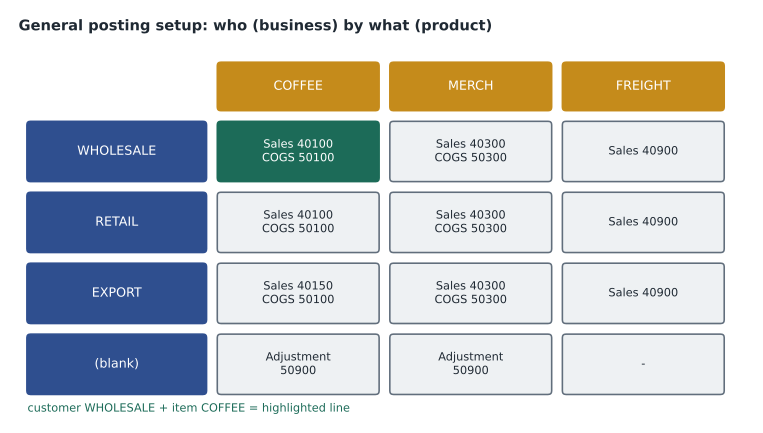
| Business group | Product group | Sales account | COGS account |
|---|---|---|---|
| WHOLESALE | COFFEE | 40100 Coffee Sales | 50100 Cost of Coffee Sold |
| RETAIL | COFFEE | 40100 Coffee Sales | 50100 Cost of Coffee Sold |
| EXPORT | COFFEE | 40150 Export Coffee Sales | 50100 Cost of Coffee Sold |
| RETAIL | MERCH | 40300 Merchandise Sales | 50300 Cost of Merchandise Sold |
| WHOLESALE | FREIGHT | 40900 Freight Recovered | (not used) |
| (blank) | COFFEE | (not used) | Inventory adjustment 50900 |
Wholesale and retail coffee sales go to the same revenue account here, because the business line dimension (lesson 8) separates them for reporting. Export sales go to a separate account because the auditors wanted them visible in the financial statements. This is the design trade-off consultants make constantly: use accounts for distinctions that belong in the statutory financial statements, and dimensions for distinctions used in management reporting.
Sales tax and VAT posting
Tax postings have their own setup. In most countries Business Central uses VAT posting groups (VAT business and VAT product posting groups combined in VAT Posting Setup), which work like general posting groups for tax. The North American versions use sales tax setup instead: a customer or location has a tax area, made up of tax jurisdictions (each with its own G/L accounts and rates), and items have a tax group. In the United States, Corbel & Finch's tax area combines the North Carolina state jurisdiction and the county jurisdiction, and coffee beans as food items are set up with tax details that reflect their reduced or exempt status. The Business Central Finance course covers tax setup in depth; for this course, it is enough to know that tax accounts come from tax setup, not from general posting setup.
Following one posting
Worked problem
Which accounts does a purchase invoice hit?
Corbel & Finch buys 20 sacks (1,380 kg) of green coffee from a foreign importer at 9.40 dollars per kg. The vendor has vendor posting group FOREIGN and general business posting group FOREIGN. The item has inventory posting group GREEN and general product posting group GREEN-COFFEE, and the roastery location is ROASTERY. Inventory is posted to the general ledger. Which setup tables provide the accounts, and what amounts post? (Ignore tax, duty and freight.)
Show solution
- Amount: 1,380 × 9.40 = 12,972 dollars.
- Vendor posting group FOREIGN gives the payables account: credit 12,972 to Payables, Foreign.
- General posting setup line FOREIGN / GREEN-COFFEE gives the purchase account and direct cost applied account: debit 12,972 to Purchases and credit 12,972 to Direct Cost Applied.
- Inventory posting setup line ROASTERY / GREEN gives the inventory account: debit 12,972 to Inventory, Green Coffee.
- The purchase account and direct cost applied account net to zero, leaving the purchase on the inventory account and payables.
Answer: Payables (vendor posting group) credited 12,972; inventory (inventory posting setup) debited 12,972; purchase and direct cost applied (general posting setup) post 12,972 each way and net to zero.
The purchases and direct cost applied pair is a common surprise. Business Central posts the purchase to a purchase account and immediately offsets it, so that the inventory account receives the value and the income statement shows purchases if a company wants that view. Some companies point both fields at the same account; others keep them separate for analysis. Either way, inventory and payables are what remain.
Allowing multiple posting groups
Normally a customer or vendor uses one posting group. Some businesses need exceptions, such as posting one customer's rare export order to the export receivables account. Business Central supports this when Allow Multiple Posting Groups is turned on in Sales & Receivables Setup (for customers) or Purchases & Payables Setup (for vendors). Each customer or vendor posting group can then list alternative posting groups, and users can choose an alternative on individual documents. Corbel & Finch did not need this at go-live, but Callum noted it for the export business.
Designing posting groups well
| Good practice | Reason |
|---|---|
| Start small | Every new group needs setup lines; few groups means fewer gaps |
| Use dimensions for management analysis | Accounts and groups are for statutory distinctions |
| Fill every combination you will use | A missing general posting setup line stops posting with an error |
| Review with the accountant before go-live | Wrong mappings post silently to wrong accounts |
| Test postings in a sandbox and check G/L entries | Find entries shows exactly which accounts were used |
Missing setup is easy to spot: posting stops with a message that a general posting setup or inventory posting setup line does not exist for a combination. Wrong setup is harder, because postings succeed and land in the wrong account. That is why Noor and Callum posted 40 test transactions in the sandbox, one for each combination they expected to use, and checked every one with Find entries before signing off the posting setup.
Bank accounts and fixed assets
Two more specific posting groups complete the picture. Each bank account card has a bank account posting group that names the G/L account holding its balance. Corbel & Finch has an operating account, a payroll account and a US-dollar account for export receipts; each gets its own G/L account, so the balance sheet shows each bank separately and bank reconciliation compares each bank ledger with its G/L account.
Fixed assets use FA posting groups on their depreciation books. A posting group such as EQUIPMENT names the acquisition cost account, the accumulated depreciation account, the depreciation expense account and the accounts for gains and losses on disposal. When Callum posts depreciation for the new roaster, Business Central uses the FA posting group to debit depreciation expense and credit accumulated depreciation, without anyone typing an account number.
Worked problem
A wholesale invoice with a line discount
A café customer in general business posting group WHOLESALE buys 50 bags of House Blend (general product posting group COFFEE) at 14 dollars, with a 10 percent line discount. The customer posting group is DOMESTIC. Ignoring tax and cost of goods sold, which setup provides each account, and what posts?
Show solution
- Gross amount 50 × 14 = 700 dollars; line discount 10 percent of 700 = 70 dollars; net 630 dollars.
- Customer posting group DOMESTIC gives the receivables account: debit 630.
- General posting setup WHOLESALE / COFFEE gives the sales account and the sales line discount account.
- If the setup posts discounts separately, the sales account is credited 700 and the line discount account debited 70; if not, sales is credited 630 net.
Answer: Receivables (customer posting group) debit 630; sales and, if used, the sales line discount account (general posting setup) record 700 and −70, or 630 net.
Whether discounts post to their own account is controlled by the Discount Posting setting on Sales & Receivables Setup (and its purchase equivalent). Bettina wanted to see how much discounting cost the business, so Callum chose to post line and invoice discounts separately, which means the corresponding accounts must be filled on every general posting setup line that is used for sales.
| Error message pattern | Meaning | Where to fix |
|---|---|---|
| General Posting Setup does not exist | No line for that business and product group combination | General Posting Setup: add the line |
| Sales Account must have a value in General Posting Setup | The line exists but the account is blank | Fill the account on that line |
| Inventory Posting Setup does not exist | No line for that location and inventory posting group | Inventory Posting Setup: add the line |
| Gen. Prod. Posting Group must have a value | The item or G/L account on the line has no product group | Item card or G/L account card |
Posting setup is also something to revisit as the business changes. Bettina is considering a subscription coffee service. If it goes ahead, Callum will create a new general product posting group, SUBSCRIPTION, add general posting setup lines for each business group that will sell it, and test a posting in the sandbox before the first subscription invoice goes out.
Common mistakes
MistakeCreating a general business posting group for every customer type someone can imagine.
InsteadCreate groups only for distinctions that need different accounts; use dimensions for the rest.
MistakeForgetting the blank business group line.
InsteadItem journals and adjustments use the line with a blank business group and the item's product group.
MistakeExpecting tax accounts in the general posting setup.
InsteadTax accounts come from VAT posting setup or, in North America, sales tax jurisdictions.
MistakeTrusting that a successful posting is a correct posting.
InsteadCheck test postings with Find entries to see which accounts were used.
Summary and key terms
- Posting groups translate customers, vendors, items and other records into G/L accounts so users rarely choose accounts directly.
- Specific posting groups (customer, vendor, inventory, bank, fixed asset) set balance-sheet control accounts; inventory uses inventory posting setup by location.
- General posting setup combines a general business group and a general product group to choose sales, purchase, COGS and related accounts.
- Tax uses VAT posting setup or, in Canada and the United States, sales tax areas, jurisdictions and groups.
- Allow Multiple Posting Groups lets documents use alternative customer or vendor posting groups.
- Keep groups few, use dimensions for analysis, and verify test postings.
- Customer posting group
- A code on a customer that sets the receivables account and related accounts.
- Vendor posting group
- A code on a vendor that sets the payables account and related accounts.
- Inventory posting setup
- A table combining location and inventory posting group to set inventory accounts.
- General business posting group
- A code on customers and vendors describing the kind of trading partner.
- General product posting group
- A code on items, resources and accounts describing the kind of product or service.
- General posting setup
- A matrix of business and product groups that sets sales, purchase and cost accounts.
- Tax area
- In North America, a combination of tax jurisdictions assigned to customers or locations.
Practice problems
Work each problem on paper first, then reveal the answer to check.
Which setup decides the receivables account for a customer?
Show answer
The customer posting group.
Posting stops with "General Posting Setup does not exist: WHOLESALE, GIFTCARD". What is missing?
Show answer
A general posting setup line for business group WHOLESALE and product group GIFTCARD.
Which two codes combine to choose a sales account?
Show answer
The customer's general business posting group and the item's general product posting group.
Lesson quiz · 5 questions
Score 60% or more to complete this lesson.
Create a free account to save your progress, take quizzes and earn a certificate.