
MSBA-150 · Lesson 5 of 12 · 19 min
Users, permissions and licenses
▶ Video coming soon A video version of this lesson is on the way.
In October, Bettina asked a question that made Noor smile: "Can the café managers see wholesale prices?" The honest answer was "only if we let them". Business Central controls who may sign in through licenses, what they may see and do through permission sets, and which records they may see through security filters. This lesson covers all three, plus profiles, security groups and the audit features that show who changed what. Corbel & Finch will have 14 Business Central users at go-live: Bettina, Callum, two order processors, the purchasing lead, the roastery manager, three café managers, the warehouse lead, two shared warehouse devices and a sales rep.
Where users come from
Business Central online does not have its own user directory. Users are people in the organization's Microsoft Entra ID tenant, the same accounts they use for Outlook and Teams. To give someone access, an administrator assigns them a Business Central license in the Microsoft 365 admin center (or through Entra group-based licensing). Then, in Business Central, the Users page brings them in with the Update users from Microsoft 365 action, which creates or updates the user records, applies license changes and adds the default permissions associated with the license.
A few kinds of users do not need a paid license. Internal administrators, people with admin roles such as Global Administrator or Dynamics 365 Administrator in the tenant, can sign in to administer Business Central without a Business Central license, though they cannot do regular business transactions. Partners with delegated administration privileges can administer the tenant on the customer's behalf. Noor had delegated admin access to Corbel & Finch's tenant through Quarrystone, so she never needed a Corbel & Finch license.
| User type | License | Can do |
|---|---|---|
| Full user | Essentials or Premium | All business tasks the permissions allow |
| Team Member | Team Member | Read data, approve, and edit a limited set of records |
| Shared device | Device | Business tasks on one device such as a scanner or point of sale |
| Internal administrator | None (admin role in the tenant) | Administration and setup, not business transactions |
| Delegated (partner) administrator | None (partner relationship) | Administration and support for a customer tenant |
Permissions and permission sets
A permission grants access to one object, such as a table, page, report or codeunit, with specific rights. For tables, the rights are Read, Insert, Modify and Delete, and each can be granted directly (the user can use the table freely) or indirectly (the user can change the table only through a process that has permission, such as posting). For other objects, the right is Execute. Indirect permissions are why an order processor can post a sales invoice, which writes general ledger entries, without having direct permission to edit G/L entries.
Permissions are grouped into permission sets, and users or security groups receive permission sets. Microsoft provides system permission sets with the base application and extensions, such as D365 BASIC (basic access for every user), D365 BUS FULL ACCESS (full access to business functionality), D365 READ, and sets for specific areas like sales documents, purchases and journals. Their exact list grows with each release. Customers and partners create their own user-defined permission sets, which can include other sets and exclude permissions, so a set can be built as "the system Sales set, plus customer card editing, minus price changes". These are called composable permission sets.
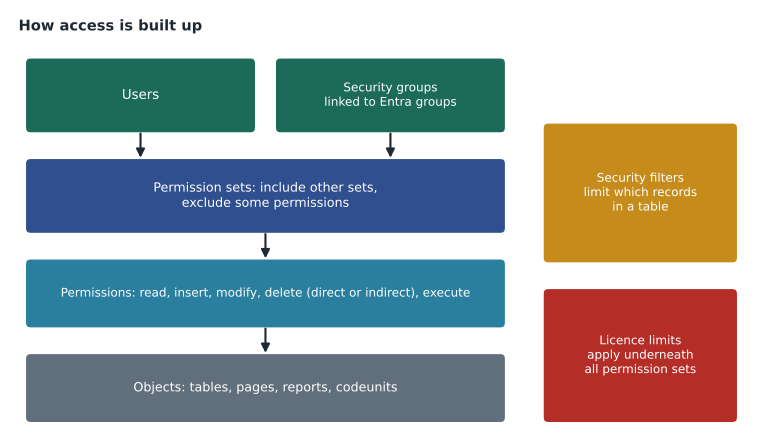
A permission set can be assigned for all companies in an environment or for one company. The Effective Permissions page shows, for a user and object, which rights the user actually has and which permission sets grant them, which is the quickest way to answer "why can't I post this?"
For building a custom set from real work, Business Central can record permissions: an administrator starts recording on a permission set, performs the task (for example, entering and posting a purchase invoice), stops recording, and Business Central adds the permissions that were used. Recorded sets usually need tidying, but they are a fast starting point.
Security groups
Assigning permission sets user by user does not scale. Security groups in Business Central link to Microsoft Entra security groups (or Microsoft 365 groups). An administrator creates a security group in Business Central that points to an Entra group, then assigns permission sets to the security group. Everyone in the Entra group receives those permission sets, and adding or removing people is done in Entra, often by the IT team, without touching Business Central. Security groups replaced the older user groups feature, which you may still see in older material.
Noor set up five Entra groups and matching Business Central security groups for Corbel & Finch: BC-Finance, BC-Sales, BC-Purchasing, BC-Warehouse and BC-Cafe. Each received a small number of permission sets, and each was given a default profile so the right role center appeared at first sign-in.
| Security group | Permission sets | Default profile |
|---|---|---|
| BC-Finance | D365 BASIC, D365 BUS FULL ACCESS | Accountant |
| BC-Sales | D365 BASIC, a custom set CF-SALES built from the sales sets | Order Processor |
| BC-Purchasing | D365 BASIC, a custom set CF-PURCH | Purchasing Agent |
| BC-Warehouse | D365 BASIC, a custom set CF-WHSE | Warehouse Worker |
| BC-Cafe | D365 BASIC, a custom set CF-CAFE with read access to items and sales | A customized café profile |
Security filters
Permission sets decide which tables a user can touch. Security filters decide which records in those tables they can see. A security filter is added to a permission on a table, for example a filter on the Customer table where Salesperson Code equals JPL, so that a sales rep sees only their own customers. Filters can be applied to many tables and fields. They are powerful but have costs: they can slow some pages, they must be designed carefully so that posting processes still work, and users with several permission sets get the combined (broadest) access. For the café managers, Noor decided a security filter was unnecessary: the custom CF-CAFE set simply did not include price list tables, so wholesale prices were never visible to them.
Worked problem
Why can't the rep see this customer?
At a fictional distributor, a sales rep is set up with a permission set that includes the Customer table with a security filter Salesperson Code = MRV. He reports that a new customer he signed yesterday does not appear in his list. What should the administrator check first?
Show solution
- The security filter shows only customers whose Salesperson Code is MRV.
- Check the new customer card: if Salesperson Code is blank or belongs to someone else, the filter hides it.
- Use Effective Permissions for the user and the Customer table to confirm which set and filter apply.
- Set the correct salesperson on the customer, or adjust the filter if the business rule has changed.
Answer: Check the customer's Salesperson Code against the security filter; a blank or different code hides the record.
Profiles and user settings
Permissions and profiles are separate, as lesson 2 explained, but administrators manage both. On the Profiles (Roles) page, they customize profiles and can set a default profile for the company. Security groups and individual users can have a default profile, and user settings (role, company, language, region, time zone and work date) can be set for users by administrators on the User Settings list. Language and region matter at Corbel & Finch because the US version is used in English with US date and number formats.
User Setup is another page with per-user controls covered in earlier lessons: the posting date window, approval limits used by workflows (lesson 9), whether time is registered, and the user's email for notifications.
Licenses in practice
License rules interact with permissions. A Team Member user cannot exceed what the Team Member license allows, even with a full permission set, because Business Central enforces license entitlements underneath permission sets. A Team Member can, for example, read records, approve or reject approval requests, and edit certain existing records, but cannot post sales or purchase invoices. The café managers mostly needed to look up items and approve small purchase requests, which made them candidates for Team Member licenses, while the order processors needed full licenses. Licenses are assigned per named user, not per concurrent session, and the Device license is assigned to a device rather than a person.
An important exam point is that licenses come from Microsoft 365, so a person who leaves the company is removed or unlicensed in Entra and the Microsoft 365 admin center. Running Update users from Microsoft 365 then marks the Business Central user as disabled or removes their license-based permissions. Posted entries keep the user's ID for the audit trail.
Security auditing
Knowing who did what is part of good control. Business Central provides several tools that the MB-800 outline groups under security auditing:
| Tool | What it records | Typical use |
|---|---|---|
| Change log | Old and new values for selected tables and fields | Who changed a customer's credit limit or a vendor's bank account |
| Field monitoring | Changes to sensitive fields, with notifications | Alerts when bank account numbers change |
| Permission set and user changes | Assignments and edits of permissions | Audit of who granted access |
| Posted entries with user IDs | Who posted each entry and when | The audit trail for transactions |
| Sign-in and telemetry (admin center) | Environment operations and sign-in activity | Investigating access and operations |
The change log must be activated and told which tables and fields to log; logging everything slows the system and fills storage, so consultants choose sensitive data such as vendor bank accounts, customer credit limits, payment terms and posting setup. Field monitoring goes further for a small number of critical fields, recording changes and sending a notification to a chosen user. Because vendor bank account changes are a common route for invoice fraud, Noor turned on field monitoring for vendor bank accounts with notifications to Callum and Bettina.
A permissions design workshop
Good permission design starts from tasks, not from objects. Noor ran a one-hour workshop where each team described the tasks it performs, then mapped tasks to permission sets. Starting from Microsoft's system sets and adding only what was missing kept the custom sets small and easy to maintain through updates.
| Task | Who | Permission approach |
|---|---|---|
| Create and post sales orders and invoices | Order processors | Microsoft's sales document sets in CF-SALES |
| Change customer credit limits | Callum only | Excluded from CF-SALES; included in finance access |
| Enter purchase orders and receive goods | Purchasing lead, warehouse | Purchase and warehouse sets in CF-PURCH and CF-WHSE |
| Post payments and reconcile banks | Callum | Finance access, with journal approval workflow |
| Change vendor bank accounts | Callum only, monitored | Finance access plus field monitoring |
| Look up items and availability | Café managers | Read access in CF-CAFE |
| Configure Copilot and permissions | Noor and Callum | Administrator role or SUPER in sandboxes only |
The workshop also produced a principle that saved arguments later: nobody who enters vendor invoices may also change vendor bank accounts or approve their own payments. This segregation of duties is basic internal control, and Business Central supports it through permission sets, approval workflows and monitoring rather than through any single setting.
| Symptom | Likely cause | Fix |
|---|---|---|
| "You do not have the following permissions" when posting | Missing direct or indirect permission on a table the posting writes | Check Effective Permissions; add the right system set |
| A user sees the wrong home page | Profile not set for the user or security group | Set the default profile |
| A list appears empty for one user | Security filter hides the records | Review filters with Effective Permissions |
| A new user cannot sign in | No license, or users not updated | Assign the license and run Update users from Microsoft 365 |
| A scheduled job fails overnight | The scheduling user lacks permissions | Schedule under a user with the needed sets |
Permission sets also need care through updates. Microsoft adds new objects to the base application in each release wave, and system permission sets are updated to include them, but user-defined sets are not. A custom set that copied a system set years ago can therefore miss permissions for new features. Building custom sets by including system sets, rather than copying them, avoids most of this, which is why Noor built CF-SALES as "includes the system sales sets" rather than as a copy.
Common mistakes
MistakeCreating users directly in Business Central.
InsteadAssign a license in Microsoft 365, then use Update users from Microsoft 365.
MistakeGiving everyone full access to save time.
InsteadUse security groups with focused permission sets, and check Effective Permissions when access fails.
MistakeExpecting a permission set to override a Team Member license.
InsteadLicense entitlements limit what any permission set can grant.
MistakeLogging every table in the change log.
InsteadLog sensitive tables and fields, and use field monitoring for the most critical ones.
Summary and key terms
- Users are Microsoft Entra ID accounts; licenses are assigned in Microsoft 365 and brought in with Update users from Microsoft 365.
- Permissions grant read, insert, modify, delete (direct or indirect) or execute rights; permission sets group them, and can include or exclude other sets.
- Security groups link Entra groups to permission sets and default profiles, replacing older user groups.
- Security filters limit which records a user sees within a permitted table.
- License entitlements, such as Team Member limits, apply beneath permission sets.
- Change log, field monitoring and posted user IDs support security auditing.
- Permission
- A right to use one object, such as reading or modifying a table or executing a report.
- Indirect permission
- A right to change a table only through a process that is permitted, such as posting.
- Permission set
- A named group of permissions assigned to users or security groups.
- Security group
- A Business Central group linked to a Microsoft Entra group, used to assign permissions and profiles.
- Security filter
- A filter on a table permission that limits which records a user can access.
- Effective Permissions
- A page that shows a user's actual rights on an object and where they come from.
- Change log
- A log of old and new values for selected tables and fields.
Practice problems
Work each problem on paper first, then reveal the answer to check.
An order processor can post invoices but cannot edit G/L entries directly. Which kind of permission makes this possible?
Show answer
Indirect permission on the G/L Entry table.
How do you give a new hire the same access as the warehouse team without touching Business Central?
Show answer
Add them to the Entra group linked to the BC-Warehouse security group (and assign the license).
Which feature notifies someone when a vendor's bank account changes?
Show answer
Field monitoring.
Lesson quiz · 5 questions
Score 60% or more to complete this lesson.
Create a free account to save your progress, take quizzes and earn a certificate.