
MSBA-150 · Lesson 4 of 12 · 23 min
Assisted setup and configuration packages
▶ Video coming soon A video version of this lesson is on the way.
By late September the sandbox company had a name, a logo and accounting periods, and Callum was starting to feel the size of the job. Business Central has hundreds of setup pages. "We are not going to fill them in one by one," Noor said. "We are going to use the guides for the things that have guides, and packages for everything else." This lesson covers both: assisted setup guides, which walk a user through one area step by step, and RapidStart configuration packages, which move setup and data in bulk. It ends with opening balances, the last setup step before a company can start trading.
Assisted setup guides
The Assisted Setup page lists guided setup wizards, each covering one area. Each guide asks a few questions, explains the choices and writes the answers to the right setup tables. The page shows which guides are complete and offers videos and help for many of them. The exact list grows with each release, and extensions can add their own guides, but typical entries include:
| Guide | What it sets up |
|---|---|
| Set up email | Email accounts used to send documents from Business Central |
| Set up approval workflows | Simple approval workflows for documents or records |
| Migrate business data | Data import from another system or from Excel files |
| Set up Outlook for Business Central | The add-in that shows Business Central data in Outlook |
| Set up company and users | Company Information basics and user setup |
| Set up cash flow forecasting | Cash flow setup and the forecasting service |
| Set up Copilot and agents | Specific Copilot capabilities or agents (lesson 10) |
Guides are good for areas with a small number of decisions that each need explanation. They are less suitable for bulk master data or for setup that must be identical across companies. For those, consultants use configuration packages.
A related page, Manual Setup (often reached by searching for "setup"), lists the setup pages by area, such as General Ledger Setup, Sales & Receivables Setup, Purchases & Payables Setup, Inventory Setup and Fixed Asset Setup. When a guide does not exist, Manual Setup is the map.
RapidStart Services and configuration packages
RapidStart Services is Business Central's toolkit for configuring companies in bulk. Its central object is the configuration package: a named collection of tables, with chosen fields and optional filters, whose data can be exported, edited, imported, validated and applied to a company. Packages carry setup data, such as payment terms, posting groups and number series, and master data, such as customers, vendors and items. Partners build packages once and reuse them across customers, and consultants use them to move a tested configuration from a sandbox company into production.
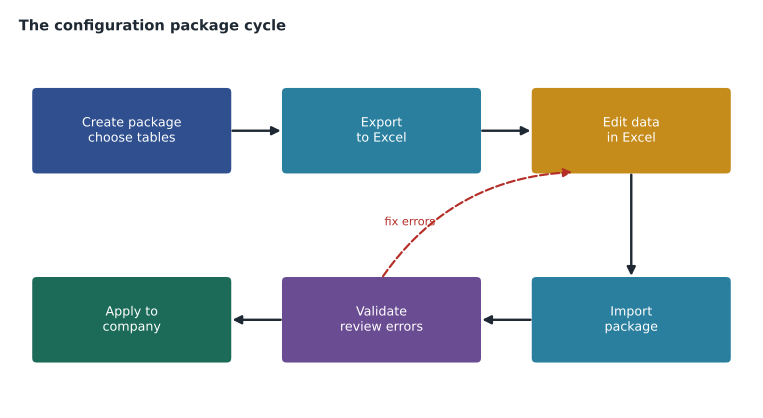
Working with a package follows the same steps each time:
| Step | Where | What happens |
|---|---|---|
| 1. Create the package | Configuration Packages page | Give it a code and name, and set options such as the language and the processing order |
| 2. Add tables | Package tables | Choose tables by ID, then choose fields and add filters if only some records are needed |
| 3. Export | Export to Excel action | Business Central produces a workbook with one sheet per table |
| 4. Fill in or edit | Excel | Business experts enter or clean data in familiar columns |
| 5. Import | Import from Excel action | Data loads into the package, not yet into the company |
| 6. Validate | Validate Package action | Errors are listed per table and record; fix them in the package or the workbook |
| 7. Apply | Apply Package action | Validated data is written to the company's tables |
Packages can also be exported and imported as a single package file (.rapidstart), which is how a package travels from one environment to another. Noor exported Corbel & Finch's setup package from the sandbox and applied the same file to the production company in December.
Order, relationships and errors
The order in which tables are applied matters, because records refer to each other. A customer refers to a customer posting group, payment terms and a payment method; if the customer is applied before those exist, validation fails. Business Central sorts package tables by processing order and lets consultants set it, and it can find related tables automatically with the "Get related tables" action. The rule of thumb is setup before master data, and master data before transactions.
When validation finds errors, the package shows them with the table, record and field concerned. Typical errors include a value that does not exist in a related table, a field too long, a date in the wrong format, or a required field left blank. Errors can be fixed directly in the package lines or in the workbook before re-importing. Packages also support field mapping, so that old values (for example, old payment-terms codes such as NET30) can be mapped to new ones (30 DAYS) during import, without retyping the source data.
Worked problem
Fixing a failed customer import
Callum imports 214 wholesale customers. Validation reports 18 errors, all saying that the payment terms code "N30" does not exist. The company uses the code 30 DAYS. What are two ways to fix this, and which is better?
Show solution
- Option 1: edit the 18 customer rows in Excel, replacing N30 with 30 DAYS, and import again.
- Option 2: add a field mapping in the package for the Payment Terms Code field, mapping N30 to 30 DAYS, then validate again.
- Option 2 leaves the source data untouched and will also catch any further N30 values in later imports from the same source.
- After validation shows no errors, apply the package.
Answer: Either fix the data or map the value; mapping is better when the old code appears repeatedly in source data.
The configuration worksheet and questionnaires
For larger projects, the configuration worksheet is a planning tool. It lists the areas and tables to be configured, groups them, assigns them to responsible people, and can create configuration packages from the selected tables. It acts as a checklist of what has been set up and by whom. Noor used it to give Callum ownership of the finance tables and Bettina ownership of the pricing tables.
Configuration questionnaires help gather setup decisions from business users. A questionnaire is built from setup tables; it exports to Excel as plain questions, such as "Should credit warnings be shown?", and the answers are imported and applied to the setup fields. Questionnaires are useful when the people who know the answers are not the people configuring the system.
Templates for new records
Once a company is running, users create new customers, vendors and items every week, and each needs the same dozen fields filled in. Templates do this. A customer template might hold the customer posting group, general business posting group, tax area, payment terms, reminder terms and default dimensions for a type of customer. When a user creates a new customer, Business Central asks which template to use and fills in those fields. Corbel & Finch created three customer templates (WHOLESALE, CAFE-ACCOUNT and WEB-SHOP), two vendor templates (GREEN-COFFEE and GENERAL) and item templates for finished coffee, green coffee, packaging and merchandise.
Configuration packages can use templates too: during import, a template can fill fields that the source data does not have, which reduces the size of migration workbooks.
Opening balances
The final setup step before go-live is to record where the business stands on the cutover date. Opening balances bring the old system's closing figures into Business Central so that the first new transaction starts from the right position. There are several kinds, and each goes through the matching journal so that subledgers and the general ledger agree.
| Balance | How it is entered | What it creates |
|---|---|---|
| General ledger accounts without subledgers | A general journal, balanced against an opening balance account | G/L entries |
| Customer balances | Open invoices entered in a sales journal or general journal with the customer as account | Customer ledger entries plus G/L entries to receivables |
| Vendor balances | Open invoices entered in a purchase journal or general journal with the vendor as account | Vendor ledger entries plus G/L entries to payables |
| Inventory | An item journal with quantities and unit costs per location | Item ledger entries, value entries and G/L entries to inventory |
| Fixed assets | A fixed asset G/L journal with acquisition cost and accumulated depreciation | FA ledger entries and G/L entries |
| Bank accounts | A general journal with the bank account as account | Bank ledger entries and G/L entries |
The key principle is to avoid double counting. If customer open invoices are posted through customer accounts, they already post to the receivables account in the general ledger, so the general ledger opening journal must not post receivables again. Consultants usually post subledger balances first, then post the general ledger journal for everything else, and finally check that the trial balance matches the old system's closing trial balance account by account. The opening-balance offset account, often a temporary account, should net to zero when everything is in.
Customer and vendor balances are best entered as individual open documents, not one total per customer, so that payments received in January can be applied to the right December invoices and aging reports work from the first day. Callum planned to bring in 340 open wholesale invoices this way, using a configuration package to fill the journal.
Worked problem
Checking an opening trial balance
After posting opening balances, the Business Central trial balance shows receivables of 96,400 dollars, while the old system showed 92,150 dollars. The customer ledger entries total 92,150 dollars. What probably went wrong, and how is it fixed?
Show solution
- The customer subledger agrees with the old system, so the customer entries are right.
- The general ledger has 96,400 − 92,150 = 4,250 dollars too much in receivables.
- That suggests part of the receivables total was also posted in the general ledger opening journal, double counting it.
- Post a correcting general journal entry crediting receivables 4,250 and debiting the opening balance account, or reverse and repost the faulty journal line.
Answer: Receivables were partly double-posted through the G/L journal; reverse or correct the 4,250 dollars so the G/L agrees with the customer ledger.
The setup pages that matter most
Assisted setup and packages fill tables, but consultants still need to know what the key setup pages decide. Four pages shape almost every transaction, and Callum went through each field with Noor before the first test posting.
| Setup page | Key decisions |
|---|---|
| General Ledger Setup | Allowed posting dates, local currency, rounding precision, global and shortcut dimensions, whether to show amounts with or without tax |
| Sales & Receivables Setup | Number series for customers and sales documents, credit warnings, stockout warnings, whether invoices post from shipments, default posting date behavior |
| Purchases & Payables Setup | Number series for vendors and purchase documents, whether a vendor invoice number is required, copy comments and other defaults |
| Inventory Setup | Automatic cost posting to the G/L, expected cost posting, average cost calculation settings, location mandatory, number series for items and transfers |
Two of those decisions caused real discussion. First, Ext. Doc. No. Mandatory on Purchases & Payables Setup requires users to type the vendor's invoice number on every purchase invoice. Callum turned it on, because it lets Business Central warn when the same vendor invoice is entered twice, a common cause of duplicate payments. Second, Automatic Cost Posting on Inventory Setup posts inventory value changes to the general ledger as they happen, rather than waiting for a batch job. Noor recommended turning it on for a company of Corbel & Finch's size, combined with a nightly cost adjustment job queue entry, so that the inventory account in the general ledger always matches the inventory valuation report.
Worked problem
Catching a duplicate invoice
A green-coffee importer emails the same invoice, number INV-5521, twice in one week. Imogen enters it on Monday. On Thursday, an order processor helping out enters the second copy. What stops a double payment?
Show solution
- Ext. Doc. No. Mandatory is on, so the second user must type the vendor invoice number INV-5521.
- When posting, Business Central checks whether a posted purchase invoice from the same vendor already has that external document number.
- It finds Monday's invoice and stops posting with a message that the document already exists.
- The second invoice is deleted unposted; nothing reaches the payment journal.
Answer: The required external document number lets Business Central detect the duplicate before it posts or gets paid.
Common mistakes
MistakeApplying customers before payment terms and posting groups exist.
InsteadApply setup tables first, then master data, then opening transactions.
MistakeTyping setup again in production after testing it in a sandbox.
InsteadExport the tested setup as a configuration package and apply it.
MistakeEntering one balance per customer.
InsteadEnter open invoices individually so payments can be applied and aging works.
MistakePosting receivables both through customers and in the G/L opening journal.
InsteadPost subledgers through their own journals and leave their control accounts out of the G/L journal.
Summary and key terms
- Assisted Setup offers guided wizards for areas such as email, approvals, data migration and Outlook; Manual Setup lists setup pages by area.
- Configuration packages hold chosen tables and fields; they are exported to Excel, filled in, imported, validated and applied.
- Processing order matters: setup before master data, master data before transactions; mapping can translate old codes.
- The configuration worksheet plans and assigns setup work; questionnaires gather setup decisions from business users.
- Templates fill standard fields on new customers, vendors and items.
- Opening balances are entered through the matching journals; avoid posting control accounts twice and reconcile to the old trial balance.
- Assisted setup
- A guided wizard that configures one area of Business Central.
- RapidStart Services
- The set of tools for configuring companies in bulk with packages, worksheets and questionnaires.
- Configuration package
- A collection of tables and fields whose data can be exported, imported, validated and applied.
- Configuration worksheet
- A planning list of setup tables grouped and assigned to responsible people.
- Configuration questionnaire
- A set of questions built from setup tables to gather setup answers.
- Template
- A set of default field values applied when creating a new customer, vendor or item.
- Opening balance
- An entry that brings a balance from the old system into Business Central at the cutover date.
Practice problems
Work each problem on paper first, then reveal the answer to check.
What action brings related tables, such as payment terms, into a package with customers?
Show answer
Get related tables.
In which file format does a package travel between environments?
Show answer
As a .rapidstart package file.
Through which journal is opening inventory entered?
Show answer
An item journal, with quantities and unit costs per location.
Lesson quiz · 5 questions
Score 60% or more to complete this lesson.
Create a free account to save your progress, take quizzes and earn a certificate.