
MSBA-120 · Lesson 4 of 12 · 21 min
Cost models: licenses, consumption and commitment tiers
▶ Video coming soon A video version of this lesson is on the way.
Lorne opened the fourth workshop with a page of numbers he had found on Microsoft's website and a question. "I can see a price per user. I can also see something called credits, something called capacity packs and something called a pre-purchase plan. Which of these are we going to pay, and how do I forecast it?"
It was a fair question. Generative AI is sold in more ways than most business software, and the way a solution is priced changes which use cases make financial sense. This lesson explains the three basic cost models, how Microsoft applies them to Copilot, agents and Foundry Tools, and what drives the bill in each case. Prices quoted here are Microsoft's published US list prices as of late 2026; Canadian prices are set separately in Canadian dollars, prices change often, and large customers negotiate. The structure matters more than the numbers.
Three cost models
A license, also called a subscription or seat, is a fixed price per user per period, usually per month with an annual commitment. The cost is predictable and does not depend on how much each person uses the product. Licenses suit tools that many people use every day.
Consumption pricing, also called pay-as-you-go or usage-based pricing, charges for what is actually used, measured in some unit such as tokens, messages, credits or transactions. The cost scales with use, which is fair and flexible but harder to forecast. Consumption suits workloads that are occasional, uneven or run by software rather than people, such as agents.
A commitment tier is a middle path: the customer commits in advance to buy a certain amount of usage, or a certain amount of money, in exchange for a discount. Unused commitment is usually lost, and usage above it is billed at an overage rate. Commitment suits steady, predictable workloads where the customer is confident about volume.
What drives the cost underneath
Whatever the pricing model, the underlying cost of generative AI comes from computation. Large language models process text as tokens, which are pieces of words; in English, a token averages roughly three-quarters of a word. Every request has input tokens, the prompt plus any documents or conversation history sent with it, and output tokens, the response. Larger and more capable models cost more per token than smaller ones, and output tokens typically cost more than input tokens.
This explains several facts that matter to leaders. Long documents and long conversations cost more than short ones, because more tokens are processed. Grounding an answer in company data adds tokens, because the retrieved passages are sent to the model. Reasoning models that work through a problem step by step generate many more tokens than a quick answer. And an agent that runs a multi-step task may make many model calls, each with its own tokens. When Microsoft sells Copilot by the seat, it absorbs this variation within fair-use limits; when it sells by consumption, the customer pays for it directly.
Microsoft 365 Copilot licenses
Microsoft 365 Copilot is licensed per user. For enterprise customers, Microsoft lists it at 30 US dollars per user per month with an annual commitment, as an add-on to an eligible Microsoft 365 or Office 365 plan. For small and medium businesses, Microsoft 365 Copilot Business is an add-on for eligible Business plans, listed at 21 US dollars per user per month; from July 1 to December 31, 2026 Microsoft offered it at a promotional 18 US dollars for the first year. Microsoft also sells Business plans bundled with Copilot Business.
A Copilot license gives the user Copilot in the Microsoft 365 apps such as Word, Excel, PowerPoint, Outlook and Teams, grounded in the work data they have permission to see through Microsoft Graph, plus the Researcher and Analyst agents and the ability to build and use agents for internal use. Licensed users can build internal agents with Copilot Studio inside Microsoft 365 at no additional charge; publishing agents to external channels requires separate Copilot Studio licensing.
Microsoft 365 Copilot Chat, the secure chat experience grounded in the web, is included at no additional cost for users with eligible Microsoft 365 subscriptions. Users without a Copilot license can also use agents in Copilot Chat, and those agents are billed on a metered basis. This creates a common pattern: give full Copilot licenses to people whose work is heavily document- and meeting-based, and give everyone else Copilot Chat with access to selected agents on consumption pricing.
Copilot Credits and consumption
For consumption, Microsoft uses a common unit called Copilot Credits. Agents built in Copilot Studio, agents used by people who do not have a Copilot license, and some advanced experiences consume credits. The number of credits used depends on what the agent does, such as answering from knowledge, calling an action or grounding in company data. At the pay-as-you-go rate a credit costs one US cent, billed monthly in arrears to an Azure subscription linked to the environment.
In September 2026, Microsoft announced a further split in Copilot pricing. Everyday AI, the familiar Copilot experiences in the apps and chat, stays inside the per-user license, subject to fair-use limits. Advanced AI, including long-running and unsupervised agent workflows and some new premium experiences, is billed in Copilot Credits on top of the license. For enterprise tenants, this usage-based billing stays switched off until an administrator creates a spending policy in the Microsoft 365 admin center. For a leader, the message is simple: the seat price is no longer the whole Copilot bill once advanced agents are in use.
| Way to buy Copilot Credits | How it works | Suits |
|---|---|---|
| Pay-as-you-go | One US cent per credit, billed monthly in arrears through Azure; no commitment | New or uneven agent workloads |
| Capacity pack | 200 US dollars per month for 25,000 credits (Copilot Studio) | Steady agent use at a known level |
| Pre-purchase plan | A one-year pool paid up front with volume discounts from 5 to 20 percent; unused credits expire | Large, predictable consumption |
| AI Flex Plan | A one- or three-year monetary commitment that can fund Copilot Credits and other Microsoft AI services | Organizations consolidating AI spending |
A capacity pack works out to 0.8 cents per credit if every credit is used, a 20 percent saving on pay-as-you-go. The pre-purchase plan's discounts start at 5 percent for 300,000 credits and reach 20 percent at the largest volumes. The catch with any commitment is the same: credits that are not used are lost, so the discount is only real if the forecast is good.
Worked problem
Comparing capacity packs with pay-as-you-go
Yusra's claims-status agent is expected to use about 40,000 Copilot Credits a month. Compare the monthly cost of pay-as-you-go with buying two capacity packs of 25,000 credits each, at the list prices in this lesson.
Show solution
- Pay-as-you-go: 40,000 credits x 0.01 US dollars = 400 US dollars a month.
- Two capacity packs: 2 x 200 = 400 US dollars a month for 50,000 credits.
- At 40,000 credits, the two options cost the same, but the packs leave 10,000 credits unused.
- One pack plus pay-as-you-go for the remaining 15,000 credits: 200 + 150 = 350 US dollars.
Answer: One capacity pack plus pay-as-you-go for the overflow, about 350 US dollars a month, is cheapest at this volume. Commitments save money only when they match actual use.
License or consumption: the break-even question
For agents that many people use, the choice between licenses and consumption becomes a break-even calculation. A licensed user can use agents in Microsoft 365 as part of the license for everyday use, while an unlicensed user's agent use is metered. If a group of light users interacts with an agent only occasionally, consumption is cheaper. If a group uses Copilot heavily every day, licenses are cheaper and more predictable.
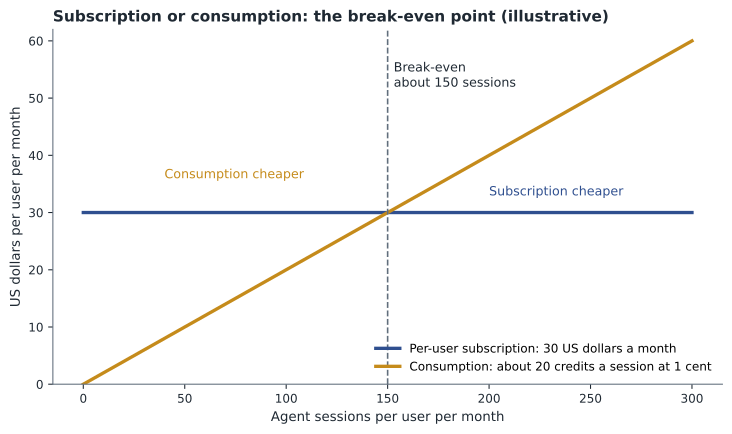
The exact break-even point depends on how many credits a typical interaction uses, which varies with the agent's design. A good practice is to pilot an agent on consumption pricing, measure the actual credits per session, and only then decide whether to license the heavy users. Hamish's illustrative calculation for a Quillfield agent that used about 20 credits per session put the break-even at about 150 sessions a month for a 30-dollar license: 30 dollars divided by 0.20 dollars per session. But a license also brings Copilot in all the Microsoft 365 apps, so the comparison is never purely about one agent.
Foundry Tools and Microsoft Foundry
When an organization builds its own AI applications rather than using Copilot, it typically uses Microsoft Foundry, Microsoft's platform for building AI applications and agents on Azure, and Foundry Tools, the prebuilt AI services for tasks such as speech, translation, language analysis, vision and document processing. These are Azure services with Azure pricing.
Most Foundry Tools are sold on standard pay-as-you-go pricing per transaction, character, page or hour of audio. Several also offer commitment tiers: the customer pays a fixed monthly fee for a set quota of usage at a discount compared with pay-as-you-go. Microsoft documents commitment tiers for features such as speech to text, text to speech, text translation, several Azure Language features, optical character recognition in Vision, and Document Intelligence custom and invoice models. The commitment period is a calendar month, the first month is prorated, usage above the quota is billed at a defined overage rate, and a purchase cannot be refunded. Commitment tiers apply only to resources dedicated to a single service. Plans for disconnected containers, which run without an internet connection, are sold for a calendar year.
Generative models deployed through Foundry are generally billed per token on a standard deployment, or reserved as dedicated throughput for steady, high-volume workloads that need predictable performance. The same logic applies as with Copilot Credits: pay-as-you-go for uncertain demand, commitments for steady demand.
| Offering | Main cost model | Typical cost driver |
|---|---|---|
| Microsoft 365 Copilot | Per-user license, annual commitment | Number of licensed users |
| Microsoft 365 Copilot Chat | Included with eligible Microsoft 365 plans | None for chat; agents are metered |
| Copilot Studio agents | Copilot Credits: pay-as-you-go, capacity packs or pre-purchase | Sessions, actions and grounding per agent |
| Advanced Copilot experiences | Copilot Credits on top of the license | Long-running and premium agent work |
| Foundry Tools | Pay-as-you-go or monthly commitment tiers | Transactions, characters, pages or audio hours |
| Models in Microsoft Foundry | Per token, or reserved throughput | Input and output tokens; model choice |
The costs that are not on the price list
License and consumption charges are often less than half of the total cost of an AI program. A complete cost estimate also includes:
- Data preparation: cleaning up permissions, labeling sensitive content, migrating documents out of old systems.
- Integration and building: connecting agents to business systems, building custom agents, testing them.
- Training and change management: role-based training, champions, communications and the time people spend learning.
- Governance and security: policy work, reviews, monitoring and the tools that support them.
- Support and operations: help desk load, agent maintenance, model updates and evaluation.
- Productivity dip: a temporary loss of output while people learn new ways of working.
Together these make up the total cost of ownership, the figure a business case should use. Lorne added one more item from experience: "the cost of the licenses nobody uses". Monitoring usage and reassigning or removing unused licenses is one of the simplest ways to improve the return.
Worked problem
Estimating a first-year cost
Quillfield plans 120 Microsoft 365 Copilot licenses at 30 US dollars per user per month, one agent expected to use 25,000 Copilot Credits a month bought as a capacity pack, and one-time costs of 40,000 US dollars for data clean-up and 25,000 US dollars for training. What is the first-year cost?
Show solution
- Licenses: 120 x 30 x 12 = 43,200 US dollars.
- Capacity pack: 200 x 12 = 2,400 US dollars.
- One-time costs: 40,000 + 25,000 = 65,000 US dollars.
- Total: 43,200 + 2,400 + 65,000 = 110,600 US dollars.
Answer: About 110,600 US dollars in the first year, of which more than half is one-time preparation and training rather than licenses.
Controlling spend
Consumption pricing needs controls that license pricing does not. In Microsoft's model, administrators link pay-as-you-go billing to an Azure subscription, set budgets and alerts on it, and decide which environments and agents may consume credits. For advanced Copilot experiences in enterprise tenants, nothing is billed until an administrator creates a spending policy. Leaders should ask for three things: a forecast per agent, a monthly report of actual consumption against the forecast, and a named person who can pause an agent whose costs run away.
By the end of the workshop, Lorne had a forecasting model with three lines: licenses, consumption and one-time costs. "I can live with consumption pricing," he said, "as long as somebody owns the meter."
Common mistakes
MistakeTreating the per-user license as the whole Copilot bill.
InsteadAgents and advanced experiences can consume Copilot Credits on top of licenses; forecast both.
MistakeBuying a large commitment before measuring real usage.
InsteadStart on pay-as-you-go, measure credits per session, then commit to what you know you will use.
MistakeLicensing everyone on day one.
InsteadLicense heavy users of documents and meetings; give others Copilot Chat and metered agents; review usage regularly.
MistakeLeaving data preparation, training and support out of the cost.
InsteadUse total cost of ownership, including one-time and ongoing costs beyond licenses.
Summary and key terms
- Generative AI is sold by license, by consumption or through commitment tiers that trade a prepayment for a discount.
- Underneath, cost is driven by tokens: longer inputs, grounding, larger models, reasoning and multi-step agents all add cost.
- Microsoft 365 Copilot is licensed per user; Copilot Chat is included with eligible plans; agents and advanced experiences consume Copilot Credits.
- Foundry Tools offer pay-as-you-go or monthly commitment tiers with prorating, overage and no refunds.
- Total cost of ownership includes data preparation, integration, training, governance, support and unused licenses.
- License
- A fixed price per user per period, independent of how much each user uses the product.
- Consumption pricing
- Charging for actual usage, measured in units such as tokens, credits or transactions.
- Commitment tier
- A prepaid volume of usage at a discount; unused amounts are usually lost and extra use is billed as overage.
- Copilot Credit
- Microsoft's common unit for usage-based billing of agents and advanced Copilot experiences.
- Token
- A piece of text, roughly three-quarters of an English word, that a language model processes.
- Total cost of ownership
- All the costs of a solution over its life, not just its price.
Practice problems
Work each problem on paper first, then reveal the answer to check.
Which cost model suits an agent whose usage is new and uneven?
Show answer
Consumption (pay-as-you-go), until real usage is measured.
What happens to unused credits in a Copilot Credit pre-purchase plan?
Show answer
They expire at the end of the one-year term.
Name three costs that are not on the price list.
Show answer
Any three: data preparation, integration and building, training and change management, governance and security, support and operations, productivity dip, unused licenses.
Lesson quiz · 5 questions
Score 60% or more to complete this lesson.
Create a free account to save your progress, take quizzes and earn a certificate.