
MSBA-120 · Lesson 2 of 12 · 18 min
Use cases by function
▶ Video coming soon A video version of this lesson is on the way.
For the second workshop, Celestine asked each leader to bring a list of the ten most time-consuming or error-prone things their teams did every week. "Do not start with AI," she said. "Start with the work. We will find the AI uses in your lists, not in a vendor brochure."
Hamish combined the lists into a single spreadsheet of 71 activities. By the end of the session, about half had been marked as possible generative AI use cases, a handful as better suited to other tools, and the rest as not worth changing. This lesson walks through how a leadership team does that sorting, using the main business functions as a guide.
What a use case is
A use case is a specific piece of work, done by a specific group of people, that an AI capability could change in a measurable way. "Use AI in sales" is not a use case; it is a hope. "Account managers use Copilot to prepare a one-page client briefing before each renewal meeting, drawing on the client's emails, past meeting notes and policy documents" is a use case. It names the people, the work, the data and the expected change, and each of those can be checked.
Good use case statements answer five questions: who does the work, what the work is, which data the AI needs, what changes, and how the change will be measured. Writing them in this form makes weak ideas easy to spot, because they leave one of the five blank.
| Question | Weak statement | Strong statement |
|---|---|---|
| Who | Staff | The 28 personal-lines account managers |
| What | Renewals | Preparing the renewal summary and client letter |
| Data | Our systems | Policy documents in SharePoint and the client's email history |
| Change | Faster | Preparation time cut from about 20 minutes to about 8 |
| Measure | Feedback | Average preparation time and error rate, before and after |
Customer service and contact centers
Customer service is often the first function where generative AI pays off, for the reasons the support-agent study in lesson 1 showed: the work is language-heavy, high-volume and repetitive, and much of the knowledge an expert agent uses can be captured in documents. Typical use cases include summarizing calls and chats, drafting replies, suggesting answers from a knowledge base while the agent is on the call, classifying and routing incoming requests, and translating.
Tomasz's list was full of these. Agents spent minutes after every call writing notes, searched three systems to answer billing questions, and escalated simple coverage questions to senior staff because new agents were not confident. Each of these is a well-understood pattern with a clear measure: average handling time, first-contact resolution, escalation rate and quality scores.
Customer-facing automation, where an agent answers clients directly without a person in the loop, is a step further. It can deliver growth value, for example by answering simple questions at night, but it needs tighter controls because mistakes reach the client directly. Wendell asked that any client-facing answer about coverage be limited to quoting the policy wording and offering to connect the client to a licensed broker.
Sales and account management
In sales, generative AI is used to prepare for meetings, summarize client history, draft proposals and follow-up emails, update customer relationship records from meeting notes, and suggest next steps. In a brokerage, account managers spend a large share of their week assembling information that already exists in emails, documents and systems. A client briefing drawn from those sources, ready before a call, is a clear productivity gain and often a quality gain too, because the account manager walks in knowing about the complaint from last spring.
Growth value in sales is possible but harder to prove. More prepared calls may lead to higher retention or more cross-selling, but those outcomes depend on many other factors. Lesson 5 shows how to measure them with comparison groups rather than assumptions.
Marketing and communications
Marketing teams use generative AI to draft and adapt content: campaign copy, newsletters, social posts, web pages and product descriptions, often in several lengths, tones and languages. They also use it to summarize research, analyze survey comments and produce first drafts of images. The productivity gains are usually large and fast. The main controls are brand voice, factual accuracy and, in regulated industries such as insurance, the rules on what marketing may claim.
Operations and back office
Operations is where many of the largest gains hide, because back-office work often involves reading, extracting and moving information between documents and systems. In insurance, that includes reading applications and supporting documents, extracting key fields, comparing policy wordings, checking certificates of insurance and preparing documents for underwriters. Generative AI can read unstructured documents, pull out the details a process needs and flag anything missing. When those steps are joined into a flow, they become process automation, which lesson 8 covers.
Finance
Finance teams use generative AI to draft commentary on monthly results, summarize contracts, answer questions about spending from reports, reconcile and explain variances, and prepare first drafts of board papers. Lorne was surprised to find several items on his own list: his analysts spent two days each month writing variance explanations that followed a predictable pattern, and the procurement team read every supplier contract renewal looking for the same five clauses.
Finance is also where generative AI's weaknesses matter most. A language model can misread a number or invent a plausible figure. Finance use cases therefore need grounding in the actual data, tools that do the arithmetic, and review by someone who knows what the numbers should look like. Analyst, the reasoning agent in Microsoft 365 Copilot, is designed for data questions and can run code to analyze files, which makes it better suited to numeric work than a plain chat answer.
Human resources
HR use cases include drafting job descriptions, answering employee questions about benefits and policies, summarizing feedback, preparing onboarding material and supporting learning. An internal assistant that answers "How much parental leave am I entitled to?" from the actual policy document can save HR staff many hours a month. HR also carries special care: decisions about hiring, pay and performance affect people's lives, and the use of AI in those decisions is regulated in some places. A safe pattern is to use AI for drafting and answering questions about policies while keeping decisions about individuals with people.
Legal, risk and compliance
Legal and compliance teams use generative AI to review contracts against a checklist, summarize regulations, compare document versions, draft standard clauses and check communications for required wording. Wendell's list included checking that every client letter contained the disclosures required by Quillfield's regulator. An assistant that flags missing disclosures before a letter is sent would deliver quality value directly: fewer compliance findings and less risk.
IT and software development
In IT, generative AI helps write and review code, explain legacy systems, generate tests, draft documentation, summarize incident logs and answer internal help desk questions. The developer study in lesson 1 found large time savings on a well-defined coding task. Quillfield has only a small IT team, so Bram Oosterhuis, the solutions architect, saw the greatest value in help desk questions and in documenting the integrations nobody had written down.
Cross-functional use cases
Some of the most valuable uses cut across every function: summarizing meetings, catching up on long email threads, finding the latest version of a document, drafting from templates and searching across company information. These are the everyday uses of Microsoft 365 Copilot in Teams, Outlook, Word and the other apps. Individually they save minutes; together, across hundreds of people, they can add up to a great deal. They are also the hardest to turn into financial value, because the time is scattered. Lesson 5 returns to this problem.
| Function | Example use case | Typical measure |
|---|---|---|
| Customer service | Call and chat summaries | Average handling time |
| Sales | Pre-meeting client briefings | Preparation time; retention rate |
| Marketing | Campaign drafts in several versions | Time to publish; engagement |
| Operations | Extracting details from applications | Cycle time; error rate |
| Finance | Variance commentary drafts | Days to close; analyst hours |
| HR | Policy question assistant | HR tickets per month |
| Legal and compliance | Disclosure checks on client letters | Compliance findings |
| IT | Help desk answers from documentation | Tickets resolved without escalation |
Prioritizing use cases
A list of 30 possible use cases is not a plan. The usual way to prioritize is to score each one on two dimensions: value, meaning how much it is worth if it works, and feasibility, meaning how likely it is to work soon and safely. Feasibility includes whether the data is available and clean, whether the tools exist today, how much change it asks of people, and how risky mistakes are.
Plotted on a two-by-two grid, use cases fall into four groups. High value and high feasibility are quick wins, which should go first. High value and low feasibility are strategic bets, which need preparation, often data work, before they can start. Low value and high feasibility are nice to have, fine for individuals to adopt but not worth a project. Low value and low feasibility should be dropped.
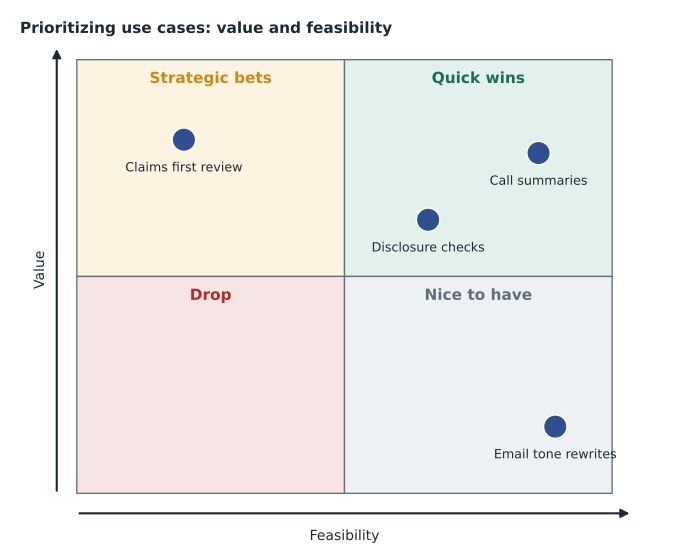
Scoring is subjective, so the discussion matters more than the numbers. Quillfield used a simple 1 to 5 scale for each dimension and asked the person who owned the work to score feasibility, because they knew where the data really lived. Two use cases moved sharply during the discussion: automated claims triage looked like a quick win until Bram pointed out that claims notes were stored in an old system with no connection to Microsoft 365, which moved it into strategic bets; disclosure checking looked like a strategic bet until Wendell showed that the required wording fitted on one page, which made it a quick win.
Worked problem
Scoring three use cases
Score each Quillfield use case for value and feasibility on a 1 to 5 scale and place it on the grid: (1) call summaries in the contact center; (2) automated first review of commercial claims stored in an old claims system; (3) a personal assistant that rewrites internal emails in a friendlier tone.
Show solution
- Call summaries: value 4 (40 hours a day, as lesson 1 calculated); feasibility 5 (built into the tools Quillfield already licenses, low risk). Quick win.
- Claims first review: value 5 (faster claims, fewer errors); feasibility 2 (data in an unconnected system, high risk of wrong decisions). Strategic bet.
- Friendlier internal emails: value 1 (small, scattered benefit); feasibility 5. Nice to have; let individuals use it, but do not fund a project.
Answer: Call summaries are a quick win, claims review is a strategic bet that needs data work first, and email tone is nice to have.
Signs of a strong use case
Across functions, the strongest early use cases share several signs. The work is frequent and done by many people, so small savings add up. It is language-heavy: reading, writing, summarizing or answering. The knowledge needed is written down somewhere the AI can reach. A person checks the result before it matters, so errors are caught. There is a clear owner who wants the change. And there is a baseline: someone already measures how long the work takes or how often it goes wrong.
The weakest share the opposite signs: rare work, exact answers required, knowledge in people's heads, results acted on without review, no owner and no baseline. Leaders do not need to reject these outright, but they should not start with them.
Hamish added one more check to the list after the workshop: whether the use case could be measured with data the business already collected. Use cases with an existing report, such as handling time in the contact center or the number of compliance findings, could start sooner and be judged more fairly than those that needed a new measurement system.
Common mistakes
MistakeStarting from the technology and looking for places to use it.
InsteadStart from the work: list time-consuming or error-prone activities, then find the ones AI can change.
MistakeWriting use cases as broad goals such as "AI for sales".
InsteadName who, what, which data, what changes and how it will be measured.
MistakeLetting enthusiasts score feasibility.
InsteadAsk the people who own the work and the data; they know the real obstacles.
MistakeUsing AI to make decisions about individual employees because it is fast.
InsteadUse AI to draft and answer questions; keep decisions about people with people, and check local rules.
Summary and key terms
- A use case names who does the work, what the work is, the data needed, the change expected and the measure.
- Customer service, sales, marketing, operations, finance, HR, legal and IT all have well-established generative AI use cases.
- Cross-functional uses such as meeting summaries add up but are the hardest to turn into financial value.
- Prioritize on value and feasibility: quick wins first, strategic bets after preparation.
- Strong early use cases are frequent, language-heavy, documented, reviewed by a person and owned by someone with a baseline.
- Use case
- A specific piece of work by specific people that AI could change in a measurable way.
- Feasibility
- How likely a use case is to work soon and safely, given data, tools, change and risk.
- Quick win
- A use case with high value and high feasibility.
- Strategic bet
- A high-value use case that needs preparation, often data work, before it can start.
- Baseline
- A measure of how the work performs before the change, used to show the effect.
Practice problems
Work each problem on paper first, then reveal the answer to check.
Rewrite "use AI in HR" as a strong use case statement.
Show answer
For example: the four-person HR team uses an assistant that answers employee questions about benefits from the benefits policy, cutting HR tickets per month; measured by ticket counts before and after.
Why did automated claims triage move from quick win to strategic bet?
Show answer
Because the claims notes were in an old system with no connection to Microsoft 365, so feasibility was low until data work was done.
Name three signs of a strong early use case.
Show answer
Any three: frequent work done by many people, language-heavy, knowledge written down, a person checks results, a clear owner, an existing baseline.
Lesson quiz · 5 questions
Score 60% or more to complete this lesson.
Create a free account to save your progress, take quizzes and earn a certificate.