
MSBA-102 · Lesson 9 of 12 · 20 min
SharePoint Advanced Management and restricted access control
▶ Video coming soon A video version of this lesson is on the way.
Some of Corvallin's oversharing could be fixed in an afternoon. Some could not. The finance team needed two weeks to work out who really needed the payroll exports, and Branch 3's operations site had hundreds of links woven into daily work. Ines did not want to delay the Copilot pilot for a month, and she did not want Copilot summarizing payroll in the meantime. SharePoint Advanced Management provided the tools to contain risk while the cleanup finished, and to stop the same problems from coming back.
What SharePoint Advanced Management is
SharePoint Advanced Management (SAM) is a set of governance features for SharePoint and OneDrive that are managed in the SharePoint admin center. It was originally a paid add-on. Microsoft now documents that SAM features are included when an organization assigns at least one Microsoft Copilot license, which made SAM part of most Copilot deployments. One capability, restricting site creation by apps, still needs the SAM Plan 1 add-on, and the sensitivity label report needs E5-level labeling. Licensing details change, so administrators should check the current SAM licensing page.
| Group | Features (included with Copilot licenses) | Purpose |
|---|---|---|
| Oversharing control | Content management assessment, data access governance reports, permission state reports, site access reviews, restricted access control, restricted content discovery, block download policy, Conditional Access with authentication contexts, EEEU insights, sharing links report | Find and contain broad access |
| Sprawl control | Site ownership policy, inactive sites policy, site attestation policy, comparing site policies | Keep sites owned, active and reviewed |
| Content lifecycle | Change history for site and organization settings, recent admin actions, catalog management | Track and govern changes |
Start with the content management assessment
Microsoft's readiness guidance for Copilot and agents begins with the content management assessment. In the SharePoint admin center, an administrator selects Advanced Management and starts the assessment, which reviews the tenant's settings and site estate and returns findings with recommended actions. Microsoft suggests rerunning it every 30 days. Teodor's first assessment flagged the permissive default link type, 41 sites without an active owner, and the EEEU sites already found in lesson 8.
Restricted access control
Restricted access control (RAC) limits access to a SharePoint site, or a OneDrive, to members of a specified Microsoft Entra security group or Microsoft 365 group. Once turned on for a site, only people in that group can open its content, even if they had been given access in other ways, such as a sharing link, a direct permission or EEEU. People outside the group are turned away. RAC is first enabled for the organization in the SharePoint admin center, under Policies and Access control, and then applied to individual sites, with an option to let site administrators manage it for their own sites.
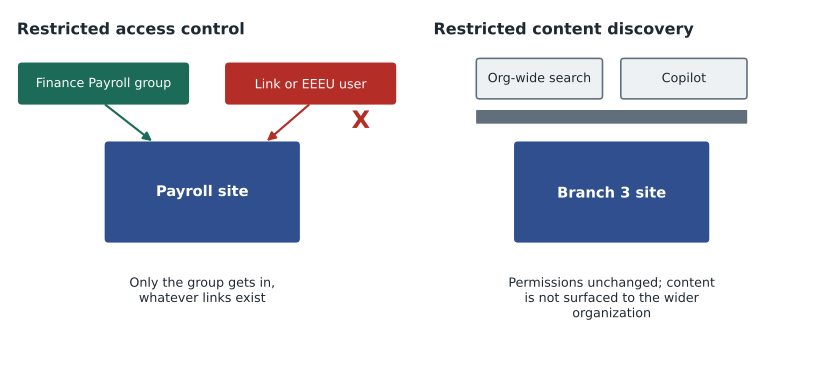
RAC was the right tool for the payroll exports. Teodor created a security group called Finance Payroll with the five people who needed access and applied RAC to the payroll site with that group. Overnight, the organization-wide links and the leftover EEEU entry stopped working for everyone else, without anyone having to find and remove each one. The finance team could then clean up the links at its own pace, knowing that nobody outside the group could use them.
Restricted content discovery
Restricted content discovery (RCD) takes a different approach. It leaves permissions unchanged but stops the site's content from being surfaced in Copilot, agents and organization-wide search for people who have not recently interacted with it. People who work in the site every day still find their documents; Copilot and search simply stop offering that content to everyone else who technically has access. RCD is turned on for a site from the site's Settings in Active sites in the SharePoint admin center. Microsoft recommends it for high-risk sites where several risk signals overlap, such as sensitive content with broad links or a public site with no owner.
| Restricted access control | Restricted content discovery | |
|---|---|---|
| What it changes | Who can open the site | Where the site's content is surfaced |
| Permissions | Overridden: only the chosen group gets in | Unchanged |
| Effect on Copilot | Copilot cannot use the content for anyone outside the group, because they cannot access it | Copilot does not surface the content for people who have not recently used it |
| Best for | Sites whose audience is a known group, such as payroll | Large or busy sites that cannot be re-permissioned quickly |
| Risk if misused | Locking out people who legitimately need access | A false sense of security: people with access can still open files directly |
Worked problem
Choosing between RAC and RCD
Branch 3 Operations has 60 regular users, hundreds of organization-wide links in active use and client exports scattered through it. The branch manager needs two weeks to clean it up. Finance Payroll has a clear audience of five people. Which tool fits each site?
Show solution
- Finance Payroll: the audience is a known small group, so restricted access control with the Finance Payroll group closes access immediately.
- Branch 3 Operations: the audience is large and changing, and links are in daily use, so RAC would break work.
- Restricted content discovery on Branch 3 keeps Copilot and search from surfacing its content to the wider organization while permissions stay as they are.
- After the cleanup, Teodor turns RCD off for Branch 3 and plans to keep RAC on payroll permanently.
Answer: RAC for Finance Payroll, RCD for Branch 3 Operations as a temporary containment while the cleanup finishes.
Other oversharing controls
Several more SAM features help with sensitive sites. The block download policy lets people view files in the browser but not download, print or sync them, and it can also cover Teams meeting recordings. Conditional Access with authentication contexts lets a site require stronger conditions, such as a compliant device or multifactor authentication, before anyone can open it. Site access reviews ask site owners to confirm or remove access found in data access governance reports. Together these let an organization treat its most sensitive sites differently from everyday collaboration sites.
An earlier stop-gap, Restricted SharePoint Search, limited organization-wide search and Copilot to an allowed list of sites. Microsoft introduced it as a temporary measure for organizations that needed time to review permissions. Restricted content discovery and the other SAM features now provide a more targeted approach, and Microsoft's current readiness guidance focuses on them.
Keeping sites healthy: lifecycle policies
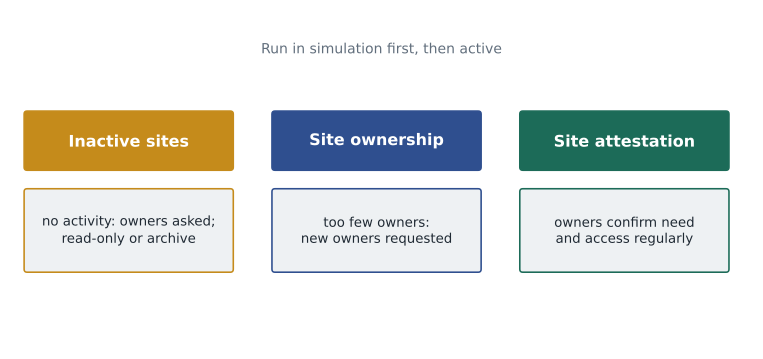
Containment and cleanup fix today's problems. Site lifecycle policies reduce tomorrow's. They run on a schedule, notify owners and can take action when owners do not respond. Each can run first in simulation mode to see which sites it would affect.
| Policy | What it does |
|---|---|
| Inactive sites policy | Finds sites with no activity for a chosen period and asks owners to confirm they are still needed; sites can then be made read-only or archived |
| Site ownership policy | Finds sites with too few owners and asks for new owners to be named |
| Site attestation policy | Asks site owners at regular intervals to confirm the site is still needed and its access is correct |
Microsoft also recommends Microsoft 365 Archive for inactive or ownerless sites. Archived sites stop using active storage, and Microsoft notes that archived content is not used by Copilot. Teodor found that 31 of Corvallin's 210 sites had been untouched for over a year, including the old funding-application site. Archiving them removed a large amount of stale content from Copilot's reach in one step.
Tracking changes and asking for help
Change history reports show who changed site and organization settings and when, which helps when a setting mysteriously becomes more permissive. Recent admin actions shows the last 30 days of administrator activity. Microsoft's guidance also mentions a SharePoint Admin Agent that can answer questions about the tenant, such as how content is distributed, from the SharePoint admin center or Teams. Teodor used it to ask which sites had both EEEU and labeled content, then confirmed the answer against the reports.
Putting the tools in sequence
Teodor wrote the order for Corvallin's pilot on a whiteboard so that everyone agreed on it before anything changed.
| Week | Action | Tool |
|---|---|---|
| 1 | Run the content management assessment and data access governance reports | SAM assessment, DAG reports |
| 1 | Contain the highest-risk sites | RAC for small known audiences, RCD for large busy sites |
| 2 to 3 | Site owners review access and remove links and EEEU | Site access reviews |
| 3 | Tighten organization sharing defaults | Sharing settings |
| 4 | Turn on lifecycle policies in simulation, then active | Inactive sites, ownership, attestation policies |
| Monthly | Rerun the assessment and reports; lift RCD where cleanup is done | SAM assessment, DSPM for AI |
Conditional Access with authentication contexts
An authentication context is a label in Microsoft Entra Conditional Access, such as "Sensitive site access", that a SharePoint site can require. When a user opens a site tagged with that context, Conditional Access applies the matching policy, for example requiring a compliant device and phishing-resistant multifactor authentication. Corvallin applied this to the clinical and payroll sites, so a nurse could read the intranet from a personal phone but needed a managed device to open client records. Authentication contexts let one tenant hold sites with very different security needs without making every site as strict as the most sensitive one.
Block download in practice
The block download policy keeps files viewable in the browser while preventing download, print and sync. It is useful for sites that people must read but should not take away, such as policy archives or incident reports. Microsoft documents that it can also apply to Teams meeting recordings, which matters for clinical case conferences that are recorded for absent colleagues. Teodor used it on the incidents site: managers could read reports in the browser, but could not save copies to their laptops.
Simulation for lifecycle policies
Worked problem
Simulating an inactive sites policy
Teodor creates an inactive sites policy for sites with no activity for 12 months, in simulation mode. The report lists 31 sites. What should he do before activating it?
Show solution
- Review the list with the records manager to remove any site that must be kept for retention reasons but is rarely used.
- Check owners: for sites without owners, assign one so the notification reaches someone.
- Decide the action after no response, such as making the site read-only or archiving it.
- Activate the policy and track owner responses.
Answer: Review the simulated list with records and owners, fix ownership, choose the follow-up action, then activate.
Delegating to site administrators
Restricted access control can be managed centrally or delegated so that site administrators turn it on for their own sites. Delegation suits organizations where site owners understand their audiences well; central management suits organizations that want a single point of control. Corvallin kept RAC central at first, then allowed the finance and HR site owners to manage it for their sites once they had been trained.
Communicating containment
Containment changes what people experience, so it needs a short explanation. When Teodor turned on restricted content discovery for Branch 3, branch staff kept working normally, but a head office manager noticed that a Branch 3 document no longer appeared in search. Teodor had prepared a note for the help desk: "This site is temporarily excluded from organization-wide search and Copilot while access is reviewed. Members of the site are not affected." A clear message turned a possible complaint into a non-event.
Within a few weeks, the content management assessment showed far fewer findings, and the remaining ones each had a named owner and a date.
Common mistakes
MistakeThinking restricted content discovery removes access.
InsteadRCD only stops content from being surfaced; people with access can still open files directly.
MistakeUsing restricted access control on a large, changing site with no clear group.
InsteadUse RAC where the audience is a known group; use RCD as temporary containment for busy sites.
MistakeBuying SharePoint Advanced Management separately for a Copilot tenant.
InsteadMost SAM features are included once the tenant has Microsoft Copilot licenses; check which few need an add-on.
MistakeTreating containment as the finished fix.
InsteadContainment buys time for cleanup and lifecycle policies, which remove the cause.
Summary and key terms
- SharePoint Advanced Management features are included when a tenant assigns at least one Microsoft Copilot license, apart from a few add-on features.
- The content management assessment is the recommended first step and should be rerun every 30 days.
- Restricted access control limits a site to one group, overriding links and other grants.
- Restricted content discovery keeps a site's content out of Copilot, agents and organization-wide search without changing permissions.
- Inactive sites, site ownership and site attestation policies, plus archiving, keep stale and ownerless content under control.
- SharePoint Advanced Management (SAM)
- Governance features for SharePoint and OneDrive, included with Microsoft Copilot licenses.
- Restricted access control (RAC)
- A setting that limits access to a site or OneDrive to members of a chosen group.
- Restricted content discovery (RCD)
- A site setting that stops content from appearing in Copilot, agents and organization-wide search for people who have not recently used it.
- Content management assessment
- A SAM assessment that reviews tenant settings and sites and recommends actions.
- Inactive sites policy
- A lifecycle policy that finds unused sites and asks owners to confirm or archive them.
- Block download policy
- A policy that allows viewing files in the browser but blocks download, print and sync.
Practice problems
Work each problem on paper first, then reveal the answer to check.
Which SAM feature would immediately stop an organization-wide link to the payroll site from working for people outside Finance Payroll?
Show answer
Restricted access control with the Finance Payroll group.
Does restricted content discovery change who has permission to a site?
Show answer
No. It only stops content from being surfaced in Copilot, agents and organization-wide search.
How often does Microsoft suggest rerunning the content management assessment?
Show answer
Every 30 days.
Lesson quiz · 5 questions
Score 60% or more to complete this lesson.
Create a free account to save your progress, take quizzes and earn a certificate.