
MSBA-102 · Lesson 2 of 12 · 18 min
How Copilot reaches data through Microsoft Graph and permissions
▶ Video coming soon A video version of this lesson is on the way.
Teodor knew he could not govern something he did not understand, so before touching a single policy he spent an afternoon tracing what happens when a Corvallin scheduler types a question into Copilot. He wanted to be able to explain it to Ines and to Dr. Marguerite Ostrander-Bey in plain words, because they would have to defend the rollout to the board.
Two kinds of Copilot
Microsoft uses the Copilot name for several products, and the difference matters for governance. Microsoft 365 Copilot is the paid add-on license. It works inside Word, Excel, PowerPoint, Outlook and Teams and in the Microsoft 365 Copilot app, and it can ground its answers in the user's work content: emails, chats, meetings, files and calendar. Microsoft 365 Copilot Chat is available to users with a Microsoft Entra work account. By default it grounds answers in the web, and it can work with content the user supplies, such as an uploaded file or a document open in an app. It can also run agents, some of which are billed on a pay-as-you-go basis. Both products sign in with the user's work account and run within Microsoft 365's enterprise data protections.
| Microsoft 365 Copilot (licensed) | Microsoft 365 Copilot Chat | |
|---|---|---|
| Who can use it | Users with a Microsoft 365 Copilot license | Users with a Microsoft Entra work account |
| Work grounding | Emails, chats, meetings, files and calendar through Microsoft Graph | Content the user provides, plus agents configured for it |
| Web grounding | Available if the administrator allows it | The default source for general questions |
| In the Office apps | Full Copilot features in Word, Excel, PowerPoint, Outlook and Teams | Chat features with the open document in supported apps |
| Governance concern | Oversharing in the tenant becomes visible in answers | Sensitive data pasted or uploaded into prompts |
Corvallin planned to give licensed Copilot to 40 office staff and leave Copilot Chat available to everyone else. Teodor noted that the oversharing work in this course mainly protects the licensed users, while DLP for prompts protects both groups.
Microsoft Graph and the semantic index
Microsoft Graph is the gateway to data in Microsoft 365. It connects users, groups, mail, calendars, files in SharePoint and OneDrive, Teams messages and meetings, and the relationships between them, such as who works with whom and which files a person opened recently. Administrators often meet Microsoft Graph through its API and PowerShell modules, but for Copilot the important point is that Graph already enforces Microsoft 365 permissions. A request made on behalf of a user only returns what that user is allowed to see.
The semantic index sits on top of Microsoft Graph search. Ordinary keyword search finds documents that contain the words you typed. The semantic index also represents the meaning of content, so a question about "weekend shift premiums" can find a document that talks about "Saturday and Sunday differential pay". The semantic index respects the same permissions as search; it is an index of content, not a copy that anyone can read.
Organizations can bring data from outside Microsoft 365 into the same picture with Copilot connectors, formerly called Microsoft Graph connectors. A connector can index content from another system, such as a ticketing tool or a file share, and the connector carries that system's access control lists so that people only see items they could see in the source. Corvallin's scheduling software was a separate product, and Teodor wrote "no connector until permissions in the source are reviewed" in his plan, because a connector inherits whatever mess exists in the source system.
The path of one request
When a user asks Copilot something, a short chain of steps happens before any text appears on the screen. Microsoft documents the general sequence, and the names below follow Microsoft's descriptions.
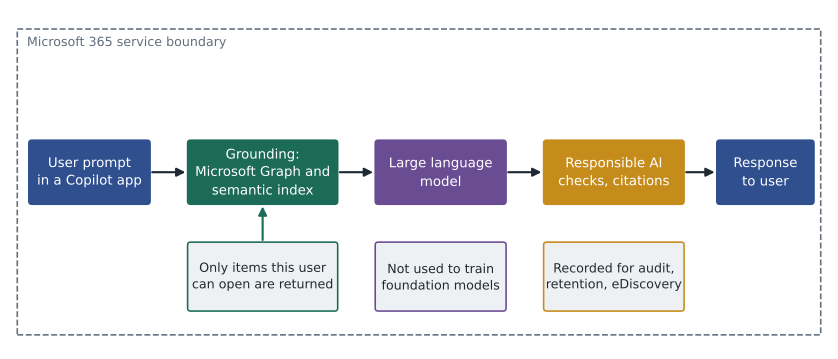
| Step | What happens | Governance point |
|---|---|---|
| 1. Prompt | The user types or speaks a request in a Copilot experience | DLP for the Copilot location can block prompts containing sensitive information types |
| 2. Grounding | Copilot retrieves relevant content through Microsoft Graph and the semantic index, and optionally the web | Only items the user can access are retrieved; labeled encrypted items need the right usage rights |
| 3. Model | The prompt and grounding data are sent to a large language model hosted in Microsoft's service | Prompts, responses and grounding data are not used to train the foundation models |
| 4. Post-processing | Responsible AI checks, citation building and further Graph calls run on the draft | Harmful content filtering and protected material detection run here |
| 5. Response | The answer returns with links to its sources | Interactions are recorded for audit and can be retained and discovered |
The order matters. Because grounding happens with the user's identity, the model never receives a file the user could not open. That is why Microsoft can say that Copilot respects existing permissions, and also why oversharing is the main risk: the model will happily use anything the user can reach.
Security trimming in practice
Security trimming means search results are filtered by the permissions of the person searching. Teodor showed it to Ines with three test accounts. Each asked the same question, "Summarize our weekend staffing costs", and each got a different answer.
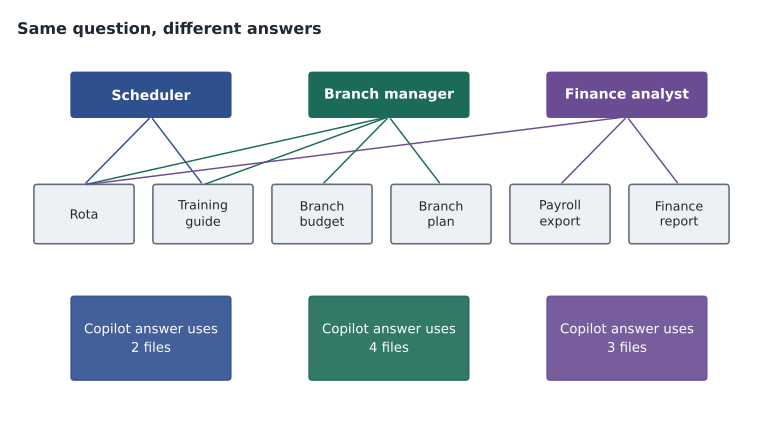
The scheduler's answer came only from the public rota and a training guide. The branch manager's answer also used the branch budget workbook. The finance analyst's answer drew on the payroll export. The model was the same; the permissions were different. Ines found this reassuring and alarming at once. Reassuring, because the system was doing what it promised. Alarming, because the scheduler test account, before Teodor fixed a sharing link, had also seen the payroll export.
Worked problem
Predicting what Copilot can use
A client intake form is stored in a SharePoint library. The library inherits permissions from a site whose members are the Intake team. One intake worker also created a "People in Corvallin with the link" sharing link for the form and pasted it in a branch Teams chat. A scheduler in that chat clicked the link last month. Can the scheduler's Copilot use the form in an answer?
Show solution
- Copilot can use the form only if the scheduler has access to it.
- The Intake team membership does not include the scheduler, so inherited permissions do not give access.
- The organization-wide link, once the scheduler used it, gave the scheduler access to that file.
- Therefore the form is within the scheduler's reach, and Copilot can ground answers in it.
Answer: Yes. The sharing link gave the scheduler access, so the form is available to the scheduler's Copilot. Removing or narrowing the link is the fix.
Sensitivity labels and usage rights
Permissions are not the only gate. When a sensitivity label applies encryption, the label defines usage rights, such as view, edit, copy and print, for each user or group. Microsoft documents that for Copilot to return content from an encrypted item, the user needs both the VIEW and EXTRACT usage rights. EXTRACT is the right that allows content to be copied out of the item. A label that lets a group read a document but not copy from it therefore also stops Copilot from quoting it for that group.
Labels also travel with new content. When Copilot in Word, PowerPoint or Outlook creates something from a labeled source, the new item inherits the label and its protection. If several labeled sources are used, the label with the highest priority wins. A user can change or remove an inherited label unless the organization makes labeling mandatory, which is one reason Teodor planned mandatory labels for clinical sites in lesson 3.
Agents use the same rules
Agents are specialized assistants built on Copilot, such as an agent attached to a SharePoint site that answers questions about the documents in it, or an agent made in Copilot Studio that follows a business process. For data governance the rule is the same: an agent answering a user retrieves content with that user's permissions, unless it has been deliberately built to use its own credentials for a specific connector. Agents add governance questions of their own, such as who may create and share them, which the administration courses in this program cover. For this lesson, Teodor wrote one line in his notes: "An agent is a shortcut to content. Fix the content first."
Web grounding and outside content
Copilot can also search the web to answer questions about public information. When web grounding is used, Copilot generates search queries from the prompt and sends those queries, not the user's files, to the Bing search service. Administrators can control whether web search is available to users through Copilot settings and policies, and DLP for the Copilot location can block web searches for prompts that contain sensitive information. For a health-care organization, Teodor recommended keeping web search on for general questions, such as drug-interaction leaflets or provincial guidance, but adding DLP rules so that a prompt containing a client identifier never generates a web query.
What administrators can and cannot see
Administrators sometimes assume they can read everyone's Copilot conversations from an admin center. They cannot simply browse them. Prompts and responses are stored in the user's Exchange mailbox in a hidden location, recorded in the audit log as Copilot interaction events, and made available to properly authorized people through Purview tools such as eDiscovery and communication compliance. Access to those tools is controlled by Purview roles, and searches are themselves audited. Lesson 10 shows how this works. Teodor liked this design because it let him tell staff honestly that IT could not casually read their prompts, while compliance staff could investigate when there was a legitimate reason.
Copilot in each app
Copilot looks slightly different in each Microsoft 365 app, and each uses work data in its own way. Knowing which data an app can reach helps an administrator predict where oversharing will show up first.
| App | Typical request | Data it usually draws on |
|---|---|---|
| Microsoft 365 Copilot app (chat) | Summarize what happened with the Branch 2 staffing issue this week | Emails, chats, meetings and files the user can access across Microsoft 365 |
| Outlook | Summarize this thread and draft a reply | The open thread and related messages in the user's mailbox |
| Teams | What did we decide in this meeting? | Meeting transcript and chat, if the user attended or has access |
| Word | Draft a care-team update from this plan | The open document and files the user references or can find |
| Excel | Which branch had the most missed visits? | The open workbook |
| PowerPoint | Create slides from this report | The referenced document |
Enterprise-wide chat is where oversharing is most visible, because it searches across everything. Teodor therefore planned his test questions for the chat experience: if a test account could not find payroll there, it was unlikely to find it anywhere else.
Testing what Copilot can reach
Teodor did not need a Copilot license to estimate the exposure. Because Copilot uses the same permissions as Microsoft Search, a test account with a scheduler's group memberships could search for sensitive terms such as "payroll", "diagnosis" or a known client number and see what came back. He kept a short list of test searches, ran them before and after each cleanup step, and recorded the results. After the pilot started, he repeated the same questions in Copilot to confirm the results matched. Simple, repeatable tests like these turn an abstract risk into evidence that managers understand.
One more point surprised Ines. Because Copilot works through each person's own permissions, there is no single "Copilot account" to lock down. Every change that tightens a user's access, such as removing them from a broad group, tightens their Copilot too, immediately and automatically.
Common mistakes
MistakeSaying Copilot "has access to everything in the tenant".
InsteadCopilot retrieves content with the signed-in user's identity, so each user's answers are limited to what that user can open.
MistakeThinking the semantic index is a separate copy of data that ignores permissions.
InsteadThe semantic index respects the same access controls as Microsoft Search.
MistakeAdding a Copilot connector to an external system without reviewing its permissions.
InsteadConnectors carry the source system's access lists, so problems in the source become problems in Copilot.
MistakeAssuming an encrypted label that allows viewing is enough for Copilot to use the content.
InsteadCopilot needs both VIEW and EXTRACT usage rights to return content from an encrypted item.
Summary and key terms
- Microsoft 365 Copilot grounds answers in work content through Microsoft Graph; Copilot Chat grounds in the web and user-supplied content by default.
- Microsoft Graph and the semantic index enforce Microsoft 365 permissions, so results are security trimmed for each user.
- Grounding happens before the model sees anything, and prompts, responses and grounding data are not used to train foundation models.
- Encrypted labeled content needs VIEW and EXTRACT rights for Copilot to use it, and generated content inherits the highest-priority source label.
- Agents and connectors follow the same permission rules, so fixing access is the foundation of AI governance.
- Microsoft Graph
- The gateway to Microsoft 365 data and the relationships between users, content and activity, which enforces permissions on every request.
- Semantic index
- An index over Microsoft Graph content that represents meaning as well as keywords and respects existing permissions.
- Grounding
- Retrieving relevant content to include with a prompt so that the model's answer is based on real data.
- Security trimming
- Filtering search and Copilot results so each person only sees items they have permission to access.
- Copilot connector
- A connector, formerly called a Microsoft Graph connector, that indexes content from an outside system with its access controls.
- EXTRACT usage right
- A sensitivity label usage right that allows content to be copied from a protected item; Copilot needs it with VIEW.
Practice problems
Work each problem on paper first, then reveal the answer to check.
Two users ask Copilot the same question and get different answers. Give the most likely reason.
Show answer
Security trimming: each answer is grounded only in content that user can access.
Which two usage rights does Copilot need to use content from an encrypted, labeled document?
Show answer
VIEW and EXTRACT.
What is sent to Bing when Copilot uses web grounding?
Show answer
Search queries generated from the prompt, not the user's files.
Lesson quiz · 5 questions
Score 60% or more to complete this lesson.
Create a free account to save your progress, take quizzes and earn a certificate.