
MSBA-102 · Lesson 6 of 12 · 20 min
Insider risk management
▶ Video coming soon A video version of this lesson is on the way.
Most data loss is accidental, like the coordinator's spreadsheet in lesson 4. Some is not. In 2025, before Teodor joined Corvallin, a scheduler who was leaving for a competing agency had downloaded the client list for her branch the week she resigned. The agency only found out when families mentioned calls from the competitor. Ines wanted to know whether Microsoft 365 could notice that kind of behavior without turning IT into a surveillance department. The tool designed for that balance is Microsoft Purview Insider Risk Management.
What insider risk management does
Insider risk management looks for patterns of activity that suggest a person inside the organization may be putting data at risk, whether through theft, careless leaks or policy violations. It does not read every message or watch screens. It collects specific indicators, such as downloading many files, copying files to a USB drive, uploading to personal cloud storage, deleting files in bulk or sharing sensitive content with personal email, and combines them with context such as a resignation date. When a combination crosses a threshold, it raises an alert for trained staff to review.
Insider risk management is designed with privacy controls. By default, user names in alerts and cases are pseudonymized, so analysts see an anonymous identifier until someone with the right permission chooses to reveal it. Access is controlled by specific Purview role groups, such as insider risk management analysts and investigators, and actions are audited. These protections matter in a workplace with unions, professional colleges and employment law, and Ines insisted that the human resources director and a union representative be briefed before any policy went live.
Policy templates
Policies start from templates, each built around a scenario. Microsoft adds templates over time, and the names below are among those documented for Microsoft Purview.
| Template | Scenario | Typical trigger |
|---|---|---|
| Data theft by departing users | People taking data before they leave | A resignation or termination date from the HR connector |
| Data leaks | Accidental or intentional oversharing of sensitive content | A high-severity DLP alert or other leak activity |
| Data leaks by risky users | Leaks by people already flagged as higher risk | A user added through an HR or other risk signal |
| Security policy violations | Installing unwanted software or evading security controls | Microsoft Defender for Endpoint alerts |
| Patient data misuse | Health-care staff viewing records they have no reason to see | Access signals from an electronic health record connector |
| Risky browser usage | Visiting potentially harmful or inappropriate websites | Browser activity on onboarded devices |
| Risky AI usage | Risky prompts and responses in AI apps, such as prompt injection or access to protected material | Signals from Copilot and other AI apps |
For Corvallin, three templates mattered most: data theft by departing users, using an HR connector that imported resignation dates from the payroll system; patient data misuse, which needed a connector to the client records system and would wait for a later phase; and Risky AI usage, which looks for risky activity in Copilot and other generative AI apps and feeds its signals into Microsoft Defender XDR as well. The Risky AI usage template answered a question Marguerite had raised: what if someone tries to trick Copilot into revealing information, or uses it to collect material they should not?
From signal to alert
Each policy defines who is in scope, which indicators count, and what triggering event starts scoring for a user. For a departing-users policy, the triggering event is the resignation date; activity before and after that date is scored. Indicators are weighted, and thresholds can use Microsoft's recommended defaults or be tuned. A user who downloads twenty files the day after resigning scores higher than one who downloads twenty files in an ordinary week. Sequences, such as downloading files, renaming them, compressing them and then copying them to a USB drive, raise scores further because they show intent.
Worked problem
Reading a departing-user alert
An alert shows that user ANON-4471, who resigned on November 2, downloaded 380 files from a branch site on November 4, compressed them into an archive, and uploaded the archive to a personal cloud storage site from an onboarded laptop. What should the analyst do first?
Show solution
- Confirm the facts in the alert's activity timeline: dates, volumes and which files were involved.
- Check the files' labels and sensitivity: are they client lists, or ordinary training documents?
- If the content is sensitive, confirm the alert and open a case so an investigator can review it with the right permissions.
- Follow the agreed process with HR and privacy, which may include revealing the user's identity, contacting the person and escalating to eDiscovery.
Answer: Verify and assess sensitivity first; if the activity involves client data, confirm the alert and open a case under the agreed HR and privacy process.
The workflow: alerts, triage and cases
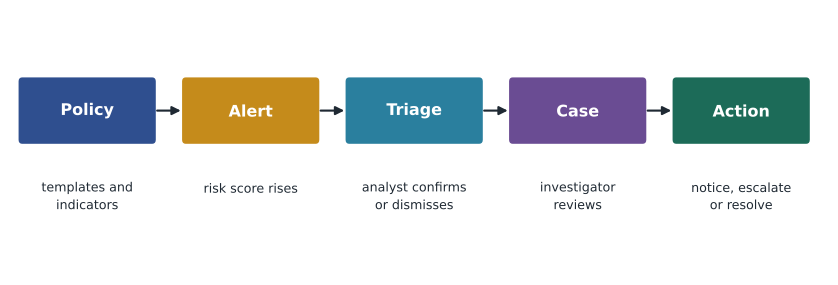
Alerts appear in the insider risk management solution in the Purview portal, sorted by severity. An analyst triages each one: is this normal work, a false positive or a real concern? Confirmed alerts become cases, where an investigator reviews the user activity explorer, the content involved and related alerts. Possible outcomes include sending the user a notice using a template, for example a reminder of the acceptable use policy; escalating the case to eDiscovery (Premium) for a legal investigation; sharing it with Microsoft Defender XDR or a ticketing system; or resolving it as benign. Every step is recorded.
Teodor drew up the roles with Ines. The privacy officer and one HR advisor would be analysts. Only the privacy officer and Ines could be investigators with permission to reveal identities. IT administrators would configure policies but would not see case content. Separating configuration from investigation is one of the most important design decisions in insider risk, because it prevents the people who run the system from quietly investigating colleagues.
Adaptive Protection
Insider risk scores can also drive other controls automatically through Adaptive Protection. Each user in scope receives an insider risk level, such as minor, moderate or elevated. DLP, Conditional Access and data lifecycle policies can then be written for those levels. A DLP policy might only show tips to most users but block sharing of sensitive files outside the organization for users whose risk level is elevated. When the risk level drops, the stricter controls stop applying.
Adaptive Protection is attractive because it reacts in minutes, faster than any human review. It also needs careful explanation to staff, because people may find their actions blocked without understanding why. Corvallin decided to use it only for the departing-users scenario at first.
Communication compliance
Insider risk management focuses on activity with data. Microsoft Purview Communication Compliance focuses on the content of messages. It scans communications in channels such as Exchange email, Teams chats and channels, Viva Engage and Copilot interactions for policy violations: harassment, threats, discrimination, sharing sensitive information, regulatory concerns or attempts to get inappropriate content from AI. Policies use trainable classifiers, sensitive information types and keyword lists, and matches go to designated reviewers.
| Insider risk management | Communication compliance | |
|---|---|---|
| Focus | Patterns of activity with data | Content of messages and AI interactions |
| Typical signals | Downloads, copies, uploads, deletions, risky AI use | Harassing language, sensitive information, inappropriate prompts |
| Output | Alerts and cases with a risk score | Policy matches for reviewers |
| Reviewer actions | Sending notices, escalation to eDiscovery, resolution | Resolve, notify the user, tag, escalate, remove a Teams message |
| Privacy controls | Pseudonymized users by default, role-based access | Pseudonymized users by default, role-based access |
Communication compliance and Copilot meet in a specific way. Microsoft documents that policies can detect violations in Copilot prompts and responses, and DSPM for AI offers a ready-made policy for unethical behavior in Copilot that is reviewed in communication compliance. Marguerite asked whether this meant someone would read staff prompts. Teodor's honest answer was that a small group of trained reviewers would see only the prompts that matched a policy, with names hidden until there was a reason to reveal them. That is very different from browsing everyone's conversations, and Corvallin wrote the difference into its acceptable use policy.
Preparing people as well as policies
Microsoft's planning guidance for insider risk stresses stakeholders: legal, HR, privacy, security and, where they exist, employee representatives. Corvallin's plan had four commitments: tell staff that insider risk management exists and what it looks for; use pseudonymization by default; limit investigators to two named people; and review every policy's alerts monthly to remove noise. Teodor also turned on the analytics feature first, which scans the tenant for potential insider risks without creating alerts, so the committee could see what the policies would find before switching them on.
Settings that shape every policy
Insider risk management has global settings that apply across policies. The most important are privacy settings, which control pseudonymization; policy indicators, which decide which activity types can be scored at all; intelligent detections, which let administrators exclude file types or domains that create noise; and the analytics option, which scans for potential risk without creating alerts. Teodor turned on only the indicators that Corvallin's policies needed, on the principle that the system should collect as little as it can to do its job.
The HR connector
The departing-users template needs to know when someone resigns. Insider risk management gets that information from a data connector, usually an HR connector that imports a regular file with each employee's account and resignation or termination date. The connector can also import other HR signals, such as performance improvement plans, for other templates. Corvallin's payroll system exported a nightly file, and Teodor set up the HR connector with the HR director's approval, limiting the fields to account and dates.
Reviewing a communication compliance match
Worked problem
Handling a match
A communication compliance policy for inappropriate content flags a Teams message in which a branch coordinator calls a colleague an insulting name. The user name is pseudonymized. What can the reviewer do?
Show solution
- Read the message in context, including the surrounding conversation, which the reviewer can see in the match.
- Decide whether it is a policy violation or a false positive, such as a quotation or a joke between friends.
- If it is a violation, choose an action: notify the user with a template message, tag the item, escalate to HR or an investigation, or remove the message from Teams.
- Resolve the item, which records the decision and its reason.
Answer: Review in context, decide, then notify, tag, escalate or remove as the policy requires, and resolve with a recorded reason.
Sending notices and escalating
Many insider risk cases end with a notice rather than a sanction. A notice template sends a short, factual email, for example reminding staff that client lists must not be copied to personal storage. Each notice is logged in the case, so a pattern becomes visible if the same person receives several. Serious cases can be escalated to eDiscovery (Premium) for a legal review, which preserves the evidence properly. Corvallin's policy said that no case could lead to discipline without HR and the privacy officer agreeing, which reassured staff representatives that the tool supported fair processes rather than replacing them.
Licensing and scope
Insider risk management and communication compliance need advanced compliance licensing, such as Microsoft 365 E5, E5 Compliance or the specific add-ons, for the users they cover. Corvallin's E5 Compliance add-on covered only 12 people, so its first insider risk policies were scoped to that group plus a pilot of head office staff who received additional licenses. Scoping a policy to licensed users is not a technicality; it is a requirement, and Microsoft's documentation lists the license for each solution. Teodor kept a simple table of who was covered by which control so that nobody assumed protection that did not exist.
Ines summarized the approach for the leadership team in one line: insider risk management is a smoke detector, not a camera. It tells trained people where to look, and people still decide what happened and what to do.
Common mistakes
MistakeDescribing insider risk management as reading everyone's email.
InsteadIt scores specific activity indicators and shows pseudonymized alerts to authorized reviewers.
MistakeLetting the administrators who configure policies also investigate cases.
InsteadSeparate configuration roles from analyst and investigator roles.
MistakeUsing a departing-users policy without an HR connector.
InsteadThe template needs resignation or termination dates as its triggering event.
MistakeConfusing insider risk management with communication compliance.
InsteadInsider risk looks at activity patterns; communication compliance looks at message and prompt content.
Summary and key terms
- Insider risk management scores activity indicators and context to find people who may be putting data at risk.
- Templates include data theft by departing users, data leaks, patient data misuse and Risky AI usage.
- Alerts are triaged by analysts and confirmed alerts become cases for investigators, with pseudonymized names by default.
- Adaptive Protection lets DLP and other controls tighten automatically for users with higher insider risk levels.
- Communication compliance reviews message and Copilot interaction content for policy violations.
- Insider risk management
- A Purview solution that detects risky user activity with data and manages alerts and cases.
- Indicator
- A type of activity, such as downloading or copying files, that insider risk policies score.
- Triggering event
- The event, such as a resignation date or a DLP alert, that starts risk scoring for a user.
- Pseudonymization
- Showing an anonymous identifier instead of a user's name until an authorized person reveals it.
- Adaptive Protection
- A feature that assigns insider risk levels and applies matching DLP and other policies automatically.
- Communication compliance
- A Purview solution that detects policy violations in messages and AI interactions for review.
Practice problems
Work each problem on paper first, then reveal the answer to check.
Which insider risk template would use a resignation date as its triggering event?
Show answer
Data theft by departing users.
What does pseudonymization hide in insider risk alerts?
Show answer
The user's name, until an authorized person chooses to reveal it.
Which solution would detect a harassing message sent in a Teams chat?
Show answer
Communication compliance.
Lesson quiz · 5 questions
Score 60% or more to complete this lesson.
Create a free account to save your progress, take quizzes and earn a certificate.