
MSBA-102 · Lesson 7 of 12 · 18 min
Data Security Posture Management for AI
▶ Video coming soon A video version of this lesson is on the way.
By November, Teodor had permissions reports, labels, DLP and retention plans spread across half a dozen Purview pages. Ines asked for one place where she could see whether AI use at Corvallin was safe. Microsoft built Data Security Posture Management for AI, which the exam calls DSPM for AI, for exactly that request.
What DSPM for AI is
DSPM for AI is a hub in the Microsoft Purview portal for securing data used with AI apps and monitoring how people use them. It gathers signals from other Purview solutions, recommends policies, offers ready-to-use policies that can be created with one click, reports on AI activity and runs data risk assessments that look for oversharing. It does not replace DLP, labels or insider risk management. It shows where they are needed and helps create them.
Microsoft has been reorganizing this area. As of late 2026, Microsoft's documentation describes the original experience as DSPM for AI (classic), found under Solutions in the Purview portal, and says it has been replaced by a broader Data Security Posture Management experience that covers AI apps and agents alongside other data security objectives. New improvements go to the newer experience. The AB-900 skills outline still refers to DSPM for AI, and the concepts are the same in both: discover AI use, assess risk, apply policies and monitor. Administrators should expect the exact page names to keep changing and should work from the current documentation.
Prerequisites and permissions
Three prerequisites unlock most of DSPM for AI. Microsoft Purview Audit must be on; it is on by default for new tenants, and AI interactions are reported from audit events. To see activity on third-party AI websites, devices must be onboarded to Microsoft Purview, and the Microsoft Purview browser extension must be installed in supported browsers. Without the last two, DSPM for AI still reports on Microsoft Copilot experiences but has no view of consumer AI sites. Administrators need suitable Purview permissions, such as the Compliance Administrator role, and when administrative units are used, creating one-click policies for everyone needs an unrestricted administrator.
The pages
| Page | What it shows or does |
|---|---|
| Overview | A summary of AI activity, sensitive data in prompts and the status of recommended actions |
| Recommendations | Suggested steps, such as turning on a one-click policy or running an assessment, with guidance |
| Reports | Charts of AI interactions, sensitive information in prompts and responses, and users by risk |
| Policies | The policies created from DSPM for AI, which live in DLP, insider risk and communication compliance |
| Apps and agents | The AI apps and agents in use and their activity |
| Activity explorer | Individual AI interaction events, such as prompts containing sensitive information |
| Data risk assessments | Oversharing assessments for SharePoint sites and other data sources |
One-click policies
Many recommendations come with a one-click policy that DSPM for AI creates in the right Purview solution with sensible defaults. Microsoft's documentation names examples such as a policy to extend insights for data discovery, which collects information about visits to third-party generative AI sites and sensitive information sent to them, and a communication compliance policy that detects unethical behavior in Copilot. Recommendations also point to insider risk policies for Risky AI usage, DLP policies to secure interactions with Microsoft Copilot experiences and enterprise AI apps, and Compliance Manager guidance for AI regulations. Policies need at least a day to collect data before reports show results.
Teodor liked one-click policies as a starting point, with a caution he wrote in his notes: "One click creates a policy; it does not decide whether the policy is right for us." Each created policy appears in its home solution, where it can be reviewed, scoped and tuned like any other. He reviewed every one with the privacy officer before leaving it on.
Which AI apps are covered
DSPM for AI reports group AI apps into three categories. Copilot experiences and agents include Microsoft 365 Copilot and Copilot Chat, Copilot Studio and agents, and other Microsoft copilots such as Security Copilot and Copilot in Fabric. Enterprise AI apps include AI apps registered in Microsoft Entra ID, Microsoft Foundry and connected services such as ChatGPT Enterprise. Other AI apps are third-party AI websites reached through a browser. The last category is where staff paste things they should not, and it is the one that needs device onboarding and the browser extension.
Two weeks after turning on the discovery policy for the head office, Teodor's report showed that 37 people had used consumer AI websites, and that 11 prompts had contained text matching the health card number sensitive information type. Nobody had been malicious; staff had been trying to rewrite visit notes more quickly. The finding changed the rollout plan: Corvallin would give those staff Copilot, which kept data inside Microsoft 365's protections, and add an endpoint DLP rule warning people who pasted client data into other AI sites.
Data risk assessments
A data risk assessment looks for content that is both sensitive and widely accessible, which is the definition of oversharing risk for AI. Microsoft documents a default assessment that runs automatically each week on the top 100 SharePoint sites by usage in the organization, with no setup needed. The first results appear after a delay of about four days. Administrators can also create custom assessments scoped to chosen users, sites or data sources. Results are kept for 30 days, and an assessment can be duplicated to run it again.
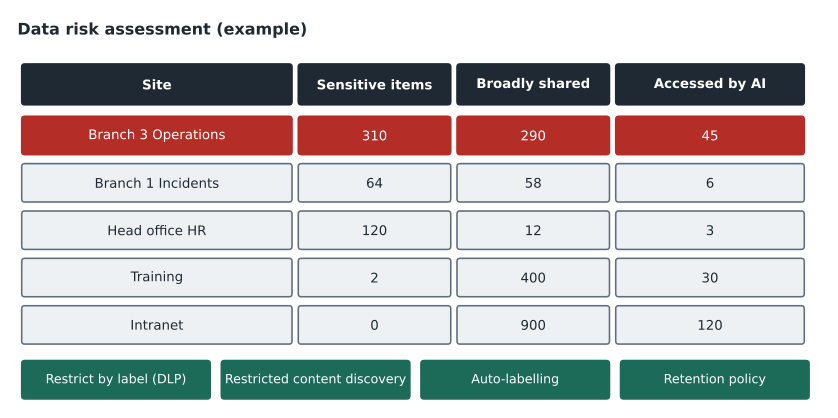
Each result shows, for each site, how many items contain sensitive information, how many are shared broadly, for example with everyone in the organization or through organization-wide links, and how many have been accessed by AI. From the result, administrators can go straight to remediation options that Microsoft lists, including restricting access by sensitivity label with DLP, turning on SharePoint restricted content discovery for a site, creating an auto-labeling policy and applying a retention policy to delete stale content.
Worked problem
Reading an assessment result
The default assessment lists the Branch 3 Operations site with 1,240 items, 310 containing health card numbers, 290 of those reachable by everyone in the organization through old links, and 45 accessed by Copilot in the last month. What should Teodor do, in order?
Show solution
- Treat the site as high risk: sensitive content and broad access overlap, and Copilot is already using it.
- Short term, turn on restricted content discovery for the site so Copilot and organization-wide search stop surfacing it while the cleanup happens.
- Remove or narrow the organization-wide links and review site membership with the branch manager (lesson 8).
- Apply the Confidential / Clinical label to the sensitive files, using auto-labeling for scale, and delete stale exports under the retention plan.
- Rerun or wait for the next weekly assessment to confirm the counts have dropped.
Answer: Contain quickly with restricted content discovery, fix the links and membership, label and clean up the content, then confirm with the next assessment.
Item-level scanning and limits
Custom assessments for Microsoft 365 can scan individual items rather than relying only on site-level signals. Microsoft documents that item-level scanning needs a registered Microsoft Entra application and has limits, such as a maximum number of sites and items per location, and that OneDrive is not supported for this scanning. These limits mean assessments are a way to prioritize, not a complete inventory. Teodor used the default assessment to choose the worst sites and data explorer to find individual files.
Monitoring AI activity over time
Once policies are in place, DSPM for AI becomes a monitoring tool. Activity explorer shows individual AI events, filtered by app, user, sensitive information type or label. Reports show trends: are fewer prompts containing sensitive data this month than last? Which agents are used most, and with which sites? Teodor set a monthly review with the privacy officer: read the overview, check the top recommendations, look at the weekly assessment and the AI reports, and agree on one or two actions. That rhythm mattered more than any single setting, because the tenant kept changing as people created sites, shared files and built agents.
| Monthly review question | Where to look |
|---|---|
| Are people still pasting sensitive data into AI apps? | Reports: sensitive information in AI interactions; activity explorer |
| Which sites are oversharing risks now? | Data risk assessments: default weekly results |
| Are our policies working or too noisy? | Policies page, then each policy's alerts in its home solution |
| What new AI apps or agents appeared? | Apps and agents |
| What should we do next? | Recommendations and the overview's action status |
Explaining it to the board
Ines presented the first DSPM for AI summary to Corvallin's board in November. She did not show charts of prompts. She showed three numbers that the board could follow from month to month: the count of sensitive items in broadly shared sites from the weekly assessment, the count of prompts that DLP had stopped because they contained client identifiers, and the number of staff who had used consumer AI sites with client data. The first two were expected to fall as cleanup and training progressed; the third was expected to fall as Copilot replaced outside tools. Turning a technical dashboard into a few governance measures was, in her view, the real value of the tool.
DSPM for AI and agents
As organizations build agents in Copilot Studio and attach agents to SharePoint sites, DSPM for AI reports on them alongside Copilot. The Apps and agents page shows which agents are in use, and activity explorer can be filtered to agent interactions. This matters because an agent connected to a site makes that site's content easier to reach. Teodor added a monthly check: for each new agent, which sites does it use, and has the default assessment flagged any of them?
AI events in activity explorer
Activity explorer in DSPM for AI shows individual events, each with a time, user, app and details. The event types Teodor used most are listed below.
| Event | What it records | Typical use |
|---|---|---|
| AI interaction | A prompt and response in a supported AI app, with sensitive information types detected | Spotting staff who paste client data |
| AI website visit | A visit to a generative AI site from an onboarded device | Measuring consumer AI use |
| Sensitive information in a prompt | Which sensitive information types appeared | Tuning DLP and training |
| DLP rule match | A DLP rule matched during AI use | Checking that Copilot DLP works |
Where DSPM for AI fits
| Question | Best tool |
|---|---|
| Is AI use at our organization safe overall? | DSPM for AI overview and reports |
| Which file has a health card number? | Data explorer |
| Who can reach this site? | Data access governance reports |
| Should this prompt have been blocked? | DLP for the Copilot location |
| Is this person a risk? | Insider risk management |
DSPM for AI is the right starting point for broad questions and the wrong tool for detailed ones. Teodor treated it as a dashboard that pointed him to the specialist tool for each follow-up.
Starting small
Teodor's first month with DSPM for AI followed a deliberate order. He confirmed audit was on, onboarded the head office laptops and deployed the browser extension through device management. He turned on the discovery policy only, waited a week, and read the reports with the privacy officer before creating any blocking policy. That order meant every later decision rested on evidence from Corvallin's own tenant rather than on guesses about how staff used AI. It also gave staff time to hear about the new controls before any of them noticed a change.
The privacy officer added one practical habit: whenever a report showed a spike in sensitive prompts, she checked whether a new form or process had been introduced that week, because most spikes had an ordinary cause that training could fix.
Common mistakes
MistakeExpecting DSPM for AI to show third-party AI website use with no extra setup.
InsteadThird-party site visibility needs onboarded devices and the Purview browser extension.
MistakeTreating one-click policies as finished configuration.
InsteadReview, scope and tune each created policy in its home solution.
MistakeReading a data risk assessment as a complete inventory.
InsteadAssessments prioritize sites; use data explorer and site reports for item detail.
MistakeChecking reports the same day a policy is created.
InsteadAllow at least a day for new policies to collect data.
Summary and key terms
- DSPM for AI is a Purview hub to discover AI use, assess oversharing, create policies and monitor AI activity.
- Prerequisites are Audit, plus onboarded devices and the browser extension for third-party AI sites.
- One-click policies are created in DLP, insider risk and communication compliance and should be reviewed there.
- The default data risk assessment runs weekly on the top 100 SharePoint sites; custom assessments can target chosen scopes.
- Microsoft now calls the original experience DSPM for AI (classic) and is moving features to a broader DSPM experience.
- DSPM for AI
- Data Security Posture Management for AI, a Purview hub for securing data used with AI apps.
- One-click policy
- A recommended policy that DSPM for AI creates with default settings in the relevant Purview solution.
- Data risk assessment
- An assessment that finds content that is both sensitive and broadly accessible.
- Default assessment
- The data risk assessment that runs weekly on the top 100 SharePoint sites by usage.
- Purview browser extension
- A browser extension that lets Purview see activity on third-party AI websites from onboarded devices.
Practice problems
Work each problem on paper first, then reveal the answer to check.
Which two prerequisites are needed for DSPM for AI to report activity on third-party AI websites?
Show answer
Devices onboarded to Purview and the Purview browser extension.
How often does the default data risk assessment run, and on what?
Show answer
Weekly, on the top 100 SharePoint sites by usage.
Name two remediation options linked from a data risk assessment.
Show answer
Any two of: restrict access by label with DLP, restricted content discovery, auto-labeling, a retention policy.
Lesson quiz · 5 questions
Score 60% or more to complete this lesson.
Create a free account to save your progress, take quizzes and earn a certificate.