
MSBA-101 · Lesson 8 of 12 · 21 min
Privileged Identity Management and least privilege
▶ Video coming soon A video version of this lesson is on the way.
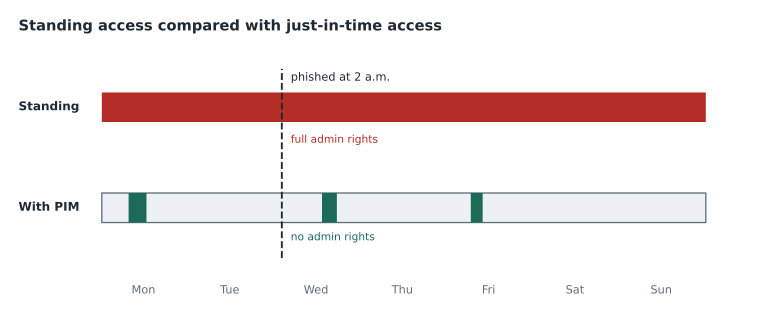
After lesson 4's clean-up, Corvallin was down to two Global Administrators and two emergency access accounts. But Teodor still held Exchange Administrator, SharePoint Administrator, Teams Administrator and User Administrator permanently, every hour of every day, on an account he also used to read admin email. "If someone phished that account at two in the morning," Ines said, "they would have everything you have, and you would be asleep." The answer to that problem has a name: least privilege, enforced with Privileged Identity Management.
The principle of least privilege
Least privilege means giving each identity only the permissions it needs, for only as long as it needs them. It has two dimensions. Scope is how much an identity can do: a Helpdesk Administrator instead of a Global Administrator, an administrative unit instead of the whole tenant, Read on a library instead of Full Control on the site. Time is how long the permission lasts: an hour while a task is done, instead of permanently. Lesson 4 dealt mostly with scope. This lesson deals with time.
Permanent, always-on administrator rights are called standing access. Standing access is convenient and dangerous. Every account with standing admin rights is a target, because one successful phish or one stolen token gives the attacker those rights immediately. Most real-world tenant takeovers involve an administrator account, and many of those accounts did not need their rights at the moment they were attacked.
What Privileged Identity Management does
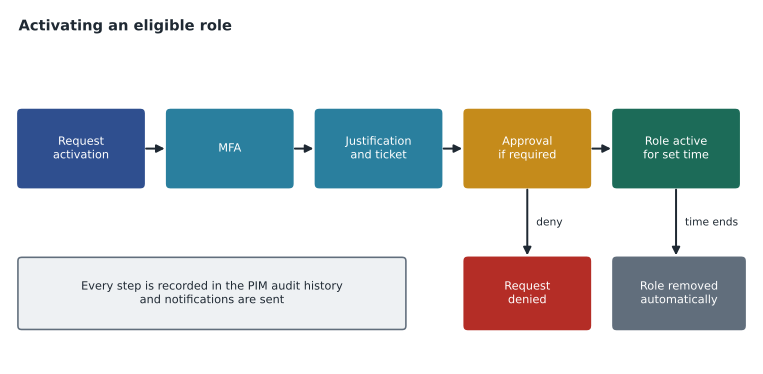
Microsoft Entra Privileged Identity Management (PIM) manages, controls and monitors access to important roles in Entra ID, Azure and other Microsoft services. Instead of assigning a role permanently, an administrator makes a person eligible for it. An eligible person has no rights until they activate the role, which they do in the Entra admin center or the My roles page, for a limited time and after meeting the activation requirements. When the time runs out, the rights disappear automatically. PIM needs Microsoft Entra ID P2 or Microsoft Entra ID Governance licenses for the people who use it.
| Assignment type | What it means | Example |
|---|---|---|
| Eligible | Can activate the role when needed, subject to requirements | Teodor is eligible for Exchange Administrator |
| Active | Holds the role now, either permanently or for a set period | An emergency access account is permanently active as Global Administrator |
| Time-bound | An eligible or active assignment with a start and end date | A contractor is eligible for Teams Administrator until the project ends |
| Permanent | An assignment with no end date | Avoid for people; acceptable only where justified, such as emergency accounts |
Each role has role settings in PIM that decide what activation requires: the maximum activation duration (for example two hours), whether MFA or a specific authentication strength is required at activation, whether the person must type a justification or a ticket number, and whether someone must approve the request. Settings also decide who is notified when a role is activated or assigned. For Global Administrator, Ines set a one-hour maximum, phishing-resistant MFA, a justification and approval by the other Global Administrator. For Exchange Administrator, Teodor could self-activate for up to four hours with MFA and a ticket number.
What else PIM provides
PIM also brings alerts, which point out risky configurations such as too many Global Administrators, roles assigned outside PIM, or roles that nobody has activated for a long time and so are probably not needed. Its audit history records every assignment, activation, approval and denial, giving auditors and incident responders a clear record of who had which rights when. Access reviews ask role holders or their managers at regular intervals whether each assignment is still needed, and can remove assignments automatically if nobody responds. And PIM for Groups applies the same just-in-time approach to membership or ownership of a security group, which is useful when a group grants access to something powerful, such as the owners of a sensitive SharePoint site.
AB-900 asks you to "identify the role of Privileged Identity Management in an organization". In one sentence: PIM turns standing administrator rights into just-in-time, approved, time-limited and audited rights, so fewer powerful accounts are exposed at any moment.
Worked problem
Designing Corvallin's role plan
Corvallin's IT team has four people. Ines needs Global Administrator occasionally. Teodor does daily Microsoft 365 administration. Ama runs the help desk. Felix manages Teams Phone and the network. Two emergency access accounts exist. Propose PIM assignments and settings.
Show solution
- Emergency access accounts: permanently active Global Administrator, excluded from Conditional Access that could lock them out, phishing-resistant credentials stored securely, sign-in alerts to Ines and Teodor.
- Ines: eligible for Global Administrator, one-hour activation, phishing-resistant MFA, justification, approval by Teodor. Permanently active as Global Reader so she can always look without changing anything.
- Teodor: eligible for Exchange, SharePoint, Teams and User Administrator, four-hour activation with MFA and a ticket number; eligible for Global Administrator with approval by Ines.
- Ama: eligible for Helpdesk Administrator and Intune Administrator, eight hours (a help desk shift) with MFA.
- Felix: eligible for Teams Administrator, four hours with MFA.
- Quarterly access reviews of all eligible assignments, and PIM alerts sent to Ines.
Answer: Only the emergency accounts and read-only roles are permanently active. Everything else is eligible, time-limited, MFA-protected and reviewed.
Separate admin accounts and protected devices
Least privilege is not only about roles. Administrators should use a separate admin account for administration, one with no mailbox, no browsing and no daily work, so that a phishing email opened in their normal account does not compromise admin rights. Ideally, admin work is done only from privileged access workstations: managed, hardened devices used for nothing else. Conditional Access can enforce this by requiring a compliant device and phishing-resistant MFA for admin roles, which is the policy that stopped Ama at the hotel in lesson 7.
Least privilege beyond Entra roles
The same thinking applies across Microsoft 365. Exchange, Microsoft Purview and Microsoft Defender have their own role groups that grant workload-specific permissions; prefer a narrow role group such as View-Only Organization Management to a full administrator role. In SharePoint, give Read rather than Edit, and Edit rather than Full Control, and use groups rather than individuals. In apps, grant the smallest permission scope an integration needs, such as reading one mailbox rather than all mailboxes. And for Copilot and agents, least privilege is what keeps an AI assistant from surfacing data a person should never have been able to reach, which is the subject of the next course.
# List eligible role assignments in PIM
Connect-MgGraph -Scopes "RoleEligibilitySchedule.Read.Directory"
Get-MgRoleManagementDirectoryRoleEligibilitySchedule -ExpandProperty "roleDefinition,principal" |
    Select-Object @{n='Role';e={$_.RoleDefinition.DisplayName}}, @{n='Who';e={$_.Principal.AdditionalProperties.displayName}}, EndDateTime
A week with PIM
The first week after PIM went live, Teodor activated Exchange Administrator three times, for a total of five hours, and SharePoint Administrator once. Ines activated Global Administrator once, to approve a new enterprise application, for twenty minutes. The PIM audit history showed every activation with its ticket number. When the auditor from Corvallin's insurer asked, in October, who could change mail flow rules, Teodor could answer precisely: nobody, until they activate a role, and here is every time anyone did.
Access reviews in practice
Roles and memberships drift. People change jobs and keep old rights; projects end and their admins stay. Access reviews, part of Microsoft Entra ID Governance and available for PIM roles with Entra ID P2, put a regular question to the right people: does this person still need this access? A review can cover members of a group or team, guests, users assigned to an application, or holders of a privileged role. Reviewers can be the users themselves, their managers, the group owners or named people, and the review can apply results automatically, removing anyone who is denied or, if configured, anyone nobody responds about.
Corvallin set up three reviews. Quarterly, Ines reviewed every eligible and active assignment of an admin role. Quarterly, team owners reviewed guests in their teams. And twice a year, managers reviewed membership of the security groups that granted access to clinical libraries. The first role review removed two eligible assignments that nobody could explain: Teams Administrator for a former help desk temp and Exchange Administrator for a consultant from the 2023 migration.
| Review | Reviewers | Frequency | If no response |
|---|---|---|---|
| Admin role assignments | IT manager | Quarterly | Remove assignment |
| Guests in teams | Team owners | Quarterly | Remove guest |
| Clinical library groups | Managers | Every six months | Keep, but flag for follow-up |
| Enterprise app assignments | App owners | Yearly | Remove assignment |
Watching privileged activity
Least privilege reduces risk; monitoring catches what slips through. Every role activation, assignment and policy change is written to the Entra audit logs, and admin activity across Exchange, SharePoint, Teams and other services is written to the unified audit log, searched with Audit in the Microsoft Purview portal. Alerts can be built on top: an email when anyone signs in with an emergency access account, when a role is assigned outside PIM, or when a Conditional Access policy is changed. Organizations with Microsoft Sentinel or another security information and event management tool send these logs there for long-term storage and correlation.
Microsoft Entra also supports protected actions, which require a particular authentication context, such as phishing-resistant MFA from a compliant device, before an administrator can perform especially sensitive operations like deleting a Conditional Access policy. Protected actions add a second gate even for someone who has already activated the right role.
Emergency access, done properly
Because emergency access accounts are exempt from many controls, they need their own rules. Microsoft's guidance includes: at least two accounts; cloud-only accounts on the onmicrosoft.com domain so they do not depend on a federated or synchronized identity; strong credentials, preferably FIDO2 security keys, with any passwords long, random and stored securely in separate physical locations; exclusion from Conditional Access policies that could lock everyone out, while still being covered by a policy that requires phishing-resistant authentication if that cannot itself cause a lockout; alerts on every sign-in; and a test of each account at least every few months to confirm it still works. Corvallin kept one key in the head office safe and one in the safe at the largest branch, and tested both every quarter.
Roles and groups together
Assigning roles to groups instead of individuals can simplify administration. Entra ID allows role-assignable groups, which must be created as such and can only be managed by privileged administrators, so that adding someone to the group is as protected as assigning the role directly. Combined with PIM for Groups, a person can be made eligible for membership of the group, and activating membership activates every role the group holds. Corvallin decided to keep things simple with direct eligible assignments for four people, but noted role-assignable groups as the option to use if the team grew.
Worked problem
Handling an urgent change at night
At 11 p.m. on a Saturday, Corvallin's monitoring partner calls Teodor: a phishing message is reaching staff mailboxes, and a mail flow rule is needed to quarantine it. Teodor is eligible for Exchange Administrator with MFA and a ticket number, up to four hours. Ines is unreachable. What does he do, and what record is left?
Show solution
- Teodor signs in to his separate admin account from his managed laptop with his security key; Conditional Access requires both.
- He opens My roles in PIM, activates Exchange Administrator for one hour, enters the partner's incident number as the ticket and a short justification. No approval is needed for this role, so activation completes in under a minute.
- He creates the mail flow rule, or better, uses the Defender portal to remove the messages and block the sender, which needs only the security roles the partner already holds.
- After an hour the role is removed automatically. The PIM audit history shows the activation with the ticket number, and the Exchange admin audit log shows the rule he created.
- On Monday he reviews the change with Ines and records it in the change log.
Answer: He activates the narrowest role for a short time, makes the change, and lets the role expire. Every step is recorded without anyone having held standing rights over the weekend.
Notice what did not happen in the example. Nobody had to keep a Global Administrator account open over the weekend just in case, and Teodor did not need a shared admin password from a safe. Just-in-time access made the urgent change both possible and accountable.
Common mistakes
MistakeMaking everyone eligible for Global Administrator to be safe.
InsteadEligibility should follow the job; choose the narrowest role and scope.
MistakeSetting very long activation durations so admins are not interrupted.
InsteadUse durations that fit a task or a shift; long durations bring back standing access.
MistakePutting emergency access accounts into PIM with approval required.
InsteadEmergency accounts must work when other admins and systems are unavailable; keep them permanently active and closely monitored.
MistakeUsing an everyday mailbox account for admin work.
InsteadUse a separate admin account, ideally from a privileged access workstation.
Summary and key terms
- Least privilege limits both the scope and the duration of access.
- Standing admin access exposes powerful rights to any attacker who compromises the account.
- PIM makes people eligible for roles and lets them activate for limited time with MFA, justification and optional approval.
- PIM provides alerts, audit history, access reviews and PIM for Groups, and needs Entra ID P2 or Entra ID Governance.
- Separate admin accounts, protected devices and narrow workload roles complete the picture.
- Least privilege
- Granting only the access needed, for only as long as it is needed.
- Standing access
- Permanent, always-active permissions.
- Eligible assignment
- A PIM assignment that lets a person activate a role when needed.
- Activation
- Turning on an eligible role for a limited time after meeting its requirements.
- Access review
- A periodic check on whether assignments or memberships are still needed.
- Privileged access workstation
- A hardened, managed device used only for administration.
Practice problems
Work each problem on paper first, then reveal the answer to check.
What is the difference between an eligible and an active assignment?
Show answer
Eligible means the person can activate the role when needed; active means they hold it now.
Name three requirements PIM can set for activation.
Show answer
Any three of: MFA or an authentication strength, justification, ticket number, approval, maximum duration.
Which license does PIM require?
Show answer
Microsoft Entra ID P2 or Microsoft Entra ID Governance.
Lesson quiz · 5 questions
Score 60% or more to complete this lesson.
Create a free account to save your progress, take quizzes and earn a certificate.