
MSBA-101 · Lesson 3 of 12 · 19 min
SharePoint, OneDrive and Microsoft Teams as one collaboration platform
▶ Video coming soon A video version of this lesson is on the way.
Dr. Marguerite Ostrander-Bey, Corvallin's clinical director, came to the third review with a printed list. It showed seven places where versions of the wound-care protocol could be found: two SharePoint sites, a Teams channel, three people's OneDrive folders and an attachment in a distribution list from 2023. "If Copilot is going to answer a nurse's question about dressings," she said, "I need to know which of these it will read." The question was the right one, and answering it needed a clear picture of how SharePoint, OneDrive and Teams fit together.
One storage platform, three faces
SharePoint in Microsoft 365, OneDrive and Microsoft Teams look like three products, but files in all of them are stored in the same place. SharePoint stores files in sites and libraries for groups of people. OneDrive is a personal SharePoint library for each user. Teams stores channel files in SharePoint and chat files in OneDrive. Understanding that single storage layer is what lets an administrator answer Marguerite's question, and it is what Copilot relies on when it looks for content a person is allowed to see.
SharePoint: sites, libraries and folders
A site is a container with its own address, permissions, pages and content. The two main kinds are team sites, for groups who work together and usually connected to a Microsoft 365 group, and communication sites, for publishing information to a wider audience, such as an intranet home page or a policy portal. Sites can be associated with a hub site so that related sites share navigation, branding and search scope; Corvallin's branch sites could all join a Branches hub.
Inside a site, files live in document libraries. A library is a special kind of list with columns for metadata, version history, check-in and check-out, and its own settings. Each site has a default library called Documents, and more can be added. Folders inside a library group files the way people expect, but metadata columns such as Document type or Review date are often more useful for finding and governing content. SharePoint lists hold structured items such as a register of clinical equipment. AB-900 asks you to identify sites, libraries and folders as the objects you configure in the SharePoint admin center and in the sites themselves.
| Object | What it is | Corvallin example |
|---|---|---|
| Team site | A collaborative site, usually linked to a Microsoft 365 group | Clinical Practice team site |
| Communication site | A publishing site for a wide audience | Corvallin Policies portal |
| Hub site | A site that links related sites with shared navigation and search | Branches hub |
| Document library | A list of files with metadata and version history | Protocols library |
| Folder | A grouping of files inside a library | Wound care folder |
| List | Structured items with columns | Equipment register |
Site permissions
SharePoint permissions are granted through permission levels such as Full Control, Edit and Read. Every site starts with three SharePoint groups: Owners with Full Control, Members with Edit, and Visitors with Read. For a team site connected to a Microsoft 365 group, the group's owners and members are placed in the Owners and Members groups automatically, so adding someone to the team in Teams also gives them edit access to the site.
Permissions are inherited by default: a library inherits from its site, a folder from its library, a file from its folder. A site owner can break inheritance and give a library, folder or single file its own unique permissions. That is sometimes necessary, but every broken inheritance is a place where access no longer follows the site's membership, and a tenant with thousands of them becomes very hard to audit. Marguerite's list included a folder on the Clinical Practice site that had been shared individually with forty people over three years.
The AB-900 skills outline lists "identify the appropriate roles and permissions for sites" as an objective. In practice that means choosing a SharePoint group for the job (Visitors to read, Members to edit, Owners to manage) and preferring group membership over individual grants. Site owners should be a small number of named people, at least two, so that the site is not orphaned when one person leaves.
Sharing and sharing links
Permissions decide who already has access. Sharing gives access to someone else, usually by sending a link. SharePoint and OneDrive offer several kinds of link, and the defaults matter a great deal.
| Link type | Who can use it | Risk |
|---|---|---|
| Anyone | Whoever has the link, with no sign-in | Highest; links can be forwarded |
| People in your organization | Anyone signed in to the tenant who has the link | Medium; can spread widely inside the tenant |
| People with existing access | Only those who already have permission | None; used to send a reminder of where a file is |
| Specific people | Only the named people, inside or outside the tenant | Lowest; the recommended default for sensitive content |
The SharePoint admin center sets organization-level sharing: whether anyone links are allowed at all, whether guests may be invited, and which link type is offered by default. Each site can be set to the same level or a more restrictive one, never a more permissive one. OneDrive has its own setting, which can also only be as permissive as SharePoint's. Corvallin's tenant still allowed anyone links, a setting left over from a marketing campaign, and the default link type was "People in your organization". Teodor recommended turning off anyone links for every site except the public brochure site and changing the default to "Specific people", a change that lesson 12 of the next course, on preparing for Copilot, builds on.
OneDrive
OneDrive gives each licensed user a personal library, with 1 TB of storage on most business and enterprise plans and much less on frontline plans. It is the right place for drafts and personal working files, and it is where files go when someone attaches a file in a Teams chat or shares from Outlook. Files can be synced to Windows and macOS devices with the OneDrive sync app, and Known Folder Move can redirect Desktop, Documents and Pictures into OneDrive so that a lost laptop does not mean lost work.
OneDrive is not the right place for files a team depends on. When an employee leaves, their OneDrive is kept for a retention period set in the SharePoint admin center (30 days by default) and their manager can be given access, but after that it is deleted. Two of the seven copies of the wound-care protocol lived in the OneDrive of a nurse educator who had retired the previous spring; one was gone already.
Microsoft Teams
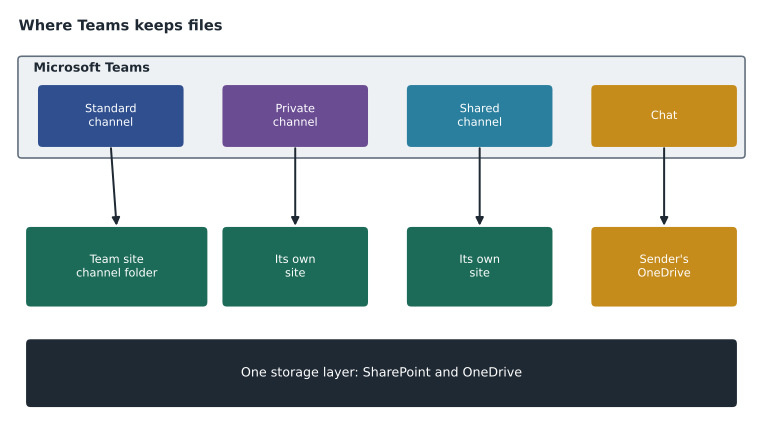
Microsoft Teams is the hub for chat, meetings, calls and channel conversations. A team is built on a Microsoft 365 group, so creating a team creates the group, its mailbox and calendar, and a SharePoint team site. Inside a team, work is organized into channels. A standard channel is open to every member of the team and its files are stored in a folder in the team's SharePoint site. A private channel is limited to some members of the team and has its own separate SharePoint site. A shared channel can include people from other teams and even other organizations without adding them to the whole team, and it too has its own site. Chats, one-to-one or group, sit outside teams; files shared in a chat are stored in the sender's OneDrive and shared with the chat members.
| Teams object | Who sees it | Where files live |
|---|---|---|
| Standard channel | All team members | A folder in the team's SharePoint site |
| Private channel | Selected team members | Its own SharePoint site |
| Shared channel | Invited people, including other teams or organizations | Its own SharePoint site |
| Chat | The people in the chat | The sender's OneDrive |
In the Teams admin center, administrators manage teams and channels across the organization, but most of the work is done through policies: meeting policies (who can record, who can bypass the lobby), messaging policies (whether people can edit or delete sent messages, use stickers or chat with outside users), app setup and permission policies (which apps are pinned and which are allowed) and many more. A policy is assigned to users, to groups or as the organization-wide default called Global. AB-900 names teams, channels and policies as the Teams objects you should be able to identify.
Worked problem
Answering Marguerite's question
A nurse asks Copilot how to dress a pressure injury. The protocol exists in the Policies communication site (Visitors: all staff), in a folder on the Clinical Practice team site shared individually with 40 people, in a private channel of the Wound Care team, and in two OneDrive folders, one shared with "People in your organization" links. Which copies could Copilot use in the nurse's answer?
Show solution
- Copilot only uses content the signed-in person can already open, so the question is really which copies this nurse can open.
- The Policies site is open to all staff as Visitors, so that copy is available.
- The Clinical Practice folder is available only if the nurse is one of the forty people.
- The private channel copy is available only if the nurse is a member of that private channel.
- A OneDrive file shared with an organization link is available only to people who have received or used the link; Copilot does not treat such links as permission for everyone until they are used, but anyone in the tenant who opens the link gains access.
- The right fix is to make the Policies site the single source, remove the stale copies and stop broad sharing, so the answer is the same for every nurse.
Answer: Whatever the nurse can already open, which today depends on who she is. Consolidating to one governed copy makes the answer predictable.
Why this matters for Copilot
Microsoft 365 Copilot reaches files, mail, chats and meetings through Microsoft Graph and honors the same permissions a person has. It does not give anyone access they did not already have. But it is extremely good at finding things, so content that was technically accessible but practically hidden, such as an old spreadsheet shared with the whole organization, suddenly appears in answers. That is why the AB-900 exam puts so much weight on permissions, sharing and oversharing, and why the next course in this program, Data Protection and Governance for Microsoft 365 and Copilot, starts with exactly that problem.
Versions, recycle bins and recovery
Because SharePoint and OneDrive keep version history for files in libraries, an overwritten or damaged document can usually be restored to an earlier version by its owner without calling IT. Libraries keep a number of major versions set by the site owner or, in current tenants, by organization-wide version limits that an administrator can configure. Deleted files go to the site's recycle bin and then a second-stage recycle bin, for 93 days in total, before they are gone. OneDrive and whole SharePoint sites can also be restored to an earlier point in time with Restore tools that roll back everything changed in a chosen period, which is the usual first answer to ransomware that has encrypted a user's synced files.
Governing the collaboration estate
Left alone, a tenant collects sites and teams the way an attic collects boxes. Corvallin had 214 teams for 450 people, many created for one meeting and never used again. Microsoft 365 offers several controls an administrator can use. Who can create Microsoft 365 groups and teams can be limited to a security group. A naming policy can add a prefix or suffix and block certain words. A group expiration policy asks owners to renew groups after a set period, such as 180 days, and deletes groups nobody renews, with a 30-day window to restore them. Guest access settings decide whether teams and sites may include people from outside the organization. And the SharePoint admin center can show inactive sites and sites with no owner.
Corvallin chose a middle path. Anyone could still create a team, because blocking creation would push people back to personal email and USB sticks, but every team would expire after a year without renewal, each needed two owners, and guests could be added only to teams whose names began with "Ext". The policies would make the tenant tidier and, as lesson 12 of the next course shows, would make a Copilot rollout much safer, because stale sites are where oversharing hides.
| Control | Where it is set | Effect |
|---|---|---|
| Group creation restriction | Microsoft Entra ID group settings | Only members of a chosen group can create teams and groups |
| Naming policy | Microsoft Entra ID groups | Consistent names, blocked words |
| Expiration policy | Microsoft Entra ID groups | Unrenewed groups are deleted after a set period |
| Guest access | Entra external collaboration, Teams and SharePoint settings | Controls who outside the organization can be added |
| Inactive site reports | SharePoint admin center | Finds sites nobody has used |
Common mistakes
MistakeKeeping a team's important files in one person's OneDrive.
InsteadStore shared work in a SharePoint site or a team so it survives people leaving.
MistakeBreaking permission inheritance whenever one file needs different access.
InsteadPrefer a separate library or site with its own membership; unique permissions are hard to audit.
MistakeAssuming a site can allow more sharing than the organization setting.
InsteadA site can only be as permissive as the organization-level setting, or more restrictive.
MistakeBelieving a private channel's files sit in the team site.
InsteadPrivate and shared channels each have their own SharePoint site.
Summary and key terms
- SharePoint, OneDrive and Teams share one storage layer in SharePoint.
- Sites contain libraries, libraries contain folders and files; permissions are inherited unless broken.
- Owners, Members and Visitors map to Full Control, Edit and Read.
- Sharing links range from Anyone to Specific people; sites can only be as permissive as the organization allows.
- Teams are built on Microsoft 365 groups; standard channel files live in the team site, private and shared channels have their own sites, chat files live in OneDrive.
- Site
- A SharePoint container with its own address, permissions and content.
- Document library
- A SharePoint list of files with metadata and version history.
- Permission inheritance
- The default flow of permissions from a site down to its libraries, folders and files.
- Sharing link
- A link that gives a defined set of people access to a file or folder.
- Private channel
- A Teams channel limited to some team members, with its own SharePoint site.
- Teams policy
- A set of settings assigned to users or groups to control Teams features.
Practice problems
Work each problem on paper first, then reveal the answer to check.
Which SharePoint group has Edit permission on a new site by default?
Show answer
Members.
Where is a file stored when it is shared in a one-to-one Teams chat?
Show answer
In the sender's OneDrive.
Can a site allow anyone links if the organization-level setting does not?
Show answer
No. A site can only be as permissive as the organization setting.
Lesson quiz · 5 questions
Score 60% or more to complete this lesson.
Create a free account to save your progress, take quizzes and earn a certificate.