
MSAZ-342 · Lesson 7 of 12 · 19 min
Notebooks for investigation
▶ Video coming soon A video version of this lesson is on the way.
KQL answers most hunting questions, but not all. Some questions need loops, statistics, outside lookups or a chart that the query language does not draw, and some need data older than the analytics tier keeps. For those, Sentinel offers notebooks: documents that mix code, results and notes, run in Python. This lesson covers the two notebook routes available to Harrow & Finch in autumn 2026, the classic Jupyter notebooks with the MSTICPy library and the newer notebooks that run against the Sentinel data lake, and shows what each is good for. The clinic session on this topic was held on Friday, November 13, the day after incident 4196 was contained, and Nadia used the incident's data for the examples, with names removed where the notebook would be shared.
Why notebooks
A notebook is a file made of cells. A code cell runs Python and shows its output underneath: a table, a chart, an error. A text cell holds notes in Markdown. Because the notes, the code and the results sit together, a notebook is also a record of the investigation, which a query history is not. Nadia's rule was that any hunt that took more than three queries, or that she expected to repeat, belonged in a notebook.
| Need | KQL alone | Notebook |
|---|---|---|
| Filter, count and join one or two tables | Best tool | Possible, but slower to write |
| Repeat the same steps for many accounts or days | Awkward | A loop over the inputs |
| Statistics or machine learning beyond series functions | Limited | Python libraries |
| Enrich results with outside lookups | Externaldata only | Call services, with credentials kept in a key vault |
| Keep a narrative of what was tried and why | Comments only | Text cells beside the code and results |
| Query months or years of lake data | KQL jobs or the lake explorer | Spark notebooks over the lake |
Jupyter notebooks and MSTICPy
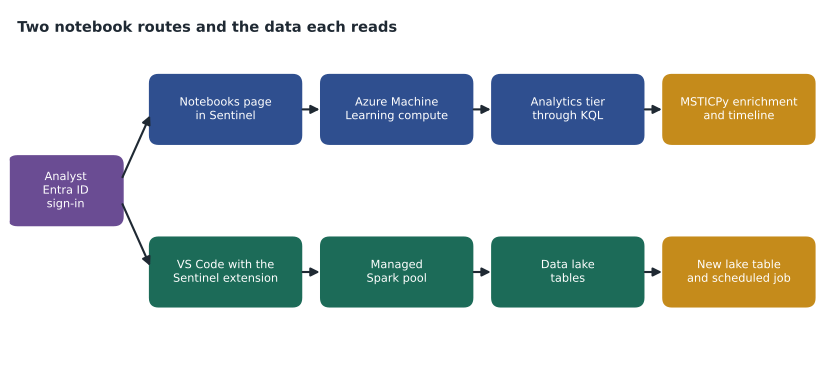
The original notebook feature in Sentinel runs Jupyter notebooks in an Azure Machine Learning workspace. The Notebooks page in Sentinel lists templates written by Microsoft and the community, and launching one copies it into the Machine Learning workspace, where it runs on a compute instance that the SOC pays for while it runs. Notebooks reach the Log Analytics workspace with the analyst's own Entra ID identity, so an analyst can query only what their role allows.
Most of these templates use MSTICPy, an open-source Python library that Microsoft's threat intelligence center built for security investigations. It provides query providers that run KQL against Log Analytics and Defender and return pandas data frames, threat intelligence lookups for addresses, domains and hashes, geolocation of addresses, decoding of encoded command lines, timeline and process tree charts, and simple anomaly detection. The library is maintained on GitHub and documented on Read the Docs; its version history shows regular releases.
// The KQL a notebook might send through a query provider for one account
SigninLogs
| where TimeGenerated between (datetime(2026-11-10) .. datetime(2026-11-13))
| where UserPrincipalName == "contractor.account@harrowfinch.example"
| project TimeGenerated, IPAddress, Location, AppDisplayName, ResultType,
          AuthenticationRequirement, SessionId
In a notebook, a query like this is run with one line of Python, and the result is a data frame with the same columns. The next cells then do what KQL cannot: look up each address against threat intelligence and the geolocation service, compute travel speed between sign-ins, and draw a timeline with the incident's alerts on it. The project statement keeps only the columns the later cells need, which keeps the data frame small.
Notebooks on the Sentinel data lake
Since the Sentinel data lake became generally available in 2025, there is a second route. Data in the lake tier, including mirrored copies of analytics tables and tables sent only to the lake, can be explored with Jupyter notebooks that run Apache Spark, using the Microsoft Sentinel extension for Visual Studio Code. The analyst signs in with Entra ID, opens or writes a notebook in VS Code, and picks a Spark pool size; Microsoft runs the compute, so no Machine Learning workspace is needed. Notebooks read lake tables into Spark data frames with a provider in the extension's library, can write results back to the lake as new tables, and can be scheduled as jobs from the same extension. Lake compute is billed separately, by the amount of processing used, so a scheduled notebook has a running cost that should be reviewed.
| Jupyter with MSTICPy | Data lake notebooks | |
|---|---|---|
| Where it runs | Azure Machine Learning compute instance | Managed Spark pools, from VS Code |
| Data it reads best | Analytics tier, through KQL | Lake tier, large volumes and long history |
| Language | Python with pandas | Python with PySpark |
| Good for | Enriching and charting a single investigation | Baselines and hunts over months of data |
| Scheduling | Through Machine Learning pipelines | Notebook jobs in the Sentinel extension |
| Cost driver | Compute instance time | Data lake compute used |
A baseline over six months
The incident made Nadia ask a question that the 90-day analytics tier could not answer: had any account other than the contractor's ever signed in from the kit's hosting ranges before October? Sunil had set SigninLogs to keep a year in the lake in lesson 5's work, so a data lake notebook could read May to November. The notebook loaded the sign-in table for the period, filtered it to the ranges from the threat intelligence watchlist, grouped by account and month, and wrote the result to a lake table called KitRangeHistory_SPRK so it could be queried again with KQL. It found no earlier sign-ins, which told the review in lesson 11 that the kit's first contact with Harrow & Finch was the October campaign.
The suffix matters. Tables a notebook writes to the lake follow a naming convention with a custom suffix, so they are easy to tell apart from the tables Sentinel creates. Ama added the table and its purpose to the SOC's data dictionary, so that nobody would mistake it for raw log data.
Impossible travel, by hand
Entra ID Protection already raises an atypical travel risk detection, and the contractor's account had one. Nadia still had Ama compute travel speed herself, because a notebook check can use the SOC's own rules: ignore sign-ins from known VPN exits, treat the head office and both distribution centers as one place, and flag anything that would need travel faster than a jet airliner. The calculation uses the haversine formula for distance on a sphere.
from math import radians, sin, cos, asin, sqrt

def km(a, b):
    lat1, lon1, lat2, lon2 = map(radians, (*a, *b))
    h = sin((lat2 - lat1) / 2) ** 2 + cos(lat1) * cos(lat2) * sin((lon2 - lon1) / 2) ** 2
    return 2 * 6371 * asin(sqrt(h))

# (time in hours from midnight Nov 12, place, latitude, longitude) - illustrative
signins = [
    (7.75, "home city", 49.90, -97.14),
    (9.10, "home city", 49.90, -97.14),
    (9.95, "abroad",    52.37,   4.90),
    (10.40, "home city", 49.90, -97.14),
]
for (t1, p1, *g1), (t2, p2, *g2) in zip(signins, signins[1:]):
    d = km(g1, g2)
    hours = t2 - t1
    speed = d / hours if hours else float("inf")
    flag = "IMPOSSIBLE" if speed > 1000 else "ok"
print(f"{p1:>9} -> {p2:<9} {d:7.0f} km in {hours*60:4.0f} min {speed:7.0f} km/h {flag}")home city -> home city 0 km in 81 min 0 km/h ok home city -> abroad 6495 km in 51 min 7642 km/h IMPOSSIBLE abroad -> home city 6495 km in 27 min 14434 km/h IMPOSSIBLE
What this code does
Four sign-ins for one account are listed with a time and a latitude and longitude. For each pair of consecutive sign-ins the program works out the distance on the Earth's surface, divides by the time between them and flags any speed above 1,000 kilometers an hour, faster than an airliner. The jump to the overseas location 51 minutes after a home sign-in, and the jump back 27 minutes later, are both flagged.
The coordinates are illustrative, not the real locations from the incident, and the speed threshold is a choice. Geolocation of an address is approximate, sometimes by hundreds of kilometers, and mobile carriers can route traffic through distant cities, so a notebook check is evidence to weigh, not a verdict. In the incident, the overseas sign-in matched the kit's hosting range from threat intelligence, which was stronger evidence than the speed.
Writing a notebook others can follow
A notebook is only a record if someone else can read it. Nadia's template for SOC notebooks has five text cells that frame the code. The first states the question and the incident or hunt number. The second lists the data used, with table names, time range and any filters, so a reader knows what was not looked at. The third, placed after each important result, says in one or two sentences what the result means. The fourth records decisions, such as an account ruled out or a lead dropped, with the reason. The last summarizes the finding and links to the incident, the bookmark or the rule it produced.
Ama found the third cell the hardest. Her first notebook for incident 4196 had twelve result tables and no interpretation, and Nadia sent it back with a single comment: a reviewer in six months will not know which of these mattered. The revised version had four tables, each followed by a sentence such as 'Only two sign-ins in three days came from outside the United States, both from the kit range.' Fewer results, each explained, made a shorter notebook that the post-incident review could use directly.
Keeping notebooks safe
Notebooks hold code, results and sometimes secrets, and that makes them a target as well as a tool. Harrow & Finch set four rules. First, no credentials in cells: API keys for enrichment services live in Azure Key Vault and are read at run time, as the MSTICPy configuration supports. Second, results with personal information stay in the workspace or the lake; notebooks shared outside the SOC are saved with outputs cleared. Third, only notebooks from Microsoft's repository or reviewed by Nadia are run, because a notebook can run any code with the analyst's permissions. Fourth, compute instances shut down automatically when idle, which is a cost rule as much as a security one.
Privacy also applies to the questions a notebook can ask. A six-month history of where staff signed in from is personal information. Carmen Ortiz, the privacy officer, agreed that the kit-range history was proportionate because it looked only for sign-ins from known malicious ranges, but asked that broader location histories need her review first, under the company's privacy policy and the Iowa Consumer Data Protection Act's purpose limits for consumer data where it applies.
Agents and natural language over the lake
Microsoft also offers a Sentinel MCP server, which lets an AI agent, such as Security Copilot or an agent in VS Code, discover lake tables and run queries through standard Model Context Protocol tools. It reached general availability in late 2025, and its tool set has grown since. For hunting, it means a hunter can ask an agent to find which tables hold sign-in data and draft a query, then read and correct the query before running it. Lesson 9 covers Security Copilot and how to check what AI produces; the same rule applies here: the hunter owns every query that runs.
Worked problem
Choosing the route
Ama has three tasks: chart the contractor's sign-ins over three days with threat intelligence enrichment; check whether any of 950 staff accounts signed in from the kit ranges in the last 12 months; and rerun the second check every week until March. Which notebook route fits each?
Show solution
- Task one is a single investigation over analytics-tier data with enrichment and a chart: a Jupyter notebook with MSTICPy, or even KQL with a timechart if enrichment is not needed.
- Task two needs a year of data, which is only in the lake: a data lake notebook in VS Code, writing results to a lake table.
- Task three is task two on a schedule: save the notebook and schedule it as a job, weekly, and record its compute cost in the cost workbook from MSAZ-341.
- In all three, keep keys in Key Vault and clear outputs before sharing.
Answer: MSTICPy for the investigation, a data lake notebook for the history, and a scheduled notebook job for the weekly rerun.
Common mistakes
MistakePaste an API key into a notebook cell.
InsteadRead secrets from Key Vault at run time.
MistakeShare a notebook with outputs that contain names and addresses.
InsteadClear outputs, or share only inside the SOC.
MistakeRun a community notebook without reading it.
InsteadReview the code first; it runs with your permissions.
MistakeTreat impossible travel as proof of compromise.
InsteadWeigh it with threat intelligence and other evidence; geolocation is approximate.
Summary and key terms
- Notebooks combine code, results and notes, which suits long or repeated hunts.
- Jupyter notebooks in Azure Machine Learning, with MSTICPy, query and enrich analytics-tier data.
- Data lake notebooks in VS Code run Spark over lake tables, write results back and can be scheduled.
- Keep secrets in Key Vault, clear outputs before sharing and review community code.
- Location histories are personal information; check purpose and proportion with the privacy officer.
- Notebook
- A document of code, text and results cells, run interactively.
- MSTICPy
- An open-source Python library for security investigations and hunting.
- Data frame
- A table of rows and columns held in memory by pandas or Spark.
- Spark pool
- A set of managed compute that runs Spark code over large data.
- Haversine formula
- A formula for the distance between two points on a sphere.
- Notebook job
- A notebook saved and run on a schedule.
Practice problems
Work each problem on paper first, then reveal the answer to check.
Where do the classic Sentinel notebooks run?
Show answer
On an Azure Machine Learning compute instance.
Which route reads a year of lake data?
Show answer
A data lake notebook running Spark from the Sentinel extension for VS Code.
Why is impossible travel only evidence?
Show answer
Address geolocation is approximate and traffic can be routed far away.
Where should API keys for enrichment live?
Show answer
In Azure Key Vault.
Lesson quiz · 5 questions
Score 60% or more to complete this lesson.
Create a free account to save your progress, take quizzes and earn a certificate.