
MSAZ-342 · Lesson 4 of 12 · 19 min
Advanced hunting in Defender XDR
▶ Video coming soon A video version of this lesson is on the way.
On Tuesday, November 3, the clinic was canceled. At 09:40 that morning Rosa Delgado's account was taken over through the same kind of phishing kit as the October wave, and automatic attack disruption contained it at 09:58. Nadia spent the afternoon on incident 4127. When the clinic met again on Thursday, November 5, she used it as the material: the incident page had shown what Defender had correlated, and advanced hunting would show what it had not. That afternoon also brought the malicious label utility on Oskar Lind's laptop at the Ames distribution center, and Ama watched a hunt answer the question every responder asks first: where else?
What advanced hunting is
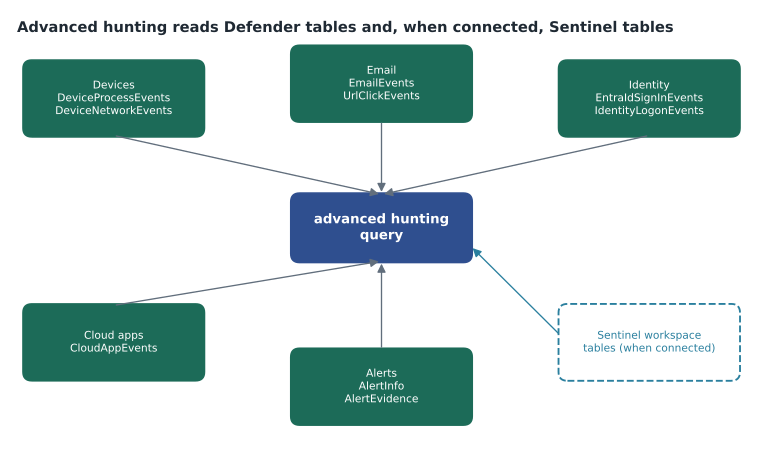
Advanced hunting is the query page in the Microsoft Defender portal. It runs KQL against Defender XDR's own tables, which hold raw events from Defender for Endpoint, Defender for Office 365, Defender for Identity and Defender for Cloud Apps, and, when a Microsoft Sentinel workspace is connected to the Defender portal, against the workspace's analytics-tier tables as well. That makes it the single place in the unified security operations platform where one query can read endpoint, email, identity, cloud app and Sentinel data together.
It has two modes. Guided mode builds queries from menus and is useful for analysts new to KQL or for a quick filter. Advanced mode is a full editor with schema browsing, IntelliSense, saved and shared queries, and charts. The SC-200 study guide asks candidates to create advanced hunting queries and to identify the appropriate table, and the exam expects advanced mode.
Limits and retention
Advanced hunting can query up to 30 days of native Defender data. Microsoft lists its manual-query limits as a result set of 100,000 rows, a timeout of ten minutes, a result size of 64 MB and a share of processing based on tenant size, with a warning when a query uses more than a tenth of it and blocking at the full share until the next fifteen-minute cycle. For longer history, Defender tables can be streamed into a Sentinel workspace and kept under that workspace's retention, which is what Harrow & Finch did for DeviceProcessEvents, DeviceNetworkEvents, DeviceLogonEvents, EmailEvents and IdentityLogonEvents in MSAZ-341. Retention on streamed data starts on the day streaming begins; it is not retroactive. Data held only in the Sentinel data lake tier is not visible in advanced hunting; it is queried through data lake exploration instead (lesson 5).
| Limit | Value |
|---|---|
| Native Defender data range | 30 days |
| Rows returned by a manual query | 100,000 |
| Query timeout | 10 minutes |
| Result size | 64 MB |
| Processing share | Based on tenant size; warning above a tenth, blocked at the full share for the rest of a 15-minute cycle |
The schema
Advanced hunting tables are grouped by the kind of entity they describe. The device tables are the largest and the ones endpoint investigations use most. Each table has a Timestamp column and a ReportId that identifies the event, and the device tables share DeviceId and DeviceName.
| Area | Tables | Example question |
|---|---|---|
| Devices | DeviceProcessEvents, DeviceNetworkEvents, DeviceFileEvents, DeviceRegistryEvents, DeviceLogonEvents, DeviceImageLoadEvents, DeviceEvents, DeviceInfo | What ran, connected, wrote or changed on this laptop? |
| EmailEvents, EmailAttachmentInfo, EmailUrlInfo, EmailPostDeliveryEvents, UrlClickEvents | Who received this message, and who clicked its link? | |
| Identity | IdentityLogonEvents, IdentityQueryEvents, IdentityDirectoryEvents, IdentityInfo, EntraIdSignInEvents, EntraIdSpnSignInEvents | Where did this account authenticate, and what did it query in Active Directory? |
| Cloud apps | CloudAppEvents | What did this user do in Exchange Online, SharePoint and other connected apps? |
| Alerts | AlertInfo, AlertEvidence | Which alerts involved this device or file? |
| Vulnerabilities | DeviceTvmSoftwareInventory, DeviceTvmSoftwareVulnerabilities and related tables | Which devices run the vulnerable version? |
Ama's first exercise was to answer the question 'where else?' for the label utility. Defender for Endpoint had raised an alert on Oskar's laptop for a file whose SHA-256 hash was known to Microsoft's threat intelligence. The alert page showed one device. The hunt asked every device.
let badHash = "4f1c0c2d9e5b7a83c6d0e1f2a3b4c5d6e7f8091a2b3c4d5e6f708192a3b4c5d6";
union DeviceProcessEvents, DeviceFileEvents
| where Timestamp > ago(30d)
| where SHA256 == badHash or InitiatingProcessSHA256 == badHash
| summarize FirstSeen = min(Timestamp), LastSeen = max(Timestamp),
            Actions = make_set(ActionType) by DeviceName
| sort by FirstSeen asc
The hash in the listing is invented. The result was two devices: Oskar's laptop and a second laptop at the same distribution center, used by a shift supervisor, on which the file had been downloaded on October 30 but never opened. No alert had fired on the second laptop because Defender's protection had quarantined the file on download, which counts as a successful prevention and produces a lower-priority event rather than an alert. The hunt turned one device into two, and the second became part of the incident's evidence.
From an incident to a hunt
Every alert in the Defender portal links to its evidence, and most alert pages offer a Go hunt option that opens advanced hunting with a query already written for the selected entity. Ama used it on the Rosa Delgado incident: from the account entity, Go hunt produced a union of the identity, email and cloud app tables filtered on her account for the incident's time window. From there she widened the question. Had anyone else signed in from the kit's hosting addresses?
let kitIPs = dynamic(["203.0.113.48", "203.0.113.52", "198.51.100.17"]);
EntraIdSignInEvents
| where Timestamp > ago(30d)
| where IPAddress in (kitIPs)
| summarize Attempts = count(), Successes = countif(ErrorCode == 0),
            First = min(Timestamp), Last = max(Timestamp) by AccountUpn
| sort by First asc
Three accounts appeared: Marek Novak on October 20 and Rosa Delgado on November 3, both known, and a third account, an external contractor's, with two failed attempts on November 4 and no successes. Failed attempts from a phishing kit's infrastructure mean the attacker has the password but has not yet got past multifactor authentication. Nadia raised the contractor's case with Sunil the same day, and lesson 5 follows what happened next.
Custom detection rules
A hunting query that finds something worth knowing every time can become a custom detection rule, which runs on a schedule, raises alerts and can take actions. The SC-200 study guide places creating and managing custom detection rules under configuring detections. Microsoft's documentation describes these frequencies.
| Frequency | Lookback for Defender XDR data | Notes |
|---|---|---|
| Continuous (near real time) | Data as it is collected | One table only; no joins, unions or comment lines; supported operators only |
| Every hour | 4 hours | Fixed lookback |
| Every 3 hours | 12 hours | Fixed lookback |
| Every 12 hours | 48 hours | Fixed lookback |
| Every 24 hours | 30 days | Fixed lookback |
| Custom | Set by the author, 5 minutes to 14 days | Only for rules that use Sentinel data alone |
A new rule runs once immediately against the past 30 days and then on its schedule. Its query must return a Timestamp or TimeGenerated column and, for Defender tables, a ReportId from the same event; device rules also need DeviceId. Projecting identifiers such as DeviceId, AccountObjectId or RecipientEmailAddress lets the rule map affected assets automatically and enables response actions. Microsoft advises not filtering on the time column in the query, because the service already limits the data to the lookback. Each rule produces at most 150 alerts per run and can carry up to 20 custom details.
The actions a rule can take depend on what it projects: isolating a device, collecting an investigation package, running an antivirus scan, starting an automated investigation or restricting app execution for devices; allowing, blocking or quarantining files; marking a user as compromised, disabling a user or resetting their authentication; and moving or deleting email. Actions apply only to Defender data. Nadia's rule for the SOC was that automatic actions belonged only on rules whose false positives had been measured, and only actions that are easy to undo.
DeviceFileEvents
| where ActionType == "FileCreated"
| where FolderPath has @"\Downloads\"
| where FileName endswith ".exe" and FileName has_any ("label", "print")
| where InitiatingProcessFileName in~ ("chrome.exe", "msedge.exe")
| project Timestamp, ReportId, DeviceId, DeviceName, FileName, SHA256,
          InitiatingProcessAccountUpn
Ama's draft rule above was meant to catch the next fake label utility. Before turning it on, she ran it over 30 days: 64 results, almost all from the help desk's legitimate printer driver downloads. She narrowed it with a leftanti join against a list of approved file hashes kept in a Sentinel watchlist, which brought the 30-day result to 3, and set it to run every 3 hours with no automatic action. The join meant it could not run in continuous mode, which allows a single table only.
Hunting graphs and Sentinel graph
The SC-200 study guide also mentions creating hunting graphs, including blast radius, and analyzing relationships between entities with Sentinel graph. These are visual views of how entities connect: which devices an account has signed in to, which accounts have rights on a server, which paths lead from a compromised identity to a valuable asset. A blast radius view answers Nadia's standing question, what can the attacker still touch, as a picture rather than a list of query results. They are newer features than KQL and change quickly, so the course treats them as views built on the same relationships the queries here find; check the current documentation for how each is opened and what it shows.
Working in the hunting page
The advanced hunting page has a few habits worth building. Queries can be saved as shared queries for the whole SOC or kept private; Harrow & Finch keeps finished hunts as shared queries in folders named by ATT&CK tactic, so a new analyst finds them where the matrix would put them. Results can be exported for evidence, but exports contain personal information and go into the incident evidence store, not a personal download folder. The schema pane shows each table's columns and a sample, and selecting a column inserts its name, which avoids typing errors in long names such as NetworkMessageId.
Time is the most common source of confusion. Timestamp in Defender tables is UTC, the portal shows results in the time zone set in the analyst's settings, and the time range picker applies only when the query does not set its own filter. Ama set her portal to UTC during investigations, so that query results, exports and the times in incident comments matched without conversion, and converted to local time only for the post-incident timeline.
Worked problem
Choosing a detection frequency
Sunil wants a custom detection for new inbox rules that forward mail outside Harrow & Finch, using CloudAppEvents, with the action of marking the user as compromised. The SOC can respond within a few hours during business hours. Which frequency should he choose, and should the action be automatic?
Show solution
- The query reads one table with simple filters, so it could run in continuous mode, which gives the fastest alert.
- An inbox forwarding rule is a strong sign of compromise but also has legitimate uses, such as a manager's assistant. Ama's 30-day test found 2 legitimate rules out of 2 results.
- Marking a user as compromised feeds the user's risk level into conditional access, which may block their sign-ins. That is disruptive if wrong.
- With a false positive rate that high, the action should be manual for now: alert, let an analyst check, then act.
- Choose continuous mode for speed, no automatic action, and review after a month of results.
Answer: Run it continuously for the fastest alert, keep the action manual until the false positives are measured, and review after a month.
Common mistakes
MistakeExpect advanced hunting to show 90 days of endpoint data.
InsteadNative Defender data covers 30 days; stream to Sentinel for longer retention.
MistakeFilter on Timestamp inside a custom detection rule.
InsteadThe service applies the lookback; filtering the time column can make the rule miss data.
MistakePut joins in a rule meant to run continuously.
InsteadContinuous rules read one table with supported operators only.
MistakeTurn on automatic isolation for a new rule.
InsteadMeasure false positives first and start with manual or easily undone actions.
Summary and key terms
- Advanced hunting runs KQL over Defender XDR tables and, when connected, Sentinel analytics-tier tables.
- Native Defender data covers 30 days; manual queries return up to 100,000 rows within 10 minutes and 64 MB.
- Tables are grouped by devices, email, identity, cloud apps, alerts and vulnerabilities.
- Go hunt turns an alert's entity into a query; widen it to ask where else.
- Custom detection rules run continuously or every 1, 3, 12 or 24 hours, with fixed lookbacks for Defender data, at most 150 alerts per run.
- Rules need Timestamp and ReportId, and identifier columns for asset mapping and actions.
- Advanced hunting
- The KQL query page in the Defender portal for Defender XDR and connected Sentinel data.
- Go hunt
- An option on alerts and entities that opens advanced hunting with a query for that entity.
- Custom detection rule
- A saved advanced hunting query that runs on a schedule and raises alerts or takes actions.
- ReportId
- An identifier for an event in Defender tables, required in custom detection results.
- Blast radius
- The set of assets an attacker could reach from a compromised entity.
Practice problems
Work each problem on paper first, then reveal the answer to check.
Why did the hunt for the label utility find a second laptop with no alert?
Show answer
Protection quarantined the file on download, which is a prevention event rather than an alert.
What lookback does a custom detection rule running every 3 hours use on Defender data?
Show answer
12 hours.
Why could Ama's label utility rule not run continuously?
Show answer
It used a join, and continuous rules allow a single table only.
What did failed sign-ins from the kit's addresses suggest about the contractor?
Show answer
The attacker probably had the password but had not passed multifactor authentication.
Lesson quiz · 5 questions
Score 60% or more to complete this lesson.
Create a free account to save your progress, take quizzes and earn a certificate.