
MSAZ-342 · Lesson 12 of 12 · 21 min
A full investigation walkthrough
▶ Video coming soon A video version of this lesson is on the way.
This lesson puts the course together by following incident 4196 from the first alert to the new detection rule, query by query. Each step says what question the analyst was answering, which query answered it, what the result showed and what decision followed. The earlier lessons explained the tools one at a time; here they are used in the order a real investigation needs them. The names, addresses and accounts are invented for the course, and the queries are written so they can be adapted to any Microsoft Sentinel workspace or Defender XDR tenant.
The setting: Thursday, November 12, 2026, at Harrow & Finch's SOC in Des Moines. Local time is six hours behind UTC. Ama Boateng is on shift, Nadia Okonjo leads the SOC and Sunil Rao is the IT security manager. All times in the narrative are local; all times in the queries are UTC.
Step 1: Read the alert
At 10:02 the analytics rule from MSAZ-341 that looks for a sign-in from a new country followed by an MFA change fired for the account of Theo Lambert, a contractor with Brightfield Merchandising. The Defender portal created incident 4196 and added an Entra ID Protection atypical travel alert for the same account. Ama's first question was simply what the rule had seen, so she opened the alert's query results rather than relying on the title.
SecurityAlert
| where TimeGenerated > datetime(2026-11-12 15:30)
| where AlertName has "new country" and Entities has "contractor.account"
| project TimeGenerated, AlertName, AlertSeverity, ProviderName,
          Entities = todynamic(Entities), ExtendedProperties = todynamic(ExtendedProperties)
| mv-expand Entities
| where Entities.Type in ("account", "ip")
| project TimeGenerated, AlertName, Type = tostring(Entities.Type),
          Value = coalesce(tostring(Entities.Name), tostring(Entities.Address))
The SecurityAlert table keeps each alert with its entities as JSON. The query converts the column to dynamic, expands one row per entity with mv-expand and keeps the account and the address. It returned the contractor's account and one address in a hosting range abroad. Decision: the alert is specific and high severity; acknowledge, set In progress, and confirm the sign-in.
Step 2: Confirm the sign-in and the change
let acct = "contractor.account@harrowfinch.example";
SigninLogs
| where TimeGenerated between (datetime(2026-11-11 12:00) .. datetime(2026-11-12 17:00))
| where UserPrincipalName =~ acct and ResultType == "0"
| project TimeGenerated, IPAddress, Location, AppDisplayName, SessionId,
          AuthenticationRequirement, ClientAppUsed, UserAgent
| sort by TimeGenerated asc
Successful sign-ins from noon UTC on November 11 showed four sessions: the usual working-day sign-ins on November 11, one at 16:20 local through an unfamiliar browser string from a hosting provider's address in the United States, the normal 07:45 sign-in on November 12, and the 09:57 sign-in from abroad. The overseas sign-in had the same SessionId as the 16:20 sign-in the day before and an authentication requirement satisfied by a token, not a fresh MFA prompt. The kit relays sign-ins through servers rented in the victim's own country, so the 16:20 sign-in did not look foreign; the stolen session was replayed later from a server abroad. That pattern, a session begun through one sign-in and reused from another country much later, is what the ATT&CK technique Steal Web Session Cookie looks like in sign-in logs.
AuditLogs
| where TimeGenerated between (datetime(2026-11-12 15:00) .. datetime(2026-11-12 17:00))
| where OperationName has_any ("security info", "authentication method")
| extend Target = tostring(TargetResources[0].userPrincipalName),
         IP = tostring(InitiatedBy.user.ipAddress)
| where Target =~ "contractor.account@harrowfinch.example"
| project TimeGenerated, OperationName, Result, IP
AuditLogs showed one operation at 09:58 local registering new security info, initiated from the overseas address. Decision: compromise confirmed. Raise to Nadia and prepare containment. Nadia called Brightfield to confirm Theo was at home and had not traveled, and he had not.
Step 3: Scope what the attacker did
Before containing, an analyst spends a few minutes on scope if it is safe to do so, because some evidence is easier to see while the attacker is active. Nadia allowed ten minutes. Ama's question was what the attacker had done with the account since 09:57.
let acct = "contractor.account@harrowfinch.example";
let t0 = datetime(2026-11-12 15:57);
let attackerIP = "198.51.100.73";
CloudAppEvents
| where Timestamp > t0
| where tostring(RawEventData.UserId) =~ acct
| summarize Count = count(), First = min(Timestamp), Last = max(Timestamp)
            by ActionType, IPAddress, Application
| extend FromAttacker = IPAddress == attackerIP
| sort by First asc
CloudAppEvents in advanced hunting combines Exchange Online, SharePoint and other app activity. Grouping by action, address and app gives a short summary rather than hundreds of rows. From the attacker's address there were 64 MailItemsAccessed events, one New-InboxRule, and two FileDownloaded events from the merchandising SharePoint site. From Theo's home address there were ordinary mail reads, which helped separate his activity from the attacker's. The address 198.51.100.73 is from a range reserved for documentation, standing in for the real one.
OfficeActivity
| where TimeGenerated > datetime(2026-11-12 15:57)
| where Operation in ("New-InboxRule", "Set-InboxRule", "UpdateInboxRules")
| where UserId =~ "contractor.account@harrowfinch.example"
| mv-expand Param = todynamic(Parameters)
| summarize Settings = make_bag(bag_pack(tostring(Param.Name), tostring(Param.Value)))
            by TimeGenerated, Operation, ClientIP
The rule's parameters arrive as an array of name and value pairs. Expanding them and packing them back into one property bag gives a readable record of the rule: it moved messages containing the word invoice to the RSS Feeds folder and marked them as read. That is the ATT&CK technique Email Hiding Rules, the same one seen in October, and it suggests the attacker was preparing to intercept supplier invoices. Decision: contain now; enough is known.
Step 4: Contain and confirm
At 10:44 Ama disabled the account and revoked its sessions. The containment query from lesson 10 confirmed eleven failed sign-in attempts from the attacker's address over the next 35 minutes and two Graph calls rejected with 401. At 11:30 Sunil added the kit's ranges to a Conditional Access block. The incident comments recorded each action with its time and reason.
Step 5: Look for other victims
One compromised account raises the question of others. Ama ran three checks: who else received the phishing message, who else signed in from the kit's address ranges, and whether any other account showed the session-reuse pattern.
let phishUrlDomain = "files-share-docs.example";
EmailUrlInfo
| where Timestamp > ago(7d) and UrlDomain == phishUrlDomain
| join kind=inner (EmailEvents | where Timestamp > ago(7d)) on NetworkMessageId
| project Timestamp, RecipientEmailAddress, Subject, DeliveryAction, DeliveryLocation
| join kind=leftouter (UrlClickEvents | where Timestamp > ago(7d)
                       | project NetworkMessageId, ClickTime = Timestamp, ActionType, AccountUpn)
    on NetworkMessageId
EmailUrlInfo lists the URLs in each message. Joining it to EmailEvents gives the recipients and delivery details; a left outer join to UrlClickEvents adds clicks where there were any, and keeps recipients who did not click. Three messages had been delivered to inboxes on November 11; one had a click, Theo's, at 16:20. The domain shown is a placeholder. Decision: remove the two unopened messages and tell those recipients.
let kitRanges = _GetWatchlist("KitHostingRanges") | project Range = tostring(SearchKey);
SigninLogs
| where TimeGenerated > ago(30d)
| where ipv4_is_in_any_range(IPAddress, toscalar(kitRanges | summarize make_list(Range)))
| summarize Attempts = count(), Successes = countif(ResultType == "0")
            by UserPrincipalName, IPAddress
The watchlist from lesson 5 holds the ranges. The query returned three accounts: Theo's, the buyer Marek Novak from the October incident, whose attempts from the October range had all failed after his reset, and the earlier contractor from lesson 5, also with only failures. Only Theo's had successes in November. The session-reuse hunting query from lesson 6, rerun for all accounts over 30 days, returned only Theo's session. Decision: no other compromised accounts found; record the checks in the incident.
Step 6: Establish what data was exposed
The breach decision in lesson 11 needed exact facts about the data. MailItemsAccessed records which messages were read, identified by internet message ID, in folders that the audit record lists. Ama used Purview eDiscovery to search for those message IDs and place the items on hold, and the two downloaded files were reviewed directly from the SharePoint site's version history.
OfficeActivity
| where TimeGenerated between (datetime(2026-11-12 15:57) .. datetime(2026-11-12 16:44))
| where Operation == "MailItemsAccessed" and ClientIP has "198.51.100.73"
| extend Folders = todynamic(Folders)
| mv-expand Folders
| mv-expand Item = Folders.FolderItems
| summarize Messages = dcount(tostring(Item.InternetMessageId)) by Folder = tostring(Folders.Path)
Each MailItemsAccessed record can cover several messages, grouped by folder. Two levels of mv-expand produce one row per message, and dcount counts distinct message IDs per folder. The answer was 64 messages, 51 from the inbox and 13 from sent items. That number went to Carmen with the list of message IDs, not the messages themselves; she reviewed the content in the eDiscovery case.
Step 7: Build the timeline
With the facts collected, Ama merged the events from the queries into one timeline. In the incident she did this by hand from the query results; the program below shows the same idea in a few lines, and checks for long gaps that might hide activity nobody looked at.
from datetime import datetime as dt
events = [
    ("2026-11-12 09:58", "AuditLogs",      "new authenticator registered"),
    ("2026-11-11 16:20", "UrlClickEvents", "phishing link opened"),
    ("2026-11-12 09:57", "SigninLogs",     "session reused from abroad"),
    ("2026-11-12 10:15", "OfficeActivity", "two files downloaded"),
    ("2026-11-12 10:06", "OfficeActivity", "inbox rule created"),
    ("2026-11-12 10:44", "AuditLogs",      "account disabled"),
    ("2026-11-11 16:18", "EmailEvents",    "phishing message delivered"),
    ("2026-11-12 10:02", "SecurityAlert",  "analytics rule fired"),
]
events.sort()
prev = None
for t, src, what in events:
    now = dt.strptime(t, "%Y-%m-%d %H:%M")
    gap = "" if prev is None else f"(+{(now - prev).total_seconds() / 60:.0f} min)"
    print(f"{t}  {src:15} {what:30} {gap}")
prev = now2026-11-11 16:18 EmailEvents phishing message delivered 2026-11-11 16:20 UrlClickEvents phishing link opened (+2 min) 2026-11-12 09:57 SigninLogs session reused from abroad (+1057 min) 2026-11-12 09:58 AuditLogs new authenticator registered (+1 min) 2026-11-12 10:02 SecurityAlert analytics rule fired (+4 min) 2026-11-12 10:06 OfficeActivity inbox rule created (+4 min) 2026-11-12 10:15 OfficeActivity two files downloaded (+9 min) 2026-11-12 10:44 AuditLogs account disabled (+29 min)
What this code does
Eight events from different log tables are listed out of order, each with a time, its source and a description. Sorting puts them in time order, and the program prints each with the minutes since the event before it. The large gap between the phishing click on the 11th and the session reuse the next morning stands out, and it is where the review looked hardest for activity that might have been missed.
The 1,057-minute gap was checked carefully. Sign-in logs, audit logs and cloud app events for the account showed nothing from the attacker in that time; the stolen session sat unused until 09:57. That supported the conclusion that the attacker acted only once, on the morning of November 12.
Step 8: Close the gap with a rule
The investigation's most useful output was the detection it produced. The session-reuse hunting query from lesson 6 became a scheduled analytics rule on November 13, after Ama tuned it on 30 days of data to exclude two VPN services that Harrow & Finch staff use when traveling, which change apparent country within a session.
let vpnRanges = _GetWatchlist("CorporateVPNEgress") | project tostring(SearchKey);
SigninLogs
| where TimeGenerated > ago(2h)
| where ResultType == "0" and isnotempty(SessionId)
| where not(ipv4_is_in_any_range(IPAddress, toscalar(vpnRanges | summarize make_list(SearchKey))))
| summarize Countries = make_set(Location, 5), IPs = make_set(IPAddress, 5),
            First = min(TimeGenerated), Last = max(TimeGenerated)
            by UserPrincipalName, SessionId
| where array_length(Countries) > 1
| extend AccountName = tostring(split(UserPrincipalName, "@")[0]),
         LatestIP = tostring(IPs[-1])
The rule runs every hour and looks back two hours, so each run overlaps the last and no sign-in falls between runs. It excludes the corporate VPN exits from a watchlist, groups successful sign-ins by user and session and alerts when one session appears in more than one country. The extend line prepares entity mapping: the account name and the most recent address, which MSAZ-341 showed how to map so alerts group into incidents correctly. It is tagged with Steal Web Session Cookie under Credential Access, which updated the coverage review. In replay against November 12 it would have alerted at 10:00. Its limitation is that an attacker who reuses a session from the same country as the user would not trigger it, which is why the review also chose phishing-resistant authentication for contractors.
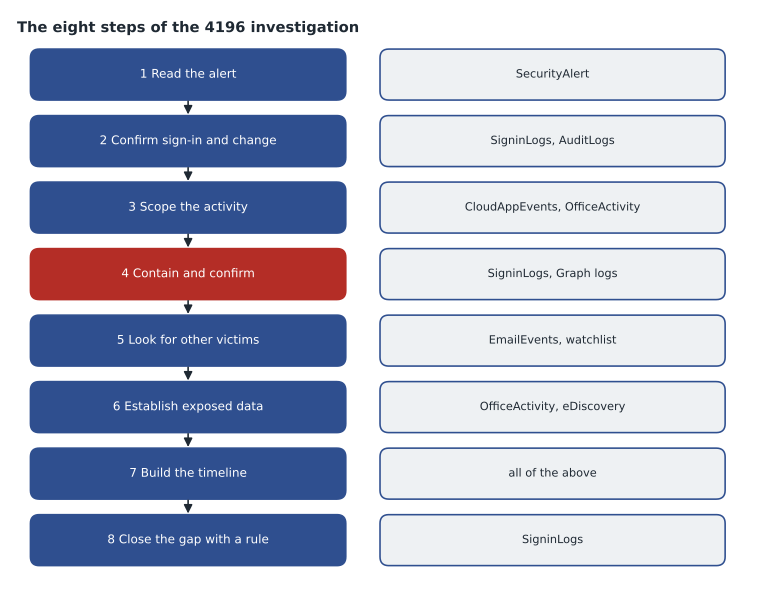
What the walkthrough shows
Three habits carried the investigation. First, each query answered one question, and each answer led to a decision recorded in the incident. Second, the analyst read the data behind every alert and every Copilot summary instead of trusting titles, which is how the session reuse and the downloads were found. Third, the investigation ended with a detection and a coverage update, so the next attacker using the same technique meets a rule instead of a hunt.
The SC-200 exam tests these skills in the same shape: given a scenario and a query, choose the step, table or operator that answers the question. MSAZ-349 reviews them against the exam outline.
Worked problem
Adapting the walkthrough
A month later, a different alert fires: a user's mailbox has a new forwarding rule to an outside address, and no MFA change. Using this lesson's steps, what are the first four queries?
Show solution
- Step 1: read the alert's entities from SecurityAlert to get the account and the forwarding target.
- Step 2: query SigninLogs for the account's successful sign-ins over the previous day, looking at addresses, countries and session IDs for reuse.
- Step 3: query OfficeActivity for the rule's parameters and CloudAppEvents for what else the account did from the same address.
- Then contain if compromise is confirmed, and run step 5's checks for other recipients and other accounts.
Answer: Alert entities, sign-ins with sessions, rule details and activity, then containment and the search for other victims.
Common mistakes
MistakeStart with a broad query of everything the account did.
InsteadStart from the alert's entities and answer one question per query.
MistakeSpend an hour on scope before containing an active attacker.
InsteadTake a short, agreed time for scope, then contain.
MistakeCount MailItemsAccessed records as messages.
InsteadExpand the folder items and count distinct message IDs.
MistakeFinish with a report only.
InsteadFinish with a tested rule and a coverage update.
Summary and key terms
- Read the alert's data first; confirm with sign-ins and audit logs.
- Scope quickly while the attacker is active, then contain and confirm in the logs.
- Look for other victims: recipients, sign-ins from the same ranges and the same pattern elsewhere.
- Establish exposed data precisely, from audit records and eDiscovery, for the breach decision.
- Turn the investigation into a detection with documented limits.
- mv-expand
- A KQL operator that turns each element of an array into its own row.
- make_bag
- An aggregation that combines property bags into one.
- MailItemsAccessed
- An audit record of mailbox items read, grouped by folder.
- Session reuse
- One sign-in session used from a different place than where it began.
- Lookback
- The time window an analytics rule queries on each run.
- Placeholder value
- A stand-in value, such as a documentation address range, used in examples.
Practice problems
Work each problem on paper first, then reveal the answer to check.
Which table showed the session reuse?
Show answer
SigninLogs, through the shared SessionId.
Why did Ama count distinct message IDs?
Show answer
One MailItemsAccessed record can cover several messages.
What limitation does the session-reuse rule have?
Show answer
It misses reuse from the same country as the user.
Why does the rule's lookback exceed its frequency?
Show answer
So no sign-in falls between runs.
Lesson quiz · 5 questions
Score 60% or more to complete this lesson.
Create a free account to save your progress, take quizzes and earn a certificate.