
MSAZ-342 · Lesson 10 of 12 · 19 min
Containment, eradication and recovery
▶ Video coming soon A video version of this lesson is on the way.
Detection and investigation tell a SOC what happened. Containment stops it getting worse, eradication removes what the attacker left behind, and recovery returns the affected people and systems to normal use with confidence that the attacker cannot simply come back. This lesson follows those three stages through incident 4196 on November 12 and 13, and explains the Microsoft actions behind each one, how to confirm each worked, and the trade-offs that make the order of actions matter.
Where these stages come from
Most incident response plans, including Harrow & Finch's, follow the lifecycle in the US National Institute of Standards and Technology's incident handling guide, SP 800-61. Revision 3, published in April 2025, reorganized the guidance around the six functions of the NIST Cybersecurity Framework 2.0: govern, identify, protect, detect, respond and recover. The older four-phase model of preparation; detection and analysis; containment, eradication and recovery; and post-incident activity still appears in many plans and in exam questions, and its middle phase maps to the Respond and Recover functions. The Canadian Center for Cyber Security publishes incident response guidance for organizations along the same lines. The vocabulary in this lesson works with either model.
| Stage | Goal | Typical actions for a compromised cloud account |
|---|---|---|
| Containment | Stop the attacker acting now | Disable the account, revoke sessions, block the source, preserve evidence |
| Eradication | Remove what the attacker added or changed | Remove authentication methods, inbox rules, forwarding, consents, delegations, registered devices; purge phishing mail |
| Recovery | Return to normal use safely | Verify identity, issue new credentials, re-enable with stronger controls, monitor closely |
| After | Learn and improve | Post-incident review, new detections, policy changes (lesson 11) |
Containment: short-term and long-term
Containment has two parts. Short-term containment acts within minutes and is allowed to be blunt: disable the account, isolate the device. Long-term containment keeps the attacker out while the investigation continues, often with narrower controls that let the business keep working: block the attacker's address ranges with Conditional Access, require a compliant device for the affected app, or move an account to a policy that requires phishing-resistant authentication.
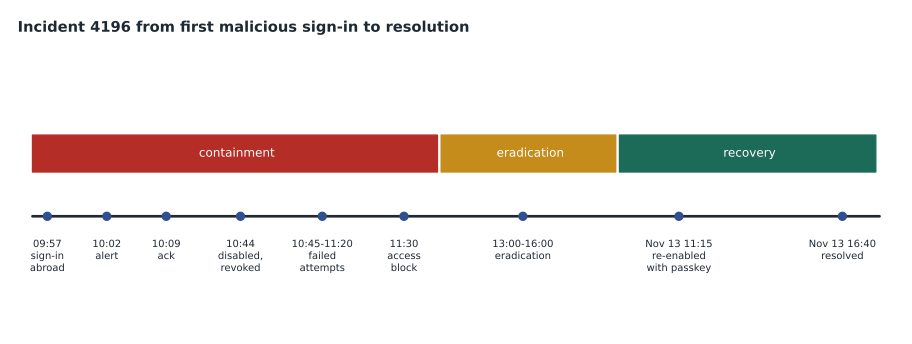
For 4196 the short-term step was clear: disable Theo's account and revoke his sessions. The account was cloud-only, so disabling it in Entra ID was enough; for a synchronized account, the Defender for Identity disable-user action disables it in on-premises Active Directory too, which matters because a disabled cloud account can be re-enabled by the next sync. Nadia confirmed with Brightfield by phone at 10:40 that disabling the account would not stop work that afternoon, and Ama took the action at 10:44.
Who decides, and how fast
Containment always costs something. Disabling a store manager's account stops the store's schedule from being published; isolating a till PC stops a lane; blocking a supplier's address stops orders. Harrow & Finch's plan gives the SOC authority to take short-term containment actions on any user account or single device without asking first, when the evidence supports compromise, and to tell the owner straight away. Anything wider, such as isolating a server, blocking a partner's network or disabling a service account that runs nightly jobs, needs the on-call IT manager's agreement, which the plan expects within 30 minutes. The rule exists because the slowest part of containment is usually not the click but finding someone willing to approve it.
Defender's automatic attack disruption, covered in MSAZ-340, can contain an account or device before any analyst sees the incident, when its high-confidence signals line up. It did not act in 4196, because the signals that trigger it for adversary-in-the-middle attacks did not all appear before the analytics rule fired. That is normal: attack disruption is designed to act only when it is very sure, and manual containment covers the rest. When it does act, the analyst's job is to confirm that the containment was right and to carry on with eradication, not to undo it.
The SOC also checks what containment will break before acting, when there is time. For 4196 that was one phone call. For a service account it might mean reading the scheduled task list first, which is what the lesson 3 investigation of svc-rpt01 had taught.
Why revoking sessions is not instant
Revoking a user's sessions invalidates their refresh tokens and session cookies, so the attacker's stolen session cannot be used to get new access tokens. Access tokens already issued remain valid until they expire, typically between one and about one and a half hours, for apps that do not support continuous access evaluation. Exchange Online, SharePoint Online and Teams do support it: they receive critical events such as account disabled or sessions revoked from Entra ID and reject the token in close to real time. Graph calls to mail also honor it. For 4196 that meant the attacker's mail client lost access within a minute or two, and Ama could confirm it in the logs.
let acct = "contractor.account@harrowfinch.example";
let contained = datetime(2026-11-12 16:44);   // 10:44 local
union
  (SigninLogs
   | where TimeGenerated > contained and UserPrincipalName =~ acct
   | project TimeGenerated, What = "sign-in", ResultType = tostring(ResultType), IPAddress),
  (MicrosoftGraphActivityLogs
   | where TimeGenerated > contained and UserId == "<object id of the account>"
   | project TimeGenerated, What = "graph call", ResultType = tostring(ResponseStatusCode), IPAddress)
| summarize Events = count(), Successes = countif(ResultType in ("0", "200"))
            by What, IPAddress, bin(TimeGenerated, 5m)
| sort by TimeGenerated asc
The query counts sign-ins and Graph calls for the account after the containment time, in five-minute bins, and counts the successes separately. For 4196 it showed eleven failed sign-in attempts from the overseas address between 10:45 and 11:20, with the error for a disabled account, and two Graph calls at 10:45 that returned 401, unauthorized; nothing succeeded. The failed attempts were themselves useful: they showed the attacker was still trying, which justified long-term containment. Replace the placeholder with the account's object ID when running the query; Graph activity logs record the ID, not the name.
Long-term containment
At 11:30 Sunil added the kit's current hosting ranges, from the threat intelligence indicators in MSAZ-341, to a Conditional Access named location and a policy that blocks sign-ins from it for all users. He knew this was a short-lived control, because the ranges change, and set it to be reviewed in 30 days. The stronger long-term control was the one MSAZ-340 had already started piloting after incident 4127: phishing-resistant authentication. An adversary-in-the-middle kit captures whatever the user types and the session cookie that results, but it cannot complete a passkey sign-in, because the passkey is bound to the real site. For contractors, Sunil created a Conditional Access policy requiring the phishing-resistant MFA authentication strength for every sign-in from an account in the external contractors group, starting with Theo.
Token protection, which binds sign-in session tokens to the device they were issued to, is another control against session cookie theft. In 2026 it covers a limited set of apps and platforms, so Sunil recorded it as a candidate for the review rather than a fix.
Eradication
Eradication removes everything the attacker added or changed. For a compromised account, that list is long, and the identity compromise task list from lesson 8 keeps it complete. The attacker's changes in 4196 were found by queries on AuditLogs, OfficeActivity and CloudAppEvents and by checking each item in the Entra admin center and Exchange admin center.
| What to check | Found in 4196 | Action taken |
|---|---|---|
| Authentication methods | Authenticator app registered from abroad at 09:58 | Removed; all methods reviewed with Theo |
| Inbox rules | Rule moving mail containing invoice to RSS Feeds | Removed; rule details kept as evidence |
| Mail forwarding | None | Confirmed none |
| Mailbox delegations and send-as | None | Confirmed none |
| OAuth consents | None new; consent restricted since MSAZ-340 | Confirmed none |
| Registered devices | None | Confirmed none |
| Phishing message in other mailboxes | Two other recipients, not opened | Soft-deleted through Threat Explorer; users told |
| Files taken | Two files from the merchandising site | Contents reviewed for personal information (lesson 11) |
The phishing message was a fake shared-document notification sent on November 11 to three Harrow & Finch addresses used by Brightfield staff. Theo had opened the link at 16:20 that day and signed in through the kit's page. The two other recipients had not opened it. Removing the message from their mailboxes, and telling them why, closed the route for a second compromise. Nadia also called Brightfield's IT contact, because the same campaign was likely aimed at Brightfield's own mailboxes, which Harrow & Finch does not manage.
Recovery
Recovery is where haste does damage. Re-enabling an account before eradication is finished, or with the same weak controls, invites the attacker back. Harrow & Finch's plan sets conditions that must all be met before a compromised account is re-enabled, and Ama wrote a small check to run against the incident's task list.
conditions = {
    "Identity verified by a second channel":          True,   # video call with Brightfield IT
    "All attacker-added methods removed":             True,
    "Inbox rules, forwarding, delegations checked":   True,
    "OAuth consents and devices checked":             True,
    "Phishing message removed from other mailboxes":  True,
    "Phishing-resistant method ready (passkey)":      True,
    "Conditional Access policy for contractors on":   True,
    "Watch rule for the account for 30 days":         False,  # not yet created
}
missing = [c for c, ok in conditions.items() if not ok]
print(f"{len(conditions) - len(missing)} of {len(conditions)} conditions met")
if missing:
    print("Do not re-enable yet. Missing:")
    for c in missing:
        print("  -", c)
else:
print("Ready to re-enable.")7 of 8 conditions met Do not re-enable yet. Missing: - Watch rule for the account for 30 days
What this code does
Eight conditions for returning a compromised account are listed, each marked met or not. The program counts how many are met and, if any are missing, says not to re-enable the account and lists what is still to do. Here seven are met and the watch rule for the next 30 days has not been created, so the answer is to wait.
The missing condition was quick to fix. Ama added Theo's account to a watchlist called RecentlyCompromised, which an existing Sentinel analytics rule uses to raise a medium alert for any sign-in from a new country, any authentication method change and any new inbox rule on a listed account, for 30 days from the date added. On November 13 at 11:15, after a video call in which Brightfield's IT manager confirmed Theo's identity, Ama issued a Temporary Access Pass valid for one hour, Theo registered a passkey in the Authenticator app, and the account was re-enabled. Self-service password reset was not needed, because the new policy for contractors does not accept passwords alone.
Recovery for the business, not just the account
Recovery also means the people affected can work again and know what happened. Theo had lost most of a day. The two other recipients of the phishing message, and the store managers whose names were in the downloaded files, needed a short, factual explanation, which Carmen Ortiz reviewed before it was sent. The merchandising team asked whether the planograms in the downloaded files could be used by a competitor. They could, in principle, and the review in lesson 11 recorded that as a business risk, separate from the privacy question.
Worked problem
Choosing the order
An analyst confirms at 14:00 that an account is compromised. The attacker has an active session, has added an authenticator app and has a forwarding rule sending mail outside. The analyst's first idea is to reset the password, then remove the app and the rule, then revoke sessions. What order is better, and why?
Show solution
- Revoke sessions and disable the account first, so the attacker cannot act while the rest is done. A password reset alone does not end a session the attacker already has.
- Preserve evidence of the app registration and the forwarding rule before removing them: record the details and keep the log rows.
- Remove the forwarding rule, then the authenticator app and any other changes the eradication checklist finds.
- Reset credentials and re-enable only after identity is verified by a second channel and a stronger method is in place.
Answer: Contain first (disable and revoke), preserve evidence, eradicate, then recover with verified identity and stronger authentication.
Common mistakes
MistakeReset the password first and assume the attacker is out.
InsteadRevoke sessions and disable the account; a reset does not end existing sessions.
MistakeRely on blocking the attacker's address.
InsteadTreat address blocks as short-term; use phishing-resistant authentication as the lasting fix.
MistakeRemove the attacker's changes without recording them.
InsteadRecord and preserve each change before removing it.
MistakeRe-enable the account as soon as the user calls.
InsteadMeet every recovery condition, including a watch period.
Summary and key terms
- Containment stops the attacker now; eradication removes what they changed; recovery returns use safely.
- Revoking sessions invalidates refresh tokens; continuous access evaluation makes supporting apps reject tokens quickly.
- Confirm containment in the logs: failed attempts after containment show the attacker is still trying.
- Eradication needs a complete checklist: methods, rules, forwarding, delegations, consents, devices and phishing mail.
- Recover with verified identity, phishing-resistant authentication and a period of closer monitoring.
- Containment
- Actions that stop an attacker acting further during an incident.
- Eradication
- Removing what an attacker added or changed.
- Recovery
- Returning affected accounts and systems to normal use safely.
- Continuous access evaluation
- A way for supporting apps to reject tokens quickly after critical events such as revocation.
- Temporary Access Pass
- A time-limited passcode for registering authentication methods.
- Authentication strength
- A Conditional Access control that requires particular authentication methods.
Practice problems
Work each problem on paper first, then reveal the answer to check.
Why does a password reset alone not contain an account?
Show answer
It does not end sessions the attacker already has.
What did the failed attempts after 10:44 show?
Show answer
The attacker was still trying, so containment was working and long-term controls were justified.
Why is a passkey effective against the kit?
Show answer
It is bound to the real site, so a proxy page cannot complete the sign-in.
Which recovery condition was missing?
Show answer
The 30-day watch rule for the account.
Lesson quiz · 5 questions
Score 60% or more to complete this lesson.
Create a free account to save your progress, take quizzes and earn a certificate.