
MSAZ-320 · Lesson 8 of 12 · 20 min
Incremental and full loads
▶ Video coming soon A video version of this lesson is on the way.
Thursday, November 5 started badly. Overnight, Ines had run a backfill notebook that rebuilt every day of the curated sales table from lh_raw, all three years in one go, to apply a corrected rounding rule. It worked, but it used so much of the trial capacity that, by mid-morning, interactive queries were being delayed: for about forty minutes Keiko's reports waited twenty seconds before they started, the delay stage of throttling described in MSAZ-310. Nikolai turned the incident into the afternoon's lesson. "The rounding fix was right," he said. "The loading pattern was wrong."
Full loads and how to make them safe
A full load copies all of a table every run. For small tables, such as the 23 stores or the product categories, it is the right choice: there is no state to keep, nothing can be missed, and rows deleted in the source disappear from the hub. The risk is the moment of replacement. If the load truncates the destination and then fails halfway through refilling it, readers see a half-empty table.
Two patterns avoid that. In a Delta table, an overwrite is a single commit: the new files are written first and the log entry that swaps them in is written last, so readers see either the old table or the new one, never half. In a warehouse, the same effect comes from loading into a staging table and then, inside a transaction, deleting the old rows and inserting from staging, or from building a new table with CTAS and swapping names. In both cases the rule is the same: write the new data completely before readers can see it.
Incremental loads with a watermark
An incremental load copies only rows that changed since the last successful run, and a watermark records where that was. The pattern has five steps. Read the old watermark, the highest value of a change column loaded so far, from a small control table. Read the new watermark, the highest value in the source now. Copy rows whose change column is greater than the old watermark and no greater than the new one. Check the copy. Only then write the new watermark back. Writing the watermark last is what makes the pattern safe: if anything fails, the next run starts from the old watermark and copies the same rows again.
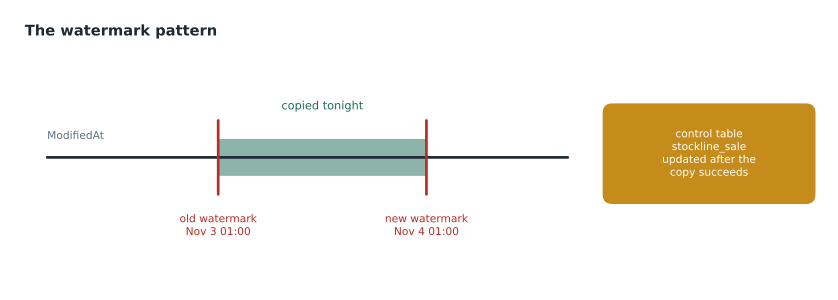
The change column must change whenever a row changes. StockLine's SaleId increases with every new sale but never changes when a sale is corrected, so it catches inserts and misses updates. ModifiedAt is set on insert and on every update, so it catches both. SQL Server's rowversion type is even better, because it is set by the database engine and cannot be forgotten by application code. Neither catches deleted rows: a row that is gone has no change column to read. Deletes need change data capture, a full comparison of keys, or a soft-delete flag in the source.
| Change column | Catches inserts | Catches updates | Catches deletes | Notes |
|---|---|---|---|---|
| Increasing id (SaleId) | Yes | No | No | Fine for append-only data |
| ModifiedAt timestamp | Yes | Yes, if every update sets it | No | Watch for clock and time zone issues |
| rowversion | Yes | Yes, always | No | Set by SQL Server itself |
| Change data capture | Yes | Yes | Yes | Needs CDC enabled in the source |
Late-arriving data and lookback windows
Real sources are not perfectly ordered. A till that loses its network connection at 9 p.m. may upload its sales at 2 a.m., after the nightly load has already moved the watermark past 9 p.m. if the watermark is based on sale time. Rows like these are called late-arriving data, and DP-700 asks candidates to handle them. Using a column that records when the row reached the source, such as ModifiedAt set on upload, solves most of it. For the rest, a lookback window re-reads a little before the old watermark, for example the last two days, and the destination uses MERGE on the key so rows already loaded are updated rather than duplicated.
# Watermark loads with and without a lookback window, with one late row
from datetime import datetime as dt, timedelta

source = [  # (SaleId, ModifiedAt stamped on the row, when the row actually reached StockLine)
    (1001, dt(2026, 11, 3, 18, 5),  dt(2026, 11, 3, 18, 5)),
    (1002, dt(2026, 11, 3, 21, 40), dt(2026, 11, 3, 21, 40)),
    (1003, dt(2026, 11, 4, 0, 50),  dt(2026, 11, 4, 0, 50)),
    (1004, dt(2026, 11, 3, 20, 15), dt(2026, 11, 4, 0, 30)),  # late upload, stamped with its sale time
]

def load(old_wm, new_wm, lookback=timedelta(0)):
    start = old_wm - lookback
    return {sid for sid, mod, arrived in source if arrived <= new_wm and start < mod <= new_wm}

run1 = dt(2026, 11, 3, 21, 0)    # first load (illustrative times)
run2 = dt(2026, 11, 4, 1, 0)     # second load
first = load(dt(2026, 11, 3, 0, 0), run1)
plain = load(run1, run2)
with_lb = load(run1, run2, lookback=timedelta(hours=3))
print("first load:          ", sorted(first))
print("second, no lookback: ", sorted(plain), "-> total", sorted(first | plain))
print("second, 3 h lookback:", sorted(with_lb), "-> total", sorted(first | with_lb), "| re-read:", sorted(first & with_lb))first load: [1001] second, no lookback: [1002, 1003] -> total [1001, 1002, 1003] second, 3 h lookback: [1001, 1002, 1003, 1004] -> total [1001, 1002, 1003, 1004] | re-read: [1001]
What this code does
The program holds four sale rows with the time each one reached StockLine, one of them a late upload stamped with an earlier time. It runs two nightly loads that copy rows between an old and a new watermark, once without a lookback and once re-reading three extra hours before the old watermark. The output shows that without the lookback the late sale is never loaded, and with it the late sale is caught, while one row already loaded is read again, which is why the destination must merge on the key rather than simply append.
The output shows sale 1004 missing from the total without a lookback, because by the time it arrived its timestamp was already behind the watermark, and present with the lookback, at the cost of re-reading sale 1001. Ines asked StockLine's developers whether uploads could stamp ModifiedAt with the upload time rather than the sale time. Liam Ferreira confirmed they could from the January release; until then, the hub's sales load uses a two-day lookback with MERGE, which re-reads about 76,000 rows a night instead of 38,000, a cost worth paying for complete data.
Changing the past: reloading a slice
Sometimes past data must be recomputed, as with the rounding rule. Overwriting a whole table to change three years is the blunt way, and it caused the incident. Delta tables allow a narrower overwrite: writing with the option replaceWhere replaces only the rows matching a condition, such as one month, in a single commit, and leaves the rest of the table untouched. In a warehouse the same is done with a transaction that deletes and reinserts one month. Either way, the change can be split into slices and run one slice at a time.
# Rebuild one month of curated sales with replaceWhere (PySpark)
month_start, month_end = "2024-03-01", "2024-03-31"
fixed = (spark.read.table("lh_raw.stockline_sale")
              .filter(f"SaleDate BETWEEN '{month_start}' AND '{month_end}'")
              .transform(clean_sales))            # the shared cleaning function
(fixed.write.format("delta").mode("overwrite")
      .option("replaceWhere", f"SaleDate BETWEEN '{month_start}' AND '{month_end}'")
      .saveAsTable("lh_curated.stockline.sales"))
Backfills that do not hurt anyone
A backfill is a reload of past data, usually after a fix or when a new table is added. The incident taught three rules that the hub's design note now lists. Slice the work: one month at a time, so each run is small and a failure only repeats one slice. Run it when people are not: the capacity smooths background work over 24 hours, but heavy background use can still push a capacity into throttling, as the November 5 incident showed, so large backfills run at weekends or in the quiet hours of the night. And make each slice idempotent, so it can be rerun without double-counting.
Storing the watermark
Where the watermark lives is a small decision with large consequences. The hub keeps a control table, etl.load_control, in the warehouse, with one row per source table holding the change column's name, the last loaded value, the time of the last successful load and its row count. The pipeline reads it with a Lookup, and the final step updates it with a stored procedure inside the same transaction as the load's last write where possible. Keeping watermarks in a table, rather than in pipeline variables or files, means they survive redeployments, can be inspected with a query, and can be reset deliberately when a reload is needed: setting a table's watermark back by a month makes the next run reload that month, with MERGE ensuring nothing is duplicated.
Time zones need care here too. StockLine stores ModifiedAt in local time, while Fabric works in Coordinated Universal Time. A watermark compared across the two can skip or repeat an hour when daylight saving time changes, twice a year. The hub converts ModifiedAt to UTC in the source query and stores watermarks in UTC, and the design note says so in bold.
Finally, incremental loads need a way back to full. Sources get repaired, history gets corrected, and sometimes the only safe answer is to reload everything. The hub's pipeline takes a FullReload parameter, false by default; when it is set to true for one table, the copy ignores the watermark, the curated step overwrites the table in one commit, and the control table's watermark is reset to the new maximum at the end. Having that switch built in, tested and documented means a full reload is a calm, planned task rather than an emergency rewrite.
Worked problem
Plan the rounding backfill again
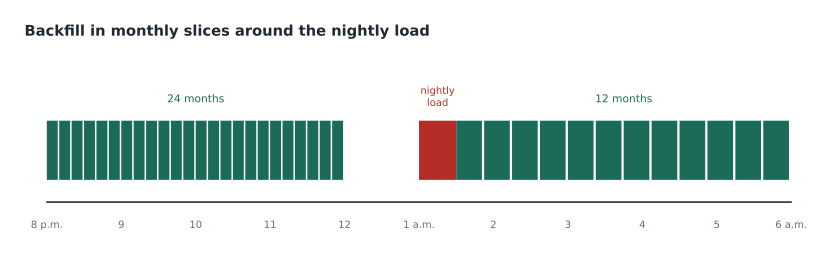
The full backfill took 6 hours of Spark time on the trial capacity in one run. It covers 36 months of data. Ines wants to run it in monthly slices between 8 p.m. and 6 a.m., stopping at least an hour before the 1 a.m. nightly load and resuming after it finishes at about 1:30 a.m. How many nights will it take if each month takes the same time?
Show solution
- Time per month: 6 hours ÷ 36 = 10 minutes.
- Window before the nightly load: 8 p.m. to midnight, which stops an hour before 1 a.m.: 4 hours, or 240 minutes.
- Window after it: 1:30 a.m. to 6 a.m.: 4.5 hours, or 270 minutes.
- \[(240 + 270) \div 10 = 51 \text{ slices per night}\]
- 51 is more than the 36 slices needed, so one night is enough, spread over both windows.
Answer: One night: 24 months before midnight and the remaining 12 after the nightly load, with no slice overlapping the 1 a.m. run.
In the event, Ines ran 24 slices on Friday evening and 12 on Saturday morning, to keep a margin, and the Capacity Metrics app showed background use peaking at well under half of the trial's capacity.
Choosing between full and incremental
The decision comes back to the lesson 1 sheet. Small tables, or tables where deletes matter and no change data capture exists, are loaded in full. Large, growing tables with a reliable change column are loaded incrementally, with a lookback if late data is possible. Tables where updates and deletes matter and the source supports CDC are best served by a copy job with CDC or by mirroring, which lesson 10 covers. And whatever the choice, the load records its watermark, its row counts and its outcome, so that the morning's first question, did last night's load work, has an answer that does not depend on anyone's memory.
Common mistakes
MistakeWrite the new watermark before copying the data.
InsteadWrite it only after the copy and its checks succeed, so a failure repeats the same rows.
MistakeUse an increasing id as the change column for rows that can be updated.
InsteadUse a column that changes on every update, such as ModifiedAt or rowversion, or CDC.
MistakeExpect watermarks to catch deleted rows.
InsteadDeletes need CDC, a full key comparison or a soft-delete flag.
MistakeBackfill three years in one run during the working day.
InsteadSlice the backfill, run it in quiet hours and make each slice idempotent.
Summary and key terms
- Full loads suit small tables and catch deletes; replace data in one commit so readers never see a half table.
- Incremental loads use a watermark: copy the band between old and new values, check, then move the watermark.
- The change column must change on every update; deletes need CDC or another method.
- Lookback windows with MERGE catch late-arriving rows without duplicates.
- replaceWhere and delete-and-insert transactions reload one slice of history.
- Backfills run in slices, in quiet hours, with idempotent steps.
- Watermark
- The stored highest value of a change column already loaded.
- Control table
- A small table that stores watermarks and load status for each source table.
- Late-arriving data
- Rows that reach the source after the load that should have included them.
- Lookback window
- An extra period before the old watermark that is read again to catch late rows.
- replaceWhere
- A Delta write option that replaces only rows matching a condition, in one commit.
- Backfill
- Reloading past data, for example after a fix or a new table.
- rowversion
- A SQL Server column type that the engine changes automatically on every insert and update.
Practice problems
Work each problem on paper first, then reveal the answer to check.
Why is the watermark written last?
Show answer
So that if the copy or checks fail, the next run copies the same rows again.
Which change column catches both inserts and updates in StockLine?
Show answer
ModifiedAt, as long as every update sets it.
How does a lookback window avoid duplicates?
Show answer
The destination merges on the key, updating rows already loaded.
What does replaceWhere do?
Show answer
Replaces only the rows matching a condition, such as one month, in a single commit.
Name three rules for backfills.
Show answer
Slice the work, run in quiet hours, make each slice idempotent.
Lesson quiz · 5 questions
Score 60% or more to complete this lesson.
Create a free account to save your progress, take quizzes and earn a certificate.