
MSAZ-320 · Lesson 11 of 12 · 20 min
Eventstreams for streaming ingestion
▶ Video coming soon A video version of this lesson is on the way.
On Tuesday, November 10, the hub got its first stream. The Ames store has 14 freezer and cooler units in its garden center and grocery corner, and in October facilities had fitted each one with a temperature sensor that reports every ten seconds to an Azure IoT Hub. Until now the readings went nowhere useful. Nikolai wanted them in Fabric for two reasons: an alert when a unit warmed up, which MSAZ-321 builds with Activator, and a history of temperatures by hour for the facilities team, which needed the data landed in a table. Today's job was the ingestion half: an eventstream.
What an eventstream is
An eventstream is a Fabric item, part of Real-Time Intelligence, that brings events into Fabric, optionally transforms them as they flow, and routes them to one or more destinations, all in a visual editor without code. Sources connect on the left, processing operations sit in the middle and destinations on the right. Each eventstream also exposes an Apache Kafka endpoint, backed by Azure Event Hubs, so applications that already speak the Kafka protocol can send events to it or read from it.
Eventstreams have a few limits worth knowing for design questions: they need a capacity of at least F4, a single message can be up to 1 MB, events can be retained for up to 90 days, and delivery is at least once. At least once means an event will not be lost, but in rare cases, such as a retry after a network fault, it may be delivered twice, so downstream logic should tolerate duplicates, usually by keeping an event id and removing repeats.
Sources
The list of sources is long and growing. Azure sources include Event Hubs, IoT Hub, Event Grid, Service Bus and Blob Storage events. Change data capture sources take an initial snapshot of a database table and then stream every insert, update and delete as an event, for Azure SQL Database, Azure SQL Managed Instance, SQL Server on a virtual machine, PostgreSQL, MySQL, Cosmos DB, MongoDB and others. Streaming platforms include Apache Kafka, Confluent Cloud, Amazon Kinesis and Google Cloud Pub/Sub. Fabric itself emits events, such as items being created in a workspace or files arriving in OneLake. A custom endpoint gives any application a connection string to send events, and sample data sources, such as a stream of bicycle rentals, let a team build and test an eventstream before real data is connected.
| Source group | Examples | Hub use |
|---|---|---|
| Azure messaging | Event Hubs, IoT Hub, Event Grid, Service Bus | Freezer sensors through IoT Hub |
| Database CDC | Azure SQL Database, SQL Managed Instance, PostgreSQL, Cosmos DB | Considered for Rewards; mirroring chosen instead |
| Streaming platforms | Kafka, Confluent Cloud, Amazon Kinesis, Google Pub/Sub | Not used |
| Fabric events | Workspace item events, OneLake events, job events | Planned: alert when a price file lands |
| Custom endpoint | Any app with the connection string, including Kafka clients | Door counters in a later phase |
| Sample data | Bicycles, taxis, stock market | Testing the editor |
Processing events on the way
Between source and destination, an eventstream can apply operations. Filter keeps events that meet a condition. Manage fields adds, removes, renames or changes the type of fields. Aggregate keeps a running sum, minimum, maximum or average over a period as each event arrives. Group by computes aggregations over time windows, optionally by one or more fields. Union combines streams that share fields. Expand turns an array inside one event into a row per element. Join combines two streams on a matching condition. A SQL operator, in preview, lets engineers write the same kinds of transformation in SQL and mix it with the visual operations.
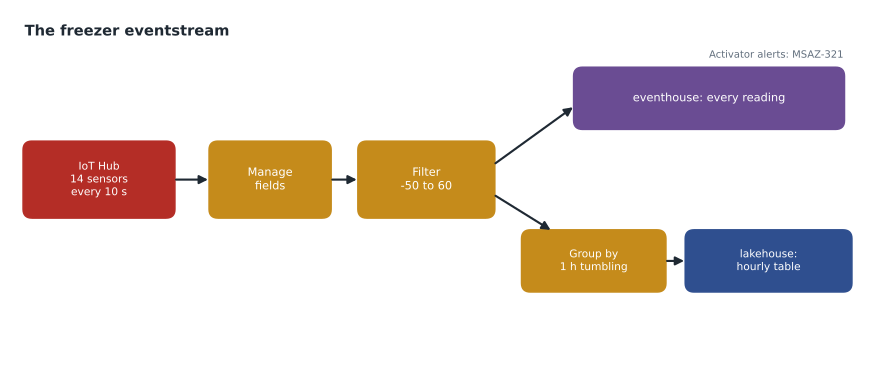
For the freezers, Ines built a small chain. Manage fields renamed the sensor's terse field names, deviceId, t and ts, to UnitId, TemperatureC and ReadingTime, and cast ReadingTime to a timestamp. A filter removed readings with a temperature outside the sensor's physical range, minus 50 to plus 60 degrees, which the facilities team said only came from faulty probes. Then the stream split: one branch went straight to an eventhouse table for second-by-second queries and alerting, and another went through a group by into a lakehouse table of hourly figures.
Time windows
Streaming aggregations need a window, because a stream never ends and an average of all time is rarely useful. A tumbling window cuts time into fixed, non-overlapping intervals, such as each hour; every event belongs to exactly one window. A hopping window has a fixed length but starts at a shorter interval, such as a one-hour window starting every 15 minutes, so windows overlap and an event can count in several. A sliding window produces a result whenever the set of events within a given length changes. A session window groups events separated by gaps shorter than a timeout, which suits bursts of activity. A snapshot window groups events that share the same timestamp. DP-700 lists creating windowing functions as a skill, and the same ideas appear in KQL and Spark structured streaming, which MSAZ-321 covers.
| Window | Shape | Use for |
|---|---|---|
| Tumbling | Fixed length, back to back, no overlap | Hourly averages per freezer |
| Hopping | Fixed length, starting at a shorter interval, overlapping | A rolling one-hour average updated every 15 minutes |
| Sliding | A result whenever events enter or leave a fixed span | Any 10 minutes with readings above a limit |
| Session | Events grouped until a gap longer than a timeout | Periods when a freezer door is opened repeatedly |
| Snapshot | Events with exactly the same timestamp | Readings sent together in one batch |
# Hourly tumbling-window averages for two freezers, from readings every 10 minutes
from datetime import datetime as dt, timedelta
from collections import defaultdict

start = dt(2026, 11, 10, 1, 0)
readings = []  # (unit, time, temperature in degrees Celsius)
for i in range(18):                                   # 3 hours of readings every 10 minutes
    t = start + timedelta(minutes=10 * i)
    readings.append(("F-03", t, -18.0 + (0.5 if i % 2 else 0)))
    readings.append(("F-07", t, -18.0 + (4.0 if 6 <= i <= 9 else 0)))  # warms up for 40 minutes
readings.append(("F-07", start + timedelta(minutes=50), -14.0))         # a duplicate delivery

seen, windows = set(), defaultdict(list)
for unit, t, temp in readings:
    if (unit, t) in seen:
        continue                                      # at-least-once delivery: drop repeats
    seen.add((unit, t))
    window = t.replace(minute=0, second=0)            # the hour this reading belongs to
    windows[(unit, window)].append(temp)

for (unit, window), temps in sorted(windows.items()):
print(unit, window.strftime("%H:00"), f"avg {sum(temps) / len(temps):6.2f}", f"max {max(temps):6.1f}", f"({len(temps)} readings)")F-03 01:00 avg -17.75 max -17.5 (6 readings) F-03 02:00 avg -17.75 max -17.5 (6 readings) F-03 03:00 avg -17.75 max -17.5 (6 readings) F-07 01:00 avg -18.00 max -18.0 (6 readings) F-07 02:00 avg -15.33 max -14.0 (6 readings) F-07 03:00 avg -18.00 max -18.0 (6 readings)
What this code does
The program makes three hours of readings for two freezers, one reading every ten minutes, with one freezer warming by four degrees for forty minutes, and it adds one reading delivered twice, as at-least-once delivery sometimes does. It first drops any reading it has already seen for the same freezer and time, then puts each reading into the hour it belongs to and works out the average and highest temperature per freezer per hour. The output shows six readings in every window and makes the warm spell in freezer F-07 stand out in the hours it covered.
The output shows F-07 averaging about minus 15.3 degrees in the hour from 2:00, with a maximum of minus 14, while F-03 stays near minus 17.75 throughout; every window has six readings because the duplicate was dropped. In the real eventstream, the group by handles the windowing, and the eventhouse keeps every raw reading, so a facilities engineer can always go from an hourly figure back to the individual readings.
Destinations
Every eventstream can send to several destinations at once, and they do not interfere with each other. An eventhouse destination writes into a KQL database table, either directly or after processing. A lakehouse destination converts events into Delta tables. Activator watches events for conditions and takes actions, such as sending a message. A custom endpoint passes events on to an application, inside or outside Fabric. A derived stream is the transformed stream itself, published so that other eventstreams and the Real-Time hub can use it. A Spark notebook destination, in preview, runs a structured streaming job on the stream. Ines published the cleaned freezer stream as a derived stream, ds_freezer_clean, so that the store's future door counters and any other team could reuse it without repeating the cleaning.
Choosing a streaming engine
DP-700 asks candidates to choose an appropriate streaming engine. Eventstreams suit no-code ingestion, light transformations and routing to several destinations. KQL, in an eventhouse, suits querying and transforming streaming data at very large scale with time-series functions, including update policies that transform data as it is ingested. Spark structured streaming suits complex transformations in code, reuse of existing Spark logic and writing to Delta tables with exactly the shaping a batch notebook would do. Many designs combine them, as the hub does: an eventstream ingests and routes, the eventhouse serves second-level queries, and a lakehouse table holds hourly history.
Event time and arrival time
Every event has two times: when it happened, usually a timestamp the device puts in the message, and when it reached the eventstream. They differ, sometimes by seconds and sometimes, when a sensor loses its connection and later uploads a backlog, by hours. Windows should normally use event time, so that a reading taken at 2:59 counts in the 2:00 hour even if it arrives at 3:01. Ines mapped the sensor's own ts field to ReadingTime and used it for the group by, and the eventhouse keeps the ingestion time as well, so analysts can tell a warm freezer from a late upload.
Event time brings its own question: how long should a window wait for late events before it is closed and its result written? Waiting longer gives more complete results but delays them. For hourly freezer history, a few minutes of tolerance was plenty, because readings that arrive later still land in the eventhouse and can be recounted. For an alert, waiting is the wrong choice, which is why alerting in MSAZ-321 reads the stream directly rather than the hourly table.
Schemas for events
Events often arrive as JSON with fields that change over time, such as a new sensor model adding a humidity field. Eventstreams can register and version schemas in a schema registry, so consumers know what shape to expect, and newer schema-aware features, some in preview, help when one stream carries several event types. For the pilot, the sensors' format was fixed and documented, but Ines noted the schema registry as the place to start when the door counters, with a different format, join the same stream later.
Eventstreams can also be paused and resumed, and derived streams can be paused independently, which helps during maintenance on a destination. While a destination is paused, events wait in the stream within its retention period and are delivered when it resumes, so a short pause loses nothing. Ines tested this by pausing the lakehouse destination for twenty minutes; when it resumed, the hourly table caught up within a minute and no readings were missing.
Worked problem
How many events, and how big?
14 sensors each send one 240-byte reading every 10 seconds. How many events does the eventstream receive per day, roughly how much data is that, and does any message approach the 1 MB limit?
Show solution
- Readings per sensor per day: 86,400 seconds ÷ 10 = 8,640.
- For 14 sensors: 14 × 8,640 = 120,960 events a day.
- \[120{,}960 \times 240 \text{ bytes} \approx 29 \text{ MB a day}\]
- Each message is 240 bytes, about four-thousandths of the 1 MB limit.
Answer: About 121,000 events and 29 MB a day; message size is nowhere near the limit, and the stream is small enough for the smallest capacity that supports eventstreams.
Common mistakes
MistakeAssume each event is delivered exactly once.
InsteadDelivery is at least once; keep an event id or key and remove repeats.
MistakeUse one destination per eventstream.
InsteadAn eventstream can route to several destinations at once.
MistakeA hopping window is the same as a tumbling window.
InsteadHopping windows overlap; tumbling windows do not.
MistakeDo heavy, complex transformations in the eventstream editor.
InsteadKeep eventstreams light; use KQL or Spark structured streaming for complex logic.
Summary and key terms
- Eventstreams ingest, transform and route events without code, with a Kafka endpoint for Kafka clients.
- Sources include Azure messaging services, database CDC, streaming platforms, Fabric events, custom endpoints and samples.
- Operations include filter, manage fields, aggregate, group by, union, expand and join, plus a SQL operator in preview.
- Tumbling, hopping, sliding, session and snapshot windows define how streaming aggregations group time.
- Destinations include eventhouses, lakehouses, Activator, custom endpoints and derived streams.
- Eventstreams need at least an F4, allow 1 MB messages and deliver at least once.
- Eventstream
- A Fabric item that ingests, transforms and routes streaming events.
- Derived stream
- A transformed stream published from an eventstream for reuse by others.
- Tumbling window
- Fixed, non-overlapping time intervals for streaming aggregation.
- Hopping window
- Fixed-length windows that start at a shorter interval and overlap.
- Session window
- A window that groups events separated by less than a timeout.
- At-least-once delivery
- A guarantee that events are not lost, though some may arrive more than once.
- Change data capture source
- An eventstream source that streams a database table's inserts, updates and deletes.
Practice problems
Work each problem on paper first, then reveal the answer to check.
Name three kinds of eventstream source.
Show answer
For example Azure IoT Hub, a database CDC source and a custom endpoint.
What does at-least-once delivery mean for the design?
Show answer
Events are not lost but may repeat, so downstream logic removes duplicates.
How does a hopping window differ from a tumbling window?
Show answer
Hopping windows overlap because they start more often than their length.
Why did Ines publish a derived stream?
Show answer
So other teams could reuse the cleaned freezer stream.
When is Spark structured streaming a better choice than an eventstream?
Show answer
For complex transformations in code or reuse of existing Spark logic.
Lesson quiz · 5 questions
Score 60% or more to complete this lesson.
Create a free account to save your progress, take quizzes and earn a certificate.