
MSAZ-320 · Lesson 4 of 12 · 20 min
Dataflows Gen2 at scale
▶ Video coming soon A video version of this lesson is on the way.
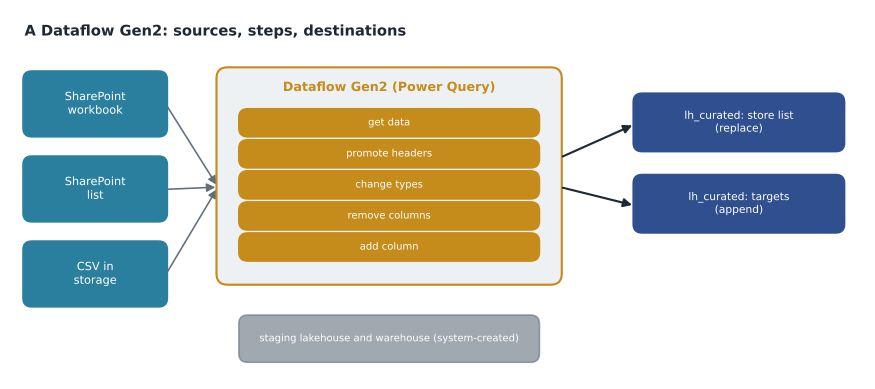
On Thursday, October 29, Keiko joined the engineering afternoon for the first time. The hub needed a handful of reference tables that lived outside StockLine: the store list with each store's region, opening date and manager, kept by store operations in an Excel workbook on SharePoint; the finance department's monthly sales targets, in another workbook; and the product category hierarchy, which merchandising maintained in a SharePoint list. None of them was large, all of them changed by hand, and the people who changed them already knew Power Query from Power BI. Nikolai's plan was for Keiko to own these loads as Dataflows Gen2, with Ines making sure they fitted into the nightly run.
What a Dataflow Gen2 is
A Dataflow Gen2 is a Fabric item that uses Power Query to get data from a source, transform it with a sequence of steps and write the result to a destination. Power Query is the same engine found in Excel and Power BI Desktop: a visual editor where each transformation, such as removing a column, changing a type, filtering rows or merging two tables, becomes an applied step, and behind the steps sits a script in the M language. The first generation of dataflows, Gen1, kept its output inside its own storage and could only be read through the dataflow connector. Gen2 writes to real destinations and works with pipelines, which is what made it useful for the hub.
| Feature | Dataflow Gen1 | Dataflow Gen2 |
|---|---|---|
| Where output goes | Its own internal storage | Output destinations such as lakehouses, warehouses and databases |
| Run from a pipeline | No | Yes, with the dataflow activity |
| Saving | Manual publish | AutoSave and background publishing |
| Monitoring | Basic refresh history | Detailed refresh history per query and in the monitoring hub |
| Git and deployment pipelines | No | Yes; new dataflows have CI/CD support by default |
| Engine for large data | Power Query only | Can use staging items and other features that offload heavy work |
Since April 2026, every new Dataflow Gen2 is created with CI/CD support, meaning it can be stored in Git and promoted with deployment pipelines like the other hub items. The older kind, which was called Dataflow Gen2 without CI/CD, can no longer be created, though existing ones keep working. A Gen1 dataflow or an older Gen2 can be converted with Save As, or rebuilt by exporting its queries as a Power Query template and importing them into a new dataflow.
Queries, steps and M
Keiko built the store list in about ten minutes. She connected to the SharePoint site, picked the workbook and the Stores sheet, promoted the first row to headers, changed StoreNumber to a whole number, trimmed spaces from the manager names, removed two columns that held personal phone numbers, and added a column for the region code taken from the first three characters of the region name. Each action appeared as a step in the Applied steps pane, and the Advanced editor showed the same steps as M.
let
    Source       = SharePoint.Files("https://harrowfinch.sharepoint.com/sites/storeops", [ApiVersion = 15]),
    Workbook     = Excel.Workbook(Source{[Name = "Store list.xlsx"]}[Content], true),
    Stores       = Workbook{[Item = "Stores", Kind = "Sheet"]}[Data],
    Typed        = Table.TransformColumnTypes(Stores, {{"StoreNumber", Int64.Type}, {"OpenedOn", type date}}),
    Trimmed      = Table.TransformColumns(Typed, {{"Manager", Text.Trim, type text}}),
    NoPhones     = Table.RemoveColumns(Trimmed, {"MobilePhone", "HomePhone"}),
    WithRegion   = Table.AddColumn(NoPhones, "RegionCode", each Text.Start([Region], 3), type text)
in
    WithRegion
Removing the phone columns in the dataflow, rather than later, was deliberate. Data that never reaches the hub cannot leak from it, and store managers' home numbers had no reporting use. The same principle applies to every source: drop personal data you do not need as early as possible, and record what was dropped in the design note.
Output destinations and update methods
Each query in a Dataflow Gen2 can have its own output destination. Destinations include lakehouse tables and files, warehouses, SQL databases in Fabric, KQL databases, Azure SQL databases, Azure Data Lake Storage, Azure Data Explorer and several others. For each destination the dataflow either replaces the data on every refresh or appends the new rows, and it can map columns and create the table automatically or write to an existing one. Keiko sent the store list to the table stockline_store_ref in lh_curated with replace, because the workbook is the full truth each night. The sales targets went to the same lakehouse with append, one month at a time, because finance wanted to keep every version of a target they had ever issued.
Query folding
Query folding is the single most important idea for dataflows at scale. When a source can run a query itself, such as a SQL database, Power Query translates as many steps as it can into the source's own language and sends one query, so filtering, column selection and often grouping happen in the source and only the result travels. Steps that cannot be translated, such as some text functions or a custom column written in M, are run by the dataflow engine after the data arrives, and every step after a non-folding step is usually run there too. A filter that folds might bring 38,000 rows; the same filter after a step that breaks folding might bring 41 million rows and then throw most away.
Power Query shows whether each step folds: in the Applied steps pane, an indicator marks steps that fold to the source and steps that do not, and View data source query shows the query actually sent. Keiko's habit, which Nikolai asked her to keep, was to put filters and column removals first, before any step that might break folding, and to check the indicators before saving.
# Rows moved from the source when a filter folds, and when it does not
rows_in_source = 41_200_000
rows_matching_filter = 38_000          # one day of sales
bytes_per_row = 180                    # rough width of a sales row

def megabytes(rows):
    return rows * bytes_per_row / 1_000_000

folded = rows_matching_filter          # the source filters, only matches travel
not_folded = rows_in_source            # every row travels, then the engine filters
print(f"filter folds:        {folded:>11,} rows, about {megabytes(folded):8,.1f} MB")
print(f"filter does not fold: {not_folded:>11,} rows, about {megabytes(not_folded):8,.1f} MB")
print(f"the second moves about {not_folded / folded:,.0f} times as many rows")filter folds: 38,000 rows, about 6.8 MB filter does not fold: 41,200,000 rows, about 7,416.0 MB the second moves about 1,084 times as many rows
What this code does
The program compares two ways of loading one day of sales from a table of 41.2 million rows. When the filter folds, the source returns only the 38,000 matching rows; when it does not, all rows travel and the dataflow throws most of them away. Using an assumed width of 180 bytes per row, it prints the rows and approximate megabytes moved each way and how many times larger the unfolded transfer is, which shows why filters should come before any step that stops folding.
The output makes the point in numbers: about 7 megabytes against about 7,400, and roughly a thousand times as many rows. That is why dataflows are not the hub's tool for the StockLine sales table, even though Power Query could connect to it through the gateway. Small reference tables do not care about folding; large tables care about nothing else.
Staging and heavy transformations
Behind the scenes, Dataflow Gen2 can stage data in a lakehouse and a warehouse that Fabric creates in the workspace, which appear as items named DataflowsStagingLakehouse and DataflowsStagingWarehouse. They are system items: you should not build anything on them or edit them, and they can be ignored in workspace listings. Staging lets the dataflow hand heavy operations, such as joins and aggregations over large inputs, to the warehouse engine instead of doing them in the Power Query engine. Turning staging on or off for a query changes where the work happens and how long a refresh takes, so it is worth testing both for a large query. Microsoft publishes benchmark guidance comparing time and capacity use for different settings, and newer options such as fast copy for simple large movements; check the current documentation before relying on any one of them, because these features change quickly.
Refreshes, schedules and parameters
A dataflow refresh runs all its queries and writes their destinations. It can be run on demand, on its own schedule or from a pipeline's dataflow activity. In the hub, refreshes run from pl_nightly_sales, so that the star schema load waits for the store list to finish, as lesson 2 showed. Dataflows can also be given parameters, so a pipeline can pass a value, such as the month to load, into the dataflow when it starts it. Keiko used a parameter for the targets workbook's month, so that finance's late corrections could be reloaded for one month without touching the others.
Dataflows use capacity while they refresh, measured in capacity units like every other Fabric workload, and the cost grows with the time spent and the engine used. A reference load of a few hundred rows costs almost nothing. A dataflow joining millions of rows without folding can be one of the most expensive items on a capacity, which shows up quickly in the Capacity Metrics app from MSAZ-310.
Who owns a dataflow
Every dataflow has an owner whose identity is used for its connections, and that matters when people change jobs. If Keiko left Harrow & Finch and her account were disabled, her dataflows would start failing at the next refresh. The hub's design note therefore asks for connections that use a shared service account or the workspace identity where the source supports it, and for every dataflow's owner to be recorded next to the load it runs. Ownership can be taken over by another workspace member when needed, but finding that out at 3 a.m. is the scenario the note is meant to prevent.
Before the session ended, Keiko set the store list dataflow to refresh only from the nightly pipeline and removed its own schedule, so it could not run twice in one night.
Worked problem
Fix a dataflow that has become slow
A test dataflow loads the StockLine returns table, 2.6 million rows, filters it to the last 30 days and groups by store. It used to take 2 minutes; after Keiko added a custom column that cleans the reason text with an M function, placed before the filter, it takes 24 minutes. What changed, and what is the fix?
Show solution
- Before the change, the filter and grouping folded to SQL Server, so only about 30 days of rows, grouped by store, traveled through the gateway.
- The new custom column uses an M function that SQL Server cannot run, so folding stops at that step; the filter and grouping after it are now run by the dataflow engine.
- All 2.6 million rows now travel through the gateway before being filtered, which explains most of the extra time.
- Move the filter, and if possible the grouping, above the custom column, so they fold again; then clean the reason text on the much smaller result.
Answer: Folding broke at the custom column. Reordering the steps so that the filter comes first restores folding and the refresh time.
Copilot and the boundaries of low code
Dataflow Gen2 includes Copilot, which can create steps from a description such as remove rows where quantity is zero and add a column for the month name. It is useful for people learning M, and Keiko used it to write a date table, but every generated step still deserves the same check as a hand-made one: does it fold, and does it do what the description said? The boundary with notebooks is not a fixed row count. When a transformation needs loops, complex joins across large tables, reusable functions shared with other loads or code review line by line, Spark is usually the better home. When it needs connectors, a visual audit trail and an owner who is not a programmer, a dataflow is.
Common mistakes
MistakeA Dataflow Gen2 keeps its output in internal storage like Gen1.
InsteadGen2 writes to output destinations such as lakehouse and warehouse tables.
MistakePut custom columns first and filters last.
InsteadPut filters and column removals first so they fold to the source.
MistakeBuild reports on the DataflowsStagingLakehouse item.
InsteadStaging items are system items; build on the dataflow's real destinations.
MistakeUse a dataflow for any table, however large.
InsteadUse dataflows for connectors and low-code shaping; use notebooks or T-SQL for heavy, complex transformations.
Summary and key terms
- Dataflow Gen2 uses Power Query steps, written in M, to get, transform and load data to destinations.
- Each query can have its own destination, with replace or append.
- New dataflows support Git and deployment pipelines by default since April 2026.
- Query folding pushes steps to the source; order steps so filters fold.
- Staging items let heavy work run in the warehouse engine and should not be edited.
- Dataflows can be scheduled or run from pipelines with parameters.
- Dataflow Gen2
- A Fabric item that uses Power Query to get, transform and load data into destinations.
- Power Query
- The data preparation engine and editor used by Excel, Power BI and dataflows.
- M
- The formula language behind Power Query steps.
- Applied step
- One recorded transformation in a Power Query query.
- Query folding
- Translating Power Query steps into the source's own query language so the source does the work.
- Output destination
- The table or store where a dataflow query writes its result.
- Staging
- Interim storage in system-created items that lets heavy dataflow work run in another engine.
Practice problems
Work each problem on paper first, then reveal the answer to check.
What does query folding mean?
Show answer
Power Query translates steps into the source's query language so the source does the work.
Why did Keiko remove the phone columns in the dataflow?
Show answer
Personal data with no reporting use should not reach the hub at all.
Which update method suits a full list that is the truth each night?
Show answer
Replace.
Name the two system items a dataflow may create in a workspace.
Show answer
DataflowsStagingLakehouse and DataflowsStagingWarehouse.
How can a pipeline tell a dataflow which month to load?
Show answer
By passing a value to a dataflow parameter from the dataflow activity.
Lesson quiz · 5 questions
Score 60% or more to complete this lesson.
Create a free account to save your progress, take quizzes and earn a certificate.