
MSAZ-320 · Lesson 12 of 12 · 21 min
Error handling and data quality
▶ Video coming soon A video version of this lesson is on the way.
The last engineering afternoon, on Thursday, November 12, was the one Elena Brandt had asked for in lesson 1. Her question had been simple: what will the business see if a load fails? That morning she had approved the hub's design table; in the afternoon she wanted to see the answer working. Ines had spent the week adding checks, failure paths and a load log to pl_nightly_sales, and Nikolai had prepared a test: he would break things on the trial capacity, one at a time, and everyone would watch what happened.
Two kinds of failure
Loads fail in two ways. Hard failures stop something: the gateway is offline, a source query times out, a notebook raises an error, a warehouse transaction rolls back. These are noisy and, with the right design, safe. Soft failures let everything finish while the data is wrong: a source sends an empty file, a till sends every sale twice, a code change sets every price to zero. These are quiet and dangerous, because the report looks normal. Error handling deals with the first kind; data quality checks deal with the second. A hub needs both.
Handling hard failures in pipelines
Lesson 2 introduced dependency conditions and retries. On top of those, a few patterns make pipelines robust. Retries with a sensible timeout absorb short glitches, such as a gateway restart. An on failure branch from each critical activity records the error and sends an alert. A Fail activity ends the run with a clear message and error code, so the run history says why it stopped rather than just that it stopped. And the try-catch pattern, an activity followed by an on completion step that checks the activity's status with an If Condition, lets a pipeline decide whether a failure is fatal or can be logged and passed over.
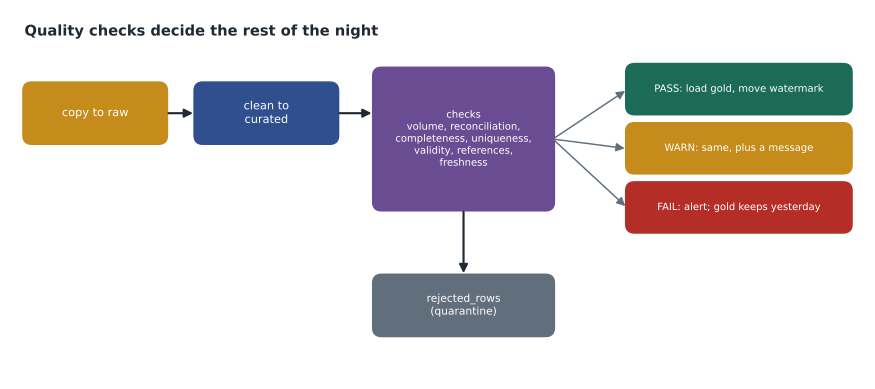
The order of steps is part of the error handling. pl_nightly_sales writes nothing to the gold layer until the copy, the cleaning and the checks have all succeeded, and it moves the watermark last, as lesson 8 described. So a failure at any point leaves yesterday's gold data untouched and readers see a complete, if slightly older, picture. The reports show the date of the last successful load in their header, which answers Elena's question in a way store managers can read.
{
  "name": "Stop if checks failed",
  "type": "IfCondition",
  "dependsOn": [ { "activity": "Run quality checks", "dependencyConditions": [ "Completed" ] } ],
  "typeProperties": {
    "expression": { "value": "@equals(activity('Run quality checks').output.result.exitValue, 'FAIL')", "type": "Expression" },
    "ifTrueActivities": [
      { "name": "Alert data team", "type": "Teams" },
      { "name": "Fail the run", "type": "Fail",
        "typeProperties": { "message": "@concat('Quality checks failed for ', pipeline().parameters.LoadDate)", "errorCode": "DQ001" } }
    ]
  }
}
Errors in notebooks and SQL
Inside a notebook, ordinary Python error handling applies. A try and except block can catch a specific problem, such as a missing input folder, write a clear message to the load log and then either continue or raise the error again so the pipeline sees a failure. Catching every error and carrying on is the mistake to avoid: it turns a hard failure into a soft one. The checks notebook ends with notebookutils.notebook.exit, returning PASS, WARN or FAIL, which the pipeline reads as shown above.
In the warehouse, T-SQL's TRY and CATCH blocks do the same job in stored procedures. The load_day procedure from lesson 7 now wraps its transaction in a TRY block; the CATCH block rolls the transaction back if it is still open, writes the error number and message to the load log, and uses THROW to re-raise the error so the pipeline's stored procedure activity fails and its failure branch runs.
BEGIN TRY
    BEGIN TRANSACTION;
    -- ... dimension and fact steps from lesson 7 ...
    COMMIT TRANSACTION;
END TRY
BEGIN CATCH
    IF @@TRANCOUNT > 0 ROLLBACK TRANSACTION;
    INSERT INTO dbo.load_log (LoadDate, Step, Outcome, Detail, LoggedAt)
    VALUES (@LoadDate, 'load_day', 'FAILED', ERROR_MESSAGE(), SYSUTCDATETIME());
    THROW;   -- re-raise so the pipeline sees the failure
END CATCH;
Data quality checks
Quality checks are small, specific tests that run after data is loaded into a layer and before it moves on. Each has a rule, a threshold and an action. The hub's checks fall into six families, and most data engineering teams use something similar: volume, completeness, uniqueness, validity, referential integrity and freshness.
| Check | Rule in the hub | Threshold | Action |
|---|---|---|---|
| Volume | Rows loaded for the day compared with the average of the same weekday over four weeks | Within 40 in 100 either way | Warn; fail below 10 in 100 of normal |
| Reconciliation | Rows written equal rows read minus rows quarantined | Exact | Fail |
| Completeness | SaleId, StoreNumber and ProductId are never empty | No empty values | Quarantine the rows |
| Uniqueness | SaleId and LineNumber together are unique | No duplicates | Remove duplicates; warn if more than 100 |
| Validity | Quantity between -500 and 500; price not negative | All rows | Quarantine the rows |
| Referential integrity | Every fact has a store and product in the dimensions | All rows | Add inferred members; warn |
| Freshness | Latest sale is from yesterday; mirrored Rewards is under 30 minutes behind | As stated | Warn |
Two design choices stand out. Bad rows are quarantined, not dropped: they go to a rejected_rows table in lh_curated with the check that failed and the load date, where Keiko reviews them each morning, as she did with the 212 rows from the history load in lesson 3. And each check has a defined action. A warning lets the load continue and tells the data team; a failure stops the load before it reaches gold. Deciding in advance which is which is what keeps a 3 a.m. problem from becoming a 3 a.m. phone call.
# Run the hub's checks on one night's load and decide PASS, WARN or FAIL
tonight = {"rows_read": 38_412, "rows_written": 38_373, "quarantined": 39,
           "duplicates_removed": 6, "missing_keys": 0, "orphan_products": 2}
same_weekday_last_4 = [37_900, 39_100, 38_600, 36_800]

results = []
normal = sum(same_weekday_last_4) / len(same_weekday_last_4)
ratio = tonight["rows_read"] / normal
results.append(("volume", "FAIL" if ratio < 0.1 else "WARN" if abs(ratio - 1) > 0.4 else "PASS", f"{ratio:.2f} of normal"))
balanced = tonight["rows_written"] == tonight["rows_read"] - tonight["quarantined"]
results.append(("reconciliation", "PASS" if balanced else "FAIL", f'{tonight["rows_read"]} - {tonight["quarantined"]} vs {tonight["rows_written"]}'))
results.append(("uniqueness", "WARN" if tonight["duplicates_removed"] > 100 else "PASS", f'{tonight["duplicates_removed"]} removed'))
results.append(("completeness", "PASS" if tonight["missing_keys"] == 0 else "WARN", f'{tonight["missing_keys"]} rows'))
results.append(("referential", "WARN" if tonight["orphan_products"] else "PASS", f'{tonight["orphan_products"]} inferred members'))

for name, outcome, detail in results:
    print(f"{name:15} {outcome:5} {detail}")
order = {"PASS": 0, "WARN": 1, "FAIL": 2}
print("overall:", max((r[1] for r in results), key=order.get))volume PASS 1.01 of normal reconciliation PASS 38412 - 39 vs 38373 uniqueness PASS 6 removed completeness PASS 0 rows referential WARN 2 inferred members overall: WARN
What this code does
The program takes one night's load figures, such as rows read, rows written, rows set aside and duplicates removed, and the row counts from the same weekday in the previous four weeks. It runs five checks: whether the volume is close to normal, whether rows written equal rows read minus rows set aside, and whether duplicates, missing keys or unknown products need attention. Each check gives pass, warn or fail with a short detail, and the overall result is the worst of them, which is the value the pipeline reads to decide whether to continue.
For this night the output gives an overall WARN, from the two inferred product members, with every other check passing: the volume is almost exactly normal and the counts reconcile, 38,412 read minus 39 quarantined equals 38,373 written. The pipeline continued, the gold layer loaded, and the warning appeared in the data team's channel with a link to the two products, which turned out to be new paint colors added at 8:55 p.m.
The load log
Every step writes a line to a load log table: the load date, the step, the start and end time, rows read and written, the outcome and any message. The log is the hub's memory. It answers the morning questions, did last night's load work and how long did it take, without anyone opening the monitoring hub; it gives the volume check its four-week history; and over months it shows trends, such as the cleaning notebook slowly getting longer as the table grows. Fabric's own monitoring, covered in MSAZ-321, records runs too, but a log in the hub's own tables can be joined with the data and kept as long as the team wants.
Nikolai's test
With Elena watching, Nikolai broke four things in turn. He stopped the gateway service: the copy retried twice, failed, the Teams alert arrived and the gold layer kept yesterday's data. He replaced a raw file with an empty one: the volume check returned FAIL, the run stopped before the curated layer, and the alert named the check. He sent the same day of sales twice: the uniqueness check removed 38,412 duplicates and warned. And he ran the gold procedure twice: thanks to its delete-then-insert design, revenue for the day was the same after the second run as after the first. Elena signed off the error handling that afternoon.
Alerts people will read
An alert is only useful if someone acts on it, and too many alerts teach people to ignore them. The hub sends three kinds. A failure stops the run and posts to the data team's Teams channel with the failed step, the error message and a link to the run. A warning posts once a night as a single summary of every warning, not one message per check. And a weekly digest, every Monday, lists trends from the load log, such as steps getting slower or rising numbers of quarantined rows. Each message says what happened, what the business sees as a result and what the first thing to check is, written so that whoever is on call, not only Ines, can start.
Alerts also need an owner and a rota. The design note names the on-call engineer for each week of the pilot and says what they must do by when: acknowledge a failure within an hour during the pilot's support hours and either fix it or post a note on the store managers' report saying the data is from the previous day.
Testing the checks themselves
Checks can be wrong too. A threshold set too tight creates a warning every Monday; a rule with a typo never fires. Ines kept a small set of test files for each check, one that should pass and one that should fail, and ran them through the checks notebook whenever its code changed. The duplicate file, the empty file and the file with a negative price from Nikolai's test became permanent members of that set, so the afternoon's demonstration turned into a repeatable test.
Data quality is not only the engineers' job. The rejected rows table and the weekly digest are visible to Keiko and the finance analysts through a small report, and when the same kind of bad row keeps appearing, the fix usually lies in the source: a till configuration, a missing validation in StockLine or a supplier's file format. The hub's job is to catch problems and make them visible; fixing them at the source is a conversation with the people who own it.
Worked problem
Is the night's volume normal?
On a Monday the load reads 21,300 rows. The four previous Mondays read 37,900, 39,100, 38,600 and 36,800. Using the hub's rule, is the result PASS, WARN or FAIL?
Show solution
- The normal Monday is the average of the four: (37,900 + 39,100 + 38,600 + 36,800) ÷ 4 = 38,100.
- \[21{,}300 \div 38{,}100 \approx 0.56\]
- 0.56 is more than 0.4 below 1, so it is outside the 40-in-100 band: at least a warning.
- It is above 0.1 of normal, so it is not a failure.
Answer: WARN. The load continues, and the data team checks why sales were low; on the day in question it was a public holiday with nine stores closed.
Common mistakes
MistakeCatch every error in a notebook and carry on.
InsteadCatch specific errors, log them, and re-raise anything that should stop the load.
MistakeDrop rows that fail validity checks.
InsteadQuarantine them with the reason so they can be reviewed and reloaded.
MistakeTreat every check failure as a reason to stop.
InsteadDecide per check whether it warns or fails.
MistakeRely on the monitoring hub as the only record of loads.
InsteadKeep a load log in the hub's own tables for history, checks and trends.
Summary and key terms
- Hard failures stop a step; soft failures produce wrong data quietly. Handle both.
- Retries, failure branches, Fail activities and the try-catch pattern make pipelines robust.
- Write to gold and move watermarks only after checks pass, so readers keep complete data.
- Notebooks use try and except with exit values; warehouse procedures use TRY, CATCH and THROW.
- Quality checks cover volume, reconciliation, completeness, uniqueness, validity, referential integrity and freshness.
- Quarantine bad rows and keep a load log of every step.
- Hard failure
- A failure that stops a step, such as a timeout or an error.
- Soft failure
- A load that completes but produces wrong or incomplete data.
- Fail activity
- A pipeline activity that ends a run as failed with a chosen message and code.
- Data quality check
- A test of loaded data against a rule, with a threshold and an action.
- Quarantine
- Setting aside rows that fail checks, with the reason, instead of loading or dropping them.
- Reconciliation
- Checking that counts or totals agree between source, steps and destination.
- Load log
- A table recording each step of each load with times, counts and outcome.
Practice problems
Work each problem on paper first, then reveal the answer to check.
Why is a soft failure more dangerous than a hard one?
Show answer
Everything finishes and reports look normal while the data is wrong.
What does the Fail activity add to a run?
Show answer
A clear message and error code explaining why the run stopped.
What does THROW do in a CATCH block?
Show answer
Re-raises the error so the caller, such as a pipeline, sees the failure.
Name four families of data quality checks.
Show answer
For example volume, completeness, uniqueness and referential integrity.
What did the duplicate test show about the gold procedure?
Show answer
Running it twice gave the same revenue, because it deletes and reinserts the day.
Lesson quiz · 5 questions
Score 60% or more to complete this lesson.
Create a free account to save your progress, take quizzes and earn a certificate.