
MSAZ-310 · Lesson 7 of 12 · 23 min
Item-level and data-level security
▶ Video coming soon A video version of this lesson is on the way.
Sunil Rao, the IT security manager, joined the seventh hub session on Tuesday, November 3. He had one question for the design, and he asked it before anyone sat down: when a store manager in Ames opens a report, what stops her from seeing the sales of every other store, and what stops her from opening the raw tables underneath the report? Answering it took the whole session, because Fabric security has several layers and each answers a different part of the question.
Two planes of security
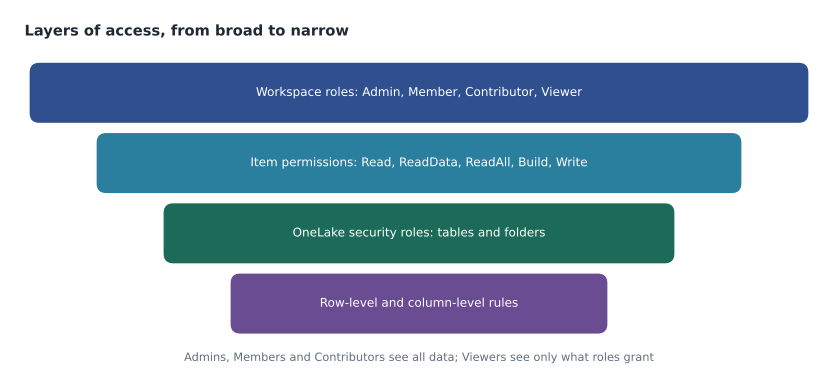
Fabric separates the control plane from the data plane. The control plane decides who can manage items: create them, change them, share them and delete them. It is governed by workspace roles, from lesson 3, and by permissions on individual items. The data plane decides who can read or write the data inside items, down to folders, tables, rows and columns. It is governed by OneLake security roles and by the security features of each engine, such as SQL permissions in a warehouse and row-level security in a semantic model. A person can have control-plane access without data-plane access, as a Viewer does, or data access to some tables and not others.
Item permissions and sharing
Not everyone who needs one item should be in its workspace. Fabric lets a person with permission share an individual item, which gives the recipient access to that item alone. The permissions that come with sharing depend on the item type, and the exam expects you to know the main ones for lakehouses, warehouses and semantic models.
| Permission | What it allows |
|---|---|
| Read | Connect to the item and see its metadata; for a lakehouse or warehouse, connect to the SQL endpoint |
| ReadData | Read data through the SQL endpoint, subject to SQL permissions |
| ReadAll | Read the item's data directly in OneLake, for example from Spark, subject to OneLake security roles |
| Build | Build new content, such as reports, on a semantic model |
| Reshare | Share the item with others, with the same or fewer permissions |
| Write | Change the item and its data |
Sharing is a convenient way to give a consultant one semantic model or a partner one report, but it is easy to lose track of. Each share is visible on the item's Manage permissions page, and a Fabric administrator can see sharing across the tenant in audit logs. For anything more than a few people, the hub preferred groups and roles over shares, for the same reasons as in lesson 3.
Workspace apps
Most business users should not be in a workspace at all. A workspace app, published from a workspace, packages selected reports and dashboards for an audience, with its own navigation. Users of an app see only what the app shows, with the data they are allowed to see, and they cannot browse the workspace's lakehouses or notebooks. An app can have several audiences, each seeing a different set of reports. For the pilot, the 140 report readers will reach their reports through an app called Finch Sales, published from FDH Sales [Prod], with a store audience and a head office audience. Nobody in that group will hold a workspace role.
OneLake security roles
OneLake security adds data access roles to lakehouses and other items whose data lives in OneLake. A role names some data, such as specific tables, folders or schemas, grants Read or ReadWrite on it, and lists its members, who are Microsoft Entra users, groups or identities. Roles grant access; there is no deny, so a user sees the union of what their roles allow. Each lakehouse has a role called DefaultReader that gives everyone with ReadAll permission access to all its data; to restrict people, the DefaultReader role is edited or removed and narrower roles are created. OneLake security roles also support row-level security, with a filter on a table, and column-level security, which hides columns.
These roles apply to Viewers and to people who reach the item through item permissions. They do not limit workspace Admins, Members or Contributors, who already have full access to the workspace's data. Sunil found that the most important sentence of the session: the only way to keep someone from seeing a table in a workspace is to keep them out of the three higher roles and give them only the roles that cover what they need.
Role: StoreOps_Read            (lakehouse lh_curated, FDH Stores [Prod])
  Permission: Read
  Data:       Tables/stores/*, Tables/stockline/sales
  Members:    sg-fdh-storeops
  Row filter on stockline.sales:
      StoreNumber IN (SELECT StoreNumber FROM stores.manager_map
                      WHERE ManagerUpn = USER_NAME())
How each engine enforces it
OneLake security is defined once, on the data, and Fabric's engines enforce it when they read. Spark notebooks run by a restricted user see only the permitted tables and rows. The SQL analytics endpoint enforces it when it reads in the user's identity mode; the endpoint can also run in a delegated mode, where SQL permissions defined in the endpoint control access instead. Semantic models in Direct Lake mode respect it when they read as the user. Shortcuts carry the rules of the item that holds the data, so a table protected in lh_curated stays protected when another workspace has a shortcut to it.
Some engines still have their own security that works alongside OneLake security. Warehouses use SQL GRANT and DENY, row-level security, column-level security and dynamic data masking. Semantic models have their own row-level and object-level security, defined in the model with DAX filters, which MSAZ-311 covers. For the store managers, whose only route to data is the Finch Sales app, the row filter that matters most will be in the semantic model; the OneLake role protects the curated tables for the store operations analysts who query them directly.
def can_read(user, table):
    """Simplified rules: high workspace roles see everything; others need a OneLake role."""
    if user["workspace_role"] in ("Admin", "Member", "Contributor"):
        return "yes, workspace role " + user["workspace_role"]
    for role in user["onelake_roles"]:
        if table in ROLES[role]:
            return "yes, through role " + role
    return "no"

ROLES = {"StoreOps_Read": {"stores.store", "stockline.sales"},
         "DefaultReader": {"stores.store", "stockline.sales", "rewards.member"}}
people = [
    {"name": "Ines", "workspace_role": "Contributor", "onelake_roles": []},
    {"name": "Priya (store ops)", "workspace_role": "Viewer", "onelake_roles": ["StoreOps_Read"]},
    {"name": "Consultant", "workspace_role": None, "onelake_roles": []},
]
for p in people:
print(f"{p['name']:18} rewards.member: {can_read(p, 'rewards.member')}")Ines rewards.member: yes, workspace role Contributor Priya (store ops) rewards.member: no Consultant rewards.member: no
What this code does
The program writes down the two rules that matter most: anyone with the Admin, Member or Contributor workspace role can read every table, and everyone else needs a OneLake security role that lists the table. It then checks three people against the Rewards member table. Ines can read it because she is a Contributor, the store operations analyst cannot because her only role does not list that table, and the consultant cannot because he has neither a workspace role nor a OneLake role.
The program is a simplification, but it captures why the hub removed the DefaultReader role from lh_curated before giving anyone Viewer access. With DefaultReader in place, every user with ReadAll permission would have seen the Rewards member table, which holds customers' names and emails.
Guests and partners
Sooner or later someone outside the company needs access. Harrow & Finch's paint supplier, for example, had asked to see weekly sales of its products. Fabric supports guest users through Microsoft Entra B2B: a guest is invited into the tenant, appears as a user, and can be given an app audience, an item share or, where the tenant settings allow, a workspace role. Several tenant settings decide what guests may do, such as whether they can browse content or only open what is shared with them, and whether content can be shared with external users at all. The safest pattern, and the one the hub planned for the supplier, is a separate app, published from a workspace that contains only a model filtered to that supplier's products, so that a mistake in one report cannot expose another supplier's figures. Elena added a rule: no guest is ever given a role in a workspace that holds customer data.
Semantic models deserve a word of their own, because they are the item most often shared beyond their workspace. A model with the Build permission granted to an analyst lets her build new reports in her own workspace on the hub's model, without copying data and without access to the lakehouses underneath. That is how the hub expects other departments to use its data: through certified semantic models, discussed in lesson 8, rather than through direct table access.
Network and tenant controls
Security also has a perimeter. Microsoft Entra Conditional Access can require multifactor authentication and compliant devices for Fabric sign-ins. Private links can restrict access to Fabric from approved networks, at tenant level or for individual workspaces, and managed private endpoints let Spark reach Azure resources such as a storage account over private networking. Trusted workspace access, from lesson 3, lets firewall-protected storage accept specific workspaces. Tenant settings control exports, external sharing, guest users and whether external apps may read OneLake. These are mostly decisions for Renata and Sunil rather than for the hub team, but the exams expect a candidate to know they exist and which problem each solves.
Worked problem
Answering Sunil
Sunil's question had two parts: what stops a store manager from seeing other stores' sales, and what stops her from opening the raw tables? Using the hub design, answer both.
Show solution
- She reaches data only through the Finch Sales app, as a member of the store audience. She holds no workspace role, so she cannot browse lakehouses, notebooks or the warehouse.
- The app's reports use the Sales Overview semantic model. Row-level security in that model, planned for MSAZ-311, filters sales to the stores mapped to her account, so each visual shows only her store.
- Even if she were given access to the curated lakehouse later, she would be a Viewer or item-level user, not a Contributor, so OneLake security roles would apply, and the hub has removed DefaultReader and grants only role-based access.
- Exports are limited by tenant settings, and labels, from lesson 8, follow any exported file.
Answer: Her own store only: through the app, model row-level security and, behind it, OneLake roles; no workspace role means no route to the raw tables.
Auditing access
Security that cannot be checked is hard to trust. Fabric records user and administrator activity in the Microsoft Purview audit log, including who viewed a report, who shared an item, who changed a workspace role and who changed OneLake security. The admin monitoring workspace, available to Fabric administrators, provides prebuilt reports on activity across the tenant. Sunil asked for a monthly review of three things during the pilot: everyone holding Admin, Member or Contributor in production workspaces, every direct share of a hub item, and every change to OneLake security roles. Each could be answered from the audit log in a few minutes, and a short list was exactly what he wanted.
A useful rule for reviews is to look for access that exists for convenience rather than need. Elena found two examples on the first pass: a former contractor still held a share on a test semantic model, and a whole department had been added to a workspace's Viewer role when only two of its members used the content. Both were removed the same day.
Common mistakes
MistakeRow-level security in a OneLake role restricts workspace Contributors.
InsteadOneLake security roles restrict Viewers and item-level users; Admins, Members and Contributors see all data in the workspace.
MistakeOneLake security roles can deny access to a table.
InsteadRoles only grant access; restrict people by removing broad roles such as DefaultReader and granting narrower ones.
MistakeEvery report reader should be a workspace Viewer.
InsteadReaders are better served by a workspace app, which shows only the published reports.
MistakeA shortcut lets people bypass security on the target.
InsteadShortcuts carry the security of the item that holds the data.
Summary and key terms
- Fabric separates the control plane, managed by workspace roles and item permissions, from the data plane, managed by OneLake security and engine security.
- Item permissions such as Read, ReadData, ReadAll, Build, Reshare and Write give access to one item.
- Workspace apps give business users reports without workspace access.
- OneLake security roles grant Read or ReadWrite on tables and folders, with optional row and column rules, and are enforced by Fabric engines.
- Admins, Members and Contributors bypass the finer layers; keep restricted users out of those roles.
- Conditional Access, private links, managed private endpoints and tenant settings protect the perimeter.
- Control plane
- The permissions that govern managing items: creating, changing, sharing and deleting.
- Data plane
- The permissions that govern reading and writing the data inside items.
- Item permission
- A permission on a single item, such as Read, ReadData, ReadAll or Build.
- Workspace app
- A packaged set of reports and dashboards published from a workspace to an audience.
- OneLake security role
- A data access role granting Read or ReadWrite on chosen tables or folders to its members.
- DefaultReader
- The built-in OneLake security role that gives users with ReadAll access to all of an item's data.
- Managed private endpoint
- A private network connection from Fabric Spark to an Azure resource.
Practice problems
Work each problem on paper first, then reveal the answer to check.
Which workspace roles are not restricted by OneLake security roles?
Show answer
Admin, Member and Contributor.
Which item permission lets someone build a report on a semantic model?
Show answer
Build.
Why did the hub remove DefaultReader from lh_curated?
Show answer
Because it gives every user with ReadAll access to all tables, including the Rewards member table.
How should 140 report readers reach their reports?
Show answer
Through a workspace app, without workspace roles.
What does a managed private endpoint connect?
Show answer
Fabric Spark to an Azure resource over private networking.
How should an outside supplier see sales of its own products?
Show answer
Through a separate app or model filtered to that supplier, as a guest user, never through a workspace role on customer data.
Which permission lets another department build reports on the hub's semantic model without table access?
Show answer
Build on the semantic model.
Lesson quiz · 5 questions
Score 60% or more to complete this lesson.
Create a free account to save your progress, take quizzes and earn a certificate.