
MSAZ-310 · Lesson 4 of 12 · 21 min
OneLake and shortcuts
▶ Video coming soon A video version of this lesson is on the way.
On Tuesday, October 27, Keiko arrived with a question that had bothered her since the first session. If OneLake is one lake for the whole company, where exactly is a file? Nikolai answered by opening the OneLake file explorer on his laptop. The hub's workspaces appeared as folders, exactly like a network drive, and inside FDH Sales [Dev] was a folder called lh_raw.Lakehouse with two subfolders, Files and Tables. OneLake, he said, is a lake organized by the same hierarchy as Fabric itself: tenant, workspace, item, and then the item's own folders.
How OneLake is organized
Every Fabric tenant has exactly one OneLake. Within it, each workspace is a top-level container, and each data item in the workspace is a folder whose name ends with its type, such as lh_raw.Lakehouse or wh_sales.Warehouse. A lakehouse has two areas. The Tables area holds managed Delta tables, which Fabric recognizes and exposes to its engines as tables. The Files area holds anything else: CSV extracts, JSON, images, PDFs or raw Parquet files, organized in whatever folders the team likes. Warehouses, eventhouses, SQL databases and mirrored databases also store their data in OneLake, though their folders are managed by the engine rather than edited directly.
OneLake is built on Azure Data Lake Storage Gen2 and offers the same APIs. Any tool that can talk to ADLS Gen2, such as Azure Storage Explorer, Azure Databricks, a Python program using the Azure storage libraries or the OneLake file explorer on Windows, can read and write OneLake with a path that names the workspace and the item. The address uses the host onelake.dfs.fabric.microsoft.com, followed by the workspace name, the item name with its type, and the path inside the item. Names with spaces can be used, though many teams prefer the workspace and item IDs in code because names can change.
abfss://FDH Sales [Dev]@onelake.dfs.fabric.microsoft.com/lh_raw.Lakehouse/Files/stockline/sales_2026-10-28.csv
https://onelake.dfs.fabric.microsoft.com/FDH Sales [Dev]/lh_raw.Lakehouse/Tables/salesfrom urllib.parse import unquote
def parse_onelake(url):
"""Split an abfss OneLake path into workspace, item, item type, area and path."""
rest = url.split("://", 1)[1]
workspace, rest = rest.split("@", 1)
host, _, path = rest.partition("/")
parts = unquote(path).split("/")
item, item_type = parts[0].rsplit(".", 1)
return {"host": host, "workspace": workspace, "item": item,
"type": item_type, "area": parts[1], "path": "/".join(parts[2:])}
url = "abfss://FDH Sales [Dev]@onelake.dfs.fabric.microsoft.com/lh_raw.Lakehouse/Files/stockline/sales_2026-10-28.csv"
for key, value in parse_onelake(url).items():
print(f"{key:9} {value}")host onelake.dfs.fabric.microsoft.com workspace FDH Sales [Dev] item lh_raw type Lakehouse area Files path stockline/sales_2026-10-28.csv
What this code does
The program takes one OneLake address and splits it at the punctuation that separates its parts: the workspace name sits before the @ sign, the host comes after it, and the first folder of the path is the item name with its type after a dot. It then prints each part on its own line, showing that the address names the workspace, the lakehouse, whether the data is in Files or Tables, and the folder and file inside.
Access to OneLake follows Fabric permissions. A person who opens a OneLake path with Azure Storage Explorer signs in with Microsoft Entra ID and sees only the workspaces and items their Fabric roles and permissions allow; OneLake has no separate account keys to hand out. A tenant setting, Users can access data stored in OneLake with apps external to Fabric, controls whether tools outside Fabric may connect at all.
Storage and protection
OneLake storage is billed by the amount of data stored, separately from capacity compute, and it is billed to the capacity the workspace runs on. Deleted files are kept for a short soft-delete period, so an accidental deletion can be undone with the storage APIs within that window. For disaster recovery, a capacity can have a setting that replicates its OneLake data to the region's paired region, at extra cost. Elena wanted that for production in time, but not for the pilot, where every table could be rebuilt from its sources.
Shortcuts
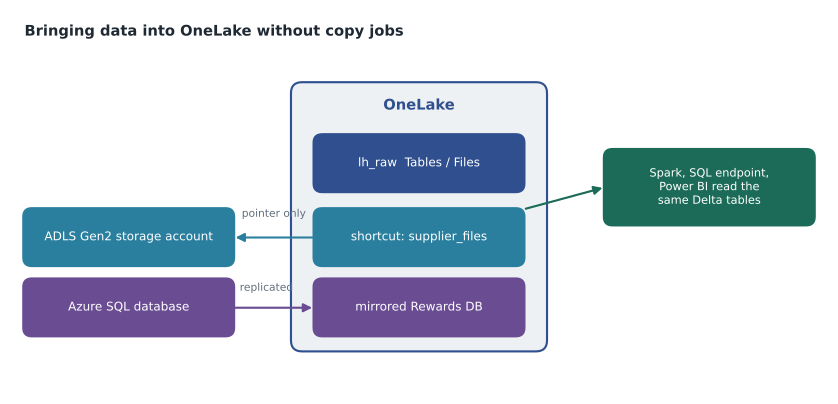
A shortcut is an object in OneLake that points to data stored somewhere else. To any Fabric engine it looks like a folder or a table that lives in the lakehouse, but no data is copied: reading through the shortcut reads the target. Shortcuts are created in a lakehouse, in a KQL database or at other points in OneLake that support them, and they come in two kinds.
| Kind | Targets | Whose identity is used |
|---|---|---|
| Internal (OneLake) shortcut | Another lakehouse, warehouse, KQL database or mirrored database in OneLake, in the same or another workspace | The identity of the person or process reading, checked against the target's permissions |
| External shortcut | Azure Data Lake Storage Gen2, Amazon S3, S3-compatible storage, Google Cloud Storage, Dataverse and other supported sources | The credential stored in the shortcut's connection, such as a workspace identity, service principal or key |
The difference in identity matters for security. An internal shortcut is checked against the target: if Keiko cannot read wh_sales, she cannot read it through a shortcut in another lakehouse either. An external shortcut uses the connection's credential, so anyone who can read the shortcut in Fabric reads the external data with that credential's rights. The external storage account cannot tell who is behind the read; Fabric permissions on the lakehouse become the real control. That is a reason to give external connections the narrowest rights that work, for example read-only access to one container.
Shortcuts in Files and in Tables
Where a shortcut is created decides how it is treated. A shortcut in the Files area can point to any folder and is seen as files. A shortcut in the Tables area must point to a Delta table, or to a folder that a supported engine can read as a table, and it appears as a table in the lakehouse and its SQL analytics endpoint. Pointing a Tables shortcut at a folder of CSV files does not turn them into a table; they need loading or converting first.
Deleting a shortcut removes only the pointer, never the target. Deleting files through a shortcut, however, deletes them at the target if the identity has write permission there. Nikolai showed this with a test container: he deleted a file inside a shortcut folder, then opened the storage account in the Azure portal, and the file was gone. Shortcuts to external stores should therefore use read-only credentials unless writing is intended.
Caching and cost of external shortcuts
Reading external data repeatedly can cost money in egress charges from the other cloud or region. For some external targets, such as Amazon S3, S3-compatible storage and Google Cloud Storage, a workspace can turn on shortcut caching, which keeps recently read files in OneLake for a set number of days so repeated reads are served locally. Data read through a shortcut also consumes Fabric capacity for the engine doing the reading, just as local data would. The data itself is billed by whoever stores it: the supplier price files in the storage account stay on the storage account's bill.
The supplier files shortcut
Harrow & Finch already kept supplier price lists and product PDFs in an ADLS Gen2 account, sthfsuppliercus, which the purchasing team's own process updated every week. Copying those files into Fabric each night would have meant a pipeline to maintain and two copies to keep in step. Instead, Ines created an external shortcut called supplier_files in the Files area of lh_raw, pointing to the prices container. For the trial she used a connection with a service principal that had the Storage Blob Data Reader role on that one container. In January she will replace it with the workspace identity of FDH Supply [Prod] and trusted workspace access, so the storage account's firewall can stay closed.
Keiko's first notebook read the newest price file straight from the shortcut path, and a second shortcut, this time internal, let FDH Stores [Dev] use the curated product table from FDH Sales [Dev] without copying it. That second shortcut is the pattern Nikolai expected to use most: one workspace owns a table, and others reference it, so there is one version of the product list in the whole hub.
Worked problem
Who can read the price files?
Ines's external shortcut uses a service principal with read access to the prices container. Keiko is a Viewer on FDH Sales [Dev] with no OneLake security role that covers Files. Ines is a Contributor. A consultant has no role in the workspace but has been given read access directly on the storage account. Who can read the price files through the shortcut in Fabric?
Show solution
- Ines is a Contributor, and Contributors can read all OneLake data in the workspace, including Files. She can read them.
- Keiko is a Viewer. Viewers see OneLake data only where a OneLake security role grants it, and none covers the Files area, so she cannot read them through the shortcut, although she may still query tables exposed through the SQL endpoint if permitted.
- The consultant has no Fabric access to the lakehouse, so cannot use the shortcut at all. Their direct access to the storage account is a separate route that Fabric does not control.
- The storage account sees only the service principal in every Fabric read, so its own logs show neither Ines nor Keiko.
Answer: Only Ines can read them through the shortcut; Keiko would need a OneLake security role; the consultant's access is outside Fabric.
Organizing the Files area
The Files area has no enforced structure, which is both its strength and its risk. Without rules, it fills with folders called test, new and final_v2. The hub agreed a simple layout for lh_raw before anything was loaded: one top-level folder per source system, such as stockline, rewards and suppliers, then a folder per dataset, then files named with the date they were received. Raw files are never edited after they land; if a file was wrong, the corrected one arrives as a new file and the old one stays for the record. That rule means any curated table can be rebuilt from the raw files, which is exactly what Elena wanted before she would agree to skip disaster recovery replication for the pilot.
Files that are really tables, such as a daily CSV extract with the same columns every day, are loaded into Delta tables in the Tables area as soon as they arrive, because Delta tables can be queried by every engine, while the raw files remain as an audit trail. Files that are documents, such as supplier PDFs and product images, stay in Files permanently.
Finding data: the OneLake catalog
Storing data once only helps if people can find it. The OneLake catalog, in the Fabric portal, lists every item a user has permission to see, across all workspaces, with its type, owner, workspace, domain, sensitivity label and endorsement. A user can filter by domain, search by name, and open an item's details to see its tables, its description and its lineage. Keiko spent ten minutes in the catalog during the session and found two forgotten Power BI semantic models from 2023 that duplicated the hub's planned Sales Overview model. Both were flagged for retirement, a small example of the catalog doing its job before the hub had even started.
Mirroring compared
Mirroring, introduced in lesson 1, solves a different problem. A shortcut works when the data is already in an open format in a store Fabric can read. An operational database such as Azure SQL Database stores rows in its own format and changes them constantly. Mirroring reads the database's change feed and keeps a Delta copy in OneLake, usually seconds to minutes behind, which Fabric engines can read through a SQL analytics endpoint and which can be the target of internal shortcuts from other workspaces. Mirroring has its own capacity and storage rules, with a free allowance of mirroring storage that depends on capacity size, and its list of supported sources and features changes often, so current documentation should be checked when planning one.
The Finch Rewards test mirror, set up by Ines on October 26, showed the trade-off clearly. It gave Keiko member and points tables with no pipeline at all, but those tables mirror the source exactly, including its design; any reshaping for reports still happens downstream, in lh_curated.
Common mistakes
MistakeDeleting a shortcut deletes the data it points to.
InsteadDeleting a shortcut removes only the pointer; deleting files through a shortcut is what removes target data, if the identity can write.
MistakeExternal shortcuts check each user's own rights on the external storage.
InsteadExternal shortcuts use the connection's credential; Fabric permissions decide who can use the shortcut.
MistakeA Tables shortcut turns any folder into a table.
InsteadA Tables shortcut must point to a Delta table or a folder a supported engine reads as a table.
MistakeOneLake has storage account keys for external tools.
InsteadOneLake access uses Microsoft Entra ID and Fabric permissions; there are no account keys.
Summary and key terms
- OneLake is organized by workspace and item, with Tables and Files areas in each lakehouse.
- OneLake supports the ADLS Gen2 APIs, so existing tools can read it using Fabric permissions.
- Storage is billed separately from compute; soft delete and optional disaster recovery replication protect data.
- Internal shortcuts check the reader's permissions on the target; external shortcuts use the connection's credential.
- Shortcuts copy nothing; caching can reduce egress for some external targets.
- Mirroring keeps a near real-time Delta replica of an operational database.
- Tables area
- The part of a lakehouse that holds managed Delta tables.
- Files area
- The part of a lakehouse that holds files in any format.
- Internal shortcut
- A shortcut to another OneLake location, checked against the reader's permissions on the target.
- External shortcut
- A shortcut to storage outside OneLake, such as ADLS Gen2 or Amazon S3, using a stored connection credential.
- Shortcut caching
- Keeping copies of recently read external files in OneLake to reduce egress.
- OneLake file explorer
- A Windows app that shows OneLake as folders in File Explorer.
Practice problems
Work each problem on paper first, then reveal the answer to check.
What two areas does a lakehouse have?
Show answer
Tables and Files.
Which identity does an internal shortcut use when Keiko reads it?
Show answer
Keiko's own, checked against the target's permissions.
What happens to the target data when a shortcut is deleted?
Show answer
Nothing; only the pointer is removed.
Why might an external shortcut's connection get read-only rights?
Show answer
Because deleting through the shortcut deletes target data if the credential can write.
When is mirroring a better fit than a shortcut?
Show answer
When the source is an operational database that does not store data in an open format.
Lesson quiz · 5 questions
Score 60% or more to complete this lesson.
Create a free account to save your progress, take quizzes and earn a certificate.