
MSAZ-310 · Lesson 1 of 12 · 23 min
What Microsoft Fabric is
▶ Video coming soon A video version of this lesson is on the way.
On Tuesday, October 20, 2026, Nikolai Petrenko booked the small meeting room on the third floor at Harrow & Finch's head office in Des Moines and wrote two words on the whiteboard: Finch Data Hub. The board had approved the idea in principle a few weeks earlier. The company would stop building its sales reports from a SQL Server database and a folder of Excel workbooks, and move its analytics to Microsoft Fabric. Before anyone designed a table, Nikolai wanted the two people who would do most of the work to understand what Fabric actually is, how it is paid for, and how it is governed.
Those two people were Ines Duarte and Keiko Tanabe. Ines joined the company in October 2026 as a data engineer and will build the pipelines and lakehouses; she plans to sit exam DP-700, Implementing Data Engineering Solutions Using Microsoft Fabric, in May 2027. Keiko is the data analyst who has owned the nightly sales report for seven years; after her fundamentals exam in March 2027 she plans to work toward DP-600, Implementing Analytics Solutions Using Microsoft Fabric. Nikolai ran the sessions, which the team called hub sessions, three mornings a week until November 11, on a Fabric trial capacity he had started on October 19. Elena Brandt, the data platform lead, reviewed each design before it was adopted. Nikolai's habit, familiar to anyone who had worked with him, was to stop every design discussion with the same question: who reads this data, and how fast do they need it?
This course covers the ground both exams share. DP-600 is aimed at analytics engineers who prepare data and build semantic models; DP-700 at data engineers who ingest, transform and monitor data. Both expect a candidate to plan and manage a Fabric environment: capacities, workspaces, access, sensitivity labels, version control and deployment. The later courses in each program, MSAZ-311 and MSAZ-312 for DP-600 and MSAZ-320 and MSAZ-321 for DP-700, build on the foundations here.
A software-as-a-service analytics platform
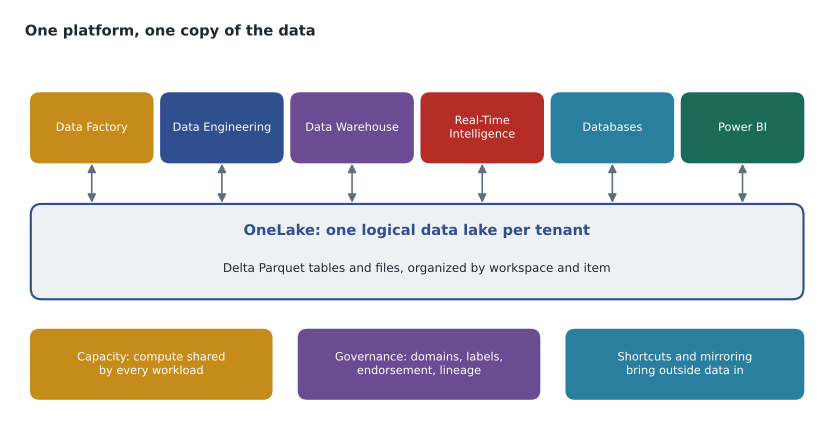
Microsoft Fabric is an analytics platform delivered as software as a service. That phrase matters more than it first seems. With the older Azure analytics services, a team created separate resources: a storage account for the data lake, a Data Factory for pipelines, a Synapse workspace or a Databricks workspace for Spark, a dedicated SQL pool for the warehouse, and a Power BI tenant for reports. Each had its own pricing, its own security model, its own networking and its own place where data was copied. In Fabric, all of these experiences live in one product, reached through one web portal, billed through one pool of compute, and storing their data in one lake.
Being a service also changes who does what. Microsoft runs the Spark clusters, the SQL engines and the storage. The team does not choose virtual machine sizes, patch servers or plan storage accounts. What the team does choose is how much capacity to buy, how to organize workspaces, who gets access, and how to govern the data. Those choices are the subject of this course. Nikolai summed it up on the first morning: in Fabric you spend less time building the platform and more time deciding how to run it well.
The workloads
Fabric groups its tools into workloads, sometimes called experiences. Each is a set of item types that a workspace can hold. The exams expect you to know which workload an item belongs to and what it is for.
| Workload | Main items | Typical use at Harrow & Finch |
|---|---|---|
| Data Factory | Pipelines, Dataflows Gen2, copy jobs | Load StockLine sales and supplier price files every night |
| Data Engineering | Lakehouses, notebooks, Spark job definitions | Clean and join raw data with Spark |
| Data Warehouse | Warehouses | Hold the star schema the reports use |
| Real-Time Intelligence | Eventhouses, eventstreams, Activator | Freezer sensor readings at the Ames store |
| Databases | SQL databases, mirrored databases | Copies of operational databases for analytics |
| Power BI | Semantic models, reports, dashboards | Store and head office sales reporting |
| Data Science | Notebooks, experiments, ML models | Demand forecasting, later |
Power BI was a product in its own right long before Fabric, and it remains the part of Fabric most people see. Existing Power BI content, workspaces and licenses carry over: a Power BI workspace is a Fabric workspace, and a report published last year sits in the same structure as a lakehouse created today. Keiko had been publishing reports to Power BI for years, which meant the hub would start with something familiar.
OneLake: one lake for the whole tenant
Underneath every workload is OneLake, a single logical data lake that comes with the tenant. Nobody creates OneLake; it exists as soon as Fabric is turned on. Each workspace is a folder in it, and each data item in a workspace, such as a lakehouse or a warehouse, is a folder inside that. Tables are stored in the open Delta Lake format, which is a set of Parquet files plus a transaction log. Because every engine reads and writes the same format, a table loaded by a Spark notebook can be queried with T-SQL through the lakehouse's SQL analytics endpoint and read by a Power BI semantic model in Direct Lake mode, all without making a copy.
That single copy is the point. In the old reporting process, the same sales figures existed in StockLine, in a reporting database, in an extract file and in each analyst's workbook, and the four versions rarely agreed by the end of a month. OneLake is built on Azure Data Lake Storage Gen2 and accepts the same file APIs, so existing tools that can read ADLS can read OneLake too. Lesson 4 covers OneLake in detail, including shortcuts, which make data stored elsewhere appear inside OneLake without copying it.
Capacity: one pool of compute
Every Fabric operation, from a Spark job to a report query, runs on a capacity. A capacity is a purchased amount of compute measured in capacity units, and all the workspaces assigned to it share it. Instead of paying for a Spark cluster, a SQL pool and a Power BI subscription separately, Harrow & Finch will pay for one capacity whose size it can change. The capacity also decides some licensing questions: whether report readers need their own paid Power BI licenses depends on its size. Lesson 2 covers capacities, sizes, trials and licenses, and lesson 11 covers how to watch capacity usage and what happens when a capacity is overloaded.
Tenant, capacity, workspace, item
Fabric has a small hierarchy, and most of its settings live at one of four levels. Knowing which level a setting belongs to answers many exam questions.
| Level | What it is | Who manages it | Examples of settings |
|---|---|---|---|
| Tenant | The organization's Microsoft Entra tenant and its Fabric service | Fabric administrators | Whether users can create Fabric items, export settings, guest access, tenant-wide features |
| Capacity | A pool of compute in one region | Capacity administrators | Size, which workspaces it serves, who may assign workspaces, some workload settings |
| Workspace | A container for items, linked to one capacity | Workspace admins | Roles, Git connection, Spark settings, workspace identity, domain |
| Item | A lakehouse, warehouse, notebook, report and so on | Item owners and workspace roles | Sharing, sensitivity label, endorsement, item-level permissions |
Tenant settings are managed in the admin portal by people with the Fabric administrator role in Microsoft Entra ID; at Harrow & Finch that is Renata Kowal, the cloud lead, and one colleague. Many tenant settings can be turned on for the whole organization, for specific security groups only, or for everyone except certain groups. That fine-grained delegation lets the company switch on a new feature for the hub team first. Capacity administrators, a role assigned on each capacity, can change the capacity's settings and decide who may assign workspaces to it; Nikolai holds that role for the trial capacity. Workspace roles are covered in lesson 3.
Domains
As the number of workspaces grows, a tenant needs a way to group them by business area. Fabric domains do this. A domain is a logical grouping of workspaces, such as Sales, Stores or Supply chain, and it can have subdomains. Domain admins can manage the domain's settings, and some tenant settings can be delegated to domain level so that, for example, the Sales domain can decide its own default sensitivity label. In the OneLake catalog, users can filter by domain to find data from their part of the business. Domains support a data mesh way of working, where each business area owns and publishes its own data products, but they are useful even for a single central team because they make the catalog easier to browse.
Nikolai proposed three domains for the hub: Sales, Stores and Supply chain. Elena asked why the hub needed domains at all with only a handful of workspaces. His answer was that domains cost nothing, and that adding them on day one is easier than sorting fifty workspaces into them in two years. She agreed, and the domains were created on October 22.
Governance built in
Fabric includes governance features that the older stack left to separate tools. The OneLake catalog lists the items a user can see, with their owners, endorsement, labels and lineage. Lineage view shows, for any item, what feeds it and what depends on it: which pipeline loads a table, which semantic model reads it, and which reports are built on that model. Microsoft Purview integration brings sensitivity labels from the Purview information protection service into Fabric items, and Purview's data map can scan Fabric for the wider catalog. The admin monitoring workspace and the audit log record who did what. Lessons 7 and 8 cover security, labels and endorsement.
Bringing data in without copying it
Two features let OneLake include data that is stored somewhere else. A shortcut is a pointer from a lakehouse folder to data in another location: another OneLake item, an Azure Data Lake Storage Gen2 account, Amazon S3, Google Cloud Storage and several other sources. The data stays where it is, and Fabric engines read it as if it were local. Mirroring goes further for operational databases: Fabric keeps a near real-time replica of a source database, such as Azure SQL Database, Azure SQL Managed Instance, SQL Server, Azure Cosmos DB, Snowflake or Azure Database for PostgreSQL, in Delta format in OneLake, so it can be analyzed without writing a pipeline. The set of supported sources keeps growing, and some are in preview, so the current list should be checked when planning.
On October 26, Ines mirrored the Finch Rewards test database, hf-sql-rewards-test-cus, as an experiment. Within twenty minutes its member and points tables appeared as Delta tables, and Keiko queried them through the mirror's SQL analytics endpoint. The production StockLine database will be mirrored only after it moves to Azure SQL Managed Instance in 2027.
Worked problem
Placing settings at the right level
During the first session Keiko listed five things she wanted to control. For each, decide whether it is set at tenant, capacity, workspace or item level: (1) stop exports of report data to Excel across the company, except for the finance group; (2) give Ines the right to create items in the sales development workspace; (3) mark the Sales Overview semantic model as Confidential; (4) choose which workspaces run on the pilot capacity; (5) connect the sales development workspace to a Git repository.
Show solution
- (1) Export settings are tenant settings in the admin portal. They can apply to the whole organization with an exception for a security group, so this is set at tenant level by a Fabric administrator.
- (2) Permission to create items comes from a workspace role. Contributor or higher in FDH Sales [Dev] lets Ines create items, so this is workspace level.
- (3) A sensitivity label is applied to an individual item, so this is item level, although a default label can be set higher up.
- (4) Workspaces are assigned to a capacity. A capacity admin, or someone the capacity admin allows, makes the assignment, so this is capacity level, carried out from the workspace settings or the capacity settings.
- (5) Git integration is configured per workspace by a workspace admin, so this is workspace level.
Answer: Tenant: exports. Capacity: which workspaces it serves. Workspace: roles and Git connection. Item: the label on the semantic model.
How this course is organized
Lessons 2 and 3 cover capacities, licenses, workspaces and roles. Lessons 4 to 6 cover where data lives: OneLake, lakehouses with Delta tables, and warehouses. Lessons 7 and 8 cover security, sensitivity labels and endorsement. Lessons 9 and 10 cover version control with Git and promotion with deployment pipelines. Lesson 11 covers monitoring capacity use, and lesson 12 brings it together by comparing Fabric's data stores and choosing the right one for each part of the hub. Each lesson follows the hub sessions in order, so by the end the team has a design ready for the January 2027 pilot.
The two exams in brief
Both exams are Microsoft associate-level certifications. As of November 2026, the DP-700 study guide lists three skill groups with equal weight, each 30 to 35 in 100 of the exam: implement and manage an analytics solution; ingest and transform data; and monitor and optimize an analytics solution. The DP-600 certification page lists three skill areas: maintain a data analytics solution, prepare data, and implement and manage semantic models. Both certification pages give an exam time of 100 minutes, note that the exams may include interactive components, and list several languages. Weights change from time to time, so candidates should check the current study guide on Microsoft Learn when they book. The first skill group of each exam is the one this course supports: workspace settings, capacity, access, labels, lifecycle management and monitoring.
Neither study guide gives a question count, and both note that most questions cover generally available features, though commonly used preview features can appear. That matters in Fabric more than in older products, because Fabric changes monthly and many features spend a period in preview before they are generally available. Throughout this course, features are described as they stood in November 2026, and anything still in preview is marked as such.
Common mistakes
MistakeFabric is a new name for Azure Synapse Analytics.
InsteadFabric is a separate software-as-a-service platform. Synapse is still an Azure service; Fabric takes many of its ideas and adds a single lake, a shared capacity and built-in Power BI.
MistakeEach workload in Fabric stores its own copy of the data.
InsteadAll workloads store data in OneLake in Delta format, so one copy can be read by Spark, T-SQL and Power BI.
MistakeDomains change who can see the data in a workspace.
InsteadDomains group workspaces for discovery and delegated settings; access still comes from workspace roles and item permissions.
MistakeMirroring and shortcuts are the same thing.
InsteadA shortcut points to data that stays where it is; mirroring keeps a replica of a database in OneLake.
Summary and key terms
- Microsoft Fabric is a software-as-a-service analytics platform that combines data integration, engineering, warehousing, real-time analytics, databases, data science and Power BI.
- All workloads store data in OneLake, one logical data lake per tenant, in the open Delta Parquet format.
- Compute comes from capacities measured in capacity units and shared by the workspaces assigned to them.
- Settings live at tenant, capacity, workspace or item level; domains group workspaces by business area.
- Shortcuts and mirroring bring outside data into OneLake without copy jobs.
- DP-600 and DP-700 both test planning and managing a Fabric environment.
- Microsoft Fabric
- A software-as-a-service analytics platform built around a single data lake and a shared capacity.
- Workload
- A group of related Fabric item types, such as Data Engineering or Power BI.
- OneLake
- The single logical data lake that every Fabric tenant has, storing data in Delta Parquet format.
- Capacity
- A purchased pool of compute, measured in capacity units, that runs Fabric operations for the workspaces assigned to it.
- Domain
- A logical grouping of workspaces by business area, used for discovery and delegated settings.
- Shortcut
- A pointer in OneLake to data stored in another location.
- Mirroring
- A Fabric feature that keeps a near real-time replica of an operational database in OneLake.
Practice problems
Work each problem on paper first, then reveal the answer to check.
Why does a table loaded by Spark not need to be copied before Power BI can use it?
Show answer
Because it is stored once in OneLake in Delta format, which Spark, the SQL analytics endpoint and Direct Lake semantic models all read.
At what level are export settings controlled?
Show answer
At tenant level, in the admin portal, optionally scoped to security groups.
What does a domain group?
Show answer
Workspaces, by business area.
Name two kinds of external storage a shortcut can point to.
Show answer
For example Azure Data Lake Storage Gen2 and Amazon S3; other OneLake items and Google Cloud Storage are also supported.
Which skill group of DP-700 does this course mainly support?
Show answer
Implement and manage an analytics solution.
Lesson quiz · 5 questions
Score 60% or more to complete this lesson.
Create a free account to save your progress, take quizzes and earn a certificate.