
MSAZ-310 · Lesson 10 of 12 · 21 min
Deployment pipelines
▶ Video coming soon A video version of this lesson is on the way.
Git answers the question of which version of an item is current. It does not, by itself, move that version from development into the workspace store managers rely on. On Tuesday, November 10, the tenth hub session tackled promotion: how a change built and reviewed in FDH Sales [Dev] reaches FDH Sales [Test] for checking and then FDH Sales [Prod] for use, without anyone editing production by hand. Fabric's built-in tool for that is the deployment pipeline.
What a deployment pipeline is
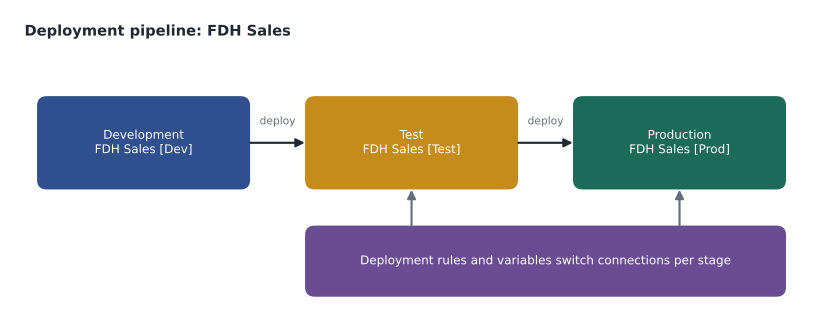
A deployment pipeline is a Fabric object with a sequence of stages, each assigned to one workspace. By default a new pipeline has three stages, Development, Test and Production, but a pipeline can have anywhere from two to ten stages, and stages can be added, removed and renamed when the pipeline is created. Deploying from one stage to the next copies the definitions of the selected items from the source workspace into the target workspace. Items that already exist in the target, paired with their source counterparts, are overwritten with the new definition; items that do not exist are created; items in the target that are missing from the source are left alone. Workspace folders are carried across too.
A deployment pipeline is not the same thing as a data pipeline. A data pipeline, from the Data Factory workload, moves and transforms data on a schedule. A deployment pipeline moves item definitions between workspaces when a person or an automated process asks it to. The names are similar enough that the exams sometimes test the difference.
What is and is not deployed
Deployment copies definitions and metadata, not data. Deploying a lakehouse creates or updates the lakehouse item in the target, but the tables and files inside it are not copied; production data is loaded in production by production pipelines. Deploying a semantic model copies its definition, but the target model must be refreshed to hold data. Workspace settings, workspace roles and item permissions are not deployed, so production keeps its own access rules. Some item properties are deliberately kept per stage, such as a semantic model's data source credentials and scheduled refresh settings, because they usually differ between test and production.
| Deployed | Not deployed |
|---|---|
| Item definitions: notebooks, data pipelines, reports, semantic model structure, lakehouse and warehouse definitions | Data in tables and files |
| Folder structure in the workspace | Workspace roles and item permissions |
| Relationships between items in the same stage, through autobinding | Most workspace settings |
| Rules and variable values chosen for the target stage | Data source credentials and refresh schedules, kept per stage |
Pairing and autobinding
Items in neighboring stages are paired: once an item has been deployed from Development to Test, the pipeline remembers that the two are the same item, even if one is later renamed. Pairing is what lets a later deployment overwrite the right target instead of creating a duplicate. Items created separately in each workspace with the same name and type can also be paired when the pipeline is first set up.
Autobinding keeps dependencies inside a stage. When a report in Development is built on the Sales Overview model in Development, deploying both to Test binds the Test report to the Test model, not back to the Development one. Without autobinding, a production report could quietly read development data. If the item a report depends on is not deployed and has no pair in the target, the deployment warns and may fail, which is a reason to deploy related items together.
Rules and variables
Some settings must differ between stages. The test semantic model should read the test warehouse, and the production model the production warehouse; a notebook in test should write to the test lakehouse. Deployment rules handle the most common cases for some item types: a data source rule or parameter rule on a semantic model, set on the target stage, replaces the connection or parameter value whenever that stage is deployed to. Variable libraries are a newer, more general tool: a variable library item holds named values, such as the name of a lakehouse or a storage path, with a different value set for each stage, and items such as pipelines and notebooks read the variable instead of a hard-coded value. The hub created a variable library, vl_fdh, with variables for the raw and curated lakehouse names and the supplier storage path.
Variable library: vl_fdh
  Variable            Dev value              Test value              Prod value
  raw_lakehouse       lh_raw (FDH Sales Dev)  lh_raw (FDH Sales Test)  lh_raw (FDH Sales Prod)
  supplier_path       prices-dev             prices-test             prices
  alert_group         developer's own        fdh test alerts         fdh alerts
Comparing stages before deploying
Before deploying, the pipeline shows a comparison between neighboring stages: which items are new in the source, which are different, which are the same, and which exist only in the target. A detailed comparison can show the changed lines of an item's definition. Checking that view before every deployment is the cheapest test there is: if the comparison shows more changes than the person expected, someone else's unfinished work may be about to go to production.
# What would deploying Dev to Test do? Compare definitions by version label.
dev  = {"nb_clean_sales": "v5", "pl_nightly_load": "v3", "Sales Overview": "v7", "returns_table": "v1"}
test = {"nb_clean_sales": "v5", "pl_nightly_load": "v2", "Sales Overview": "v6", "old_test_report": "v1"}

for item in sorted(set(dev) | set(test)):
    if item not in test:
        action = "new in source: will be created in Test"
    elif item not in dev:
        action = "only in Test: left unchanged"
    elif dev[item] != test[item]:
        action = f"different: Test {test[item]} will be overwritten by {dev[item]}"
    else:
        action = "same: nothing to do"
print(f"{item:16} {action}")Sales Overview different: Test v6 will be overwritten by v7 nb_clean_sales same: nothing to do old_test_report only in Test: left unchanged pl_nightly_load different: Test v2 will be overwritten by v3 returns_table new in source: will be created in Test
What this code does
The program lists the items in the development and test stages with a version label for each definition. For every item in either stage, it decides what a deployment from development would do: create it if it is new, leave it if it exists only in test, overwrite it if the versions differ, or do nothing if they match. The output shows the four outcomes a deployment pipeline's comparison view reports.
Who can deploy
A deployment pipeline has its own admin role: pipeline admins can view, share, edit and delete the pipeline and assign workspaces to its stages. To deploy, a person also needs permissions in the workspaces involved; deploying into a stage typically needs at least the Contributor role in the target workspace, and assigning a workspace to a stage needs workspace admin rights. Workspaces in a deployment pipeline must be on a capacity, such as an F capacity, or in Premium Per User for Power BI-only content. For the hub, the pipeline admins are the leads group, and the deployment service principal from lesson 3 is a Member of the test and production workspaces so that deployments can also be run through the Fabric REST APIs from Azure DevOps.
Approvals and automation
Fabric's deployment pipelines do not have a built-in approval step. A team that needs approvals, such as Elena's rule that every production deployment be approved by a lead, adds them outside Fabric. The usual pattern is an Azure DevOps or GitHub pipeline that, after a pull request is merged, calls the Fabric APIs to deploy from Development to Test, runs checks, waits for an approver, and then deploys from Test to Production. The deployment history in Fabric records each deployment, who ran it and what it changed, which is useful for audits.
Some teams skip Fabric deployment pipelines altogether and deploy from Git, using the REST APIs or tools such as fabric-cicd to publish items from a branch to each stage's workspace. That approach suits teams that already run all their releases from Azure DevOps or GitHub and want one release process for code and data items. Fabric deployment pipelines suit teams who want a visual, low-maintenance promotion tool inside Fabric. The hub started with the deployment pipeline because it was quick to set up and easy for Keiko's reporting team to understand, and kept the API route in mind for later.
Worked problem
Planning the first production release
The pilot starts on January 4, 2027. The leads want FDH Sales [Prod] ready by December 18, when the trial ends. Development is ready on November 10; test needs at least a week of checks. Plan the deployment steps and say what else must happen in production, given that deployment does not copy data or permissions.
Show solution
- Deploy Development to Test after the November 10 review, using the comparison view to confirm the expected items: two lakehouses, the warehouse, four notebooks, two data pipelines, the semantic model and three reports.
- Set deployment rules or variable values for Test first, so the model reads wh_sales in FDH Sales [Test] and notebooks write to the test lakehouses.
- Load test data and run a week of checks, ending around November 20: row counts against StockLine, a model refresh, and report checks by two store managers.
- Set the Production stage's rules and variable values, then deploy Test to Production in the first week of December.
- In production: assign roles to groups, create the workspace identity and grant it storage access, load history, set the model's refresh schedule and credentials, and publish the Finch Sales app. None of these come with a deployment.
Answer: Deploy Dev to Test after the November 10 review, check until about November 20, deploy to Prod in early December, then load data, assign access and publish the app in production before December 18.
Hotfixes and going backward
Sometimes a fix is needed in production faster than the normal path allows. The temptation is to edit production directly, which leaves production different from development and Git, so the next deployment silently undoes the fix. The hub's rule is that even an urgent fix starts in development: make the change in a short-lived branch, merge it, deploy through Test, and if time is very short, keep the Test checks brief rather than skip the stage. Deployment pipelines can also deploy backward, from a later stage to an earlier one, in limited cases such as filling an empty earlier stage, which helps when a team adopts pipelines for content that already exists in production. Backward deployment is a setup tool, not a way to make production the source of truth.
Common deployment problems
A few problems turn up in almost every team's first months with deployment pipelines, and knowing them in advance saves a frustrating afternoon. The first is a dependency that was not deployed: a report goes to Test but its semantic model does not, and the deployment fails or warns because the report has nothing in Test to bind to. Deploying related items together, or deploying the whole workspace, avoids it. The second is an item created directly in Test or Production with the same name as one in Development; until the two are paired, the next deployment may create a duplicate. The fix is to keep upper stages hands-off, so items reach them only by deployment.
The third is a connection that was not switched: a notebook in Production still writes to the Development lakehouse because its path was typed into a cell rather than taken from the variable library. The hub's rule was that no item may contain a workspace or lakehouse name directly; every such name comes from vl_fdh. The fourth is forgetting that data does not travel. A newly deployed lakehouse in Test is empty, and a new table in Production needs its first load to be run in Production. Keiko wrote these four on a card and pinned it beside her desk.
Common mistakes
MistakeDeploying a lakehouse copies its tables to the next stage.
InsteadDeployment copies definitions only; data must be loaded in each stage.
MistakeA deployment pipeline must have exactly three stages.
InsteadThree is the default; a pipeline can have two to ten.
MistakeDeploying also copies workspace roles to production.
InsteadRoles and item permissions are not deployed; each stage keeps its own access.
MistakeFabric deployment pipelines include an approval gate.
InsteadApprovals are added outside Fabric, for example in Azure DevOps or GitHub release pipelines.
Summary and key terms
- A deployment pipeline has two to ten stages, three by default, each assigned to a workspace.
- Deploying copies item definitions and folders to the next stage; data, roles and most settings stay per stage.
- Pairing links items across stages, and autobinding keeps dependencies within a stage.
- Deployment rules and variable libraries supply per-stage values such as connections and lakehouse names.
- The comparison view shows new, different, same and target-only items before deployment.
- Approvals and automation come from Azure DevOps or GitHub through the Fabric REST APIs.
- Deployment pipeline
- A Fabric object that promotes item definitions through a sequence of stage workspaces.
- Stage
- One step of a deployment pipeline, assigned to one workspace.
- Pairing
- The link a deployment pipeline keeps between an item and its counterpart in the next stage.
- Autobinding
- Rebinding deployed items to their dependencies in the same target stage.
- Deployment rule
- A per-stage override, such as a data source or parameter, applied when deploying to that stage.
- Variable library
- An item holding named values with a different value set for each stage.
- Deployment history
- The record of deployments, who ran them and what changed.
Practice problems
Work each problem on paper first, then reveal the answer to check.
How many stages can a deployment pipeline have?
Show answer
Between two and ten.
Are workspace roles copied during deployment?
Show answer
No; each stage keeps its own roles and permissions.
What stops a deployed Test report from reading the Development model?
Show answer
Autobinding, which binds it to the paired model in Test.
Where should a lakehouse name that differs by stage come from?
Show answer
A variable library or a deployment rule, not a hard-coded value.
How can a team require approval before production deployments?
Show answer
Run deployments through an Azure DevOps or GitHub pipeline with an approval step, calling the Fabric APIs.
Lesson quiz · 5 questions
Score 60% or more to complete this lesson.
Create a free account to save your progress, take quizzes and earn a certificate.