
MSAZ-310 · Lesson 2 of 12 · 21 min
Capacities and licensing
▶ Video coming soon A video version of this lesson is on the way.
The second hub session, on Wednesday, October 21, was about money. Dana Whitcombe, the chief financial officer, had asked for a monthly figure before the pilot started in January, and Nikolai wanted Ines and Keiko to understand how Fabric is paid for before he gave her one. Fabric has two separate things that cost money, and confusing them is the most common licensing mistake: capacity, which pays for compute, and per-user licenses, which decide what each person can do with Power BI content.
Capacity units and F SKUs
A Fabric capacity is bought as an Azure resource. In the Azure portal, an administrator creates a Microsoft Fabric capacity in a subscription, a resource group and a region, chooses a size, and names one or more capacity administrators. Sizes are called F SKUs, and each provides a fixed number of capacity units, written CU. The number in the name is the number of units: an F2 has 2 CU, an F64 has 64 CU, and the range runs through F2048 and, at the very top, larger sizes up to F8192. Each step doubles the size of the one before.
| SKU | Capacity units | Typical use |
|---|---|---|
| F2, F4, F8 | 2, 4, 8 | Learning, small teams, development workspaces |
| F16, F32 | 16, 32 | Departmental analytics, pilots |
| F64 | 64 | The smallest size where free-license users can view Power BI content |
| F128 to F2048 | 128 to 2,048 | Large organizations and heavy engineering workloads |
| F4096, F8192 | 4,096, 8,192 | The largest sizes |
A capacity unit is an abstract measure of compute. Every operation consumes CU-seconds: a report query might use a few, a large Spark job many thousands. The capacity's size sets how many CU-seconds are available in each second. An F16 can deliver 16 CU-seconds every second, which is 57,600 in an hour and 1,382,400 in a day. Lesson 11 explains how Fabric spreads the cost of an operation over time, so that a short burst above the size does not immediately fail.
F SKUs are billed per second, with a one-minute minimum, and there is no commitment: a capacity can be scaled up for a busy month and down again, or paused when nobody needs it. While a capacity is paused it is not billed for compute, but the workspaces assigned to it cannot run anything, and their content cannot be viewed. Storage in OneLake is billed separately from compute, by the amount stored. For steady workloads, Azure offers a yearly reservation of capacity units that costs noticeably less than paying as you go. The older P SKUs, bought through Microsoft 365 as Power BI Premium, are being retired in favor of F SKUs.
The trial capacity
Fabric offers a trial capacity that lasts 60 days and provides 64 CU, the same size as an F64. Nikolai started one on October 19, so it will end on December 18, 2026. A trial is attached to the person who starts it, who becomes its capacity administrator, and workspaces can be assigned to it like any other capacity. It is ideal for exactly what the hub sessions are doing: learning, building a design and testing load times. It is not meant for production. When it ends, workspaces on it must be moved to a paid capacity, or their Fabric items stop working.
Per-user licenses
Separately from capacity, every person who uses Fabric has a per-user license. There are three.
| License | What it allows |
|---|---|
| Free (Fabric) | Granted on first sign-in. Can create and share non-Power BI Fabric items, such as lakehouses and notebooks, in workspaces on an F or trial capacity. Can view Power BI content only on a capacity of F64 or larger, with the Viewer role. |
| Power BI Pro | Can create, publish and share Power BI content, create Pro workspaces, and view Power BI content in Pro workspaces or on capacities smaller than F64. |
| Premium Per User (PPU) | Pro abilities plus Premium features in PPU workspaces, such as larger semantic models, more refreshes a day and the XMLA endpoint. Does not provide a Fabric capacity, so non-Power BI items still need an F or trial capacity. |
The key line in that table is the F64 threshold. On an F64 or larger capacity, people with only a free license can view Power BI reports shared with them, so a company with many report readers pays for capacity but not for a Pro license per reader. On anything smaller than F64, every person who views a Power BI report needs a Pro or PPU license. People who create and publish Power BI content need Pro or PPU on any capacity. Licenses for engineers who only build lakehouses and pipelines are less of a concern: a free license is enough for non-Power BI items on an F capacity.
Regions and data residency
A capacity lives in one Azure region, and the data in workspaces assigned to it is stored in that region. The tenant also has a home region, where tenant metadata is kept; for Harrow & Finch's Microsoft 365 tenant it is in the United States. A company can create capacities in other regions, called multi-geo, to keep data close to users or to meet residency rules. Moving a workspace with Fabric items between capacities in different regions is restricted, so the region should be decided before data is loaded.
For the hub, the capacity will be in Central US, matching the rest of the Azure estate. There is no general federal rule on where data must be stored, but payment card data follows PCI DSS and state privacy laws such as Iowa's consumer data protection act expect the company to know where customer data goes; choosing one region keeps the conversation simple.
Sizing the pilot
Nikolai's approach to sizing was to measure, not guess. During the trial he ran the nightly load, a full refresh of the Sales Overview semantic model and a simulated morning of store managers opening reports, and watched consumption in the Fabric Capacity Metrics app, covered in lesson 11. The busiest hour, around 7 a.m. when store managers check yesterday's sales, used a little under 16 CU on average once smoothing was taken into account. The nightly load ran comfortably in the background. On that evidence an F16 would carry the pilot, with an F32 as the fallback if the busy hour grew.
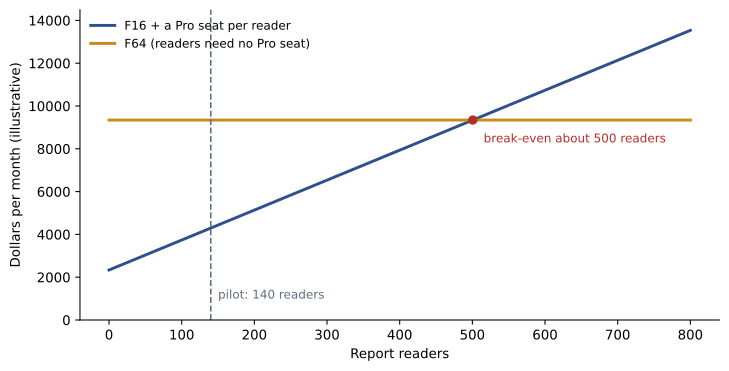
The harder question was readers. The pilot will have 140 people reading reports: 69 store managers and assistant managers across 23 stores, and 71 at head office. On an F16 every one of them needs a Pro license; on an F64 none of them does. That makes the comparison a simple sum, and the break-even number of readers is worth knowing before the pilot grows.
# Illustrative prices only, not Microsoft's price list
CU_HOUR = 0.20       # dollars per capacity unit per hour, pay-as-you-go
PRO_SEAT = 14        # dollars per Pro user per month
HOURS = 730          # hours in an average month

def capacity_cost(cu):
    return cu * CU_HOUR * HOURS

readers = 140
f16 = capacity_cost(16) + readers * PRO_SEAT
f64 = capacity_cost(64)
print(f"F16 capacity alone: {capacity_cost(16):,.0f} dollars per month")
print(f"F16 plus {readers} Pro users: {f16:,.0f} dollars per month")
print(f"F64, readers need no Pro seat: {f64:,.0f} dollars per month")
break_even = (capacity_cost(64) - capacity_cost(16)) / PRO_SEAT
print(f"Readers at which F64 costs the same: {break_even:.0f}")F16 capacity alone: 2,336 dollars per month F16 plus 140 Pro users: 4,296 dollars per month F64, readers need no Pro seat: 9,344 dollars per month Readers at which F64 costs the same: 501
What this code does
The program uses two made-up prices, one for an hour of a capacity unit and one for a monthly Pro license, and an average month of 730 hours. It works out the monthly cost of a 16-unit capacity plus a license for each of 140 readers, and of a 64-unit capacity where readers need no license. It then divides the difference in capacity cost by the license price to find how many readers would make the two options cost the same.
At these illustrative prices the pilot costs about 4,296 dollars a month on an F16 with Pro licenses, against about 9,344 on an F64, and the F64 only becomes cheaper beyond about 500 readers. The real prices differ by region and change over time, and the Azure pricing calculator and Microsoft's Fabric pricing page are the places to check them. The method, though, is the one Dana asked for: compare capacity plus licenses against the larger capacity, at the number of readers you actually have. Two other things push toward F64 even below the break-even: some features, such as Copilot in Fabric, have their own capacity requirements, and a larger capacity gives more headroom. Neither applied to the pilot.
Worked problem
Capacity units in a day
Ines wanted to know whether the nightly load would fit. During the trial the load consumed 410,000 CU-seconds. What share of an F16's daily capacity is that, and would it fit on an F8?
Show solution
- An F16 provides 16 CU-seconds per second. A day has 86,400 seconds, so the daily total is 16 × 86,400 = 1,382,400 CU-seconds.
- \[\frac{410\,000}{1\,382\,400} \approx 0.297\]
- So the load uses about 30 in 100 of an F16's daily compute, before any reports run.
- An F8 provides half as much, 691,200 CU-seconds a day. The load alone would use about 59 in 100 of it, leaving too little room for a busy morning of reports.
Answer: About 30 in 100 of an F16's daily capacity; on an F8 it would take about 59 in 100, too tight once reports are added.
Assigning workspaces to capacities
A workspace runs on exactly one capacity at a time, and it can be moved. Moving a workspace from the trial to the paid capacity in January will be a setting change in each workspace, provided both capacities are in the same region. Capacity admins can allow specific users or groups to assign workspaces to their capacity, so not everyone can put a workspace on the company's paid compute. A small company might run everything on one capacity. A larger one often separates development from production, so that an engineer's runaway notebook in development cannot slow the production reports. Nikolai noted that idea for later: during the pilot, the cost of a second capacity would be hard to justify, but once production reports were in daily use he would propose a small F4 or F8 for development workspaces.
Pay as you go or reserve
Pay-as-you-go pricing suits a pilot because nothing is committed: if the pilot is canceled in March, the capacity is deleted and billing stops. A reservation suits a capacity that will run all day, every day, for at least a year, because the discount is earned only if the reserved units are used. A reservation applies to a number of capacity units in a region rather than to a named capacity, so a company that reserves 16 units can apply them to any F16 in that region, or to two F8s. Pausing a reserved capacity saves nothing, since the reservation is already paid. The usual pattern, and the one Nikolai recommended, is to start pay as you go, watch real usage for a few months, and reserve only the baseline that production clearly needs.
What to tell finance
Nikolai's note to Dana, sent on November 10, kept to three points. First, the pilot will run on an F16 capacity in Central US, paid as you go from January 4, 2027, so it can be scaled or paused at no penalty. Second, the 140 pilot readers need Pro licenses, which many already have through the company's Microsoft 365 plan; the rest will be bought. Third, if readers grow past about 500, or if the company wants features that need a larger capacity, an F64 with a yearly reservation should be compared again. Dana approved the pilot budget the same week.
Common mistakes
MistakeA free license lets anyone view reports on any Fabric capacity.
InsteadFree-license users can view Power BI content only on F64 or larger capacities, with the Viewer role; below F64 they need Pro or PPU.
MistakePremium Per User includes a Fabric capacity.
InsteadPPU covers Power BI Premium features for that user; lakehouses, notebooks and other Fabric items still need an F or trial capacity.
MistakeThe trial capacity can be kept for production.
InsteadA trial lasts 60 days and is for evaluation; production workspaces need a paid capacity.
MistakePausing a capacity keeps reports available but stops refreshes.
InsteadA paused capacity runs nothing; content in its workspaces cannot be used until it resumes.
Summary and key terms
- Fabric is paid for in two parts: capacity for compute and per-user licenses for Power BI.
- F SKUs are named for their capacity units, from F2 upward, are billed per second with a one-minute minimum, and can be scaled or paused; reservations lower the cost of steady use.
- The trial capacity gives 64 CU for 60 days.
- Below F64, every Power BI report viewer needs Pro or PPU; on F64 and above, free users can view.
- A capacity is in one region, and data in its workspaces is stored there.
- Compare capacity plus licenses against a larger capacity at your real number of readers.
- Capacity unit (CU)
- The measure of Fabric compute; an F SKU provides as many CU as the number in its name.
- F SKU
- A Fabric capacity size bought through Azure, such as F2, F16 or F64.
- Trial capacity
- A free 60-day capacity equivalent to an F64, for evaluation.
- Power BI Pro
- A per-user license to create, share and, on smaller capacities, view Power BI content.
- Premium Per User (PPU)
- A per-user license with Premium Power BI features in PPU workspaces.
- Capacity administrator
- A person who manages a capacity's settings and who may assign workspaces to it.
- Multi-geo
- Using capacities in more than one region so data can be stored where it is needed.
Practice problems
Work each problem on paper first, then reveal the answer to check.
How many capacity units does an F32 provide?
Show answer
32.
What is the smallest capacity on which free-license users can view Power BI reports?
Show answer
F64.
How long does a Fabric trial capacity last, and how large is it?
Show answer
60 days, with 64 CU.
Which license does an engineer need to build a lakehouse in a workspace on an F16?
Show answer
A free license is enough for non-Power BI items on an F capacity.
Where is data in a workspace stored?
Show answer
In the region of the capacity the workspace is assigned to.
Lesson quiz · 5 questions
Score 60% or more to complete this lesson.
Create a free account to save your progress, take quizzes and earn a certificate.