
MSAZ-289 · Lesson 8 of 12 · 21 min
Review: high availability and disaster recovery
▶ Video coming soon A video version of this lesson is on the way.
High availability and disaster recovery is worth 20 to 25 parts in 100, and it is the group Elena expects to decide Walt's result. He scored 9 of 13 on the diagnostic. He knows backups, restores and log shipping deeply from fifteen years on HF-SQL01, but the Azure features, such as failover groups, active geo-replication, long-term retention and zone redundancy, are recent for him, and the questions that mix them with recovery objectives are where he hesitated. This review covers planning a strategy, backup and restore, and configuring and monitoring HA/DR features, in the order of the study guide.
Recovery objectives first
Every HA/DR question rests on two numbers. The recovery point objective, RPO, is the most data the business can afford to lose, measured in time: an RPO of five minutes means that after a failure, no more than five minutes of committed transactions may be lost. The recovery time objective, RTO, is how long the service may be unavailable before it is back. High availability deals with failures inside a region, such as a node, a rack or a zone; disaster recovery deals with losing a whole region. A good answer meets both objectives at the lowest cost and administrative effort, so the method is to find the cheapest option whose RPO and RTO are within the requirement.
| Option | Scope | Typical RPO | Typical RTO | Notes |
|---|---|---|---|---|
| Built-in availability, General Purpose | Node failure | Zero | Seconds to minutes | Remote storage; zone redundancy optional |
| Built-in availability, Business Critical | Node failure | Zero | Seconds | Local replicas; one readable secondary |
| Zone-redundant configuration | Zone failure | Zero | Seconds to minutes | Replicas in three availability zones |
| Point-in-time restore | User error, corruption | Minutes (log backups) | Depends on size | Restores to a new database |
| Geo-restore | Region loss | Up to about an hour | Hours | Uses geo-redundant backup copies |
| Active geo-replication | Region loss | Seconds | Minutes after failover | Azure SQL Database only; up to four secondaries |
| Failover group | Region loss | Seconds | Minutes | SQL Database and Managed Instance; listeners keep connection strings |
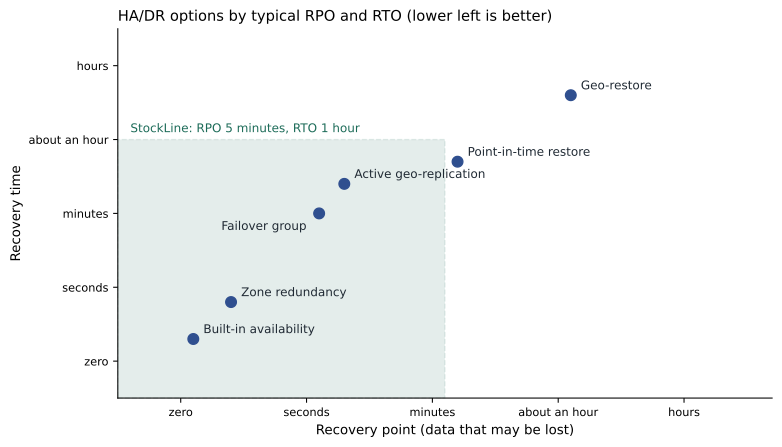
Harrow & Finch's StockLine requirement is an RPO of five minutes and an RTO of one hour for a regional disaster. Geo-restore fails the RPO. A failover group between the Business Critical managed instance in Central US and a secondary in East US 2 meets both, and its listener means the tills do not need a new connection string after a failover. That is the plan in MSAZ-282.
Hybrid and Azure-specific options
Hybrid HA/DR questions involve servers both on premises and in Azure. The Managed Instance link can replicate a SQL Server database to Managed Instance for disaster recovery, and since SQL Server 2022 it can fail over to Managed Instance and back. An Always On availability group can span an on-premises replica and an Azure VM replica over a VPN or ExpressRoute. Log shipping to an Azure VM is a simple, older option with an RPO equal to the log backup interval. Azure-specific options are the built-in availability of each tier, zone redundancy, active geo-replication, failover groups and backups with point-in-time and geo-restore.
Planning a testing procedure is a bullet in its own right. A DR plan that has never been tested is a guess. A test procedure states the scenario, the expected RPO and RTO, the steps, who does them, how success is measured and how to fail back. For a failover group, a planned failover with no data loss is the usual test; a forced failover, which can lose data, is used only in a real disaster or in a test on non-production copies. Walt's MSAZ-282 runbook schedules a planned failover test on the non-production instance each quarter.
Backup and restore
Azure SQL Database and Managed Instance take backups automatically: full backups weekly, differential backups every 12 or 24 hours, and transaction log backups about every 5 to 10 minutes. Point-in-time restore is available within a retention period of 1 to 35 days, 7 by default, and restores to a new database. Backup storage redundancy can be locally redundant, zone-redundant or geo-redundant; only geo-redundant storage allows geo-restore to another region. Long-term retention keeps weekly, monthly or yearly full backups for up to ten years, for compliance. Deleted databases can be restored within their retention period.
On Managed Instance, a user can also take a copy-only full backup to Azure Blob storage with BACKUP DATABASE ... TO URL, for example to move a database to a VM or to an on-premises server running a compatible version. On SQL Server VMs, the DBA is responsible for backups: native BACKUP to disks or to URL, automated backup through the SQL IaaS Agent extension, or Azure Backup for SQL Server in Azure VMs. Restoring with T-SQL follows the familiar chain: the full backup WITH NORECOVERY, the latest differential, the log backups in order, and the last one WITH RECOVERY, or with STOPAT for a point in time.
-- On a SQL Server VM, restore to 09:42 after an accidental DELETE at 09:43
RESTORE DATABASE StockLine_Recovered FROM URL = 'https://hfbackups.blob.core.windows.net/sql/StockLine_full.bak'
    WITH NORECOVERY, MOVE 'StockLine' TO 'F:\data\StockLine_Recovered.mdf', MOVE 'StockLine_log' TO 'G:\log\StockLine_Recovered.ldf';
RESTORE DATABASE StockLine_Recovered FROM URL = 'https://hfbackups.blob.core.windows.net/sql/StockLine_diff.bak' WITH NORECOVERY;
RESTORE LOG StockLine_Recovered FROM URL = 'https://hfbackups.blob.core.windows.net/sql/StockLine_log_0930.trn' WITH NORECOVERY;
RESTORE LOG StockLine_Recovered FROM URL = 'https://hfbackups.blob.core.windows.net/sql/StockLine_log_0945.trn'
    WITH STOPAT = '2027-02-16T09:42:00', RECOVERY;
Configuring HA/DR features
Active geo-replication creates up to four readable secondary databases in the same or other regions for an Azure SQL database. Failover is per database, and the application must change its connection string or use its own routing. Failover groups group databases on a logical server, or all user databases on a managed instance, and fail them over together. They provide a read-write listener and a read-only listener whose DNS names follow the primary, so applications keep the same connection string. The failover policy can be customer-managed, the recommended setting, or Microsoft-managed with a grace period. For Managed Instance, the secondary instance must be in a paired region with compatible networking, and the two virtual networks must be connected.
On Azure VMs, Always On availability groups need Windows Server Failover Clustering, or Pacemaker on Linux, and a way for clients to reach the listener. Placing replicas in different subnets avoids the need for an Azure load balancer; in a single subnet, a distributed network name or a load balancer is required. Failover cluster instances on VMs need shared storage: Azure shared disks, Premium file shares or Storage Spaces Direct. Log shipping is configured as on premises, with backup, copy and restore jobs in SQL Server Agent. On Managed Instance, high availability is built in, and availability groups appear through the Managed Instance link to SQL Server.
Monitoring HA/DR means watching replication lag and health. For geo-replication and failover groups, sys.dm_geo_replication_link_status shows replication state and the time since the last replicated transaction. For availability groups, the dashboard in SQL Server Management Studio and sys.dm_hadr_database_replica_states show synchronization state, log send queue and redo queue. Troubleshooting failovers usually means checking network connectivity between regions, DNS for the listener, quorum in a cluster, and whether a forced failover lost data.
Reading HA/DR questions
HA/DR questions are dense with numbers, and the numbers decide the answer. Before reading the options, Walt now writes the RPO, the RTO, the scope of failure (node, zone or region), the platform and any constraint such as 'no change to connection strings', 'minimize cost' or 'readable secondary for reports'. Then each option is a quick check against five lines. An option that meets everything but costs more than another that also meets everything is the wrong answer when the question says to minimize cost. An option that protects against a zone failure is the wrong answer when the question describes losing a region.
A second pattern tests the difference between availability and recovery from mistakes. A failover group copies every change to the secondary within seconds, including an accidental DELETE, so it does not help when a user drops a table. Point-in-time restore does. Questions that describe human error, a bad deployment or corruption call for restores; questions that describe hardware, zone or region failures call for replicas. Many candidates choose replication for everything because it sounds more advanced.
Checking replication health
Monitoring questions in this group often show a status query and ask what it means. The query below, run in the primary database, shows the state of geo-replication links and how far the secondary is behind.
SELECT partner_server, partner_database, replication_state_desc,
       role_desc, secondary_allow_connections_desc,
       replication_lag_sec, last_replication
FROM sys.dm_geo_replication_link_status;
A replication_state_desc of CATCH_UP means the secondary is synchronized and receiving changes continuously; SEEDING means the initial copy is still in progress and the secondary cannot yet be failed over to without data loss. The replication_lag_sec column shows the gap in seconds between the last committed transaction on the primary and its arrival on the secondary; a value that grows steadily points to a network problem or a secondary that is too small for the primary's write rate. A good alert fires when the lag stays above the RPO for several minutes.
Where Walt lost marks
Walt's four misses here were all about Azure features, not about his long-standing skills. He chose active geo-replication for a managed instance, which does not support it; he chose zone redundancy for a regional outage; he chose geo-restore for an RPO of five minutes; and he chose a forced failover as a test procedure. Each is now a line on his 'Why it was wrong' page. Elena adds one more rule of her own: for every HA/DR answer, say aloud what happens to a transaction committed one second before the failure. If the answer is 'it might be lost', check that the RPO allows it.
Practice tasks for HA/DR
In the sandbox, Walt plans to run a point-in-time restore of the serverless test database to a new name, set long-term retention to keep twelve monthly backups, create a failover group between two small test servers in the primary and paired regions and run a planned failover and failback, restore a copy-only backup from Blob storage to the SQL Server test VM with T-SQL, and read the link status view before and after a failover. The failover group test is scheduled for March, after the MSAZ-282 session on the same topic, and he will write down the time each step takes, because that measured time is the honest answer to 'what is our RTO'.
The same habit helps in case studies, where a single HA/DR requirement in the Technical requirements tab can decide three questions at once. If the case study says that the reporting copy must be readable and in another region, that one sentence points to a failover group or geo-replication secondary used for reads, and rules out every answer built only on backups.
Worked problem
Meeting RPO and RTO at the lowest cost
The Finch Rewards database in Azure SQL Database General Purpose must survive a regional outage with an RPO of 15 minutes and an RTO of 2 hours, and the API must not need a configuration change after failover. The finance team asks for the cheapest design. Which option fits?
Show solution
- Geo-restore has an RPO of up to about an hour, which fails the 15-minute RPO.
- Active geo-replication meets the RPO and RTO but needs the API to change connection strings or route itself.
- A failover group meets the RPO and RTO and its listener keeps the API's connection string unchanged.
- Business Critical is not needed; zone redundancy covers zone failures, not regional ones.
Answer: A failover group with a General Purpose secondary in the paired region. It meets the RPO and RTO, and the listener satisfies the no-configuration-change requirement.
Common mistakes
MistakeGeo-restore meets an RPO of a few minutes.
InsteadGeo-restore can lose up to about an hour of data; use geo-replication or a failover group.
MistakeActive geo-replication works for Managed Instance.
InsteadActive geo-replication is for Azure SQL Database; Managed Instance uses failover groups.
MistakePoint-in-time restore overwrites the original database.
InsteadIt restores to a new database.
MistakeZone redundancy protects against a regional outage.
InsteadIt protects against a zone failure within one region.
MistakeA forced failover is the normal way to test DR.
InsteadUse a planned failover for tests; a forced failover can lose data.
Summary and key terms
- Start from RPO and RTO, then choose the cheapest option that meets both.
- Built-in availability and zone redundancy cover node and zone failures; failover groups, geo-replication and geo-restore cover regional loss.
- Automatic backups give point-in-time restore for 1 to 35 days, long-term retention up to 10 years, and geo-restore with geo-redundant storage.
- On VMs, the DBA owns backups, availability groups, failover cluster instances and log shipping.
- Failover groups provide listeners so applications keep their connection strings; test DR with planned failovers on a schedule.
- RPO
- Recovery point objective: the most data, measured in time, that may be lost after a failure.
- RTO
- Recovery time objective: the longest acceptable time before service is restored.
- Failover group
- A group of databases that fail over together to another region, with listeners that follow the primary.
- Active geo-replication
- Readable secondary copies of an Azure SQL database in other regions, failed over per database.
- Long-term retention
- Keeping weekly, monthly or yearly full backups for up to ten years.
- Geo-restore
- Restoring a database in another region from geo-redundant backup copies.
Practice problems
Work each problem on paper first, then reveal the answer to check.
What is the default point-in-time restore retention for Azure SQL Database?
Show answer
Seven days, adjustable from 1 to 35.
Which HA/DR feature keeps the application's connection string the same after a regional failover?
Show answer
A failover group, through its listener.
How long can long-term retention keep backups?
Show answer
Up to ten years.
What does placing availability group replicas in different subnets avoid on Azure VMs?
Show answer
The need for an Azure load balancer for the listener.
Which kind of failover should be used for a routine DR test?
Show answer
A planned failover.
Lesson quiz · 5 questions
Score 60% or more to complete this lesson.
Create a free account to save your progress, take quizzes and earn a certificate.