
MSAZ-289 · Lesson 7 of 12 · 21 min
Review: automation
▶ Video coming soon A video version of this lesson is on the way.
Automation is worth 15 to 20 parts in 100, and Walt scored 8 of 10 here on the diagnostic, the best result of the five groups. He has written SQL Server Agent jobs for StockLine since 2009, and the backup, index and statistics jobs on HF-SQL01 are his. The two questions he missed were both about Azure SQL Database, where SQL Server Agent does not exist and the tools are different. This review covers the three parts of the group: SQL Server Agent jobs, automated deployment of database resources, and database tasks in Azure, with the platform differences that the exam tests most.
Which tool runs where
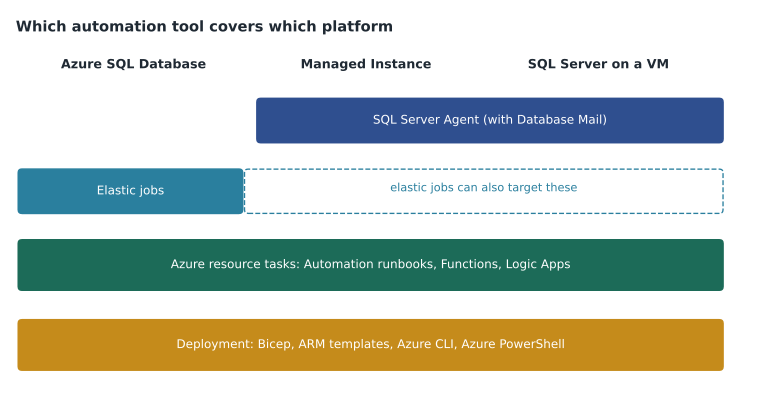
The first question to ask in any automation item is which platform the task runs on, because the tools differ. SQL Server Agent runs on SQL Server on VMs and on Azure SQL Managed Instance. Azure SQL Database has no SQL Server Agent; scheduled T-SQL against one or many databases uses elastic jobs. Tasks that act on Azure resources, such as scaling a database, pausing a VM or copying a database, use Azure Automation runbooks, Azure Functions, Logic Apps or pipeline tasks that call Azure PowerShell or the Azure CLI. Deployments of the resources themselves use ARM templates or Bicep, or the command tools.
| Task | Azure SQL Database | Managed Instance | SQL Server on a VM |
|---|---|---|---|
| Scheduled T-SQL in one database | Elastic job | SQL Server Agent job | SQL Server Agent job |
| Same T-SQL across many databases | Elastic job with a target group | Agent job or elastic job | Agent job with a loop, or elastic job |
| Email on job failure | Azure Monitor alert on job history, or a runbook | Agent notification with Database Mail | Agent notification with Database Mail |
| Scale compute on a schedule | Automation runbook or Function calling PowerShell or CLI | Runbook (change vCores) | Runbook (resize VM) |
| Deploy the resource | Bicep, ARM, CLI or PowerShell | Bicep, ARM, CLI or PowerShell | Bicep, ARM, CLI or PowerShell |
SQL Server Agent jobs
An Agent job has one or more steps, each running T-SQL, PowerShell or another subsystem, with an action on success and on failure for each step. Schedules can be one-off, recurring daily, weekly or monthly, or tied to Agent starting or the CPU being idle. One schedule can be shared by several jobs, which is convenient but means changing it changes all of them. Maintenance jobs, such as backups on VMs, index and statistics maintenance and integrity checks, should be scheduled outside business hours and spaced so they do not overlap.
Notifications need three things: Database Mail configured with a mail profile, an operator with an email address, and the job's notification settings pointing to the operator on failure, success or completion. Agent alerts are different: they fire on an error number, a severity or a performance condition, and can notify an operator or start a job. Managed Instance supports Database Mail and Agent notifications, so StockLine's existing failure emails can move with the database. On a VM, everything works as on premises.
Troubleshooting Agent jobs starts with the job history in msdb, which records each run and each step's message. Common causes are a step running under an account without the needed permission, a proxy missing for a PowerShell or SSIS step, a schedule that is disabled, a job owner whose login was removed, and on Managed Instance an Agent feature that is not supported there, such as some job step types. A job that 'did not run' may simply have no enabled schedule; a job that 'ran but did nothing' may have a step that succeeded with the wrong database selected.
Automating deployments
Deployment automation questions ask for the method that fits a constraint, and then how to monitor and troubleshoot a deployment. ARM templates and Bicep files are declarative: they state what should exist, and Azure works out what to create or change. They suit repeatable environments, pull requests and pipelines, and the what-if operation previews changes before they are made. Azure PowerShell and the Azure CLI are imperative: each command performs an action. They suit scripts, quick changes and tasks inside runbooks.
az deployment group what-if --resource-group rg-stockline-np --template-file sqlmi.bicep --parameters env=np
az deployment group create --resource-group rg-stockline-np --template-file sqlmi.bicep --parameters env=np
az deployment group list --resource-group rg-stockline-np --output table
Monitoring a deployment means watching its status in the resource group's Deployments page or with the list command, and reading the operation details when it fails. Typical failures are a name already in use, a quota limit for vCores in the region, a policy that denies a configuration such as public network access, a missing permission for the deploying identity, or a subnet for Managed Instance that is not delegated or is too small. A Managed Instance deployment can take a long time because it builds a virtual cluster, so a deployment that is still running after an hour is not necessarily stuck.
Database tasks in Azure
Elastic jobs run T-SQL on a schedule against one or many databases. An elastic job agent is an Azure resource that uses a job database, an Azure SQL database that stores job definitions and history. Target groups list the databases to run against: individual databases, all databases on a server, all databases in an elastic pool, or a shard map, with the option to exclude some. Each job has steps of T-SQL and a schedule. The agent authenticates to target databases with a Microsoft Entra identity, preferably a user-assigned managed identity created as a user in each target database with only the permissions the job needs, rather than with stored database credentials. Harrow & Finch's plan uses one elastic job to update statistics weekly on all 23 store scheduling databases in the pool.
Azure Automation runs runbooks, scripts in PowerShell or Python, on a schedule or from a webhook or alert, using the Automation account's managed identity to call Azure. Typical database runbooks scale a database up before month-end and down after, copy a production database to a test environment, or start and stop a non-production managed instance on a schedule. Managed Instance also has a built-in start and stop schedule, which is simpler for the stop-at-night case and is the plan for the non-production instance hf-mi-stockline-np.
Alerts on database tasks use Azure Monitor. An elastic job agent and an Automation account send job status to Log Analytics through diagnostic settings, and a log search alert can fire when a job fails, calling an action group that emails the team, posts to a channel or opens a ticket. Troubleshooting automated tasks means reading the job history or runbook output, checking the identity's permissions in each target, checking firewall or private endpoint access from the agent to the targets, and checking that the schedule is enabled. A job that works on twenty databases and fails on three usually points to a permission or access problem on those three.
Elastic jobs in T-SQL
Elastic jobs can be created in the portal, with PowerShell or with T-SQL stored procedures in the job database. The T-SQL form appears in exam questions, often as a hot area with the procedure names or parameter values hidden. The procedures live in the jobs schema of the job database.
-- Run in the job database
EXEC jobs.sp_add_target_group @target_group_name = 'StoreScheduling';
EXEC jobs.sp_add_target_group_member @target_group_name = 'StoreScheduling',
     @target_type = 'SqlElasticPool',
     @server_name = 'hf-sql-stores.database.windows.net',
     @elastic_pool_name = 'pool-storesched-prod';

EXEC jobs.sp_add_job @job_name = 'WeeklyStats', @description = 'Update statistics on store databases';
EXEC jobs.sp_add_jobstep @job_name = 'WeeklyStats',
     @command = N'EXEC sp_updatestats;',
     @target_group_name = 'StoreScheduling';
EXEC jobs.sp_update_job @job_name = 'WeeklyStats', @enabled = 1,
     @schedule_interval_type = 'Weeks', @schedule_interval_count = 1;
Reading the listing in order tells the story: the target group names what the job runs against, the member adds the pool, the job and its step say what to run, and the update sets the schedule. A question that asks why the job ran on some databases and not others points to the target group membership or to the identity's user missing in some targets. A question that asks how to see the results points to the job execution views in the job database, such as jobs.job_executions.
Where Walt lost marks
Walt's two misses in this group came from the same assumption. One question asked how to email the DBA team when a scheduled task fails on an Azure SQL database, and he chose an Agent operator; the right answer used an Azure Monitor alert on the elastic job's history. The other asked how to schedule an index maintenance script on Azure SQL Database, and he chose a SQL Server Agent job. Both times, his habit filled in a tool that does not exist on the platform in the question. The fix is the same as for monitoring: before judging the options, name the platform and cross out every tool it does not have.
Automation questions also test sequencing. Elena has Walt practice writing out, from memory, the order of steps to set up Database Mail and an operator, to set up an elastic job with a managed identity, and to deploy a Bicep file with a what-if preview. Build-a-list questions in this group often include one plausible step that is not needed, such as creating a credential when the job uses a managed identity, and a candidate who knows the true sequence spots the extra step quickly.
Practice tasks for automation
In the sandbox, the tasks that cover this group are short: create an Agent job on the test managed instance with a failure notification, break it on purpose and read the history; create an elastic job agent with a user-assigned managed identity and run a job against two test databases; write a runbook that scales the serverless test database's maximum vCores; and deploy a small Bicep file with what-if first. Walt has done the first already, many times, on premises. The other three are new, and his plan schedules them in February, after the MSAZ-282 sessions on the same topics.
Worked problem
Choosing the automation tool
Harrow & Finch needs four tasks automated: (1) update statistics weekly on the 23 store databases in an elastic pool in Azure SQL Database; (2) email the DBA team if StockLine's nightly integrity check fails on the managed instance; (3) scale the Finch Rewards database from 4 to 8 vCores at 06:00 on the last day of each month and back at midnight; (4) create the same test environment from source control for every release. Which tool fits each?
Show solution
- Task 1 runs T-SQL across many Azure SQL databases: an elastic job with a target group for the pool.
- Task 2 runs on Managed Instance, which has SQL Server Agent and Database Mail: an Agent job with an operator notified on failure.
- Task 3 changes an Azure resource on a schedule: an Automation runbook using its managed identity to call Azure PowerShell or the CLI.
- Task 4 needs a repeatable environment in source control: a Bicep template deployed from a pipeline.
Answer: An elastic job, an Agent job with Database Mail notification, an Automation runbook, and a Bicep template in a pipeline. Each tool fits the platform and the kind of task.
Common mistakes
MistakeAzure SQL Database runs SQL Server Agent jobs.
InsteadAzure SQL Database has no Agent; use elastic jobs.
MistakeAgent job notifications work as soon as an operator exists.
InsteadDatabase Mail must be configured and the job must be set to notify the operator.
MistakeElastic jobs should connect with a stored SQL login and password.
InsteadUse a Microsoft Entra identity, preferably a user-assigned managed identity with least-privilege users in each target.
MistakeA Bicep deployment runs commands in order like a script.
InsteadBicep is declarative; Azure works out the changes, and what-if previews them.
MistakeA Managed Instance deployment still running after an hour has failed.
InsteadCreating the virtual cluster can take a long time; check the operation status before assuming failure.
Summary and key terms
- Choose the tool by platform: Agent on Managed Instance and VMs, elastic jobs for Azure SQL Database, runbooks and Functions for Azure resource tasks, templates and command tools for deployment.
- Agent jobs need schedules, Database Mail and operators for notifications; troubleshoot from job history in msdb.
- Bicep and ARM are declarative and suit repeatable deployments with what-if previews; CLI and PowerShell suit scripts; read deployment operations to troubleshoot.
- Elastic jobs use an agent, a job database, target groups and an Entra identity, preferably a user-assigned managed identity.
- Alert on task failures with Azure Monitor log alerts and action groups.
- SQL Server Agent
- The job scheduler in SQL Server and Managed Instance that runs job steps on schedules and sends notifications.
- Operator
- An Agent contact, such as an email address, that receives notifications.
- Elastic job agent
- An Azure resource that runs scheduled T-SQL jobs against groups of Azure SQL databases.
- Target group
- The list of databases, servers, pools or shard maps an elastic job runs against.
- Runbook
- A script in Azure Automation that runs on a schedule or trigger, often with a managed identity.
- What-if
- A deployment operation that previews the changes a template would make.
Practice problems
Work each problem on paper first, then reveal the answer to check.
Which tool runs scheduled T-SQL against all databases in an Azure SQL Database elastic pool?
Show answer
An elastic job with a target group for the pool.
What three things does an Agent failure email need?
Show answer
Database Mail configured, an operator, and the job's notification set to that operator.
What identity should an elastic job agent use for its targets?
Show answer
A Microsoft Entra identity, preferably a user-assigned managed identity with least-privilege users in each target.
Which deployment command previews changes without applying them?
Show answer
az deployment group what-if (or the PowerShell equivalent).
Name two common causes of a failed Managed Instance deployment.
Show answer
A subnet that is not delegated or is too small, a vCore quota limit, a policy denial or a missing permission.
Lesson quiz · 5 questions
Score 60% or more to complete this lesson.
Create a free account to save your progress, take quizzes and earn a certificate.