
MSAZ-289 · Lesson 4 of 12 · 20 min
Review: planning and implementing resources
▶ Video coming soon A video version of this lesson is on the way.
The first review lesson covers the skill group 'Plan and implement data platform resources', worth 15 to 20 parts in 100. It was taught in MSAZ-280, where Walt and Elena drew up the Harrow & Finch database estate plan. Walt scored 6 of 10 here on the diagnostic, and the questions he missed shared a theme: he knew what each offering was, but he chose by habit rather than by the constraint in the question. This lesson revisits the decisions the outline expects, in the order the study guide lists them, with the exam traps that go with each.
Choosing the offering
Most planning questions start with a choice between three families. Azure SQL Database is a managed database with the engine, patching, backups and high availability handled by Azure; it suits new applications and databases without instance-level dependencies. Azure SQL Managed Instance is a managed instance with near-complete SQL Server compatibility: SQL Server Agent, cross-database queries, Database Mail, the CLR and linked servers, placed in a virtual network subnet. SQL Server on Azure Virtual Machines gives full control of the operating system and the engine, for software that needs operating system access, a specific SQL Server version, or features that the managed services lack.
The exam's constraints decide between them. 'The application uses cross-database queries and SQL Server Agent jobs' points to Managed Instance. 'The vendor requires local administrator access to the server' points to a VM. 'Minimize administrative effort' points away from VMs. 'Minimize cost for many small databases with uneven use' points to an elastic pool in Azure SQL Database. 'The database will grow beyond 16 TB' rules out General Purpose and Business Critical single databases and points to Hyperscale. Harrow & Finch's plan is a good map: StockLine to Business Critical Managed Instance because of Agent jobs and its cross-database query to Pricing, the Finch Rewards API to Azure SQL Database, the 23 store scheduling databases to an elastic pool, SalesHistory at 3.2 TB to Hyperscale with a named replica for reports, and the warehouse system to a SQL Server 2022 VM because the vendor needs operating system access.
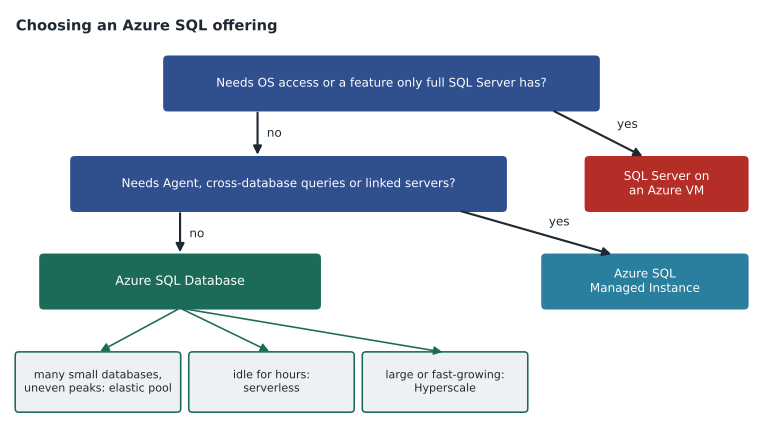
| Constraint in the question | Points to | Why |
|---|---|---|
| Cross-database queries, SQL Server Agent, Database Mail | Managed Instance | Instance-level features with managed patching and backups |
| Operating system access, unsupported version, third-party agent | SQL Server on an Azure VM | Full control of OS and engine |
| Many small databases with uneven peaks | Elastic pool | Databases share a pool of compute |
| Idle for hours, cost matters | Serverless (General Purpose) | Billed by use, can auto-pause |
| Over 4 TB on Business Critical or near 16 TB on General Purpose, fast growth | Hyperscale | Storage grows up to 128 TB with fast restores |
| Lowest latency and a readable secondary at no extra cost | Business Critical | Local SSD storage and a built-in readable replica |
| Servers stay on premises but need Azure management | Azure Arc-enabled SQL Server | Inventory, Defender, ESU and Entra sign-in from Azure |
Arc and Fabric use cases
Two newer bullets in the outline ask for use cases rather than configuration. Azure Arc-enabled SQL Server connects SQL Server instances running outside Azure, on premises or in other clouds, to the Azure control plane. Use cases on the exam include a single inventory of all SQL Server instances, Microsoft Defender for SQL on servers that stay on premises, Entra authentication for SQL Server 2022 and later, best practices assessment, pay-as-you-go licensing, and extended security updates for out-of-support versions billed through Azure. Harrow & Finch uses Arc for the finance server HF-SQL02, which runs SQL Server 2014 and receives pay-as-you-go extended security updates until July 12, 2027.
SQL database in Microsoft Fabric is a SQL database created inside a Fabric workspace, generally available since November 2025. Its data is mirrored automatically into OneLake, so it suits operational databases that feed analytics and reports in Fabric without building a separate pipeline. It is not the answer when a question needs instance features, virtual network isolation of the kind Managed Instance provides, or the full set of Azure SQL Database tiers. A question that mentions an analytics team already working in Fabric and a small application database whose data they need in near real time points toward it.
Deploying and patching
The outline asks candidates to choose an automated deployment method. ARM templates and Bicep describe resources declaratively and are the usual choice for repeatable environments in a pipeline; Bicep is easier to read and compiles to ARM. Azure CLI and Azure PowerShell run commands, and suit scripts and one-off tasks. All four can deploy every offering. Questions usually turn on the words 'repeatable', 'consistent across environments' or 'source control', which point to templates, or 'quickly', 'from a script' or 'in an existing PowerShell runbook', which point to the command tools. Lesson 7 reviews automation in more depth.
Patching differs by offering. Azure SQL Database and Managed Instance are patched by Azure; the candidate controls only the maintenance window and, for Managed Instance, the update policy, which decides whether the instance follows the SQL Server 2022 or SQL Server 2025 engine or the always-up-to-date track. SQL Server on Azure VMs and Arc-enabled servers are patched by the customer, with Azure Update Manager the recommended tool for operating system and SQL Server updates, including scheduled maintenance configurations. A question about 'minimizing patching effort' is a vote for a managed offering; a question about 'controlling when cumulative updates are applied to the VM' is about Update Manager.
Configuring for scale and performance
Scale questions ask for the right purchasing model, tier and size. The vCore model lets the candidate choose compute and storage separately and use Azure Hybrid Benefit for existing licenses; the DTU model bundles them into fixed sizes and suits simple single databases. General Purpose uses remote storage and is the cost-effective default; Business Critical uses local SSD storage with three secondary replicas, one of them readable, for low latency and fast failover; Hyperscale separates compute and storage and scales storage to 128 TB. For Managed Instance, General Purpose and Business Critical are the tiers, and the next-generation General Purpose, generally available since November 2025, separates storage size from IOPS. For VMs, the choices are memory-optimized sizes with constrained cores to cut licensing cost, Premium SSD v2 or Ultra disks for data and log, separate disks for data, log and tempdb, and tempdb on the local temporary disk where it fits.
Table partitioning and data compression appear in both the planning and the configuration bullets. Partitioning splits a table by a column's values into partitions, usually by date, so that old data can be switched out or compressed and queries that filter on the partitioning column read fewer partitions. It does not make every query faster, and it does not spread data across servers. Data compression is row or page compression on tables and indexes, which saves storage and IO at some CPU cost, and columnstore compression for analytic tables. Sharding, a separate bullet, spreads data across several databases by a key such as customer or store, using the elastic database tools to map keys to shards; it is the answer when one database cannot hold the workload, not when one table is large.
Migration
Migration questions ask the candidate to evaluate requirements, choose offline or online, and implement and troubleshoot. The deciding constraint is nearly always downtime. Offline methods stop writes, copy the database and start it in Azure: backup and restore of native backups to Managed Instance or a VM, BACPAC export and import for Azure SQL Database, and the Azure Database Migration Service in offline mode. Online methods keep the source running and replicate changes until a short cutover: the Managed Instance link, built on distributed availability groups, for SQL Server 2016 and later to Managed Instance; the Log Replay Service, which restores log backups continuously; the Database Migration Service in online mode; and transactional replication to Azure SQL Database.
Walt's StockLine plan uses the Managed Instance link because the cutover must take less than 30 minutes, and the link allows a planned failover of about 15 minutes. SalesHistory, a reporting database, can tolerate a long weekend, so it uses an offline copy of about 41 hours. Two tools from older study material are now out of date: Azure Data Studio and its Azure SQL migration extension reached the end of their life on February 28, 2026, and Microsoft points instead to the Azure Arc migration experience, Azure Migrate and the Database Migration Service through PowerShell or the CLI. An exam answer that names the retired extension is a distractor.
Moving between Azure SQL services is a bullet of its own. A database in Azure SQL Database can move between tiers by scaling, and to Hyperscale by changing the service objective; returning from Hyperscale to General Purpose is possible within 45 days of the move for databases that were migrated in. Managed Instance database copy and move copies or moves a database between managed instances, in the same or another region, while the source stays online, finishing with a short cutover; a move drops the source database at the end. Troubleshooting a migration means checking compatibility findings, network paths and ports (1433 and 5022 for the link), log backups that break the chain, and permissions on storage containers.
How Walt is fixing his planning score
Walt's missed planning questions on the diagnostic had one thing in common: he picked the offering he knew best before reading the last constraint. Elena's fix is a habit he practices on every planning question until May. Before looking at the options, he writes down, in three or four words each, every requirement in the stem: what must be kept, what must be minimized, what must be possible, what is ruled out. Then he crosses out each option that fails any of them. Only then does he choose among what is left, and if two options remain, he asks which one costs less or needs less administration, because associate questions often break ties that way.
He also keeps a one-page table of numbers that decide offerings: the 4 TB storage limit of Business Critical single databases, the 16 TB limit of General Purpose, the 128 TB of Hyperscale, the 15-minute minimum auto-pause delay of serverless General Purpose, and the SQL Server versions the Managed Instance link supports. Numbers like these turn a vague question into a clear one.
Worked problem
Choosing a migration method
A 900 GB SQL Server 2019 database on premises must move to Azure SQL Managed Instance. Writes can stop for no more than 20 minutes, there is a site-to-site VPN, and the team wants to test the target for a week with the source still live. Which method fits, and which methods are ruled out?
Show solution
- The downtime limit of 20 minutes rules out offline backup and restore of 900 GB over a VPN.
- A BACPAC import targets Azure SQL Database, not Managed Instance, and is offline.
- The Managed Instance link supports SQL Server 2016 and later, keeps the source live and replicates continuously.
- The link allows read-only testing of the replica on the instance before a planned failover.
- The Log Replay Service is also online, but the target database cannot be read until the final restore, so a week of testing on the target is not possible.
Answer: The Managed Instance link. It keeps downtime to the failover, allows read-only testing on the target and supports SQL Server 2019. Offline backup and restore, BACPAC and the Log Replay Service each fail one requirement.
Common mistakes
MistakeManaged Instance is the answer whenever a question mentions SQL Server compatibility.
InsteadCheck the specific need: operating system access points to a VM, and a single database without instance features can use Azure SQL Database.
MistakePartitioning spreads a table across several databases.
InsteadPartitioning divides a table inside one database; sharding spreads data across databases.
MistakeThe Azure Data Studio migration extension is the current migration tool.
InsteadIt was retired on February 28, 2026; use Arc migration, Azure Migrate or DMS through PowerShell or the CLI.
MistakeAzure patches SQL Server on Azure VMs automatically.
InsteadOn VMs the customer patches, usually with Azure Update Manager.
MistakeHyperscale is only for databases over 100 TB.
InsteadIt suits any database that needs large or fast-growing storage or fast restores; it scales to 128 TB.
Summary and key terms
- Choose the offering from the constraint: OS access to a VM, instance features to Managed Instance, otherwise Azure SQL Database with pools, serverless or Hyperscale as needed.
- Arc-enabled SQL Server brings Azure management, Defender, Entra sign-in and pay-as-you-go ESU to servers outside Azure; SQL database in Fabric suits operational data that feeds Fabric analytics.
- Templates (ARM, Bicep) suit repeatable deployments; CLI and PowerShell suit scripts; VMs are patched with Azure Update Manager.
- vCore versus DTU, General Purpose, Business Critical and Hyperscale, and VM sizing decide scale and performance; partitioning, compression and sharding solve different problems.
- Downtime decides offline versus online migration; the MI link, LRS, DMS online and transactional replication are online methods.
- Elastic pool
- A set of compute resources shared by several Azure SQL databases with uneven use.
- Hyperscale
- An Azure SQL tier that separates compute and storage and grows storage to 128 TB.
- Managed Instance link
- A feature that replicates a SQL Server database to Managed Instance with distributed availability groups, for migration or hybrid use.
- Log Replay Service
- A Managed Instance migration method that continuously restores log backups from storage.
- Sharding
- Spreading data across several databases by a key, managed with the elastic database tools.
- Azure Update Manager
- The Azure service used to schedule and apply operating system and SQL Server updates on VMs and Arc-enabled servers.
Practice problems
Work each problem on paper first, then reveal the answer to check.
Which offering fits a database that uses SQL Server Agent jobs and a cross-database query?
Show answer
Azure SQL Managed Instance.
What retired on February 28, 2026, and what replaces it?
Show answer
Azure Data Studio and its migration extension; use the Arc migration experience, Azure Migrate or DMS through PowerShell or the CLI.
What is the difference between partitioning and sharding?
Show answer
Partitioning divides a table within one database; sharding spreads data across databases by a key.
Which tool patches SQL Server on an Azure VM?
Show answer
Azure Update Manager.
Which online method allows testing a read-only copy on Managed Instance before cutover?
Show answer
The Managed Instance link.
Lesson quiz · 5 questions
Score 60% or more to complete this lesson.
Create a free account to save your progress, take quizzes and earn a certificate.