
MSAZ-282 · Lesson 7 of 12 · 20 min
Failover groups
▶ Video coming soon A video version of this lesson is on the way.
Walt's disaster-recovery binder for HF-SQL01 has a page titled "If the head office burns down". It lists twenty-two steps, starting with driving the backup tapes to Ames and ending with changing a DNS entry so the tills find the new server. Elena reads it with respect and then puts a single slide beside it: a failover group. Failover groups replicate a set of databases to another region, keep them in step, and give applications two connection names that always point to the current primary and secondary, so after a failover the tills reconnect to the same name and land in the other region. For Azure SQL Database and Azure SQL Managed Instance, they are the feature Microsoft recommends for most cross-region disaster recovery.
What a failover group is
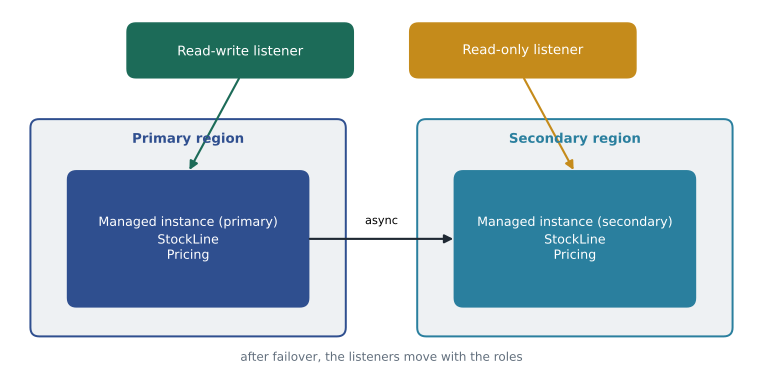
A failover group links a primary and a secondary across two regions and fails over a whole group of databases together. On Azure SQL Database, it is defined on a logical server and contains the databases you choose; one logical server can host several failover groups, each with its own set of databases. On Managed Instance, a failover group links two instances and contains all user databases on the instance; an instance can belong to only one failover group. Under the covers, replication uses the same asynchronous log streaming as geo-replication, so the RPO is the replication lag, typically seconds.
Listener endpoints
The key to failover groups is that applications stop using server names. Each group has a read-write listener and a read-only listener, which are DNS names that the service updates during failover. For a SQL Database failover group named fog-rewards, the read-write listener is fog-rewards.database.windows.net and the read-only listener is fog-rewards.secondary.database.windows.net. For a managed instance failover group, the names include the instance's DNS zone, for example fog-stockline.a1b2c3d4e5f6.database.windows.net. An application connects to the read-write listener for normal work; a report that can run on the secondary connects to the read-only listener with ApplicationIntent=ReadOnly. After a failover, the names stay the same and point to the other region, so the application needs only to reconnect, which its retry logic already does.
-- Before Skylight (the 22-step binder):
-- Server=HF-SQL01; Database=StockLine; ...
-- After the failover group is in place:
-- Server=tcp:fog-stockline.a1b2c3d4e5f6.database.windows.net,1433; Database=StockLine;
-- Authentication=Active Directory Default; MultiSubnetFailover=True; ...
-- Morning report:
-- Server=tcp:fog-stockline.secondary.a1b2c3d4e5f6.database.windows.net,1433; Database=StockLine;
-- ApplicationIntent=ReadOnly; ...
DNS changes take time to reach clients, governed by the record's time to live, which for listener records is short, around 30 seconds. Clients that cache DNS longer than that, or connection pools that keep stale connections open, may keep trying the old primary for a while after a failover. Walt's test plan includes checking how long each application takes to reach the new primary, rather than assuming the DNS change is instant.
Failover policy
A failover group has a failover policy that decides who triggers a failover when the primary region has an outage. With the customer-managed policy, the service never fails over on its own; the customer decides, using the planned or forced failover commands. With the Microsoft-managed policy, Microsoft may start a forced failover for all affected groups if an outage in the region lasts beyond a grace period that the customer chooses, of at least one hour. Microsoft's current guidance is to use the customer-managed policy for most workloads, because the customer knows best whether a forced failover's possible data loss and application disruption are worth it, and because the Microsoft-managed trigger is meant for large regional outages, not for a single database's problems.
Walt chooses the customer-managed policy for StockLine and Finch Rewards, and writes down in the runbook who may decide: the on-call DBA together with the duty manager, or the data platform lead. That decision rule, more than any setting, is what protects the one-hour RTO from lesson 4. If the decision step took longer than the grace period of a Microsoft-managed policy, Microsoft's trigger would act as a backstop; with the customer-managed policy, the runbook must make sure someone always answers.
| Policy | Who triggers a failover in a regional outage | Data loss possible | When to choose it |
|---|---|---|---|
| Customer managed | The customer, with a planned or forced failover | Only if the customer forces it | Most workloads; recommended by Microsoft |
| Microsoft managed | Microsoft, after the grace period (at least one hour) | Yes, it is a forced failover | When the customer wants a backstop and accepts possible data loss |
Requirements for Managed Instance failover groups
Failover groups for Managed Instance have more prerequisites, because the instances live in virtual networks. The secondary instance must be in a different region, must use the same service tier, and should have the same compute size and storage as the primary. It must share the primary's DNS zone, which is why MSAZ-280 noted that the DNS zone is fixed when an instance is created: the secondary must be created with the DNS zone partner set to the primary, or the listener names cannot cover both. The two instances' virtual networks must be connected, usually by global virtual network peering, their address spaces must not overlap, and network security groups must allow the replication traffic between the subnets on the ports Microsoft documents, 5022 and the range 11000 to 11999. The secondary must be empty when the group is created; seeding copies every user database across.
Worked problem
How long will the initial seeding take?
StockLine and Pricing together hold 450 GB. The replication link between Central US and East US 2 sustains about 150 MB per second for seeding. Estimate how long the first full copy will take, and decide whether it fits a Friday night.
Show solution
- Convert to megabytes: 450 GB × 1,024 = 460,800 MB.
- Time at 150 MB per second: 460,800 ÷ 150 = 3,072 seconds.
- In minutes: 3,072 ÷ 60 = 51.2 minutes.
- Seeding runs online while the primary keeps working, so it does not need an outage window.
Answer: The initial seeding should take a little under an hour. It can run on any evening, because the primary stays online; the group is ready for failover only when seeding has finished and the secondary is synchronized.
az sql instance-failover-group create --resource-group rg-stockline-prod-cus --name fog-stockline \
    --mi hf-mi-stockline --partner-mi hf-mi-stockline-dr --partner-resource-group rg-stockline-dr-eus2 \
    --failover-policy Manual

az sql instance-failover-group show --resource-group rg-stockline-prod-cus \
    --location centralus --name fog-stockline --query "{role:replicationRole, state:replicationState}"
On Managed Instance the secondary can be designated as a standby replica if it carries no read workload, which removes its SQL Server license charges, the same benefit described in lesson 6. StockLine's secondary will carry the morning report, so Walt cannot use the benefit for it in the first year. He records the trade-off: about the cost of the license portion of 8 vCores in exchange for keeping the report off the primary.
Failing over and failing back
A failover group supports the same two kinds of failover as geo-replication. A planned failover, started with the portal, PowerShell, the CLI or REST, synchronizes and then swaps roles with no data loss; it is used for drills and for failing back. A forced failover allowing data loss is used when the primary region is unavailable. After a forced failover, when the old region recovers, the old primary rejoins as the secondary automatically and resynchronizes; the team then plans a planned failover back at a quiet time, if they want the primary in its original region. Failing back is not compulsory, and some teams leave the primary where it is until the next scheduled drill.
# Planned failover (drill or failback): run against the secondary's region.
Switch-AzSqlDatabaseInstanceFailoverGroup -ResourceGroupName 'rg-stockline-dr-eus2' `
    -Location 'eastus2' -Name 'fog-stockline'

# Forced failover when the primary region is down:
Switch-AzSqlDatabaseInstanceFailoverGroup -ResourceGroupName 'rg-stockline-dr-eus2' `
    -Location 'eastus2' -Name 'fog-stockline' -AllowDataLoss
What a failover group does not replicate
A failover group replicates databases, not everything around them. On SQL Database, logins on the logical server, server-level firewall rules and the server's Microsoft Entra administrator settings are not copied; database-level firewall rules and contained users, which live in the database, are. On Managed Instance, server-level objects such as logins, SQL Server Agent jobs, linked servers, Database Mail settings and credentials live in master and msdb and are not replicated; they must be created on the secondary instance as well and kept in step. Walt adds a weekly elastic-job-style check, run by a runbook, that compares the Agent jobs and logins on both instances and reports any difference, because a failover that brings StockLine up without its nightly jobs would be a slow-motion outage.
| Object | Replicated by the failover group? | What to do |
|---|---|---|
| User databases and their data | Yes | Nothing |
| Contained database users and database-level permissions | Yes | Nothing |
| Logins (SQL Database logical server or Managed Instance) | No | Create on the secondary with the same security identifiers |
| SQL Server Agent jobs, operators and alerts (Managed Instance) | No | Script and deploy to the secondary; compare weekly |
| Database Mail and credentials (Managed Instance) | No | Configure on the secondary |
| Server-level firewall rules (SQL Database) | No | Configure on the secondary server, or use database-level rules |
Failover groups for SQL Database
On Azure SQL Database the design is simpler than on Managed Instance, because logical servers have no virtual network of their own. Walt's failover group for Finch Rewards, fog-rewards, links the production logical server in Central US with a server in East US 2, and contains the finchrewards database. When a database is added to a group, the service creates its geo-secondary on the partner server with the same service objective, so a group is also an easy way to add secondaries consistently. Databases in an elastic pool can be added to a group too, provided the partner server has an elastic pool of the right size to receive them; the store scheduling pool will have a matching pool in the secondary region for that reason.
One logical server can hold several failover groups, which lets teams group databases by application: if two applications share a server but should fail over independently, each gets its own group with its own listener. The reverse is not allowed: a database can belong to only one failover group. A group's read-only listener points to the secondary, and is useful only when the application can tolerate a few seconds of lag, as the morning report can.
Reading the failover group state
Before any planned failover, and as part of daily monitoring, Walt reads three facts about each group: which side is primary, whether the secondary is synchronized, and whether the failover policy is still what the runbook says. The portal shows them, and so do PowerShell, the CLI and, for SQL Database, the sys.dm_geo_replication_link_status view in each database. A replication state of SEEDING means the secondary is still being populated and the group is not ready for failover; CATCH_UP means it is synchronized and receiving new changes. Walt's metric alert from lesson 6 covers lag, and an activity log alert from lesson 3 tells the team whenever a failover group's role changes, so a failover is never a surprise to the people on call.
Common mistakes
MistakeA managed instance can join several failover groups, one for each database.
InsteadA managed instance can be in one failover group, and it contains all user databases.
MistakeThe Microsoft-managed policy fails over within seconds of any problem.
InsteadIt acts only after a regional outage outlasts the grace period of at least one hour.
MistakeAgent jobs fail over with the databases on Managed Instance.
InsteadAgent jobs live in msdb and must be created on the secondary instance too.
MistakeThe secondary managed instance can be created at any time with any DNS zone.
InsteadIt must be created with the primary as its DNS zone partner so the listeners cover both.
Summary and key terms
- Failover groups replicate a set of databases to another region and fail them over together.
- Applications connect to the read-write and read-only listener names, which follow the roles after failover.
- Microsoft recommends the customer-managed failover policy; the Microsoft-managed policy acts only after a grace period of at least an hour.
- Managed Instance groups contain all user databases, need a secondary in the same DNS zone, peered networks and open replication ports.
- Planned failover loses nothing and is used for drills and failback; forced failover is for an unavailable primary.
- Logins, Agent jobs, Database Mail and server-level firewall rules are not replicated and must be kept in step.
- Failover group
- A group of databases replicated to another region that fail over together behind stable listener names.
- Read-write listener
- The DNS name of a failover group that always points to the current primary.
- Read-only listener
- The DNS name of a failover group that points to the current secondary.
- Failover policy
- The setting that decides whether the customer or Microsoft triggers a failover in a regional outage.
- Grace period
- How long Microsoft waits before a Microsoft-managed failover, at least one hour.
- DNS zone partner
- The managed instance whose DNS zone a new secondary instance shares.
Practice problems
Work each problem on paper first, then reveal the answer to check.
What is the read-only listener name of a SQL Database failover group named fog-rewards?
Show answer
fog-rewards.secondary.database.windows.net.
Which failover policy does Microsoft recommend for most workloads?
Show answer
The customer-managed policy.
Why must the secondary managed instance share the primary's DNS zone?
Show answer
So the failover group's listener names can cover both instances.
Name two things on Managed Instance that a failover group does not replicate.
Show answer
For example: logins, Agent jobs, Database Mail settings or linked servers.
What happens to the old primary after a forced failover, when its region recovers?
Show answer
It rejoins as the secondary and resynchronizes.
Lesson quiz · 5 questions
Score 60% or more to complete this lesson.
Create a free account to save your progress, take quizzes and earn a certificate.