
MSAZ-282 · Lesson 5 of 12 · 22 min
Built-in availability of Azure SQL
▶ Video coming soon A video version of this lesson is on the way.
HF-SQL01 has one power supply that was replaced in 2021 and a mirrored pair of disks that Walt checks every Monday. When the server's motherboard failed in 2014, StockLine was down for six hours while a technician drove from Ames with a part. Walt's instinct is to ask what the Azure equivalent of the spare part is. Elena's answer is that in Azure SQL Database and Managed Instance, high availability inside a region is part of the service: every database is already running on an architecture designed to survive a failed node, and the customer's choices are which architecture, whether to spread it across availability zones, and how to make the application cope with the brief disconnects that failover causes. On SQL Server virtual machines, the customer builds high availability, which is the subject of lesson 8.
What can fail inside a region
An Azure region is a set of data centers close together. Inside it, the things that fail are a process or a node, which is one physical server, a rack, a whole data center's power or cooling, and software, including Microsoft's own updates. Availability zones are separate groups of data centers within a region, each with independent power, cooling and networking, close enough that synchronous replication between them is fast. A design that keeps replicas in only one zone survives a failed node but not the loss of a zone; a zone-redundant design survives both. Central US, Harrow & Finch's primary region, has three availability zones.
General Purpose: remote storage, stateless compute
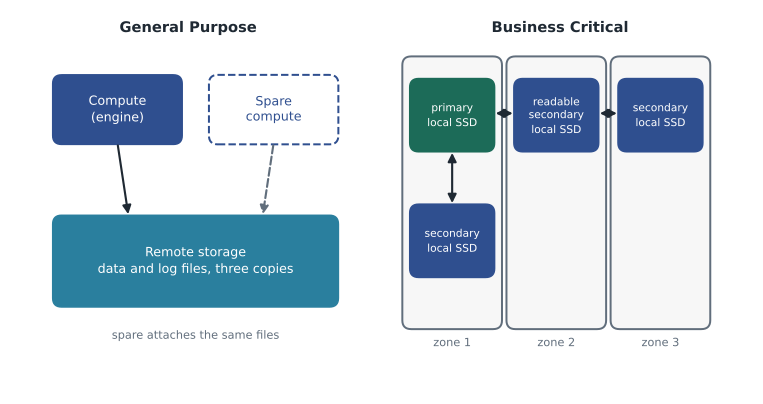
In the General Purpose tier, and in the Standard and Basic DTU tiers, the database engine runs on a compute node that holds no permanent data. Data and log files live in Azure Storage, which keeps three synchronous copies within a data center, or across zones when zone redundancy is enabled. If the compute node fails, or is taken down for an update, the service starts the engine on a spare node, attaches the same files and brings the database online. Nothing has to be copied, so the failover is quick, typically well under a minute, although the new node starts with a cold buffer cache, so queries may be slower for a while as the cache warms up.
Business Critical: replicas on local storage
In the Business Critical tier, and the Premium DTU tier, the database runs as an Always On availability group managed by the service. There are four replicas, each with its own copy of the data on fast local SSD: one primary and three secondaries. A transaction commits only when its log records have been hardened on the primary and on enough secondaries to form a quorum, so a failover to a secondary loses no committed work. Failover is usually a matter of seconds, and the secondary already has a warm cache. One of the secondaries can serve read-only queries at no extra cost, as MSAZ-280 showed for Keiko's morning report.
Hyperscale takes a third approach. Its storage is a distributed system of page servers with their own redundancy, and its compute consists of a primary plus zero to four high-availability replicas. With no replicas, a compute failure is handled like General Purpose, by starting a new compute node; with one or more, the service fails over to a replica that is already running. Microsoft's guidance for production workloads is at least one high-availability replica, and more for read scale-out.
| Tier | Where data lives | What happens when the primary node fails | Readable replica included |
|---|---|---|---|
| General Purpose (SQL Database and Managed Instance) | Remote Azure Storage | Engine restarts on a spare node and attaches the files | No |
| Business Critical (SQL Database and Managed Instance) | Local SSD on four replicas | Fails over to a synchronous secondary | Yes, one |
| Hyperscale (SQL Database) | Page servers and remote storage | Fails over to an HA replica, or restarts compute if there are none | With HA or named replicas |
Zone redundancy
Zone redundancy spreads a database's replicas, or its compute and storage, across availability zones in the region. In Business Critical, the four replicas are placed in different zones; in General Purpose, the storage is zone-redundant and spare compute is available in other zones. For Azure SQL Database, zone redundancy is available in the General Purpose, Business Critical, Premium and Hyperscale tiers, and Microsoft does not charge extra for it in Premium and Business Critical. For Managed Instance, zone redundancy has been available for Business Critical for some time, and for General Purpose since June 2025. It can usually be turned on for an existing database or instance as an online operation, but it should be planned at creation where possible, because the region must support zones and some older hardware configurations do not.
Walt's design for StockLine uses a zone-redundant Business Critical managed instance. If a whole zone in Central US fails, the instance fails over to a replica in another zone with no data loss and, typically, a disconnect of seconds. That handles the local failures that once cost six hours. It does not handle the loss of the whole region, which is the job of the failover group in lesson 7.
Service level agreements
Microsoft's SLA for Azure SQL Database and Managed Instance gives a monthly uptime commitment that depends on the tier and the configuration. At the time of writing, the general commitment is 99.99 in every 100 for most configurations, and 99.995 for Business Critical or Premium databases configured as zone redundant. Hyperscale's commitment depends on its number of high-availability replicas, with lower figures when it has none. The exact figures, conditions and service credits are in the published SLA document, which Walt bookmarks rather than copies, because the figures change from time to time and an exam question will name the configuration it means.
Worked problem
Minutes of allowed downtime
Compare the monthly downtime allowed by an SLA of 99.99 with one of 99.995, for a 30-day month. Then estimate how many 20-second failovers each would allow if failovers were the only source of downtime.
Show solution
- A 30-day month has 30 × 24 × 60 = 43,200 minutes.
- At 99.99: (1 − 0.9999) × 43,200 = 4.32 minutes, or 259.2 seconds.
- At 99.995: (1 − 0.99995) × 43,200 = 2.16 minutes, or 129.6 seconds.
- At 20 seconds each: 259.2 ÷ 20 ≈ 12.96, so about 12 failovers at 99.99; 129.6 ÷ 20 ≈ 6.48, so about 6 at 99.995.
Answer: 99.99 allows about 4.3 minutes a month and 99.995 about 2.2 minutes. Even the stricter figure leaves room for several short failovers, which is why retry logic matters more than the exact SLA.
Planned maintenance
Most failovers in Azure SQL are planned: Microsoft patches the operating system and the engine, and to apply a patch the service fails the database over to an updated node or replica. For SQL Database and Managed Instance, a maintenance window can be chosen so that these planned events happen at a predictable time. The default window is the region's local working-day evening and night, from 17:00 to 08:00, and two alternatives move it to 22:00 to 06:00 on weekdays (Monday to Thursday) or on weekend nights (Friday to Sunday). Advance notifications of planned maintenance can be received through Azure Service Health alerts, the activity-log alerts of lesson 3. StockLine's instance uses the weekday window, which keeps maintenance away from Saturday trading.
Making applications ready for failover
Even the best failover drops open connections. When a SQL Database or Managed Instance fails over, sessions are disconnected, transactions in flight are rolled back, and for a few seconds new connections are refused with transient error codes such as 40613, database unavailable, or 40501, service busy. An application that treats these errors as fatal will show users an error page; an application that waits and retries will usually recover without anyone noticing. Microsoft's guidance is for every application that talks to Azure SQL to implement retry logic for transient errors, with a short initial wait that grows on each attempt, a cap on the number of attempts, and care to retry whole transactions rather than single statements.
Worked problem
How long does a retry policy wait?
The StockLine application server retries a failed connection after 2 seconds, then doubles the wait each time up to 5 attempts. If a failover makes the database unavailable for 20 seconds, will the application reconnect, and after how long?
Show solution
- The waits before attempts 2 to 5 are 2, 4, 8 and 16 seconds.
- Cumulative time at each retry: 2, 2 + 4 = 6, 6 + 8 = 14, 14 + 16 = 30 seconds.
- The database is back after 20 seconds, so the retry at 14 seconds still fails and the retry at 30 seconds succeeds.
Answer: The application reconnects on its fifth attempt, about 30 seconds after the first failure. If the cap were 4 attempts, it would give up at 14 seconds and show an error, so the policy's total wait must be longer than a typical failover.
Business Critical and Hyperscale with replicas usually fail over faster than General Purpose, and the newer client drivers handle redirects and reconnections better, so keeping drivers current is part of high availability. The connection policy matters too: inside Azure, the Redirect policy, in which clients connect directly to the node hosting the database after the first contact with the gateway, gives lower latency, while the Proxy policy routes every packet through the gateway. Both survive failovers, but Redirect requires that clients can reach a wider range of ports, 11000 to 11999.
Testing that the application copes
High availability that is never tested is a belief, not a fact. Azure lets a customer start a failover of a SQL database or an elastic pool, or of a managed instance, on purpose, to check that applications survive it. The operation is limited in how often it can be run, so it is a test tool rather than a routine. Walt plans to run one against the Finch Rewards test database in early December 2026 while the developers watch their API's error log, and again against the non-production managed instance after the StockLine application is pointed at it in 2027.
# Start a user-initiated failover of a test database to check the application's retry logic.
Invoke-AzSqlDatabaseFailover -ResourceGroupName 'rg-rewards-test-cus' -ServerName 'hf-sql-rewards-test-cus' `
    -DatabaseName 'finchrewards-qtr'

# For a managed instance (Business Critical can target the readable secondary):
Invoke-AzSqlInstanceFailover -ResourceGroupName 'rg-stockline-np-cus' -Name 'hf-mi-stockline-np'
High availability for SQL Server on Azure VMs
The contrast with virtual machines is worth stating plainly, because exam questions often turn on it. A SQL Server virtual machine gets Azure's infrastructure protection: if its host fails, Azure restarts it elsewhere, and if it is placed in an availability zone, its disks are kept in that zone. But nothing inside SQL Server changes. There is no spare engine waiting, no second copy of the data and no automatic failover of databases. To match the availability that Business Critical gives automatically, the customer must build and patch an availability group or a failover cluster instance across at least two virtual machines, preferably in different zones, which is the design lesson 8 builds for the warehouse system. That extra work, and the extra virtual machines it needs, belong in any comparison of costs between a virtual machine and a platform service.
Common mistakes
MistakeCustomers must design high availability for every Azure SQL option.
InsteadSQL Database and Managed Instance include high availability within a region; only SQL Server on VMs needs the customer to build it.
MistakeGeneral Purpose fails over to a secondary replica with its own copy of the data.
InsteadGeneral Purpose restarts the engine on a spare node that attaches the same remote storage.
MistakeZone redundancy protects against the loss of a whole region.
InsteadZone redundancy protects against the loss of a zone; a region needs geo-replication or a failover group.
MistakeTransient errors during failover mean the application has a bug.
InsteadBrief disconnects are expected; applications need retry logic with growing waits.
Summary and key terms
- Within a region, SQL Database and Managed Instance include high availability in the service.
- General Purpose keeps data in remote storage and moves compute to a spare node; Business Critical runs four replicas on local SSD with synchronous commit.
- Hyperscale fails over to high-availability replicas when it has them; production workloads should have at least one.
- Zone redundancy spreads replicas or storage across availability zones and raises the SLA for Business Critical to 99.995.
- Maintenance windows put planned failovers at predictable times; Service Health alerts give notice.
- Applications must retry transient errors such as 40613, and test failovers prove that they do.
- Availability zone
- A separate group of data centers within a region, with independent power, cooling and networking.
- Zone redundancy
- Placing a database's replicas or storage in several availability zones.
- Quorum commit
- Committing a transaction only after its log records reach enough replicas.
- Maintenance window
- The chosen time range when planned maintenance, with its brief failovers, may happen.
- Transient error
- A temporary error, such as one during failover, that succeeds if the operation is retried.
- Retry logic
- Application code that waits and repeats an operation after a transient error.
Practice problems
Work each problem on paper first, then reveal the answer to check.
Why does a General Purpose failover not need to copy data?
Show answer
The data lives in remote storage, so the new compute node attaches the same files.
How many replicas does a Business Critical database have?
Show answer
Four: one primary and three secondaries.
Which configuration has a 99.995 SLA at the time of writing?
Show answer
Business Critical or Premium configured as zone redundant.
What should an application do when it receives error 40613?
Show answer
Wait and retry, with a growing delay and a cap on attempts.
What tool can start a failover on purpose to test an application?
Show answer
A user-initiated failover, for example Invoke-AzSqlDatabaseFailover.
Lesson quiz · 5 questions
Score 60% or more to complete this lesson.
Create a free account to save your progress, take quizzes and earn a certificate.