
MSAZ-282 · Lesson 1 of 12 · 25 min
Automating with elastic jobs and Agent
▶ Video coming soon A video version of this lesson is on the way.
In the third week of November 2026, Elena Brandt opens the DBA clinic with a printout of the StockLine server's job list. HF-SQL01 runs eleven SQL Server Agent jobs every night: index maintenance, statistics updates, a consistency check, four backup jobs, two data exports to the warehouse, a purge of old till logs and a job that emails the morning stock exceptions to the buyers. Walt Hadley wrote most of them and can recite their schedules from memory. "The first course was about where the databases will live," Elena says. "This one is about how they stay healthy once nobody is standing next to the server: what runs on its own, what tells us when something goes wrong, and what we do when a whole region has a bad day."
Walt's exam, DP-300, gives this material a lot of weight. The skills outline published by Microsoft, current as of October 27, 2026, puts the automation of tasks at 15 to 20 marks in every 100 and high availability and disaster recovery at 20 to 25. Together that is close to half the exam. This course follows Walt through both areas in the order he will need them at work: automating routine tasks first, then designing for failure, then proving that the design works.
What needs automating
Every database estate has a rhythm of routine work. Some of it is maintenance inside the database: rebuilding or reorganizing fragmented indexes, updating statistics, checking consistency and purging old rows. Some is data movement: exports, imports and refreshes of reporting copies. Some is housekeeping at the service level: scaling compute up before a busy period and down afterwards, rotating credentials, and checking that backups and replicas are healthy. And some is reporting: telling people what happened overnight. On premises, SQL Server Agent did nearly all of this. In Azure, the right tool depends on the deployment option and on whether the task runs inside a database or against the Azure resource itself.
| Task runs… | SQL Server on Azure VMs | Azure SQL Managed Instance | Azure SQL Database |
|---|---|---|---|
| Inside one database or instance, on a schedule | SQL Server Agent | SQL Server Agent | Elastic jobs |
| Across many databases at once | Agent with multiserver jobs, or scripts | Agent jobs per instance, or elastic jobs from outside | Elastic jobs with target groups |
| Against the Azure resource (scale, restart, failover) | Azure Automation, CLI or PowerShell | Azure Automation, CLI or PowerShell | Azure Automation, CLI or PowerShell |
| Triggered by an event or alert | Agent alerts, Azure Monitor action groups | Agent alerts, Azure Monitor action groups | Azure Monitor action groups, Logic Apps or Functions |
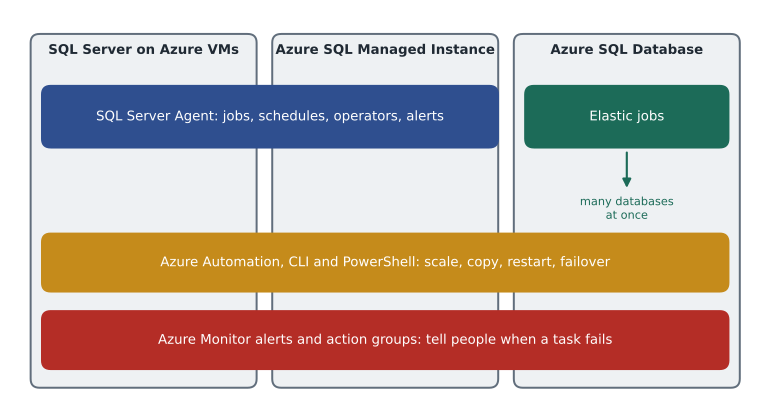
SQL Server Agent on Managed Instance and virtual machines
On a SQL Server virtual machine, Agent is exactly the service Walt knows. On Managed Instance it is built in and always running, and most of its features work the same way: jobs made of steps, schedules, operators, alerts and job history in msdb. The differences are small but they show up in exam questions. On Managed Instance the Agent service cannot be stopped or restarted by the customer; job steps can be T-SQL, SSIS packages and a few replication types, but not operating system commands or PowerShell, because there is no access to the underlying operating system; and notifications use Database Mail, which must be configured with an account and a profile before operators can receive email. Pager and net send notifications, long deprecated, are not supported.
StockLine's eleven jobs fall into three groups when Walt sorts them for the move to Managed Instance. Seven are T-SQL jobs that will move unchanged. The four backup jobs will be retired, because Managed Instance takes full, differential and log backups automatically; Walt will keep only a monthly copy-only backup for the auditors, covered in lesson 9. And the two warehouse export jobs call a batch file on the server's C: drive, which has no equivalent on Managed Instance; they will be rewritten as T-SQL that writes to a staging table the warehouse reads, or moved to an Azure Data Factory pipeline.
USE msdb;
EXEC dbo.sp_add_job @job_name = N'StockLine - nightly statistics', @owner_login_name = N'sg-dba-admins';
EXEC dbo.sp_add_jobstep @job_name = N'StockLine - nightly statistics', @step_name = N'Update statistics',
     @subsystem = N'TSQL', @database_name = N'StockLine',
     @command = N'EXEC dbo.usp_UpdateStatsSampled @MinRowsChangedPercentTimes100 = 500;',
     @retry_attempts = 2, @retry_interval = 5;
EXEC dbo.sp_add_schedule @schedule_name = N'Nightly 01:30', @freq_type = 4, @freq_interval = 1,
     @active_start_time = 013000;
EXEC dbo.sp_attach_schedule @job_name = N'StockLine - nightly statistics', @schedule_name = N'Nightly 01:30';
EXEC dbo.sp_add_jobserver @job_name = N'StockLine - nightly statistics';
EXEC dbo.sp_update_job @job_name = N'StockLine - nightly statistics',
     @notify_level_email = 2, @notify_email_operator_name = N'DBA on call';
A few details in that script are worth reading slowly. The schedule's frequency type 4 means daily, and an active start time of 013000 means 01:30 in the instance's time zone. That is why the time zone chosen when a managed instance is created matters: the StockLine instance will use Central Standard Time, Des Moines's zone, so Agent schedules keep their local meaning through daylight saving changes. The notification level 2 means notify on failure, rather than on success (1) or on completion (3). And the step retries twice, five minutes apart, before it is marked as failed, which absorbs a brief blocking problem without waking anyone.
Managing schedules for maintenance
Maintenance jobs compete for the same resources as the business. Walt's rule, inherited from the server room, is that heavy maintenance never overlaps with heavy use or with other heavy maintenance. StockLine's stores close at 21:00 and the first deliveries are scanned at 05:30, so the maintenance window is roughly 22:00 to 05:00. In Azure two more things enter the calendar. First, the platform's own maintenance window, chosen when the instance was created, during which Microsoft may apply updates with a short failover; Walt keeps the heaviest jobs out of it. Second, automated backups, which run on the platform's schedule rather than his, and which do not need to be avoided but do add input-output.
Worked problem
Fitting the nightly jobs into the window
StockLine's maintenance window runs from 22:00 to 05:00. The jobs that must run every night take: index maintenance 95 minutes, statistics updates 40 minutes, consistency check 120 minutes, till-log purge 25 minutes and the stock exceptions report 10 minutes. The report must finish by 05:00 and must run after the purge. Index maintenance and the consistency check must not overlap. Can all of them run one after another inside the window, and how much time is left?
Show solution
- Total running time: 95 + 40 + 120 + 25 + 10 = 290 minutes.
- Window length: 22:00 to 05:00 is 7 hours, or 420 minutes.
- Spare time if run one after another: 420 − 290 = 130 minutes.
- One order that meets the rules: purge 22:00–22:25, index maintenance 22:25–00:00, statistics 00:00–00:40, consistency check 00:40–02:40, report 02:40–02:50.
- The report finishes at 02:50, well before 05:00, and the two heavy jobs never overlap.
Answer: All five jobs fit with 130 minutes to spare, so Walt can leave a gap after the consistency check for a retry if one is needed. He records the order in the operations runbook rather than relying on schedules alone.
Elastic jobs for Azure SQL Database
Azure SQL Database has no SQL Server Agent, because there is no instance for it to live in. Its replacement for scheduled T-SQL is elastic jobs. An elastic job agent is an Azure resource that runs jobs; it keeps its definitions, schedules and history in a job database, which is an ordinary Azure SQL database you create for the purpose. Microsoft recommends a new, empty database of at least the S1 size for the job database, sized up if the agent will run many steps or many targets, and notes that a Hyperscale database or a serverless database with auto-pause cannot be used. Jobs are defined with stored procedures in the jobs schema of the job database, or through the portal, PowerShell or the REST API.
Where Agent runs on one instance, an elastic job runs against a target group, which can contain whole logical servers, whole elastic pools or individual databases, and can include or exclude specific databases. Servers and pools are expanded at run time, so a database added to the pool next month is picked up automatically. This is exactly what the store scheduling system needs. Its 23 databases, one per store, sit in the elastic pool pool-storesched-prod, and every one needs the same weekly index maintenance and a nightly purge of shift records older than two years. With Agent, Walt would have needed 23 jobs; with an elastic job, he needs one job aimed at the pool.
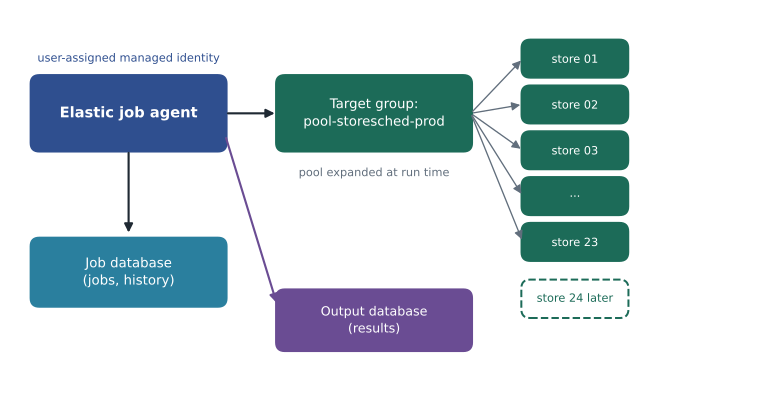
Authentication is the step people get wrong. The job agent must sign in to every target database. Microsoft's recommended method is a user-assigned managed identity attached to the agent: you create a contained database user for that identity in each target database, and in master when the target group includes a whole server or pool so the agent can list the databases, and grant only the permissions the job needs. The older method uses database scoped credentials stored in the job database, with matching users in each target. A system-assigned identity is not supported for elastic jobs. When targets block public network access, the agent can reach them through service-managed private endpoints, which must be created and approved for each target server.
-- In the job database:
EXEC jobs.sp_add_target_group @target_group_name = N'StoreScheduling';
EXEC jobs.sp_add_target_group_member @target_group_name = N'StoreScheduling',
     @target_type = N'SqlElasticPool', @server_name = N'hf-sql-stores-prod-cus.database.windows.net',
     @elastic_pool_name = N'pool-storesched-prod';

EXEC jobs.sp_add_job @job_name = N'Purge old shifts', @description = N'Nightly purge of shift rows older than two years';
EXEC jobs.sp_add_jobstep @job_name = N'Purge old shifts', @step_name = N'Purge',
     @command = N'EXEC dbo.usp_PurgeShifts @KeepMonths = 24;',
     @target_group_name = N'StoreScheduling', @retry_attempts = 3;
EXEC jobs.sp_update_job @job_name = N'Purge old shifts', @enabled = 1,
     @schedule_interval_type = N'Days', @schedule_interval_count = 1,
     @schedule_start_time = N'2026-11-20 08:30';   -- UTC, which is 02:30 in Des Moines in winter
Two operational facts complete the picture. First, capacity: an agent's tier sets how many target connections it can use at once. The default tier, JA100, allows 100 concurrent targets, and larger tiers allow 200, 400 or 800; extra targets wait in a queue. Twenty-three store databases are far below the limit, so the default tier is enough. Second, history: a built-in cleanup removes execution history older than 45 days, and the history can be queried in the jobs.job_executions view or purged sooner with a stored procedure. Walt will copy a summary of each night's results into the operations log he keeps, so the record outlives the 45 days.
Worked problem
Will the agent queue the targets?
The elastic job agent uses the default JA100 tier. Next year Harrow & Finch might add a customer-feedback database for each store as well, putting 46 databases in two pools, and run one job against both pools at once. Each target takes about 3 minutes. How many targets run at the same time, and roughly how long does the job take?
Show solution
- Number of targets: 23 + 23 = 46.
- JA100 allows up to 100 concurrent targets, and 46 is below 100, so all 46 can start together.
- Each target takes about 3 minutes, so the whole job takes about 3 minutes, plus a little start-up time.
- If the estate grew to 250 targets, 100 would run at first and the rest would wait: about three rounds of 3 minutes, or roughly 9 minutes, unless the agent were moved to a larger tier.
Answer: All 46 targets run at once and the job finishes in about 3 minutes. Queueing only starts above 100 targets on the default tier.
Troubleshooting jobs
When an Agent job fails, the first stop is the job history, which records each step's outcome and message. Walt's checklist starts with three questions: did the step fail or did the job never start, which is usually a schedule or an owner problem; did it fail on permissions, which on Managed Instance often means the job owner was a Windows login that no longer exists, so jobs should be owned by a Microsoft Entra principal or a SQL login that will stay; and did it time out or block, which the step's duration and the instance's wait statistics will show. For elastic jobs, the equivalent questions are answered in jobs.job_executions, which has a row for the job, each step and each target, with a lifecycle such as Succeeded, Failed, WaitingForRetry or Canceled and the error message from the target. The most common causes are a missing user for the agent's identity in a new target database, a missing permission, and a target that cannot be reached because of firewall or private endpoint settings.
SELECT TOP (50) j.job_name, je.step_name, je.target_database_name, je.lifecycle,
       je.start_time, je.end_time, je.last_message
FROM jobs.job_executions AS je
JOIN jobs.jobs AS j ON j.job_id = je.job_id
WHERE je.lifecycle IN ('Failed', 'WaitingForRetry', 'TimedOut')
ORDER BY je.start_time DESC;
Retries need care. An elastic job step is retried on failure, and a step may run more than once against the same target if a connection drops part way through, so Microsoft's guidance is that job steps should be idempotent: running them twice should do no harm. Walt's purge procedure deletes rows older than a date, which is naturally safe to repeat. A step that inserted a summary row each night would not be, so he writes such steps to check for an existing row first.
Common mistakes
MistakeManaged Instance runs any Agent job step type, including PowerShell and command-line steps.
InsteadManaged Instance has no operating system access, so steps are limited to T-SQL, SSIS and some replication types.
MistakeAzure SQL Database includes SQL Server Agent.
InsteadSQL Database has no Agent; scheduled work uses elastic jobs or Azure-level automation.
MistakeAn elastic job agent can use a system-assigned managed identity.
InsteadElastic jobs support a user-assigned managed identity or database scoped credentials.
MistakeA database added to an elastic pool must be added to every job by hand.
InsteadPools and servers in a target group are expanded at run time, so new databases are included automatically.
Summary and key terms
- Automation and HA/DR together make up close to half of DP-300's skills outline.
- Choose Agent for scheduled work inside a VM or managed instance, elastic jobs for scheduled T-SQL across SQL databases, and Azure-level tools for tasks on the resources.
- Agent on Managed Instance is always on, uses Database Mail for notifications and supports T-SQL and SSIS steps but not operating system steps.
- Schedule heavy jobs inside the business's quiet hours and outside the platform maintenance window.
- An elastic job agent keeps jobs in a job database and runs them against target groups of servers, pools or databases, ideally signing in with a user-assigned managed identity.
- Troubleshoot with Agent job history or jobs.job_executions, and write job steps so they can safely run twice.
- SQL Server Agent
- The SQL Server service that runs scheduled jobs, alerts and operators.
- Elastic job agent
- The Azure resource that runs T-SQL jobs against groups of Azure SQL databases.
- Job database
- The Azure SQL database where an elastic job agent stores job definitions and history.
- Target group
- A set of servers, elastic pools or databases that an elastic job step runs against.
- Database Mail
- The SQL Server feature that sends email, used by Agent to notify operators.
- Idempotent
- Safe to run more than once with the same result.
Practice problems
Work each problem on paper first, then reveal the answer to check.
Why will StockLine's four backup jobs not move to Managed Instance?
Show answer
Managed Instance takes full, differential and log backups automatically.
What must be configured before Agent on Managed Instance can email an operator?
Show answer
Database Mail, with an account and a profile.
Which identity type does Microsoft recommend for an elastic job agent?
Show answer
A user-assigned managed identity.
What happens to execution history older than 45 days in an elastic job agent?
Show answer
A built-in cleanup removes it.
Why should elastic job steps be idempotent?
Show answer
Because a step can be retried or run more than once against the same target.
Lesson quiz · 5 questions
Score 60% or more to complete this lesson.
Create a free account to save your progress, take quizzes and earn a certificate.