
MSAZ-282 · Lesson 10 of 12 · 22 min
Long-term retention
▶ Video coming soon A video version of this lesson is on the way.
Point-in-time restore covers mistakes found within weeks. Some questions arrive much later. In 2023 an auditor asked Harrow & Finch for the prices charged in one store in March 2018, and Walt found the answer on a tape in a fireproof cabinet. The IRS generally expects records that support a tax return to be kept for three years, and longer in some cases, so the finance team keeps sales and pricing records for seven years to be safe. In Azure the tape cabinet becomes long-term retention: a policy that keeps selected full backups for up to ten years, stored by the service, and restorable to a new database whenever someone asks an old question.
How long-term retention works
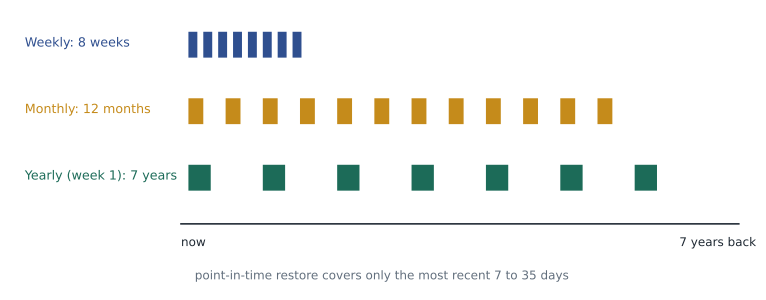
Long-term retention, or LTR, is available for Azure SQL Database and Azure SQL Managed Instance. It works by keeping copies of the automated full backups that the service already takes, so there is no extra backup job and no effect on the database's performance. A policy has up to four settings: how many weeks to keep weekly backups (W), how many months to keep the first backup of each month (M), how many years to keep one backup a year (Y), and which week of the year is the yearly backup (the week number). Each can be set from 1 week up to 10 years, or left at zero to switch that level off. LTR backups are kept in geo-redundant storage by default, so they survive the loss of the primary region, and they remain even if the database is deleted, which is the main difference from point-in-time backups.
Designing a policy
A good LTR policy starts from the questions people will ask, not from the maximum the service allows. Elena helps Walt list them. Store managers occasionally ask for last month's stock movement when a count is disputed: weekly backups for 8 weeks cover that. Buyers compare this year's seasonal pricing with last year's: monthly backups for 12 months cover that. Finance and auditors ask for year-end positions: one yearly backup, taken in the first week of January so it holds the year-end state, kept for 7 years. Anything not on the list is not kept, because each retained backup costs money and is personal data that must be protected for as long as it exists.
| Database | Weekly (W) | Monthly (M) | Yearly (Y) | Week of year | Reason |
|---|---|---|---|---|---|
| StockLine | 8 weeks | 12 months | 7 years | 1 | Disputed counts, seasonal comparisons, year-end audit |
| Pricing | 8 weeks | 12 months | 7 years | 1 | Pricing history for audits |
| Finch Rewards | 4 weeks | 12 months | 3 years | 1 | Loyalty disputes; privacy policy limits longer retention |
| Store scheduling | None | 6 months | None | — | Payroll queries are answered from the payroll system |
| SalesHistory | None | None | 7 years | 1 | The database already holds history; one yearly copy is enough |
Worked problem
How many LTR backups will StockLine keep?
StockLine's policy is W = 8 weeks, M = 12 months and Y = 7 years, with the yearly backup in week 1. When the policy has been running for more than 7 years, about how many LTR backups will exist at any time? Assume a backup that qualifies for more than one level is stored once.
Show solution
- Weekly: 8 backups.
- Monthly: 12 backups, but about 2 of them fall inside the last 8 weeks and are already among the weekly ones, leaving about 10 extra.
- Yearly: 7 backups, but the most recent yearly backup is also one of the monthly backups, leaving 6 extra.
- Total: about 8 + 10 + 6 = 24 backups.
Answer: StockLine will keep about 24 LTR backups at any time, rather than 8 + 12 + 7 = 27, because the service stores a backup once even when it meets more than one rule.
Configuring LTR
LTR policies are set per database in the portal, with PowerShell, with the CLI or in templates. On Managed Instance they are set per database too, not for the whole instance. A new policy takes effect from the next full backup, so the first weekly LTR backup appears within about a week and the first yearly backup only in the chosen week. That matters for planning: if StockLine moves to Managed Instance in spring 2027, its first yearly LTR backup will be taken in January 2028, so the 2027 year-end must also be covered by the monthly copy-only backup kept for the auditors, from lesson 9.
az sql midb ltr-policy set --resource-group rg-stockline-prod-cus --managed-instance hf-mi-stockline \
    --name StockLine --weekly-retention P8W --monthly-retention P12M --yearly-retention P7Y --week-of-year 1

az sql db ltr-policy set --resource-group rg-rewards-prod-cus --server hf-sql-rewards-prod-cus \
    --database finchrewards --weekly-retention P4W --monthly-retention P12M --yearly-retention P3Y --week-of-year 1

az sql midb ltr-backup list --location centralus --managed-instance hf-mi-stockline \
    --database StockLine --output table
Retention periods use ISO 8601 durations: P8W is eight weeks, P12M twelve months and P7Y seven years. A mistake in this notation, such as P8M when weeks were meant, keeps backups four times longer than planned, so Walt's pipeline checks the policy after each deployment with a list command and compares it with the table above.
Restoring from an LTR backup
An LTR backup is restored, like a point-in-time backup, to a new database: on any logical server in the same subscription for SQL Database, or on a managed instance for Managed Instance, including one in another region because the backups are geo-redundant. The restore takes about as long as any restore of that size. An LTR backup is a full backup, so it restores to the moment that full backup was taken, not to any point in time; anyone who needs a different moment must choose the nearest backup.
$b = Get-AzSqlInstanceDatabaseLongTermRetentionBackup -Location 'centralus' -InstanceName 'hf-mi-stockline' `
       -DatabaseName 'StockLine' | Where-Object { $_.BackupTime -lt '2028-01-08' } | Sort-Object BackupTime -Descending | Select-Object -First 1
Restore-AzSqlInstanceDatabase -FromLongTermRetentionBackup -ResourceId $b.ResourceId `
    -TargetInstanceDatabaseName 'StockLine_ye2027' -TargetInstanceName 'hf-mi-stockline-np' -TargetResourceGroupName 'rg-stockline-np-cus'
Restoring an old backup raises compatibility questions. A seven-year-old backup restores into today's engine, so the database will open, but its compatibility level, its users and its encryption keys reflect seven years ago. If the database used a customer-managed TDE key, that version of the key must still exist in Key Vault. Walt's runbook says never to delete old key versions while any LTR backup encrypted with them exists, and the key vault has purge protection turned on.
Protecting long-term backups
Long-term backups are a target. Ransomware groups try to delete backups before they encrypt production, and a careless clean-up script can remove years of history. Several controls protect them. Role-based access control limits who can change LTR policies and delete LTR backups; Harrow & Finch gives that permission only to a small group whose members must activate it through Privileged Identity Management. Resource locks prevent the deletion of servers and instances that hold the policies. Azure has also added immutability options for LTR backups, which stop backups from being changed or deleted for a set time even by an administrator; Walt notes the feature for the security review rather than enabling it in the first year, because an immutable backup cannot be removed early even when a privacy request requires it.
| Control | Protects against | Harrow & Finch setting |
|---|---|---|
| Role-based access control | Unauthorized policy changes and deletes | Only sg-dba-admins, activated through Privileged Identity Management |
| Delete locks on resource groups | Accidental deletion of servers and instances | On every production database resource group |
| Geo-redundant LTR storage | Loss of the primary region | Default, kept |
| Purge protection on Key Vault | Loss of keys needed to read old backups | On |
| Immutable LTR backups | Deletion by a compromised administrator | Under review for 2027 |
Cost
LTR storage is billed per GB per month for every retained backup, at a lower price than point-in-time backup storage above the included amount. Because each LTR backup is a full backup, the size of the database drives the cost. Compression reduces it, and the redundancy chosen changes the price.
Worked problem
What will StockLine's LTR cost?
StockLine's full backups are about 140 GB after compression. The policy keeps about 24 backups, from the earlier example. Use an illustrative price of 0.05 dollars per GB per month for geo-redundant LTR storage. Estimate the monthly and yearly cost once the policy is fully populated.
Show solution
- Storage kept: 24 × 140 = 3,360 GB.
- Monthly cost: 3,360 × 0.05 = 168 dollars.
- Yearly cost: 168 × 12 = 2,016 dollars.
Answer: Once fully populated, StockLine's LTR would cost about 168 dollars a month, or about 2,016 dollars a year, at this illustrative price. Doubling the weekly retention would add only 8 backups, while keeping monthly backups for 7 years would add more than 70.
Long-term retention and privacy
Keeping backups for years has a cost that is not measured in dollars. A backup holds every row in the database as it was, including personal information about customers and staff. Several US state privacy laws, including those that give consumers a right to deletion, expect personal information to be kept only as long as it is reasonably needed, and the FTC has taken action against companies that kept data longer than they said they would. The finance reasons for keeping StockLine's yearly backups are strong, because StockLine holds stock and prices rather than personal details. Finch Rewards is different: it holds names, email addresses and purchase histories, so its yearly backups are kept for 3 years, matching the loyalty program's published retention period, and not for 7.
Deletion requests create a further puzzle. If a customer asks for their personal information to be deleted, the live database can be changed at once, but the backups cannot be edited. The accepted approach, which the privacy officer has approved, is to keep a record of the request and to apply it again if any backup containing that customer is ever restored, while the backups age out on their normal schedule. The runbook's LTR restore procedure therefore includes a step to replay the deletion log against any restored Finch Rewards copy before anyone uses it.
LTR on SQL Server virtual machines and on premises
Long-term retention as described here is a feature of the platform services. On SQL Server virtual machines, the equivalent is built from the backup tools chosen in lesson 9. Azure Backup for SQL Server in virtual machines has its own retention settings for daily, weekly, monthly and yearly recovery points, up to many years, and stores them in a Recovery Services vault with soft delete, which keeps deleted backups recoverable for a period. Native backups to URL can be kept for years by moving older files to the cool or archive tiers of Azure Blob Storage with lifecycle management rules, and protected with immutable storage policies. The warehouse system uses Azure Backup's monthly and yearly points for 3 years, as the vendor requires. The finance server on premises sends its year-end full backups to an archive-tier container, where they cost very little to keep but take hours to rehydrate, which is acceptable for an audit request that arrives with weeks of notice.
Before switching on any policy, Walt shows the table to the finance controller and the privacy officer and asks each to sign it off. The controller confirms the seven-year yearly backups for StockLine and Pricing; the privacy officer confirms the three-year limit for Finch Rewards and asks that the store scheduling databases, which hold staff names and shift times, keep monthly copies for six months only. Their names and the date go into the runbook beside the policies, so a future DBA who wonders why a number was chosen can see who decided it.
Common mistakes
MistakeLTR backups are separate backups that slow the database down.
InsteadLTR keeps copies of the automated full backups the service already takes.
MistakeAn LTR backup can be restored to any moment in time.
InsteadAn LTR backup is a full backup and restores to the moment it was taken.
MistakeSetting LTR on a managed instance covers all its databases.
InsteadLTR policies are set per database.
MistakeDeleting the database also deletes its LTR backups straight away.
InsteadLTR backups remain after the database is deleted, until their retention ends.
Summary and key terms
- Long-term retention keeps selected full backups for up to 10 years in SQL Database and Managed Instance.
- A policy sets weekly, monthly and yearly retention and the week of the year for the yearly backup.
- Design policies from the questions people ask, and keep only what is needed.
- Retention uses ISO 8601 durations such as P8W, P12M and P7Y; check deployed policies.
- LTR restores create a new database at the moment the backup was taken; keep the TDE key versions old backups need.
- Protect LTR with role-based access, locks and key purge protection, and budget for storage per retained backup.
- Long-term retention
- Keeping selected automated full backups for weeks to years beyond the point-in-time window.
- LTR policy
- The weekly, monthly and yearly retention settings for one database.
- Week of year
- The setting that chooses which weekly backup becomes the yearly LTR backup.
- ISO 8601 duration
- A notation such as P8W, P12M or P7Y for a length of time.
- Purge protection
- A Key Vault setting that stops deleted keys from being permanently removed during a retention period.
- Immutability
- A setting that prevents backups from being changed or deleted for a set time.
Practice problems
Work each problem on paper first, then reveal the answer to check.
What is the longest LTR retention?
Show answer
Ten years.
What does P12M mean in an LTR policy?
Show answer
Twelve months.
When will a new yearly LTR setting with week 1 first take a backup?
Show answer
In the first week of the next year.
Why must old Key Vault key versions be kept?
Show answer
LTR backups encrypted with them cannot be restored without them.
Name one control that protects LTR backups from deletion.
Show answer
For example: role-based access control, resource locks or immutability.
Lesson quiz · 5 questions
Score 60% or more to complete this lesson.
Create a free account to save your progress, take quizzes and earn a certificate.