
MSAZ-111 · Lesson 7 of 12 · 22 min
Text analysis and translation in Foundry
▶ Video coming soon A video version of this lesson is on the way.
The contact center receives about 1,800 emails and chat transcripts a week. Maya's agents read every one, and much of that reading is sorting: Is this a complaint or a question? Which product is it about? Is the customer angry? Does the message contain a credit card number that must not be stored? Some arrive in Spanish, and only three of her fourteen agents are comfortable answering in Spanish. This lesson covers two Foundry Tools that take on that work, Azure Language and Azure Translator, and the other way of doing the same jobs, by asking a generative model. The AI-901 outline asks you to describe common text analysis techniques and to build a lightweight application that includes text analysis.
Azure Language in Foundry Tools
Azure Language is a set of prebuilt natural language processing features, each trained for one job, that you call with text and that return structured results. Because each feature does one thing, the results are consistent, quick and inexpensive at high volume, and they come back in a predictable format that code can use directly.
| Feature | What it returns | Contact-center use |
|---|---|---|
| Language detection | The language of the text and a confidence score | Routing a message to an agent who speaks that language |
| Sentiment analysis and opinion mining | Positive, neutral, negative or mixed for the document and each sentence, with scores; opinion mining links opinions to specific targets | Flagging angry customers and seeing which product feature they dislike |
| Key phrase extraction | The main talking points in the text | Tagging messages by topic for weekly reports |
| Named entity recognition | People, places, organizations, dates, quantities, products and other categories found in the text | Pulling out store names, dates and order numbers |
| PII detection | Personal information such as names, phone numbers, emails and card numbers, with a redacted copy of the text | Removing card numbers before transcripts are stored |
| Summarization | A short summary of a document or conversation, extractive or abstractive | Handing a long chat to the next agent |
| Conversational language understanding | The user's intent and the entities in an utterance, from a model you train with examples | Classifying requests such as track_order or start_return |
| Custom question answering | The best answer from a knowledge base of question and answer pairs | Answering frequent questions with approved wording |
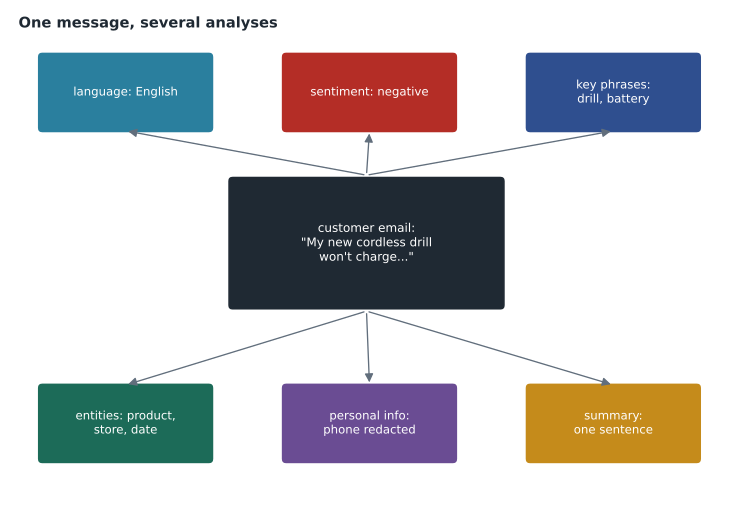
The techniques the exam names
The AI-901 outline singles out four techniques: keyword extraction, entity detection, sentiment analysis and summarization. They are worth understanding as ideas, independent of any product.
Keyword or key phrase extraction finds the words and short phrases that carry the main content of a text. Early methods counted how often a word appeared in one document compared with how often it appears in documents generally, a measure called term frequency and inverse document frequency. A word that is common in this message but rare elsewhere is likely to be important. Modern services use trained models, but the intuition holds.
Entity detection, also called named entity recognition, finds mentions of things that belong to categories, such as a person, a location, an organization, a date or a quantity, and labels each with its category. Entity linking goes one step further and connects a mention to a known item, so that "Paris" in a travel review is linked to the French city rather than to a person named Paris.
Sentiment analysis judges whether a text expresses a positive, negative or neutral opinion. Services typically return a label and confidence scores for each label, at the document level and for each sentence. A review that says "the delivery was quick but the drill stopped working after a week" is mixed: positive about delivery, negative about the product. Opinion mining identifies those targets and the opinions attached to each.
Summarization reduces a long text to a short one. Extractive summarization selects the most important existing sentences. Abstractive summarization writes new sentences that capture the meaning, as a person would. Generative models are very good at abstractive summaries, and Azure Language offers both kinds.
# A toy keyword scorer: words frequent in this message but rare across messages score highest.
import math, re
messages = [
    "My cordless drill battery will not charge after one week",
    "What time does the store open on Sunday",
    "The drill was delivered quickly but the battery is faulty",
    "Can I return paint that was mixed for me",
]
def words(t): return re.findall(r"[a-z]+", t.lower())
stop = {"my","will","not","after","one","what","time","does","the","on","was","but","is","can","i","that","for","me","open"}
docs = [[w for w in words(m) if w not in stop] for m in messages]
def score(doc_index):
    doc = docs[doc_index]
    out = {}
    for w in set(doc):
        tf = doc.count(w) / len(doc)
        df = sum(1 for d in docs if w in d)
        out[w] = tf * math.log(len(docs) / df)
    return sorted(out.items(), key=lambda kv: (-kv[1], kv[0]))[:3]
for i in (0, 3):
print(messages[i], "->", [w for w, s in score(i)])My cordless drill battery will not charge after one week -> ['charge', 'cordless', 'week'] Can I return paint that was mixed for me -> ['mixed', 'paint', 'return']
What this code does
Scores the words in each customer message so that words common in that message but rare across all messages score highest, a simple version of TF-IDF. The top words act as key phrases for each message. This illustrates the idea behind key phrase extraction in language services.
Calling Azure Language
Azure Language is called through the Foundry resource's endpoint, using an SDK or the REST API. A request names the feature, such as sentiment analysis, and supplies one or more documents, each with an identifier and, optionally, a language. The response lists results for each document. The shape is simple enough that a lightweight application, the kind the exam describes, is a few lines of code around a single call.
POST {endpoint}/language/:analyze-text?api-version=2024-11-01
Authorization: Bearer <Microsoft Entra ID token>
Content-Type: application/json

{
  "kind": "SentimentAnalysis",
  "parameters": { "opinionMining": true },
  "analysisInput": {
    "documents": [
      { "id": "1", "language": "en", "text": "The delivery was quick but the drill stopped working after a week." }
    ]
  }
}# Read a sentiment result (sample response shape, simplified).
import json
response = json.loads("""
{"results": {"documents": [{"id": "1", "sentiment": "mixed",
"confidenceScores": {"positive": 0.41, "neutral": 0.04, "negative": 0.55},
"sentences": [
{"text": "The delivery was quick", "sentiment": "positive"},
{"text": "but the drill stopped working after a week.", "sentiment": "negative"}]}]}}
""")
for doc in response["results"]["documents"]:
s = doc["confidenceScores"]
print("document", doc["id"], doc["sentiment"], "negative score", s["negative"])
if s["negative"] >= 0.5:
print(" -> route to the priority queue")
for sent in doc["sentences"]:
print(" ", sent["sentiment"].ljust(8), sent["text"])document 1 mixed negative score 0.55 -> route to the priority queue positive The delivery was quick negative but the drill stopped working after a week.
What this code does
Reads a sample sentiment analysis result in JSON and pulls out the overall sentiment and its confidence scores. Because the message is mixed with negative sentiment above a threshold, it is routed to the priority queue. It then prints the sentiment of each sentence.
Maya's routing rule is simple: any message whose negative score is 0.5 or higher goes to a priority queue handled by her most experienced agents. She chooses 0.5 after checking a week of messages by hand and finding that lower thresholds flooded the queue with mildly annoyed customers who were already being well served.
Translation with Azure Translator
Azure Translator translates text between more than a hundred languages and dialects. Its text translation feature takes one or more strings and returns translations into one or more target languages, detecting the source language automatically if it is not given. Document translation translates whole files, such as Word documents or PDFs, while keeping their layout. Transliteration converts text from one script to another, and custom translation lets an organization train a model on its own previously translated content so that product names and industry terms come out the way it wants.
For Harrow & Finch, Spanish matters for a growing share of customers. Arjun suggests two uses. Incoming Spanish messages are translated into English for the routing step and for agents who do not read Spanish, with the original always kept alongside. And Ask Finch can reply in Spanish, either by asking the chat model to answer in the customer's language or by translating its English answer. The first usually reads more naturally.
Translation needs the same care as any AI output. Machine translation can be very good and still get a product term or a polite form wrong. Carmen Ortiz asks that customer-facing policy text in the second language be reviewed by a fluent speaker before it is published, and that automatic translation be used for routing and drafts rather than for legally binding wording.
Using a generative model instead
Every task in this lesson can also be done by asking a chat model in a prompt: "Classify the sentiment of this message as positive, negative, neutral or mixed, list the products mentioned, and summarize it in one sentence. Reply in JSON." The exam expects you to understand both approaches and when each fits.
| Azure Language and Translator features | A generative model with a prompt | |
|---|---|---|
| Output | Fixed, predictable structure | Whatever the prompt asks for, which may vary |
| Consistency | Same input gives the same result | Can vary, especially at higher temperature |
| Flexibility | Only the features offered | Any task you can describe |
| Cost and speed at volume | Usually lower and faster | Usually higher and slower |
| Best for | High-volume, well-defined tasks such as PII redaction and language detection | Varied or nuanced tasks, combined analysis and natural-sounding summaries |
Arjun's design uses both. PII detection runs first on every transcript, because redaction must be reliable and auditable. Language detection and sentiment run next, cheaply, on every message. A generative model writes the hand-over summary only when a conversation is passed to an agent, because that is where a natural, nuanced summary is worth its extra cost.
Custom models in Azure Language
The prebuilt features cover general language, but some tasks need categories that only one business uses. Azure Language lets you train custom models for those. Custom text classification sorts documents into categories you define, such as Harrow & Finch's own complaint types: delivery, damaged product, store experience, website, billing. Custom named entity recognition finds entity types of your own, such as product codes or supplier names. Conversational language understanding, listed in the table, is the same idea for short utterances: you define intents, such as track_order or book_callback, and provide example sentences for each, and the trained model labels new utterances with an intent and any entities. Training needs labeled examples, typically dozens to hundreds per category, and a test set to check the result before it is deployed.
Maya considers training a custom classifier for complaint types and decides to try the generative approach first: a prompt with the five categories and two examples of each, run on a week of messages and checked by hand. If its labels are consistent enough, it saves the labeling work; if not, the hand-checked week becomes the training data for a custom model. Either way, the categories and examples she writes now are not wasted.
Multilingual by default
Most Azure Language features work in many languages, and language detection lets an application choose the right settings automatically. The feature list in Microsoft's documentation shows which languages each feature supports, and support is not identical across features: a language may be available for sentiment analysis but not yet for summarization. For Harrow & Finch, both English and Spanish are well supported across the features Maya needs, but she checks each one before relying on it.
Worked problem
Choosing what to run on every message
The contact center handles 1,800 messages a week. Running sentiment on each costs an illustrative 1 unit per message; a generative summary costs an illustrative 12 units. About 1 message in 6 is handed to an agent and needs a summary. Compare the weekly cost of summarizing every message with summarizing only the handed-over ones, with sentiment running on all of them in both cases.
Show solution
- Sentiment on all messages: 1,800 × 1 = 1,800 units.
- Summaries for every message: 1,800 × 12 = 21,600 units, for a total of 23,400.
- Handed-over messages: 1,800 ÷ 6 = 300; summaries for those: 300 × 12 = 3,600 units, for a total of 5,400.
Answer: 5,400 units instead of 23,400, less than a quarter of the cost, by using the expensive step only where it adds value. The units are made up; the pattern is real.
Common mistakes
MistakeSentiment analysis tells you why a customer is unhappy.
InsteadSentiment gives a label and scores; opinion mining or a summary is needed to see what the opinion is about.
MistakeExtractive summaries are written in new words.
InsteadExtractive summaries select existing sentences; abstractive summaries write new ones.
MistakeMachine translation is always safe for legal or policy wording.
InsteadUse it for routing and drafts; have a fluent person review binding customer-facing text.
Summary and key terms
- Azure Language offers prebuilt features: language detection, sentiment and opinion mining, key phrases, entities, PII detection, summarization, conversational language understanding and question answering.
- Key phrase extraction finds main talking points; entity detection labels mentions with categories; sentiment analysis scores opinions; summarization shortens text, extractively or abstractively.
- Requests name a feature and supply documents; responses return structured results per document.
- Azure Translator handles text and document translation, transliteration and custom terminology.
- Generative models can do the same tasks flexibly but less predictably and usually at higher cost.
- Combine them: reliable prebuilt features for every message, generative models where nuance pays.
- Natural language processing
- Techniques that let computers analyze and generate human language.
- Sentiment analysis
- Judging whether text expresses a positive, negative, neutral or mixed opinion.
- Opinion mining
- Linking opinions in a text to the specific targets they are about.
- Key phrase extraction
- Finding the main talking points in a text.
- Named entity recognition
- Finding mentions of people, places, dates and other categories in text.
- PII detection
- Finding and redacting personal information in text.
- Abstractive summarization
- Summarizing by writing new sentences rather than selecting existing ones.
Practice problems
Work each problem on paper first, then reveal the answer to check.
Which Azure Language feature would find a phone number in a transcript and hide it?
Show answer
PII detection.
What is the difference between extractive and abstractive summarization?
Show answer
Extractive selects existing sentences; abstractive writes new ones.
What does opinion mining add to sentiment analysis?
Show answer
It links each opinion to the specific thing it is about.
Name two features of Azure Translator.
Show answer
Any two of: text translation, document translation, transliteration, custom translation.
Why might you use Azure Language rather than a chat model for language detection?
Show answer
It is consistent, fast and inexpensive for a well-defined, high-volume task.
Which technique labels "Ames" as a location?
Show answer
Named entity recognition.
Lesson quiz · 5 questions
Score 60% or more to complete this lesson.
Create a free account to save your progress, take quizzes and earn a certificate.