
MSAZ-111 · Lesson 5 of 12 · 23 min
Grounding answers with your own data
▶ Video coming soon A video version of this lesson is on the way.
Maya types a test question into her chat client: "Can I return a cut length of chain if I bought too much?" Ask Finch answers confidently that cut items can be returned within 30 days with a receipt. It sounds right. It is wrong. Harrow & Finch's policy says custom-cut products, including chain, rope, carpet and lumber cut to length, are final sale. The model has never seen the policy, so it produced the most plausible-sounding answer from everything it learned in training. Arjun calls this the most important lesson of the course. "A model knows a great deal about the world in general and nothing about us in particular," he says. "Grounding is how we tell it about us."
What grounding means
Grounding means giving the model the specific information it should use to answer, at the time it answers, and instructing it to rely on that information. The most common way to do it is retrieval-augmented generation, usually shortened to RAG. When a question arrives, the application first retrieves the passages from its own documents that are most likely to contain the answer, then sends those passages to the model along with the question and an instruction to answer from them. The model's job changes from remembering facts to reading and summarizing the facts it has been handed.
Grounding does three useful things at once. It makes answers accurate for information the model never saw, such as Harrow & Finch's policies. It keeps answers current, because updating a document updates the answers without retraining anything. And it makes answers checkable, because the application can show which passages the answer came from, which supports the transparency principle Maya studied in the first course.
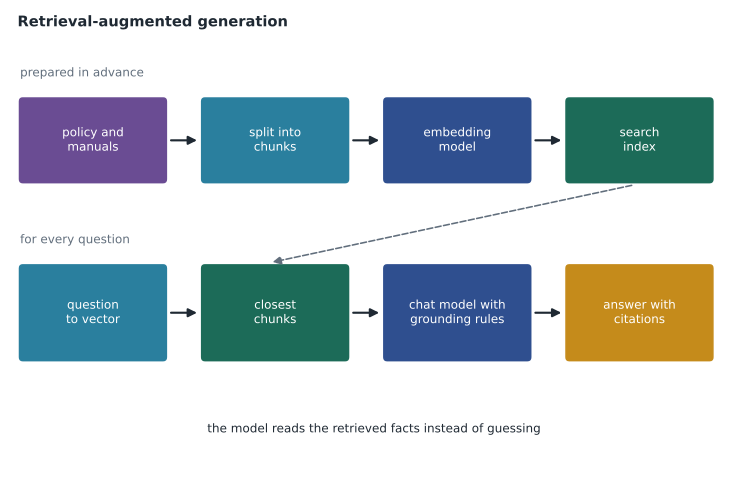
Step one: preparing the documents
Retrieval only works if the documents are ready to be searched. Preparation has three parts.
First, gather and clean the sources. For Ask Finch, that means the return policy, the store hours list, the warranty terms and a few hundred product manuals, stored in the Blob Storage account that Arjun connected to the project in lesson 1. Out-of-date versions are removed, because a model grounded in last year's policy will quote last year's policy.
Second, split the documents into chunks. A whole manual is far too long to send with every question, and most of it is irrelevant to any one question. Chunks of a few hundred words, often overlapping slightly so that a sentence split across a boundary still appears whole in one chunk, give the retriever pieces small enough to be precise and large enough to make sense on their own. Each chunk keeps a note of the document and section it came from, which later becomes the citation.
# Split a document into overlapping chunks of words, keeping the source for citations.
policy = ("Most items can be returned within 30 days with proof of purchase. "
          "Custom-cut products, including chain, rope, carpet and lumber cut to length, are final sale. "
          "Special orders can be returned only if they arrive damaged. "
          "Opened power tools can be returned within 30 days if all parts are included. "
          "Gift cards cannot be returned or exchanged for cash.")
def chunk(text, size=20, overlap=5, source="return-policy"):
    words = text.split()
    step = size - overlap
    out = []
    for start in range(0, len(words), step):
        piece = words[start:start + size]
        out.append({"source": source, "part": len(out) + 1, "text": " ".join(piece)})
        if start + size >= len(words):
            break
    return out
for c in chunk(policy):
print(c["source"], c["part"], "|", c["text"])return-policy 1 | Most items can be returned within 30 days with proof of purchase. Custom-cut products, including chain, rope, carpet and lumber return-policy 2 | chain, rope, carpet and lumber cut to length, are final sale. Special orders can be returned only if they arrive return-policy 3 | returned only if they arrive damaged. Opened power tools can be returned within 30 days if all parts are included. return-policy 4 | if all parts are included. Gift cards cannot be returned or exchanged for cash.
What this code does
Splits a returns policy into overlapping chunks of about 20 words and labels each chunk with its source and part number. The overlap keeps ideas that cross a boundary intact, and the labels let the assistant cite where an answer came from. This is the first step in grounding answers in company documents.
Third, index the chunks. A search index is a store built for fast lookup. For RAG on Azure, the usual index is Azure AI Search. Each chunk is stored with its text, its source and, for semantic search, a vector produced by an embedding model.
Embeddings and vector search
An embedding model, introduced in lesson 2, turns a piece of text into a list of numbers, often hundreds or thousands long, called a vector. Texts with similar meanings get vectors that point in similar directions, even when they share few words. "Can I bring back chain I had cut?" and "Are custom-cut products returnable?" use different words but mean much the same, and their vectors are close. Vector search finds the chunks whose vectors are closest to the question's vector, usually by measuring the angle between them, a calculation called cosine similarity.
# Cosine similarity between tiny made-up "embedding" vectors.
import math
def cosine(a, b):
    dot = sum(x * y for x, y in zip(a, b))
    return dot / (math.sqrt(sum(x * x for x in a)) * math.sqrt(sum(y * y for y in b)))
question = [0.9, 0.1, 0.8, 0.0]          # "Can I return chain that was cut for me?"
chunks = {
    "custom-cut items are final sale": [0.8, 0.2, 0.9, 0.1],
    "store hours on holidays":          [0.0, 0.9, 0.1, 0.7],
    "returning opened power tools":     [0.7, 0.1, 0.3, 0.2],
}
for name, vec in sorted(chunks.items(), key=lambda kv: -cosine(question, kv[1])):
print(f"{cosine(question, vec):.3f} {name}")0.987 custom-cut items are final sale 0.918 returning opened power tools 0.123 store hours on holidays
What this code does
Measures cosine similarity between a question's tiny made-up embedding and the embeddings of several document chunks, then ranks the chunks by score. The chunk about custom-cut products scores highest, so it is the one that would be retrieved. This shows how vector search finds the most relevant text by meaning.
Real embeddings have far more numbers, but the principle is the same: the closest chunk, here the one about custom-cut items, is retrieved first. Keyword search still has a place, because exact terms such as product codes and store names are matched more reliably by words than by meaning. Azure AI Search supports hybrid search, which runs keyword and vector search together and merges the results, and an optional semantic ranker that re-orders the top results using a language model. For most RAG solutions, hybrid search with semantic ranking is a sensible default.
Step two: retrieving and generating
With the index built, each question follows the same path. The application turns the question into a vector, asks the index for the best few chunks, and builds a prompt that contains the grounding instructions, the retrieved chunks with their sources, and the question. The model answers from what it has been given, and the application shows the answer with links or labels for the sources.
# Build a grounded prompt from retrieved chunks (the model call itself is not shown).
retrieved = [
    {"source": "return-policy", "part": 2, "text": "Custom-cut products, including chain, rope, carpet and lumber cut to length, are final sale."},
    {"source": "return-policy", "part": 1, "text": "Most items can be returned within 30 days with proof of purchase."},
]
question = "Can I return a cut length of chain if I bought too much?"
sources = "\n".join(f"[{c['source']} {c['part']}] {c['text']}" for c in retrieved)
prompt = ("Answer the customer using only the sources below. "
          "Cite the source in brackets after each fact. "
          "If the sources do not contain the answer, say you are not sure and offer a person.\n\n"
          f"Sources:\n{sources}\n\nQuestion: {question}")
print(prompt)Answer the customer using only the sources below. Cite the source in brackets after each fact. If the sources do not contain the answer, say you are not sure and offer a person. Sources: [return-policy 2] Custom-cut products, including chain, rope, carpet and lumber cut to length, are final sale. [return-policy 1] Most items can be returned within 30 days with proof of purchase. Question: Can I return a cut length of chain if I bought too much?
What this code does
Builds a grounded prompt from chunks that have already been retrieved: it lists each chunk with its source label and tells the model to answer only from those sources and cite them. The printed prompt is what would be sent to the model. The model call itself is left out.
The instruction to answer only from the sources and to admit when they do not contain the answer is as important as the retrieval itself. Without it, a model may blend retrieved facts with remembered ones. With it, Ask Finch now replies that custom-cut chain is final sale and cites the return policy, which is exactly what a trained contact-center agent would say.
Grounding options in Foundry
Foundry offers several ways to add grounding without building every step by hand, and the right one depends on how much control is needed.
| Option | What it does | When to use it |
|---|---|---|
| File search tool for an agent | Upload files to an agent; Foundry chunks, embeds and indexes them for the agent to search | Small, simple collections and quick prototypes |
| Azure AI Search index | Connect an index you build and control, with keyword, vector, hybrid and semantic search | Large collections, custom chunking, security trimming and full control |
| Foundry IQ knowledge base | A managed knowledge layer over Azure AI Search that plans queries, searches several sources and returns cited results with permissions applied | Agents that need several sources, such as storage, SharePoint and the web, with permission-aware answers |
| Your own code | Retrieve from any store, such as a database, and add the results to the prompt | Data that changes by the second, such as order status |
Foundry IQ deserves a note because it is new. Microsoft's documentation describes it as a managed knowledge layer: you create a knowledge base that points at one or more knowledge sources, such as Blob Storage, SharePoint or OneLake, and agents query the knowledge base. Behind the scenes, Azure AI Search does the indexing and retrieval, can break a complex question into several searches, applies the caller's permissions and returns passages with citations. Some of its features were still in preview when this course was written, so check the current status before relying on them.
Order status is different from policy text. It changes constantly and belongs to one customer, so it should not be copied into a search index at all. Ask Finch will look it up through a tool that calls the StockLine order system with the customer's verified identity, which is the subject of lesson 6. Grounding is not only search over documents; it is any way of handing the model the right facts at the right moment.
Security and privacy in grounding
Whatever the model can read, it can repeat. If the index contains documents a customer should not see, a cleverly worded question may surface them. Carmen Ortiz sets two rules for Ask Finch. Only public, customer-facing documents go into its index; internal procedures and staff notes stay out. And any personal information, such as an order history, is fetched only for the verified customer in the current session, never from a shared index. For internal assistants that do need restricted documents, Azure AI Search and Foundry IQ can filter results by the user's permissions, so a person sees only passages they are already allowed to open.
Worked problem
How much does grounding add to each request?
Ask Finch retrieves the top 4 chunks for each question. Each chunk is about 180 tokens, the grounding instructions are 60 tokens, and the question and recent history average 300 tokens. How many input tokens does a typical grounded request use, and what share of it is retrieved text?
Show solution
- Retrieved text: 4 × 180 = 720 tokens.
- Total input: 720 + 60 + 300 = 1,080 tokens.
- Share that is retrieved text: 720 ÷ 1,080 ≈ 0.67, about two thirds.
Answer: About 1,080 input tokens, two thirds of them retrieved text. Retrieving fewer, better chunks is the most direct way to cut cost, which is one reason semantic ranking is worth its small extra charge.
Testing grounded answers
Maya reruns the fifty test questions with grounding switched on. Answers about policy are now almost all correct, and each comes with a citation she can check. Two kinds of failure remain, and both are retrieval problems rather than model problems. When a question uses words the documents never use, such as "refund my wood" for lumber, the right chunk is sometimes missed; hybrid search with semantic ranking fixes most of those. And when two documents disagree, because an old store-hours page was never deleted, the model sometimes quotes the wrong one; removing the old page fixes that. Lesson 12 shows how to measure groundedness and retrieval quality formally.
Common mistakes
MistakeGrounding retrains the model on your documents.
InsteadGrounding supplies relevant passages with each request; the model itself is not changed.
MistakePutting every document into the prompt is the best way to ground a model.
InsteadRetrieve only the most relevant chunks; whole documents waste tokens and can bury the answer.
MistakeAnything in the search index is safe to expose through a public assistant.
InsteadA model can repeat whatever it reads; keep private documents out or filter by the user's permissions.
Summary and key terms
- Grounding gives the model the specific information to answer from, at the time it answers.
- Retrieval-augmented generation retrieves relevant passages and sends them with the question and grounding instructions.
- Prepare documents by cleaning them, splitting them into chunks with sources, and indexing them.
- Embedding models turn text into vectors; vector search finds chunks with similar meaning; hybrid search adds keyword matching.
- Azure AI Search is the usual index; Foundry also offers an agent file search tool and Foundry IQ knowledge bases.
- Instruct the model to answer only from sources, cite them and admit when they lack the answer.
- Keep private data out of shared indexes or filter results by the user's permissions.
- Grounding
- Supplying a model with specific information to base its answer on.
- Retrieval-augmented generation (RAG)
- Retrieving relevant passages and adding them to the prompt before the model generates an answer.
- Chunk
- A short section of a document stored and retrieved as a unit.
- Vector
- A list of numbers representing the meaning of a piece of text.
- Vector search
- Finding stored items whose vectors are closest to the query's vector.
- Hybrid search
- Combining keyword and vector search and merging the results.
- Foundry IQ
- A managed knowledge layer over Azure AI Search that agents query through knowledge bases.
Practice problems
Work each problem on paper first, then reveal the answer to check.
What problem does grounding solve?
Show answer
The model does not know an organization's own, current information, so it may invent plausible answers.
Why are documents split into chunks?
Show answer
So retrieval can return small, relevant pieces instead of whole documents.
What does an embedding model produce?
Show answer
A vector of numbers that represents the meaning of text.
Why combine keyword and vector search?
Show answer
Vectors match meaning, while keywords match exact terms such as product codes and names.
Which Azure service is the usual search index for RAG?
Show answer
Azure AI Search.
Why should order status not be stored in a shared index?
Show answer
It changes constantly and belongs to one customer; it should be fetched for the verified customer when needed.
Lesson quiz · 5 questions
Score 60% or more to complete this lesson.
Create a free account to save your progress, take quizzes and earn a certificate.