
MSAZ-111 · Lesson 3 of 12 · 24 min
Deploying a model and using the playground
▶ Video coming soon A video version of this lesson is on the way.
A model in the catalog is like a product on a shop shelf: you can read about it, but you cannot use it until you take it home. In Foundry, taking a model home means deploying it. Arjun and Maya deploy the chat model they chose in lesson 2, and then spend most of a session in the playground, the part of the Foundry portal where you talk to a deployed model, adjust its settings and write the instructions that turn a general model into Ask Finch. The AI-901 skills outline lists both steps: deploying a model and interacting with it in the Foundry portal, and creating effective system and user prompts.
What a deployment is
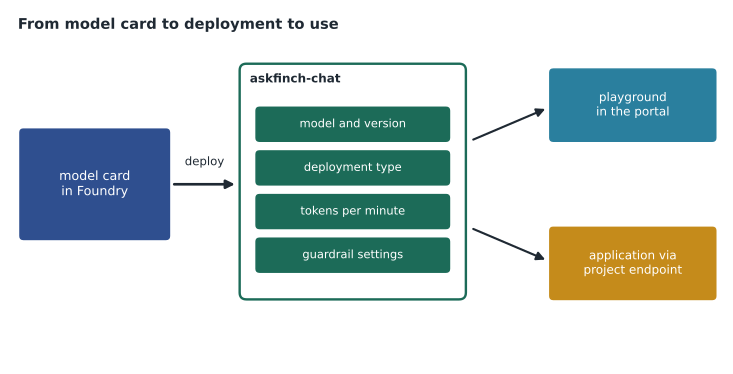
A deployment is a named, callable instance of a model in your Foundry resource. When you deploy, you choose the model and its version, give the deployment a name, pick a deployment type and set how much capacity it may use. Applications then call the deployment by its name. Because the name is yours, you can deploy the same model twice under different names, perhaps one for development and one for production with more capacity, or replace the model behind a name later without changing application code.
Arjun names the deployment askfinch-chat rather than using the model's own name. "If we switch models next year," he says, "I want to change one setting, not every line of code that mentions the old model."
Deployment types
Deployment types decide where requests are processed and how capacity is paid for. Names and availability change, and not every type exists for every model, so check the model card, but the main ideas are stable.
| Type | Where requests are processed | How capacity is paid for | Good for |
|---|---|---|---|
| Global standard | Any Azure region Microsoft chooses | Per token, as used | Highest availability and quota when data residency for processing is not a concern |
| Data zone standard | Regions within a defined zone such as the United States or the European Union | Per token, as used | Keeping processing within a zone while still sharing capacity |
| Standard (regional) | The resource's own region | Per token, as used | Strict residency needs, if the model is offered in that region |
| Provisioned throughput | As chosen for the deployment | Reserved capacity units paid for whether used or not | Steady, high-volume production traffic needing predictable latency |
| Batch | Global | Per token, at a lower rate, with results returned later | Large jobs that do not need an immediate answer |
Microsoft's documentation distinguishes where data is stored from where it is processed. For global deployments, stored data such as uploaded files stays in the resource's geography, but the prompts and responses may be processed in another region. For Harrow & Finch, Arjun chooses a United States data zone deployment for production, so that processing stays in the country, and a global deployment for the development project, which uses only made-up data.
Capacity for pay-as-you-go deployments is expressed as a rate limit, usually tokens per minute and requests per minute, drawn from a quota your subscription has for each model and region. If an application sends more than its limit, extra requests are rejected with a too-many-requests error and must be retried after a pause. Provisioned throughput instead reserves a fixed amount of processing capacity, which gives predictable speed for a predictable bill.
Worked problem
Is the rate limit enough?
The askfinch-chat development deployment allows 30,000 tokens per minute. At the busiest time Arjun expects 20 customer exchanges per minute, each using about 1,050 tokens in total (900 input and 150 output). Will the deployment cope, and how much headroom is left?
Show solution
- Tokens needed per minute: 20 × 1,050 = 21,000.
- The limit is 30,000, so the busiest minute uses 21,000 ÷ 30,000 = 0.7 of the limit.
- Headroom: 30,000 − 21,000 = 9,000 tokens per minute, enough for about 8 more exchanges at that size.
Answer: Yes, with about 9,000 tokens per minute to spare. For production, Arjun will ask for a higher limit, because a single long chat or a sudden rush could use the headroom quickly.
The chat playground
Once a deployment exists, the chat playground lets you talk to it without writing code. The screen has three main parts. A setup area holds the instructions, often called the system message, that tell the model how to behave. A chat area is where you type user messages and read the replies. And a parameters area holds settings that change how the model generates text. Most playgrounds also show a view-code button that produces sample code for the same conversation, which is a quick way to move from experiment to application in lesson 4.
The playground is for exploring, not for production. Nothing you type there becomes part of an application until you copy the settings into code or into an agent. It is, however, the fastest way to learn how a model responds to different instructions, and Arjun wants Maya to try at least twenty variations before they settle on one.
System messages and user messages
A chat model receives a conversation made of messages, each with a role. The system message, sometimes called the developer message or instructions, comes first and sets the rules for the whole conversation: who the assistant is, what it should and should not do, what tone to use and how to format answers. User messages are what the person types. Assistant messages are the model's earlier replies, which are sent back with each new turn so the model can follow the conversation.
Writing a good system message is the single most effective way to shape a model's behavior, and the AI-901 outline lists it as a skill on its own. Arjun's guidance for Maya is practical.
- Say who the assistant is and who it serves: an assistant for Harrow & Finch customers, not a general chatbot.
- State what it must do and must not do, plainly: answer questions about returns, store hours and orders; do not give legal or medical advice; never promise refunds that the policy does not allow.
- Say what to do when it does not know: admit it and offer a human agent, rather than guessing.
- Describe the tone and length: friendly, concise, plain language, two or three short paragraphs at most.
- Give the format when it matters: a numbered list for steps, a single sentence for yes-or-no questions.
- Include one or two short examples of good answers if the style is hard to describe in words.
You are Ask Finch, the customer-service assistant for Harrow & Finch Home Supply.
Help customers with returns, store hours and the status of their orders.
Use only the information provided to you. If you are not sure, say so and offer to connect the customer with a person.
Never promise a refund, discount or exception that the return policy does not allow.
Do not give legal, medical or electrical-safety advice; suggest a qualified professional instead.
Be friendly and brief: no more than three short paragraphs. Use numbered steps for instructions.
A user prompt is what the customer types, and while Ask Finch cannot control what customers write, Maya can shape the user prompts used in testing and in other internal tools. Good prompts are specific about the goal, give the needed context, and say what form the answer should take. "Summarize this chat" gets a vague paragraph. "Summarize this chat for the next agent in three bullet points: the customer's problem, what has been tried, and what the customer wants" gets something an agent can use.
Parameters
The playground's parameters change how the model picks its words. The names vary slightly between models, and some reasoning models accept fewer of them, but the common ones appear on the exam.
| Parameter | What it does | Typical setting for Ask Finch |
|---|---|---|
| Temperature | Controls randomness: low values make the most likely words more likely; high values spread the choice | Low, for consistent, factual answers |
| Top P | Limits the choice to the smallest set of words whose probabilities add up to P | Left at the default; adjust temperature or top P, not both |
| Maximum output tokens | Caps the length of the answer | A few hundred tokens, enough for three short paragraphs |
| Stop sequences | Text that ends the answer when the model produces it | Not usually needed for chat |
| Past messages included | How much earlier conversation is sent with each turn | Enough for a typical chat; lesson 4 covers trimming |
Temperature is the one Maya needs to understand properly. At each step, the model calculates a probability for every possible next token. With temperature near zero, it almost always takes the most probable token, so the same question gets nearly the same answer every time. With a higher temperature, less probable tokens get a better chance, which makes writing more varied and sometimes more creative, and also more likely to drift from the facts. For a customer-service assistant, consistency beats creativity. For drafting marketing copy, Marcus Feldt's team might prefer a higher setting.
# How temperature reshapes next-token probabilities (toy example with four candidate words).
import math
scores = {"Yes": 2.0, "Usually": 1.2, "No": 0.4, "Perhaps": 0.1}   # model's raw scores
def probabilities(temp):
    exp = {w: math.exp(s / temp) for w, s in scores.items()}
    total = sum(exp.values())
    return {w: v / total for w, v in exp.items()}
for t in (0.2, 0.7, 1.5):
    p = probabilities(t)
print(f"temperature {t}: " + ", ".join(f"{w} {v:.2f}" for w, v in p.items()))temperature 0.2: Yes 0.98, Usually 0.02, No 0.00, Perhaps 0.00 temperature 0.7: Yes 0.67, Usually 0.21, No 0.07, Perhaps 0.04 temperature 1.5: Yes 0.45, Usually 0.27, No 0.16, Perhaps 0.13
What this code does
Converts a model's raw scores for four possible answers into probabilities at several temperature settings. Lower temperatures concentrate probability on the top answer, while higher ones spread it more evenly. This shows how adjusting temperature in the playground changes how consistent or varied replies are.
The output shows the effect: at 0.2 almost all the probability sits on the top word, while at 1.5 the alternatives get a real share. The model has not changed, only how adventurous it is allowed to be when it chooses.
Testing in the playground
Maya spends the session working through the fifty test questions, changing one thing at a time. She learns three lessons that every prompt writer learns. First, small wording changes can matter: adding "use only the information provided" cut the number of invented store hours sharply. Second, instructions placed at the end of a long system message are sometimes followed less reliably than ones at the start, so the most important rules go first. Third, the model cannot know facts it has not been given. Without the actual return policy, Ask Finch makes up a plausible one, which is exactly the problem lesson 5 solves with grounding.
She keeps a simple log: the version of the system message, the parameter settings, the question, the answer and whether it was acceptable. That log turns playground experiments into evidence the AI review group can read, and it becomes the starting point for the formal evaluations in lesson 12.
Worked problem
Counting improvements
With her first system message, 31 of the 50 test answers were acceptable. After adding the rule about using only provided information and moving the refund rule to the top, 38 were acceptable. What fraction of answers was acceptable before and after, and how many more acceptable answers did the change produce?
Show solution
- Before: 31 ÷ 50 = 0.62.
- After: 38 ÷ 50 = 0.76.
- Difference: 38 − 31 = 7 more acceptable answers.
Answer: From 0.62 to 0.76, seven more acceptable answers out of fifty. Most of the remaining failures were questions the model could not answer without the real policy text.
From playground to application
When Maya is happy with the instructions and settings, Arjun shows her the view-code option. It produces a short program, in Python or another language, that sends the same system message and settings to the askfinch-chat deployment. That code is where lesson 4 begins. He also saves the system message and parameter values in the project's shared notes, because the playground does not keep a permanent, versioned record the way source code does.
Common mistakes
MistakeDeploying a model copies it into your subscription so you can change its weights.
InsteadA deployment is a named endpoint for a hosted model; you call it, but you do not retrain it by deploying.
MistakeA high temperature makes answers more accurate.
InsteadA higher temperature makes answers more varied; for factual tasks, a low temperature gives more consistent results.
MistakeThe system message is shown to the customer.
InsteadThe system message is instructions to the model; customers see only the conversation.
Summary and key terms
- A deployment is a named, callable instance of a model, with a chosen version, deployment type and capacity.
- Deployment types include global, data zone and regional standard, provisioned throughput and batch; they differ in where requests are processed and how capacity is paid for.
- Pay-as-you-go deployments have rate limits in tokens and requests per minute; provisioned throughput reserves capacity.
- The chat playground lets you test a deployment with a system message, user messages and parameters, and view equivalent code.
- A good system message states the assistant's role, rules, fallback behavior, tone and format.
- Temperature and top P control randomness; maximum output tokens caps answer length.
- Test one change at a time against a fixed set of examples and log the results.
- Deployment
- A named, callable instance of a model in a Foundry resource.
- Playground
- A portal page for testing a deployed model with instructions, messages and parameters.
- System message
- Instructions sent first in a conversation that set the assistant's role, rules and style.
- User message
- A message written by the person using the application.
- Temperature
- A parameter that controls how random the model's word choices are.
- Top P
- A parameter that limits word choices to the most likely set whose probabilities add up to P.
- Provisioned throughput
- A deployment type that reserves a fixed amount of model capacity for a fixed price.
Practice problems
Work each problem on paper first, then reveal the answer to check.
Why give a deployment your own name rather than the model's name?
Show answer
So the model behind it can be changed later without changing application code.
What happens when an application exceeds its tokens-per-minute limit?
Show answer
Extra requests are rejected with a too-many-requests error and must be retried later.
What is the system message for?
Show answer
To set the assistant's role, rules, fallback behavior, tone and format for the conversation.
Which setting would you lower to make answers more consistent?
Show answer
Temperature.
Which deployment type reserves capacity for predictable latency?
Show answer
Provisioned throughput.
Why should Ask Finch's instructions say what to do when it does not know an answer?
Show answer
So it admits uncertainty and offers a person instead of inventing an answer.
Lesson quiz · 5 questions
Score 60% or more to complete this lesson.
Create a free account to save your progress, take quizzes and earn a certificate.