
MSAZ-111 · Lesson 1 of 12 · 22 min
Microsoft Foundry: hubs, projects and resources
▶ Video coming soon A video version of this lesson is on the way.
Maya Castillo runs the customer contact center at Harrow & Finch Home Supply in Des Moines. In the first course of this program she learned what generative AI is, how models are trained and why responsible AI matters. Now Arjun Mehta, the AI engineer on Renata Kowal's cloud team, wants her to build things. "Concepts get you through half the exam," he tells her at their first hands-on session. "The other half is knowing where the buttons are and what happens when you press them." The pilot they are working toward is Ask Finch, a customer-service chat assistant that answers questions about returns, store hours and order status, and hands the conversation to a human agent when it should. Before anyone writes a prompt, Arjun wants Maya to understand where Ask Finch will live in Azure.
This course follows the second part of the AI-901 Microsoft Azure AI Fundamentals skills outline, the part about implementing AI solutions with Microsoft Foundry. Microsoft's study guide, with skills measured as of April 15, 2026, gives that part the larger share of the exam, 55 to 60 out of every 100 marks, and the concepts part 40 to 45. Each lesson takes one of the hands-on skills, explains what it means, and walks through how Arjun and Maya use it for Ask Finch or one of the other ideas on Harrow & Finch's list.
What Microsoft Foundry is
Microsoft Foundry is Microsoft's platform for building generative AI applications and agents on Azure. It brings together a catalog of models from Microsoft and many other providers, a way to deploy those models and call them, tools for building agents, prebuilt AI services for language, speech, vision and document processing, and features for testing, evaluating, monitoring and governing what you build. You work with it through a web portal, through software development kits for languages such as Python, C# and JavaScript, and through REST APIs.
The name has changed several times, and exam questions, training material and blog posts written at different times use different names. The portal began as Azure AI Studio, was renamed Azure AI Foundry, and is now Microsoft Foundry. The prebuilt services once called Cognitive Services, and later Azure AI Services, are now grouped as Foundry Tools: Azure Language, Azure Translator, Azure Speech, Azure Vision, Azure Content Understanding and others, each described as being "in Foundry Tools". If you meet an older name in a practice question, translate it in your head and carry on; the ideas behind the services have changed much less than their labels.
| Older name | Current name |
|---|---|
| Azure AI Studio, then Azure AI Foundry | Microsoft Foundry |
| Azure AI Foundry portal | Foundry portal (and Foundry classic for older projects) |
| Cognitive Services, then Azure AI Services | Foundry Tools |
| Azure AI Language, Azure AI Speech, Azure AI Vision | Azure Language, Azure Speech, Azure Vision in Foundry Tools |
| Assistants API threads, messages and runs | Responses API conversations, items and responses |
The Foundry resource
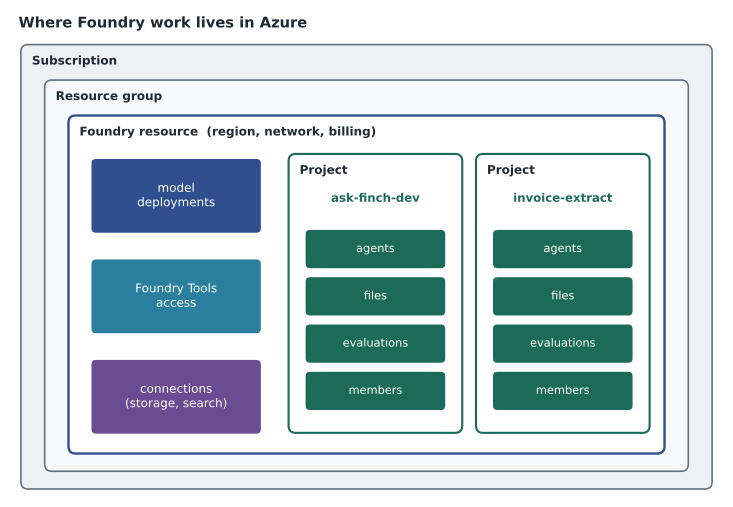
Everything in Azure is a resource that lives in a resource group inside a subscription, and Foundry is no exception. The current design uses a single Azure resource type, the Foundry resource. When you create one, you choose a subscription, a resource group, a region and a name, exactly as you would for a storage account or a virtual machine. The Foundry resource is the unit Azure bills, secures and connects to networks. It holds the model deployments, gives access to the Foundry Tools, and contains one or more projects.
Choosing the region matters for three reasons that will be familiar from Azure fundamentals. Models and tools are not available in every region, so the region must offer what the solution needs. Data residency rules or company policy may require data to stay in a particular country. And latency matters a little for interactive apps, though much less than people expect, because the time a model takes to generate an answer usually dwarfs the network round trip. Harrow & Finch's primary region is Central US, so Arjun starts by checking which models and tools are offered there and in East US 2.
Projects
A project is the workspace where you actually build. Inside a Foundry resource you can create several projects, and each one holds the work for one solution or one team: its agents, the files it uploads, the evaluation runs, the connections to other services and the settings that apply only to it. Projects share the parent resource's model deployments and network settings, which keeps administration simple, while separating the work so that people on one project do not see or change another's agents.
Arjun creates a Foundry resource for the AI work and two projects inside it. One, ask-finch-dev, is for the chat assistant. The other, invoice-extract, is for the accounts payable team's idea of reading supplier invoices automatically. Each project has its own members. Maya is a member of ask-finch-dev but not invoice-extract, because she has no business reason to see supplier invoices.
Each project also has an endpoint, a web address that applications and SDKs use to reach the project's models, agents and tools. Developers point their code at the project endpoint and authenticate with Microsoft Entra ID, the same identity system that controls sign-in to the Azure portal. Lesson 4 shows what that looks like in code.
Hubs and hub-based projects
Before the current design, Foundry used a different structure, and the exam topic for this lesson still mentions it, so you need to know both. In that structure, an Azure AI hub resource sat at the top. A hub was created together with several dependent resources: a storage account for files, a key vault for secrets, and optionally a container registry and Application Insights for monitoring. Projects were created under the hub and inherited its connections and security settings, and models came from a separate Azure OpenAI resource or Azure AI Services resource that the hub connected to.
Hub-based projects still exist and still work. They appear in the Foundry (classic) portal. Microsoft's documentation says new investment is focused on Foundry projects in the new portal, and that existing Azure OpenAI resources can be upgraded to Foundry resources while keeping their endpoints and keys. For a new solution, the Foundry resource with Foundry projects is the default choice. For the exam, know that a hub is a container for projects that shares resources and settings among them, and that the newer Foundry resource does the same job with fewer moving parts.
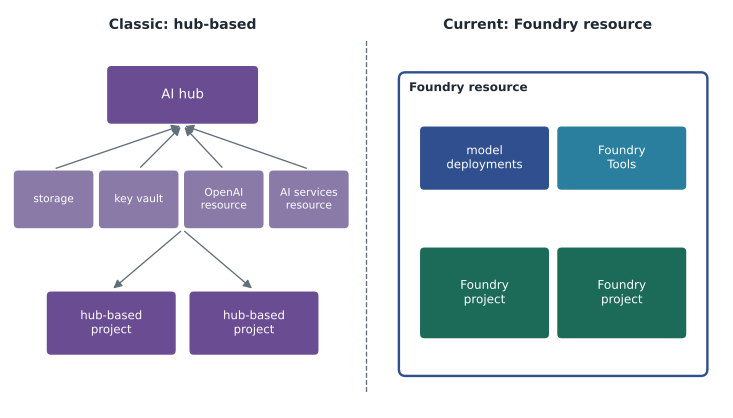
| Foundry resource with Foundry projects | Hub with hub-based projects (classic) | |
|---|---|---|
| Top-level Azure resource | Foundry resource | Azure AI hub |
| Where models come from | Deployed in the Foundry resource itself | Connected Azure OpenAI or AI Services resource |
| Dependent resources created with it | None required | Storage account, key vault, optional others |
| Portal | Foundry portal | Foundry (classic) portal |
| Recommended for new work | Yes | Existing solutions only |
Creating the resource and project
There are three ways to create a Foundry resource and project. In the Foundry portal at ai.azure.com, you can create a project and let the portal create the Foundry resource behind it, choosing the subscription, resource group and region on the way. In the Azure portal, you can create the Foundry resource first, like any other resource, and then open it in the Foundry portal. And in scripts or templates, administrators can create both with the Azure CLI, PowerShell, Bicep or ARM templates, which is how Renata's team creates everything for Project Skylight so that every environment is built the same way.
# Illustrative only: names and region are examples.
az group create --name rg-ai-dev-cus --location centralus
az cognitiveservices account create --name hf-foundry-dev --resource-group rg-ai-dev-cus --kind AIServices --sku S0 --location centralus
Arjun points out one detail in the command. Under the surface, a Foundry resource is an Azure AI Services account, which is why the command uses the cognitiveservices group and the AIServices kind. That history explains why some settings screens still show the older names. Projects are then added to the resource from the Foundry portal or with further commands.
Access control
Foundry uses Azure role-based access control, the same system that controls who can do what with every Azure resource. Roles can be assigned at the subscription, resource group, Foundry resource or project level, and each assignment flows down to everything below it. Foundry adds its own built-in roles that separate people who manage the resource from people who build with it. The details of each role change from time to time, so check Microsoft's documentation for the current list, but the pattern is consistent: an owner-type role can manage access and settings, a user-type role can build and run agents and deployments without changing the resource's security settings, and a reader-type role can only look.
Arjun gives himself the owner-type role on the Foundry resource and gives Maya a user-type role on the ask-finch-dev project only. That follows the principle of least privilege that Maya met in the responsible AI lessons: she can build and test Ask Finch, but she cannot change the network settings, delete deployments that other projects use or read the invoice project. When the pilot moves toward production, Sunil Rao's security team will review the assignments again.
Applications need access too. When code calls a Foundry project, it should authenticate with Microsoft Entra ID, ideally using a managed identity when the code runs in Azure, rather than an API key pasted into a configuration file. Keys still exist for some services, but a key is like a shared password: anyone who has it can use the service, and it must be stored in a key vault and rotated. Arjun's rule for Skylight is that no key appears in source code, ever.
Connections
A Foundry project often needs to reach other services: a storage account with product manuals, an Azure AI Search index, a database, or a third-party service an agent calls as a tool. A connection is a saved, secured link from the project to one of those services. It records where the service is and how to authenticate, so that agents and tools can use it without each developer handling credentials. Connections can be shared across all projects in a resource or kept to one project. For Ask Finch, Arjun adds a connection to the storage account that holds the return policy and product manuals; lesson 5 uses it.
Planning the Ask Finch setup
Worked problem
Estimating monthly usage for the pilot
Model usage is usually billed per token, roughly a word fragment. Arjun wants a rough idea of how many tokens Ask Finch would use in a month so that Dana Whitcombe, the chief financial officer, can see the scale before the pilot starts. He assumes 400 chats a day, 6 exchanges per chat, 900 input tokens per exchange (instructions, history and retrieved policy text) and 150 output tokens per exchange. How many input and output tokens is that in a 30-day month?
Show solution
- Exchanges per month: 400 chats × 6 exchanges × 30 days = 72,000 exchanges.
- Input tokens: 72,000 × 900 = 64,800,000.
- Output tokens: 72,000 × 150 = 10,800,000.
- Output tokens are often priced higher than input tokens, so the two totals are kept separate when costs are estimated.
Answer: About 64.8 million input tokens and 10.8 million output tokens a month. Arjun multiplies these by the published per-token prices for the chosen model when he picks one; the course does not quote prices, which change often.
# Rough monthly token estimate for a chat assistant (illustrative assumptions).
chats_per_day = 400
exchanges_per_chat = 6
days = 30
input_per_exchange = 900    # instructions + history + retrieved text
output_per_exchange = 150

exchanges = chats_per_day * exchanges_per_chat * days
print("exchanges per month:", f"{exchanges:,}")
print("input tokens:       ", f"{exchanges * input_per_exchange:,}")
print("output tokens: ", f"{exchanges * output_per_exchange:,}")exchanges per month: 72,000 input tokens: 64,800,000 output tokens: 10,800,000
What this code does
Estimates a chat assistant's monthly token use from the number of chats a day, exchanges per chat and tokens per exchange, over 30 days. Input tokens (instructions, history and retrieved text) far outnumber output tokens. This is the starting point for estimating the deployment's cost and capacity.
The calculation shows something Maya does not expect: most of the tokens are input, not output. Every exchange resends the instructions, the earlier conversation and any retrieved documents. Keeping instructions short and retrieving only the most relevant passages, both covered later in this course, are the cheapest ways to reduce cost.
Common mistakes
MistakeA Foundry project is a separate Azure resource that is billed on its own.
InsteadProjects live inside a Foundry resource, which is the unit Azure bills, secures and connects to networks.
MistakeHub-based projects have been removed.
InsteadThey still work in the Foundry (classic) portal; new work is recommended on Foundry projects.
MistakeApplications should authenticate to Foundry with an API key stored in the code.
InsteadPrefer Microsoft Entra ID and managed identities; if a key is unavoidable, keep it in a key vault and rotate it.
Summary and key terms
- Microsoft Foundry is Azure's platform for building generative AI apps and agents, formerly called Azure AI Studio and Azure AI Foundry.
- The prebuilt AI services are now grouped as Foundry Tools, such as Azure Language, Azure Speech and Azure Vision.
- A Foundry resource lives in a resource group and region, holds model deployments and contains projects.
- A project is the workspace for one solution: its agents, files, evaluations and connections.
- Hub-based projects are the older structure, with an Azure AI hub and dependent resources; they appear in Foundry (classic).
- Access is controlled with Azure RBAC at resource or project level, and applications should use Microsoft Entra ID.
- Connections are saved, secured links from a project to other services.
- Microsoft Foundry
- Microsoft's Azure platform for building, deploying, evaluating and governing generative AI apps and agents.
- Foundry resource
- The Azure resource that holds model deployments and projects and is billed, secured and networked as one unit.
- Project
- A workspace inside a Foundry resource for building one solution, with its own agents, files and settings.
- Hub
- In the classic design, a top-level resource that shares settings and dependent resources among hub-based projects.
- Foundry Tools
- The prebuilt AI services for language, translation, speech, vision, information extraction and safety.
- Connection
- A saved, secured link from a project to another service such as storage or a search index.
- Project endpoint
- The web address that code and SDKs use to reach a project's models, agents and tools.
Practice problems
Work each problem on paper first, then reveal the answer to check.
What is the current name of the platform once called Azure AI Studio?
Show answer
Microsoft Foundry.
What does a Foundry resource contain?
Show answer
Model deployments, access to Foundry Tools, and one or more projects.
Which portal shows hub-based projects?
Show answer
The Foundry (classic) portal.
Name two resources that were created along with a classic hub.
Show answer
A storage account and a key vault (optionally also a container registry and Application Insights).
How should an application running in Azure authenticate to a Foundry project?
Show answer
With Microsoft Entra ID, preferably through a managed identity.
What is a connection in a Foundry project?
Show answer
A saved, secured link to another service, such as a storage account or search index.
Lesson quiz · 5 questions
Score 60% or more to complete this lesson.
Create a free account to save your progress, take quizzes and earn a certificate.