
MSAZ-110 · Lesson 8 of 12 · 22 min
AI agents and tools
▶ Video coming soon A video version of this lesson is on the way.
The December 14 AI hour begins with a figure from Maya's call statistics: about one contact in four is some version of "Where is my order?" Answering it takes an agent less than a minute, but only because the agent opens StockLine, types the order number, reads the status and translates it into plain language. Ask Finch, as designed so far, can explain the delivery policy but cannot look up an order. "So it's polite but useless for a quarter of our customers," Maya says. Arjun agrees, and uses the problem to introduce agents: AI systems that can take actions by calling tools.
From chat model to agent
A chat model on its own can only produce text. An agent combines a model with instructions, tools and often knowledge sources, and uses the model's reasoning to decide which steps to take toward a goal. Given the goal "tell this customer where their order is", an agent can decide that it needs the order number, ask the customer for it, call a lookup tool, read the result, and write a reply. If the lookup shows that the parcel is held at a depot, it can decide to fetch the depot's address with another tool. The model does not run the tools itself. It asks the application to run them, and the application decides whether to allow it.
| Component | What it does | Ask Finch example |
|---|---|---|
| Model | Understands the request, plans steps and writes the response. | The chat model deployed in Foundry. |
| Instructions | Define the agent's goal, scope, rules and tone, like a system message. | Answer delivery and returns questions; never change orders. |
| Tools | Functions the agent can ask to call: searches, APIs, code. | A read-only order status lookup. |
| Knowledge | Documents or indexes the agent can search for grounding. | The returns and delivery policies. |
| Conversation state | The history of the current conversation, kept by the service between turns. | The customer's earlier messages in this chat. |
How tool calling works
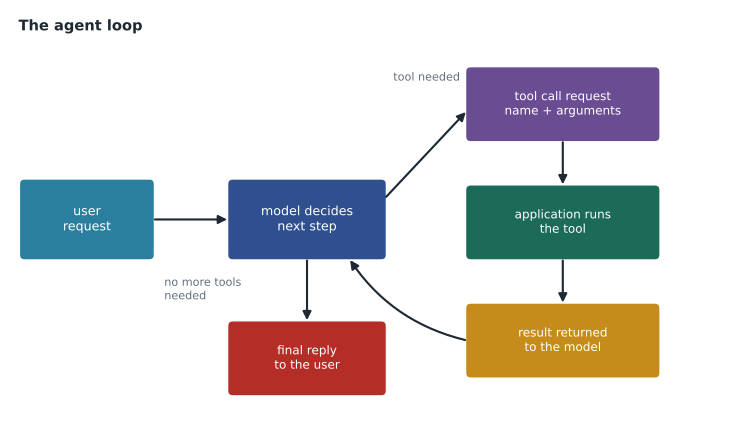
Tool calling, also known as function calling, is the mechanism that lets a model use tools. The developer describes each tool to the model: its name, what it does, and the inputs it needs, written in a structured format called a schema. When the model decides a tool would help, it does not reply with text. Instead it returns a structured request to call that tool with particular arguments. The application checks the request, runs the tool, and sends the result back to the model as a tool message. The model then continues, either calling another tool or writing its final answer.
import json
# A tool description the application gives the model (a simplified schema).
tool = {"name": "get_order_status",
        "description": "Look up the delivery status of a customer order. Read-only.",
        "parameters": {"order_number": "string, format HF followed by 8 digits"}}

orders = {"HF20261187": {"status": "out for delivery", "eta": "today between 1 and 5 p.m."}}

def run_tool(name, args):
    if name != "get_order_status":
        return {"error": "unknown tool"}
    order = orders.get(args.get("order_number", ""))
    return order if order else {"error": "order not found"}

# What the model might return instead of text when it decides to use the tool:
model_request = {"tool": "get_order_status", "arguments": {"order_number": "HF20261187"}}
result = run_tool(model_request["tool"], model_request["arguments"])
print("tool described to the model:", tool["name"])
print("tool result sent back to the model:", json.dumps(result))tool described to the model: get_order_status
tool result sent back to the model: {"status": "out for delivery", "eta": "today between 1 and 5 p.m."}What this code does
Describes a read-only order-lookup tool the application offers the model. When the model asks to use it with an order number, the application checks the number's format, looks up the order and returns the result. It shows that the application, not the model, actually runs the tool and controls what data comes back.
The sketch shows the essential split of responsibilities. The model chooses the tool and fills in the arguments, but the application's code runs the lookup, and that code decides what the tool can and cannot do. Because this tool is read-only, nothing the model says can make it cancel or change an order.
Agents in Microsoft Foundry
Foundry includes an agent service for building, testing and running agents. In the Foundry portal a developer can create an agent, choose its model, write its instructions, attach knowledge sources and tools, and try it in a playground before connecting an application. Built-in tools include searching attached files or an Azure AI Search index, running code in a sandbox to analyze data, and calling external services through APIs. Foundry also supports the Model Context Protocol, an open standard for connecting models to tools and data sources, so that tools built once can be reused by different agents. The service keeps each conversation's state, so the application does not have to resend the full history itself.
The AI-901 outline expects candidates to create and test a single-agent solution in the Foundry portal and to build a lightweight client application for an agent. Those hands-on skills are covered in MSAZ-111. Some solutions use several agents that each handle one part of a job and pass work between them, called multi-agent systems; for example, one agent might classify an incoming email and hand it to a specialist agent for returns or deliveries. They are useful for complex workflows but add more ways for things to go wrong, and Arjun recommends starting with one well-tested agent.
POST https://hf-foundry-test.services.ai.azure.com/api/projects/ask-finch/openai/v1/responses
Content-Type: application/json
Authorization: Bearer (token from Microsoft Entra ID)

{ "agent": {"name": "ask-finch-pilot"},
  "input": "Where is order HF20261187?" }
Designing agents safely
An agent that can act can also act wrongly. A chat model that misunderstands a question produces a bad paragraph; an agent that misunderstands could, if allowed, refund the wrong order or email the wrong customer. Arjun's design rules for Ask Finch follow from Maya's favorite question about the cost of a wrong answer.
- Least privilege. Give each tool only the access it needs. The order lookup reads status for one order number at a time and cannot see payment details or change anything.
- Verify identity before sharing personal data. The agent asks for the order number and the postal code on the order, and the tool checks both before returning anything.
- Keep a human in the loop for consequential actions. If the agent ever proposes a refund, a person approves it. In the pilot, refunds are not a tool at all.
- Limit steps and cost. Cap the number of tool calls per conversation so that a confused agent cannot loop forever.
- Log everything. Record each tool call, its arguments and its result so that mistakes can be investigated.
- Treat tool results and documents as data, not instructions, to reduce the risk of indirect prompt injection.
Maya adds a rule of her own: the agent must always offer a person. Some customers will want to talk to someone however good the assistant is, and the handoff should pass along the conversation so the customer does not have to repeat themselves.
Testing an agent
Testing an agent is harder than testing a chat answer, because the path matters as well as the destination. Arjun and Maya plan three kinds of check for the order-status phase. First, did the agent call the right tool with the right arguments? If a customer types the order number with a space in the middle, the agent should still pass it correctly, and if the customer gives two order numbers, it should look up both. Second, did it handle failure well? When the lookup returns "order not found", the agent should ask the customer to check the number, not invent a status. Third, was the final answer correct, clear and polite, and did it stay within scope?
Foundry's evaluation tools can score agent runs on measures such as whether the agent resolved the user's intent, whether it used tools accurately and whether it followed its instructions, using a mix of automated checks and model-graded scores. Arjun stresses that automated scores are a starting point, not a verdict. Maya's team will read a sample of real conversations every week during the pilot, the same way supervisors already review a sample of human agents' chats.
Cost and delay
Every pass through the loop is another model request, so agents cost more and take longer than single answers. A question that needs two tool calls means at least three model requests: one to decide on the first tool, one to decide on the second, and one to write the answer, each resending the growing conversation.
# Illustrative token use for one order-status chat that needs two tool calls
base_prompt = 1800        # instructions and tool descriptions sent with every request
history = 0
total_in = 0
steps = [("decide: ask for order number", 60), ("decide: call order lookup", 40),
         ("decide: call depot address lookup", 40), ("write final answer", 120)]
for name, out_tokens in steps:
    total_in += base_prompt + history
    history += out_tokens + 150      # model output plus the next user or tool message
    print(f"{name:35s} input so far {total_in:6d}")
print("total input tokens:", total_in)decide: ask for order number input so far 1800 decide: call order lookup input so far 3810 decide: call depot address lookup input so far 6010 write final answer input so far 8400 total input tokens: 8400
What this code does
Adds up the input tokens for one chat that needs several steps, including two tool calls. Every request resends the instructions, tool descriptions and growing conversation history, so input tokens pile up step by step. The total shows why agent-style chats with tool calls cost far more than a single question and answer.
The numbers explain why tool descriptions should be short and why the number of steps should be capped. They also explain why Arjun wants the agent to ask for the order number and postal code together in one message rather than in two.
Agents compared with traditional automation
Maya asks why the company does not simply build a web form for order status. Arjun says it should, and it already has one; most customers who use the website can find their order page. The agent's value is in the conversation: customers who type "my mom's birthday present hasn't come and the tracking says something weird" into the chat get an answer without having to find the right page or the right words. Agents are worth their complexity when requests are varied and phrased in natural language; for a fixed, predictable process, ordinary automation is cheaper and more reliable. Many good designs use both: an agent understands the request and then hands off to a fixed workflow to carry it out.
Worked problem
Choosing tools and permissions
Ask Finch's second phase will let customers change the delivery date of an undelivered order. Propose the tools the agent needs, the permission each should have, and one safeguard.
Show solution
- A lookup tool that reads the order status and current delivery slot, after checking the order number and postal code.
- A tool that lists available delivery slots for that order, read-only.
- A tool that requests a change to a chosen slot; it can change only the delivery date of that one order and nothing else.
- Safeguard: the agent must read the new date back to the customer and get a clear yes before calling the change tool, and every change is logged.
Answer: Two read-only tools and one narrowly scoped change tool, with explicit customer confirmation and logging.
Common mistakes
MistakeAn agent runs code and tools by itself.
InsteadThe model asks for a tool call; the application runs the tool and controls what it can do.
MistakeMore tools always make an agent more useful.
InsteadEach tool adds risk and confusion; give an agent only the tools its task needs.
MistakeAgents should replace every web form.
InsteadFor fixed, predictable processes, ordinary automation is cheaper and more reliable.
Summary and key terms
- An agent combines a model with instructions, tools, knowledge and conversation state to pursue a goal.
- Tool calling lets a model return a structured request to call a described function; the application runs it and returns the result.
- The agent loop repeats deciding, calling tools and reading results until the model can answer.
- Microsoft Foundry's agent service lets developers create, test and run agents with built-in and custom tools.
- The Model Context Protocol is an open standard for connecting agents to tools and data.
- Safe agents use least privilege, identity checks, human approval for consequential actions, step limits and logging.
- Agents suit varied natural-language requests; fixed processes are better served by ordinary automation.
- Agent
- An AI system that uses a model, instructions and tools to take steps toward a goal.
- Tool
- A function or service an agent can ask to use, such as a search or an API.
- Tool calling
- A model returning a structured request to run a described function; also called function calling.
- Schema
- A structured description of a tool's name, purpose and inputs.
- Model Context Protocol
- An open standard for connecting AI models and agents to tools and data sources.
- Least privilege
- Granting only the access a component needs to do its job.
- Human in the loop
- A design in which a person reviews or approves certain actions before they happen.
Practice problems
Work each problem on paper first, then reveal the answer to check.
What can an agent do that a plain chat model cannot?
Show answer
Decide on steps and call tools to take actions or fetch information.
In tool calling, who actually runs the tool?
Show answer
The application, not the model.
Why is the order lookup tool read-only?
Show answer
So that nothing the model says can change or cancel orders; least privilege.
What is the Model Context Protocol?
Show answer
An open standard for connecting models and agents to tools and data.
Name two safeguards for an agent that can change orders.
Show answer
Explicit customer confirmation before changes, and logging every tool call; also human approval and step limits.
When is ordinary automation better than an agent?
Show answer
When the process is fixed and predictable.
Lesson quiz · 5 questions
Score 60% or more to complete this lesson.
Create a free account to save your progress, take quizzes and earn a certificate.