
MSAZ-110 · Lesson 12 of 12 · 21 min
Risks, harms and content safety
▶ Video coming soon A video version of this lesson is on the way.
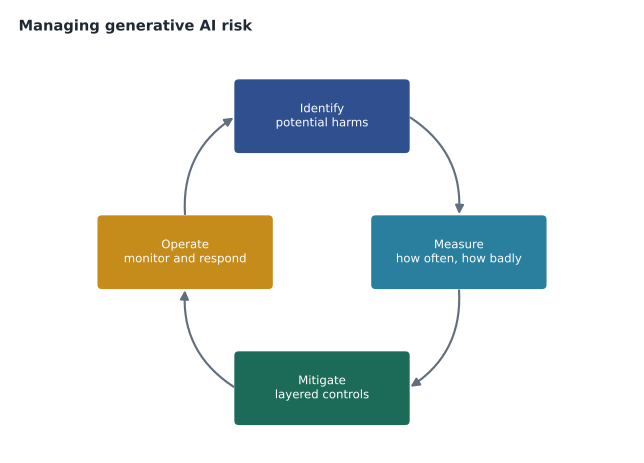
The final session of the course, on December 23, is the one Maya has been preparing for: a dry run of the presentation she will give the AI review group on January 6. She has the impact assessment from the last lesson, the test results so far and a draft design. What she needs now is a clear account of what could go wrong with a generative AI assistant, how bad each problem could be, and what the company will do about it. Arjun suggests organizing it the way Microsoft organizes its own guidance for generative AI: identify the potential harms, measure them, mitigate them in layers, and operate the system responsibly once it is live.
Identify: what can go wrong
Generative AI brings some risks that are familiar from other software and some that are new. Arjun and Maya list the ones that matter for a customer service assistant, grouped by who could be harmed.
| Harm | Description | Ask Finch example |
|---|---|---|
| Fabrication | Confident but false content, sometimes called hallucination. | Inventing a return period or a store's holiday hours. |
| Harmful content | Hateful, violent, sexual or self-harm content generated or engaged with. | Replying in kind to an abusive customer. |
| Dangerous advice | Instructions that could lead to injury or damage. | Explaining how to rewire a panel. |
| Manipulation and jailbreaks | Users or content tricking the system into breaking its rules. | A prompt that coaxes out a discount it should not offer. |
| Privacy leaks | Revealing personal or confidential information. | Showing another customer's order details. |
| Unfair treatment | Lower quality or different outcomes for some groups. | Worse answers for second-language customers. |
| Protected material | Reproducing copyrighted text or code. | Pasting large parts of a supplier's manual verbatim. |
| Overreliance | People trusting outputs without checking. | An agent sending a draft reply without reading it. |
Identifying harms is creative work, and it benefits from many viewpoints. Arjun runs a short red-teaming exercise: Maya's most experienced agents spend an afternoon trying to make the test assistant misbehave, using the strangest, rudest and most cunning messages they have received over the years. Red teaming, the practice of deliberately attacking a system to find its weaknesses before real users do, finds three problems the developers had not imagined, including a customer persona that persuaded the assistant to "make an exception just this once".
Measure: how often and how badly
Each identified harm needs a way to measure it, so that the team can tell whether a mitigation works. Measurement combines a test set of prompts designed to provoke each harm, automated scoring and human review. Foundry's evaluation tools can score responses for qualities such as groundedness, relevance and coherence, and for safety risks such as harmful content and jailbreak success, using models as graders alongside human judgment.
# Red-team results before and after adding mitigations (counts out of 120 attempts per harm)
before = {"fabricated policy": 19, "dangerous advice": 7, "jailbreak success": 11, "privacy leak": 2}
after  = {"fabricated policy": 3,  "dangerous advice": 0, "jailbreak success": 2,  "privacy leak": 0}
for harm in before:
    b, a = before[harm], after[harm]
print(f"{harm:20s} before {b:3d} after {a:3d} rate after {a / 120:.3f}")fabricated policy before 19 after 3 rate after 0.025 dangerous advice before 7 after 0 rate after 0.000 jailbreak success before 11 after 2 rate after 0.017 privacy leak before 2 after 0 rate after 0.000
What this code does
Compares red-team test results before and after safety measures were added, out of 120 attempts for each kind of harm. It prints the before and after counts and the remaining rate. The drop shows how much the mitigations reduced fabricated policies, unsafe advice, jailbreaks and privacy leaks.
The numbers become the evidence in Maya's presentation. They also set a baseline for monitoring after launch, because a sudden rise in any of them would mean something has changed.
Mitigate: layers of protection
No single control stops every harm, so Microsoft recommends mitigations at several layers, each catching some of what the others miss.
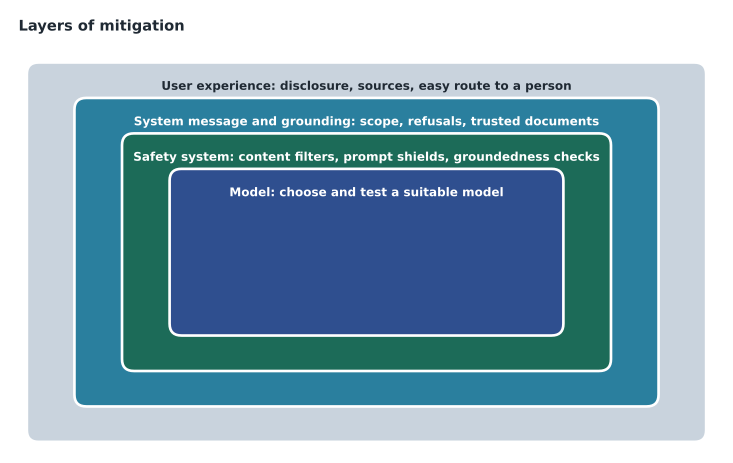
- The model layer: choose a model suited to the task, and a provider that has trained it to refuse harmful requests. Check its documentation and test it.
- The safety system layer: platform-level filters that inspect every prompt and response. In Azure this is Azure AI Content Safety, available through Foundry, described below.
- The system message and grounding layer: instructions that define scope and refusals, plus grounding in trusted documents, which together reduce fabrication and off-topic behavior.
- The user experience layer: interface design that sets expectations and keeps people in control, such as AI disclosure, source links, limits on input length, clear feedback buttons and an easy route to a person.
Content safety in Azure
Azure AI Content Safety detects harmful content in text and images. Its core classifiers cover four categories: hate, sexual, violence and self-harm. For each category it assigns a severity level, and a deployment's content filter can be configured to block content at or above a chosen level. Models deployed in Foundry have a default content filter applied to both prompts and responses, and organizations can adjust its thresholds within the limits Microsoft allows for their use case. Content Safety also offers more specialized checks: prompt shields, which detect attempts to override a model's instructions, including indirect attacks hidden in documents; groundedness detection, which checks whether a response is supported by the supplied sources; and protected material detection, which flags known copyrighted text and code.
# Applying a content filter: block a category when its severity meets the threshold.
# Severity uses a 0 to 7 scale here; thresholds are illustrative.
thresholds = {"hate": 2, "sexual": 2, "violence": 4, "self_harm": 2}
def decide(scores):
    blocked = [c for c, s in scores.items() if s >= thresholds[c]]
    return ("blocked: " + ", ".join(blocked)) if blocked else "allowed"
samples = {
    "complaint with mild swearing": {"hate": 0, "sexual": 0, "violence": 0, "self_harm": 0},
    "question about safe use of an axe": {"hate": 0, "sexual": 0, "violence": 2, "self_harm": 0},
    "abusive message about a group": {"hate": 4, "sexual": 0, "violence": 1, "self_harm": 0},
}
for name, scores in samples.items():
print(f"{name:35s} -> {decide(scores)}")complaint with mild swearing -> allowed question about safe use of an axe -> allowed abusive message about a group -> blocked: hate
What this code does
Applies a content filter by comparing each category's severity score, on a 0 to 7 scale, with a threshold for that category. If any category meets its threshold the message is blocked and the reason is listed, otherwise it is allowed. The examples show ordinary complaints passing while an abusive message about a group is blocked.
The sample shows why thresholds need thought. A hardware store gets many legitimate questions involving knives, saws and axes, so a violence threshold set too low would block ordinary product questions. Some messages also touch on self-harm, and Carmen insists that the assistant respond to any such message with care: a short, kind reply that directs the person to 988, the Suicide and Crisis Lifeline, and an immediate handoff to a trained agent, rather than a cold refusal or an attempt to continue the conversation.
Operate: after launch
Responsible operation starts before launch and continues for as long as the system runs. Before launch: a phased rollout, starting with a small share of chats, and a documented plan for incidents, including how to switch the assistant off. After launch: monitoring of quality and safety measures, review of samples of real conversations, a simple way for customers and agents to report problems, and regular retesting whenever the model, the prompts or the documents change. Models are updated and retired by their providers, so a deployment that worked in January may need retesting in June. Sunil adds security monitoring: unusual volumes of requests, repeated jailbreak attempts and calls to tools at odd hours should all raise alerts.
Rehearsing an incident
Arjun insists on one more exercise before the dry run ends: a rehearsal of something going wrong. The scenario is that on a Saturday morning a customer posts a screenshot online showing Ask Finch promising a full refund on a cut-to-size countertop, which the policy excludes. Who notices, and how? Who decides what to do? Within ten minutes the group has answers. The social media team flags the post to Maya, who is on the weekend call list. She can switch Ask Finch to a "handoff only" mode, in which every chat goes straight to an agent, from a setting in the application, without waiting for a developer. Arjun pulls the conversation from the logs to see which sources were retrieved and why the answer went wrong. Dana decides that the company will honor the promise to that customer, because a mistake by the company's assistant is the company's mistake. And the team adds the case to the test set so that the fix can be checked, and checked again after every future change.
The rehearsal exposes one gap: the logs show the prompt and the answer, but not which version of the system message was in use at the time. Arjun adds the version number to every log entry. Maya notices that the whole exercise echoes the principles of the previous lesson, with accountability, transparency and reliability turned into concrete steps that someone actually performs on a Saturday morning.
Overreliance and the agents' drafts
The last harm on the list, overreliance, applies to staff as well as customers. When Ask Finch drafts replies for agents to send, there is a risk that busy agents will send them without reading carefully, especially after weeks of drafts that were nearly always right. Mitigations here are mostly in the user experience: drafts are clearly marked as drafts, the source passages are shown beside them, the send button is a separate step from accepting the draft, and the weekly review checks how often drafts are sent unchanged. If that number approaches every draft, it is a sign of rubber-stamping rather than of a perfect assistant.
The decision
Maya finishes the dry run with a one-page summary. The pilot will start in late January 2027 with one chat in ten, during staffed hours only, in English and Spanish. Ask Finch will answer returns, delivery and store-hours questions from grounded sources, will refuse electrical, gas, plumbing and structural advice, cannot see payment details, cannot change orders and will offer a person in every conversation. Content filters stay at the default thresholds except violence, which is raised one level after testing showed too many tool questions being blocked. Quality and safety measures will be reviewed weekly, and the pilot will stop automatically if fabricated-policy answers exceed one in a hundred in the weekly sample.
Dana asks the last question: "What does it cost if we're wrong?" Maya has the answer ready, because she has been asked a version of it every week since November. The pilot is small, every conversation has a human exit, and the assistant cannot do anything irreversible. The worst realistic failure is an annoyed customer and an embarrassing screenshot, and the company has a plan for both. Arjun smiles. In January, MSAZ-111 will follow the team as they build the pilot in Microsoft Foundry, and Maya will sit AI-901 in February.
Worked problem
Choosing mitigations
Testing shows that Ask Finch sometimes answers questions about products it has no documents for, inventing specifications. Propose one mitigation at each of three layers.
Show solution
- System message and grounding layer: instruct the assistant to answer product questions only from retrieved product documents and to say when none are found.
- Safety system layer: turn on groundedness detection so that responses unsupported by the sources are flagged or blocked.
- User experience layer: show the source document for each answer and a button to ask a store associate.
Answer: Grounding instructions, groundedness detection and source links with an easy route to a person.
Common mistakes
MistakeA content filter alone makes a generative AI system safe.
InsteadFilters are one layer; model choice, system messages, grounding, user experience design and monitoring are all needed.
MistakeSetting every content filter to its strictest level is always best.
InsteadOverly strict thresholds block legitimate requests; thresholds should be tuned to the use case and tested.
MistakeOnce a system passes testing, it no longer needs review.
InsteadModels, prompts, documents and users change; systems need ongoing monitoring and retesting.
Summary and key terms
- Managing generative AI risk follows a cycle: identify harms, measure them, mitigate them and operate responsibly.
- Key harms include fabrication, harmful content, dangerous advice, jailbreaks, privacy leaks, unfairness, protected material and overreliance.
- Red teaming deliberately attacks a system to find weaknesses before real users do.
- Mitigations work in layers: the model, the safety system, the system message and grounding, and the user experience.
- Azure AI Content Safety classifies hate, sexual, violence and self-harm content by severity, and filters block content above set thresholds.
- Prompt shields, groundedness detection and protected material detection address jailbreaks, unsupported answers and copyrighted material.
- Responsible operation includes phased rollout, monitoring, incident plans and retesting after any change.
- Red teaming
- Deliberately trying to make a system misbehave in order to find its weaknesses.
- Content filter
- A control that blocks prompts or responses whose harmful-content severity exceeds set thresholds.
- Severity level
- A rating of how harmful content is within a category such as violence.
- Jailbreak
- A prompt designed to make a model ignore its rules.
- Prompt shields
- Content Safety checks that detect attempts to override a model's instructions.
- Groundedness detection
- A check on whether a response is supported by the supplied sources.
- Overreliance
- Trusting AI outputs without the checking their risk calls for.
Practice problems
Work each problem on paper first, then reveal the answer to check.
Name the four steps of the risk cycle used in this lesson.
Show answer
Identify, measure, mitigate and operate.
What is red teaming?
Show answer
Deliberately attacking a system to find weaknesses before real users do.
Which four categories do Content Safety's core classifiers cover?
Show answer
Hate, sexual, violence and self-harm.
Why might a hardware store raise the violence threshold?
Show answer
Because many legitimate product questions mention tools such as knives, saws and axes.
What does groundedness detection check?
Show answer
Whether a response is supported by the supplied sources.
Name two mitigations at the user experience layer.
Show answer
Disclosing AI use, showing sources, limiting input length or offering an easy route to a person.
Lesson quiz · 5 questions
Score 60% or more to complete this lesson.
Create a free account to save your progress, take quizzes and earn a certificate.