
MSAZ-110 · Lesson 10 of 12 · 22 min
Language, speech and information extraction workloads
▶ Video coming soon A video version of this lesson is on the way.
The last AI hour before the holidays, on December 21, takes place on the contact center floor. Maya wants Arjun to see the work as it happens: an agent typing notes while a customer explains a delivery problem, another agent scrolling through a long email thread, a supervisor listening to a recorded call for training, and, in the accounts payable office next door, two clerks keying supplier invoices from PDF files. "Every one of these is language," Arjun says. "Written, spoken or printed. And Azure has tools for each." This lesson covers text analysis, speech, translation and information extraction, the workloads that the AI-901 outline groups under language, speech and extraction.
Text analysis techniques
The AI-901 outline names four text analysis techniques: keyword extraction, entity detection, sentiment analysis and summarization. Each takes unstructured text and produces something structured or shorter that people or programs can act on.
| Technique | What it produces | Contact center example |
|---|---|---|
| Keyword or key phrase extraction | The main terms or phrases in the text | "late delivery", "patio set", "refund" from a complaint |
| Entity detection (named entity recognition) | Mentions of people, places, organizations, products, dates, quantities and similar, with their types | "Maria Lopez" (person), "Brandon" (location), "December 3" (date) |
| Sentiment analysis | A judgment of opinion: positive, negative, neutral or mixed, often with scores | Negative overall, positive about the driver |
| Summarization | A shorter version of the text, either extracted sentences or a newly written summary | Three bullet points for the agent |
Related techniques include language detection, which identifies the language a text is written in; detection of personally identifiable information, which finds names, phone numbers, addresses and payment details so that they can be masked; and classification into custom categories, such as the contact center's six email topics. Summaries come in two kinds. An extractive summary picks the most important sentences from the original. An abstractive summary writes new sentences that capture the meaning, which is more readable but, like any generated text, can occasionally introduce an error.
# A toy lexicon-based sentiment score and a simple masking of phone numbers and emails.
import re
positive = {"thanks", "great", "helpful", "friendly", "quick"}
negative = {"late", "broken", "angry", "worst", "missing", "never"}
email = "The driver was friendly but the patio set arrived late and one chair is broken. Call me at 204-555-0187 or write to maria@example.com."
words = re.findall(r"[a-z]+", email.lower())
score = sum(w in positive for w in words) - sum(w in negative for w in words)
label = "positive" if score > 0 else "negative" if score < 0 else "neutral or mixed"
masked = re.sub(r"\b\d{3}-\d{3}-\d{4}\b", "[PHONE]", email)
masked = re.sub(r"\S+@\S+\.\w+", "[EMAIL]", masked)
print("score:", score, "->", label)
print(masked)score: -1 -> negative The driver was friendly but the patio set arrived late and one chair is broken. Call me at [PHONE] or write to [EMAIL].
What this code does
Gives a short customer email a rough sentiment score by counting words from a positive list and a negative list, which here comes out negative. It also uses text patterns to replace the phone number and email address with placeholders. Both are simplified versions of sentiment analysis and personal information masking.
The toy scorer counts happy and unhappy words, and it works on this email, but it would be fooled by "not late at all" or by sarcasm. Real sentiment models are trained on large amounts of labeled text and handle negation, mixed feelings and context far better, and they can report opinion about each aspect, such as positive about the driver and negative about the product. The masking step matters for privacy: before call notes or emails are used to test Ask Finch, personal details are removed.
Two ways to analyze text in Foundry
In Foundry, text analysis can be done in two ways. Azure Language in Foundry Tools offers prebuilt features for sentiment, entities, key phrases, language detection, personal information detection and summarization, each returning structured results with confidence scores. Alternatively, a general generative model can be prompted to do the same: "List the products mentioned in this email as JSON, and say whether the customer is satisfied." The AI-901 outline expects candidates to build a lightweight application that includes text analysis, and either route can do it. As lesson 2 explained, the specialized service is usually more consistent and cheaper at high volume, while the general model is more flexible for unusual requests.
POST https://hf-language-test.cognitiveservices.azure.com/language/:analyze-text?api-version=2024-11-01
Content-Type: application/json
Ocp-Apim-Subscription-Key: (key stored in Azure Key Vault)

{ "kind": "SentimentAnalysis",
  "analysisInput": { "documents": [ { "id": "1", "language": "en",
     "text": "The driver was friendly but one chair is broken." } ] } }
Before generative models, chat assistants were usually built from intent recognition: a model trained on example phrases learned to map each message to one of a fixed set of intents, such as "check order status" or "store hours", and a fixed answer or workflow followed. Azure Language still offers this kind of conversational language understanding and a question answering feature that matches questions to a curated list of answers. These approaches are predictable and cheap, and for a short list of very common questions they can be the safest choice. Arjun suggests that Ask Finch's store-hours answers could come from such a curated list, so that they are always exactly right, while the generative model handles the long tail of varied questions.
Speech recognition and synthesis
Azure Speech in Foundry Tools provides the speech workloads. Speech recognition, or speech to text, can transcribe live audio in real time, as a call happens, or process recorded audio in batches. It can add punctuation, separate the speakers in a conversation, a feature called diarization, and be customized with company vocabulary so that it recognizes product names such as "Finch Rewards" or "PEX fittings". Speech synthesis, or text to speech, turns text into natural-sounding audio using neural voices in many languages and styles. Developers can control pronunciation, speed and pauses using a markup language called SSML. Speech translation converts speech in one language into text or speech in another.
Transcription quality is measured by word error rate: the number of words substituted, deleted or inserted, compared with a correct reference transcript, divided by the number of words in the reference. Lower is better. Noise, overlapping speakers, strong accents that were rare in the model's training data and specialist vocabulary all raise it.
# Word error rate using edit distance between a reference and a transcript
def wer(ref, hyp):
    r, h = ref.split(), hyp.split()
    d = [[0] * (len(h) + 1) for _ in range(len(r) + 1)]
    for i in range(len(r) + 1): d[i][0] = i
    for j in range(len(h) + 1): d[0][j] = j
    for i in range(1, len(r) + 1):
        for j in range(1, len(h) + 1):
            cost = 0 if r[i - 1] == h[j - 1] else 1
            d[i][j] = min(d[i - 1][j] + 1, d[i][j - 1] + 1, d[i - 1][j - 1] + cost)
    return d[len(r)][len(h)] / len(r)
reference = "i need to return the pex fittings i bought on tuesday"
transcript = "i need to return the pecks fittings i bought tuesday"
print(f"word error rate: {wer(reference, transcript):.3f}")word error rate: 0.182
What this code does
Computes the word error rate of a speech transcript by finding the fewest word substitutions, deletions and insertions needed to turn it into the correct text. That count is divided by the number of words in the correct text. A lower rate means a more accurate transcription.
One substitution ("pecks" for "pex") and one deletion ("on") in eleven words give a word error rate of about 0.18. Adding "PEX" to a custom vocabulary would fix the first error. The AI-901 outline also asks candidates to respond to spoken prompts using a deployed multimodal model, because some current models accept audio directly and can reply in speech, without separate transcription and synthesis steps. That makes voice assistants simpler to build, though the trade-offs of predictability and cost apply as always.
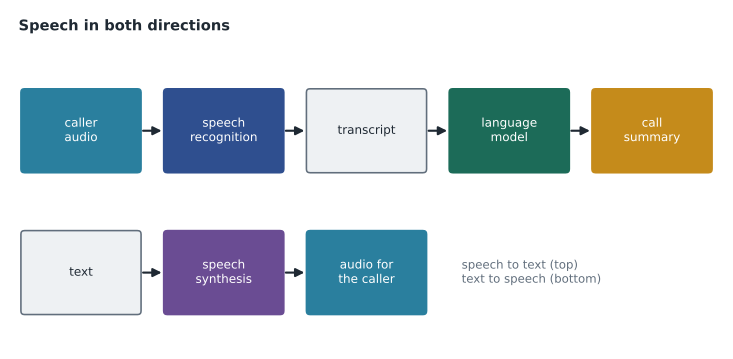
Speech synthesis has its own responsible use questions. Neural voices can sound very human, so callers should be told when they are hearing a synthetic voice, and Microsoft restricts custom neural voices, which imitate a particular real person's voice, to approved uses with that person's consent. For the store phone lines, the company will use a standard prebuilt voice and a short spoken note that the message is automated.
Translation
Azure Translator in Foundry Tools translates text and documents between many languages, keeping document formatting, and can use custom glossaries for terms that must be translated consistently. Generative models translate well too and can adapt tone, but a dedicated translation service is usually faster and cheaper for high volumes. For Harrow & Finch's US stores, Spanish is the main second language among customers, and the review group decides that Spanish chat answers will come from policy documents that have been professionally translated, rather than machine-translated on the fly.
Information extraction with Content Understanding
Information extraction turns unstructured content into structured data. The AI-901 outline names Azure Content Understanding in Foundry Tools as the service for extracting information from documents and forms, images, audio and video. Instead of writing code to find each field, a developer defines an analyzer: a description of the fields to extract, such as supplier name, invoice number, invoice date, line items and total, with their types. Content Understanding reads the content, using OCR, layout analysis and generative models together, and returns the fields as structured data, often with a confidence score for each and a pointer to where in the document it was found. Prebuilt analyzers exist for common documents such as invoices and receipts. Earlier material on extraction refers to Azure AI Document Intelligence, which remains available for document processing.
For the accounts payable team, extraction would not remove people; it would change their job from typing to checking. Fields with high confidence would be filled in automatically, and the clerk would review them; fields with low confidence, or totals that do not equal the sum of the line items, would be flagged for close attention.
# Routing extracted invoice fields by confidence (made-up results from an extraction service)
fields = {"supplier": ("Prairie Fasteners Ltd.", 0.98), "invoice_number": ("PF-55812", 0.97),
          "invoice_date": ("2026-12-02", 0.95), "total": (4818.40, 0.71)}
lines = [1200.00, 2450.40, 1168.00]
needs_review = [k for k, (v, c) in fields.items() if c < 0.90]
if abs(sum(lines) - fields["total"][0]) > 0.01:
    needs_review.append("total does not match line items")
print("auto-filled:", [k for k in fields if k not in needs_review])
print("needs review:", needs_review)auto-filled: ['supplier', 'invoice_number', 'invoice_date'] needs review: ['total']
What this code does
Takes fields an extraction service read from an invoice, each with a confidence score, and fills in automatically the ones above 0.90. It sends low-confidence fields to a person for review, and also flags the invoice if the line items do not add up to the extracted total. This keeps people in the loop where the extraction is uncertain.
The same service can extract information from images, such as the model number on a photo of a product's rating plate, and from audio and video, such as the key points and action items in a recorded supplier meeting. The contact center's call summaries could be built the same way: a speech step to transcribe, then extraction of a structured record with the reason for the call, the order number, the outcome and any follow-up.
Worked problem
Designing a call summary
Maya wants each recorded call to produce a structured record for the ticket. List the services or steps involved and the fields she might define.
Show solution
- Transcribe the call with speech recognition, with diarization to separate agent and customer.
- Mask personal details such as payment card numbers in the transcript.
- Extract structured fields: reason for the call, order number, products mentioned, outcome, follow-up needed and customer sentiment.
- Show the record to the agent to confirm or correct before it is saved.
Answer: Speech recognition, personal information masking, then extraction into defined fields, confirmed by the agent.
Common mistakes
MistakeSentiment analysis tells you what the customer wants.
InsteadSentiment judges opinion; key phrases, entities or classification are needed to capture what the customer wants.
MistakeWord error rate is the share of words the transcript got right.
InsteadIt is the share of errors: substitutions, deletions and insertions divided by the words in the reference.
MistakeInformation extraction removes the need for people to check documents.
InsteadIt changes the job to reviewing extracted fields, especially those with low confidence.
Summary and key terms
- The four text analysis techniques in the outline are keyword extraction, entity detection, sentiment analysis and summarization.
- Language detection, personal information detection and custom classification are related text features.
- Azure Language provides prebuilt text features; general generative models can also be prompted to analyze text.
- Azure Speech provides real-time and batch speech recognition, diarization, custom vocabulary, neural text to speech and translation.
- Word error rate measures transcription quality; some multimodal models accept spoken prompts directly.
- Azure Translator translates text and documents and supports custom glossaries.
- Azure Content Understanding extracts defined fields from documents, images, audio and video, with confidence scores.
- Named entity recognition
- Finding mentions of people, places, organizations, dates and other types in text.
- Key phrase extraction
- Identifying the main terms or phrases in a text.
- Extractive summary
- A summary made of the most important sentences from the original.
- Abstractive summary
- A summary written in new sentences that capture the meaning.
- Diarization
- Separating a recording into the parts spoken by each speaker.
- Word error rate
- Transcription errors divided by the number of words in the correct reference.
- SSML
- Speech Synthesis Markup Language, used to control how synthesized speech sounds.
- Analyzer
- In Content Understanding, a definition of what fields to extract from content.
Practice problems
Work each problem on paper first, then reveal the answer to check.
Which technique would find "December 3" in an email and label it as a date?
Show answer
Entity detection, also called named entity recognition.
What is the difference between an extractive and an abstractive summary?
Show answer
Extractive picks original sentences; abstractive writes new ones.
What does diarization do?
Show answer
Separates a recording by speaker.
How is word error rate calculated?
Show answer
Substitutions, deletions and insertions divided by the number of words in the reference.
Which service does the AI-901 outline name for extracting information from documents, images, audio and video?
Show answer
Azure Content Understanding in Foundry Tools.
Why route low-confidence extracted fields to a person?
Show answer
Because those fields are more likely to be wrong.
Lesson quiz · 5 questions
Score 60% or more to complete this lesson.
Create a free account to save your progress, take quizzes and earn a certificate.