
MSAZ-110 · Lesson 2 of 12 · 22 min
Common AI workloads
▶ Video coming soon A video version of this lesson is on the way.
For the second AI hour, on November 9, Arjun asks Maya to bring a list of every idea she has heard around the building for using AI. She arrives with eleven sticky notes. Some come from her own team, some from the store operations office, one from the finance department and one, written in capitals, from Marcus Feldt in e-commerce: PRODUCT DESCRIPTIONS!!! Arjun spreads them on the table and says the first job is to sort them by workload, the general kind of task the AI would perform. Knowing the workload tells you which kind of model or service to look at, what data you will need and what can go wrong.
The AI-901 study guide asks candidates to recognize scenarios for common workloads, including generative and agentic AI, text analysis, speech, computer vision and information extraction. Arjun adds two older, non-generative workloads that still matter in business: prediction from structured data and anomaly detection. This lesson tours them all; later lessons go deeper into each.
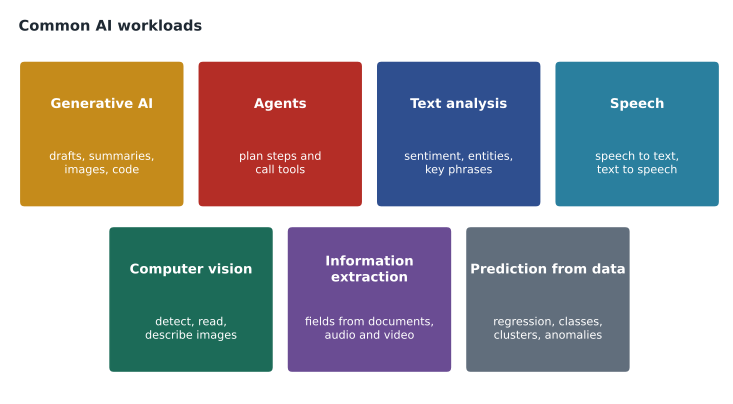
Generative AI
A generative AI workload creates new content in response to a prompt: a reply to a customer, a summary of a meeting, a first draft of a product description, a block of code, an image. The model does not copy a stored answer; it composes one each time, which is why two requests with the same prompt can give slightly different results. Generative workloads are the right fit when the output is language or media, when there are many acceptable answers rather than one correct value, and when a person can review the result or the cost of small imperfections is low.
Marcus's sticky note is a classic generative workload. Harrow & Finch adds hundreds of products to its website each season, and each needs a description. A generative model can draft one from the supplier's specification sheet in seconds, and a merchandiser can check and edit it. Maya's own idea, suggested replies for agents answering emails, is generative too. Lessons 4 to 7 explain how these models work and how to steer them.
Agents
An agent is a generative AI system that does more than answer: it pursues a goal by deciding which steps to take, calling tools such as searches, databases or other programs, and using the results to decide what to do next. The study guide calls this agentic AI. A chat assistant that answers "Where is my order?" by actually looking the order up in StockLine, rather than describing how to check, is behaving as an agent. Agents are powerful because they can act, and risky for the same reason, so they need carefully limited permissions. Lesson 8 covers them.
Text analysis
Text analysis, sometimes called natural language processing, extracts meaning from written language. Typical tasks include detecting the language of a message, judging its sentiment as positive, negative or mixed, extracting key phrases, recognizing named entities such as people, places, products and dates, and summarizing. The contact center receives about 1,900 emails a week; text analysis could tag each one by topic and mood so that the angriest messages about failed deliveries reach a senior agent first. Text analysis can be done with specialized language services or with a general language model; lesson 10 compares the two approaches.
Speech
Speech workloads convert between spoken and written language. Speech recognition, also called speech to text, turns audio into a transcript. Speech synthesis, or text to speech, produces natural-sounding audio from text. Speech translation does both across languages. The contact center records calls for training; transcribing them would let supervisors search for patterns and would give agents automatic call summaries. A store's phone line could use speech synthesis to read out holiday hours. On the US site, Maya points out, some customers call in French or Spanish, and speech translation could help.
Computer vision
Computer vision interprets images and video. It includes image classification, deciding what an image shows; object detection, finding and labeling items within an image; optical character recognition, reading printed or handwritten text; and image analysis that produces captions and tags. Grace Oduya, the store operations director, wants staff to photograph shelves so that a system can spot gaps and misplaced stock. Newer multimodal models can also accept an image in a prompt and answer questions about it. The generative side of vision, image generation, creates new pictures from a description. Lesson 9 covers both.
Information extraction
Information extraction pulls structured data, such as fields, tables and key values, out of unstructured content like documents, forms, images, audio and video. The accounts payable team keys about 3,400 supplier invoices a month into the finance system by hand. An extraction service can read the supplier name, invoice number, date, line items and totals and hand them over as structured data for a clerk to approve. The AI-901 outline names Azure Content Understanding in Foundry Tools as the service for this; it works across documents, images, audio and video.
Prediction from data and anomaly detection
Not every useful AI workload is generative. Classic machine learning predicts a value or a category from structured data in rows and columns. Regression predicts a number, such as next month's sales of patio heaters at each store. Classification predicts a category, such as whether a delivery is likely to arrive late. Clustering groups similar items without predefined labels, such as customers with similar buying habits. Anomaly detection flags data points that do not fit the usual pattern, such as a till that suddenly records ten times its normal refunds. These workloads are covered in the next lesson.
Sorting the sticky notes
Arjun and Maya work through the eleven notes together. Some are easy. Others combine workloads: "summarize calls for agents" needs speech recognition to produce a transcript and then a generative model to summarize it. The table records their decisions.
| Idea | Workload | Notes |
|---|---|---|
| Draft product descriptions | Generative AI | A merchandiser reviews every draft. |
| Answer chat questions about returns and hours | Generative AI grounded in company documents | This becomes Ask Finch. |
| Look up order status in chat | Agent with a read-only tool | Planned for a later phase of Ask Finch. |
| Tag incoming emails by topic and mood | Text analysis | Classification and sentiment. |
| Transcribe and summarize calls | Speech, then generative AI | Customers must be told calls are recorded. |
| Read holiday hours on the phone line | Speech synthesis | Low risk. |
| Check shelf photos for gaps | Computer vision: object detection | Needs photos of real shelves to test. |
| Key supplier invoices | Information extraction | A clerk approves each extracted invoice. |
| Forecast seasonal stock | Machine learning: regression | Uses sales history, not a chat model. |
| Flag unusual refunds | Anomaly detection | Alerts go to loss prevention, who investigate. |
| Wiring help in chat | Generative AI | Rejected: the cost of a wrong answer is too high. |
# A toy keyword sorter, like the first pass Maya does by eye. Real systems use trained models.
rules = [
    ("generative AI", ["draft", "write", "summarize", "reply", "describe"]),
    ("speech", ["call", "phone", "spoken", "audio"]),
    ("computer vision", ["photo", "image", "camera", "shelf"]),
    ("information extraction", ["invoice", "form", "receipt", "document"]),
    ("prediction from data", ["forecast", "predict", "estimate"]),
]
ideas = ["Draft product descriptions", "Check shelf photos for gaps", "Key supplier invoices",
         "Forecast seasonal stock", "Read holiday hours on the phone line"]
for idea in ideas:
    found = [w for w, keys in rules if any(k in idea.lower() for k in keys)]
print(f"{idea:40s} -> {found[0] if found else 'needs a closer look'}")Draft product descriptions -> generative AI Check shelf photos for gaps -> computer vision Key supplier invoices -> information extraction Forecast seasonal stock -> prediction from data Read holiday hours on the phone line -> speech
What this code does
Sorts a list of business requests into AI workload types (generative AI, speech, computer vision, information extraction or prediction from data) by looking for telltale keywords in each request. It prints the workload assigned to each one. Real systems use trained models rather than keyword lists, but the example shows how tasks map to workload categories.
The keyword sorter gets these five right, but Arjun points out how brittle it is: "Summarize calls" contains both "summarize" and "call" and would be filed under generative AI only, missing the speech step. That brittleness is exactly why AI is used for language tasks. Rules break on the variety of real input; learned models cope with it better.
Choosing between a prebuilt service and a general model
For several of these workloads, Azure offers two routes. One is a prebuilt, specialized service in Foundry Tools, such as Azure Speech for transcription or Azure Language for sentiment and entity recognition. These are trained for one job, return structured results, and are usually cheaper and more consistent for that job. The other is a general-purpose generative model, which can be asked in plain language to do the same task. The general model is more flexible and easier to adapt, but its output is less predictable and it usually costs more per item.
Arjun's rule of thumb is to start with the specialized service when the task is well defined and high volume, such as tagging every incoming email, and to use a general model when the task is varied or needs judgment, such as drafting a reply. Many real solutions combine both. The exam expects you to match a scenario to the right workload first; picking the specific Foundry tool comes in MSAZ-111.
How each workload is judged
Arjun points out that each workload has its own idea of a good result, and knowing it early saves arguments later. A classification workload, such as tagging emails, is judged by how often its labels match what a careful person would choose, and by which mistakes it makes; lesson 3 shows how to count them. Speech recognition is judged by word error rate, the share of words the transcript gets wrong, which rises with background noise, accents the model saw rarely in training and product names it has never heard. Object detection is judged by whether it finds each item and draws its box in the right place. Information extraction is judged field by field: an invoice reader that gets every supplier name right but misreads one total in fifty is not ready to post invoices without review.
Generative workloads are the hardest to judge, because there is no single correct answer. Teams use a mix of methods: people rating samples against a checklist, comparisons with reference answers, automated checks for forbidden content, and, increasingly, a second model asked to grade the first against written criteria. Microsoft Foundry includes evaluation tools for this, covered in MSAZ-111. Whatever the method, the test set must look like the real work. Maya volunteers to collect two hundred real, anonymized chat questions from last month's logs so that Ask Finch can be tested on what customers actually type, typos and all.
Data, privacy and where workloads run
Every workload on the list touches data, and some of it is personal: customer names in emails, voices in call recordings, faces that might appear in a shelf photo. Carmen Ortiz, the company's privacy officer, joins the end of the session to set two early rules. Only the data a workload needs should be sent to it, so shelf photos should be framed to avoid shoppers and call summaries should not keep payment details. And customers must be told when AI is involved and when calls are recorded. In the United States there is no single federal privacy law for retailers, but state laws such as Iowa's consumer data protection act apply, along with the company's own privacy notice. Lesson 11 returns to privacy as one of the principles of responsible AI.
Worked problem
Matching scenarios to workloads
For each scenario, name the main workload: (a) a store manager photographs a delivery pallet and wants to count the boxes; (b) a customer leaves a voicemail, and the team wants the text in the ticket; (c) the website needs a short paragraph about a new cordless drill; (d) finance wants the total and due date from each supplier invoice PDF.
Show solution
- (a) Counting items in a photo means finding each one: computer vision, object detection.
- (b) Turning audio into text is speech recognition.
- (c) Writing new text is generative AI.
- (d) Pulling fields out of documents is information extraction.
Answer: Object detection, speech recognition, generative AI and information extraction.
Common mistakes
MistakeEvery AI task needs a generative model.
InsteadMany tasks, such as forecasting and anomaly detection, are better served by traditional machine learning or specialized services.
MistakeAn agent is just a chatbot.
InsteadAn agent decides on steps and calls tools to act toward a goal, rather than only replying with text.
MistakeOptical character recognition is a speech service.
InsteadReading text from images is a computer vision capability.
Summary and key terms
- A workload is the general kind of task an AI system performs; identifying it guides the choice of model, data and safeguards.
- Generative AI creates new content; agents add planning and tool use so the system can act.
- Text analysis covers language detection, sentiment, key phrases, entities and summarization.
- Speech covers speech recognition, speech synthesis and speech translation.
- Computer vision covers classification, object detection, optical character recognition, image analysis and image generation.
- Information extraction turns documents, images, audio and video into structured fields; AI-901 names Azure Content Understanding for it.
- Regression, classification, clustering and anomaly detection are traditional machine learning workloads on structured data.
- Workload
- The general type of task an AI system performs.
- Agentic AI
- AI that plans steps and uses tools to act toward a goal.
- Sentiment analysis
- Judging whether text expresses positive, negative, neutral or mixed opinion.
- Speech recognition
- Converting spoken audio into text; also called speech to text.
- Speech synthesis
- Producing spoken audio from text; also called text to speech.
- Object detection
- Finding and labeling individual items, with their locations, in an image.
- Information extraction
- Pulling structured fields and tables out of unstructured content.
- Anomaly detection
- Flagging data points that do not fit the usual pattern.
Practice problems
Work each problem on paper first, then reveal the answer to check.
Which workload turns call recordings into text?
Show answer
Speech recognition.
Which workload would read the invoice number and total from a scanned invoice?
Show answer
Information extraction.
What makes an agent different from a plain chat model?
Show answer
It decides on steps and calls tools to act toward a goal.
Give one example of a non-generative AI workload.
Show answer
Forecasting sales with regression, or flagging unusual refunds with anomaly detection.
When is a specialized prebuilt service usually a better fit than a general model?
Show answer
When the task is well defined and high volume, because it is more consistent and cheaper.
Which two workloads does summarizing phone calls combine?
Show answer
Speech recognition, then generative AI.
Lesson quiz · 5 questions
Score 60% or more to complete this lesson.
Create a free account to save your progress, take quizzes and earn a certificate.