
LVT-340 · Lesson 8 of 12 · 20 min
Networking, PoE and wireless review
Installer exams are not network engineering exams, but they expect an installer to understand what the cabling carries. Questions in this area ask about Ethernet speeds and the cabling they need, Power over Ethernet classes and budgets, basic IP addressing, and the radio fundamentals behind wireless access points and in-building coverage. This review covers LVT-220 and LVT-320. The calculations are short, and the traps are mostly about units and about mixing up similar standards.
Ethernet and the cabling it needs
LVT-220 lesson 2 matched Ethernet applications to media. The ones to know:
| Application | Speed | Typical medium and reach |
|---|---|---|
| 1000BASE-T | 1 Gb/s | Category 5e or better, 100 m channel |
| 2.5GBASE-T and 5GBASE-T | 2.5 and 5 Gb/s | Category 5e and 6 over 100 m in most installations; used for Wi-Fi access points |
| 10GBASE-T | 10 Gb/s | Category 6A over 100 m; Category 6 over shorter, installation-dependent lengths |
| 10GBASE-SR | 10 Gb/s | Multimode fiber, about 300 m on OM3 and 400 m on OM4 |
| 10GBASE-LR | 10 Gb/s | Singlemode fiber, about 10 km |
A switch learns the MAC address of each device on each port and forwards frames only where they need to go. A MAC address is 48 bits, written as six pairs of hexadecimal digits. A VLAN, defined by IEEE 802.1Q, divides one physical network into separate logical networks; an access port carries one VLAN to a device, and a trunk port carries several VLANs, tagged, between switches. Installers meet VLANs when cameras, phones and building systems are put on their own networks, as on the Brightwater floor in LVT-220 lesson 12.
Exam trap: a switch port's link light shows only that a physical link exists. A device can have a link and still not work because it is on the wrong VLAN, has no IP address or has a duplex mismatch.
IP addressing
LVT-220 lessons 4 and 5 covered addressing. An IPv4 address is 32 bits, written as four decimal octets. The subnet mask, or prefix length, says how many bits identify the network; the rest identify the host. A /24 network has 256 addresses, of which 254 are usable for hosts, because the first is the network address and the last is the broadcast address. Each bit taken from the host part halves the number of addresses: /25 has 128 addresses and 126 usable hosts, /26 has 64 and 62, /27 has 32 and 30. The private address ranges that do not route on the internet are 10.0.0.0/8, 172.16.0.0/12 and 192.168.0.0/16. A device that gets no address from DHCP gives itself one in 169.254.0.0/16, which is a sign that DHCP failed, not that the device is working.
DHCP gives devices their addresses in four messages, often remembered as discover, offer, request and acknowledge. DNS turns names into addresses. The default gateway is the router address a device uses to reach other networks; a device with a correct address and mask but the wrong gateway can reach devices on its own subnet but nothing beyond it.
Worked problem
Choosing a subnet size
The camera VLAN on a floor will have 38 cameras now and up to 20 more later. What is the smallest subnet that fits, and how many addresses are left over?
Show solution
- Total hosts needed: 38 + 20 = 58, plus the gateway, which also needs an address: 59.
- /27 gives 30 usable hosts: too few.
- /26 gives 62 usable hosts: enough.
- Spare: 62 − 59 = 3.
Answer: A /26 fits with 3 addresses to spare; many designers would choose /25 to leave room for growth. The trap is forgetting the gateway or using 64 instead of 62.
Power over Ethernet
LVT-220 lesson 6 covered PoE. The power sourcing equipment (PSE), usually the switch, supplies power; the powered device (PD) receives it. Power is lost in the cable, so the PD receives less than the PSE supplies.
| Standard | Type | Power at the PSE | Power at the PD | Pairs used |
|---|---|---|---|---|
| 802.3af | Type 1 | 15.4 W | 12.95 W | Two pairs |
| 802.3at | Type 2 | 30 W | 25.5 W | Two pairs |
| 802.3bt | Type 3 | 60 W | 51 W | Four pairs |
| 802.3bt | Type 4 | 90 W | 71.3 W | Four pairs |
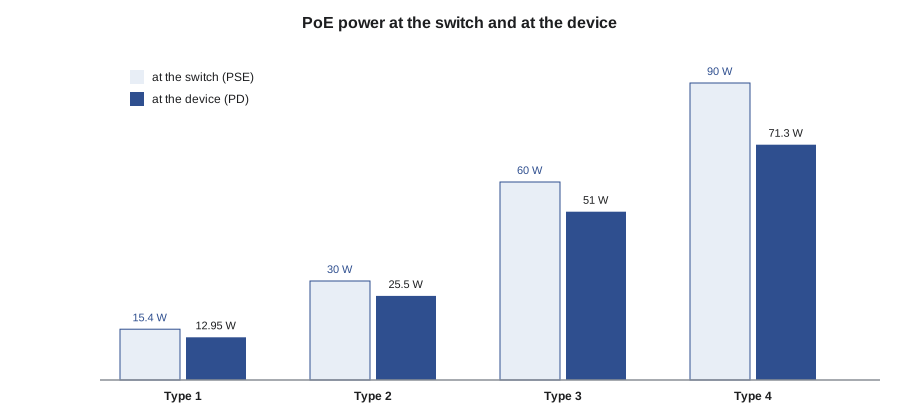
A switch has a total PoE budget, often well below the sum of its ports' maximums. The budget is planned with the power each device class may draw, not the device's typical draw, unless the switch allocates power by measured use. Cable heating matters too: large bundles of cables carrying high PoE currents warm up, raising insertion loss, which is why TIA guidance recommends Category 6A for new high-power PoE and limits on bundle size, as in LVT-220 lesson 6.
Exam trap: the power at the PD is the figure that matters for the device; the power at the PSE is the figure that matters for the switch budget. A question that asks whether a 25 W device can run on 802.3at is asking about the PD figure, 25.5 W: yes, just.
# Subnet plan with ipaddress, and a PoE budget by class allocation versus typical draw
import ipaddress

base = ipaddress.ip_network("10.60.0.0/16")
needs = {"cameras": 59, "phones": 110, "access points": 24, "building systems": 12}
plan, nxt = {}, base.network_address
for name, hosts in sorted(needs.items(), key=lambda kv: -kv[1]):
    prefix = 32
    while 2 ** (32 - prefix) - 2 < hosts:
        prefix -= 1
    net = ipaddress.ip_network(f"{nxt}/{prefix}")
    plan[name] = net
    nxt = net.broadcast_address + 1
    print(f"{name:17s} {hosts:4d} hosts -> {net}  ({net.num_addresses - 2} usable)")

CLASS_W = {3: 15.4, 4: 30.0, 6: 60.0}           # power reserved at the switch, by class
devices = [("camera", 3, 6.5, 24), ("access point", 6, 38.0, 4), ("phone", 4, 7.0, 10)]
budget = 740.0
by_class = sum(CLASS_W[c] * n for _, c, _, n in devices)
typical = sum(t * n for _, _, t, n in devices)
print(f"Switch budget {budget:.0f} W: by class {by_class:.1f} W, typical draw {typical:.1f} W")
print("Fits if the switch allocates by class:", by_class <= budget)phones 110 hosts -> 10.60.0.0/25 (126 usable) cameras 59 hosts -> 10.60.0.128/26 (62 usable) access points 24 hosts -> 10.60.0.192/27 (30 usable) building systems 12 hosts -> 10.60.0.224/28 (14 usable) Switch budget 740 W: by class 909.6 W, typical draw 378.0 W Fits if the switch allocates by class: False
The code works two of the problems this review covers: a subnet plan with the standard library's ipaddress module and a PoE budget for a switch. The subnet plan places the largest group first so that every block starts on a boundary its size allows, which is how a network engineer lays out addresses by hand. The budget shows why designers check the allocation method: the devices' typical draw of 378 W fits in half of the switch's 740 W, but if the switch reserves the full class power for each device at startup, the same devices need about 910 W and some ports will not power up. The fixes are a switch that allocates by measured or requested power, a second switch, or moving some devices to another switch. On an exam the question usually gives the class and asks for the reserved figure.
Radio and decibels
LVT-320 lessons 2 and 3 covered radio fundamentals. Decibels express ratios: adding 3 dB doubles power, adding 10 dB multiplies it by ten, and subtracting does the reverse. dBm is power relative to 1 mW, so 0 dBm is 1 mW, 10 dBm is 10 mW, 20 dBm is 100 mW and 30 dBm is 1 W. Gains and losses in a link add and subtract in dB: transmit power plus antenna gains minus cable losses and path loss gives the received signal.
Free-space path loss grows with distance and frequency: doubling the distance adds about 6 dB of loss, and a higher frequency loses more over the same distance. Walls and floors add more; concrete and metal are worst, and glass with metal coatings can be surprisingly bad.
Wi-Fi uses the 2.4, 5 and 6 GHz bands. In 2.4 GHz, only channels 1, 6 and 11 do not overlap in North America. The 5 GHz band has many more channels, some of which need radar detection, and the 6 GHz band, opened for Wi-Fi 6E and Wi-Fi 7, has the most room. A Wi-Fi survey checks coverage, often to a design target such as −67 dBm for voice and real-time applications, and capacity, which depends on the number of clients and what they do, not just signal strength.
Public safety radio coverage, covered in LVT-320 lesson 9, is required by the fire and building codes in many buildings so that firefighters' radios work inside. The usual acceptance criteria, in the International Fire Code and NFPA 1225 and in the Canadian codes and local bylaws that follow them, ask for a minimum signal and audio quality over 99 percent of critical areas, such as the fire command center and stairwells, and a high percentage, such as 95 percent, of other areas. The test uses a grid of points on each floor.
Worked problem
A quick link budget
An access point transmits at 17 dBm with a 4 dBi antenna. The path to a client loses 82 dB, and the client antenna adds 2 dBi. What signal does the client receive, and does it meet a −67 dBm design target?
Show solution
- Received power = transmit power + gains − losses.
- 17 + 4 + 2 − 82 = −59 dBm.
- −59 dBm is stronger than −67 dBm, because it is 8 dB less negative.
Answer: The client receives −59 dBm, which meets the target with 8 dB to spare. The trap is thinking −67 is stronger than −59 because 67 is the bigger number.
Duplex, autonegotiation and link speed
Ethernet devices agree on speed and duplex by autonegotiation when the link comes up. If one end is set manually and the other is left on automatic, the automatic end may fall back to half duplex while the manual end runs full duplex, and the link works badly: slow, with errors that grow with traffic. The rule for installers is to leave both ends on automatic unless the network engineer specifies otherwise. A link that negotiates a lower speed than expected, such as 100 Mb/s instead of 1 Gb/s, often points to a cabling fault on one of the pairs, because 10 and 100 Mb/s Ethernet need only two pairs while 1 Gb/s and faster need all four. A link that drops to 100 Mb/s on a good-looking cable is a cue to certify that link.
PoE classes and detection
When a powered device is connected, the switch first detects it by a signature resistance, about 25 kilohm, so that it never sends power to an ordinary network card. It then classifies the device, which tells the switch how much power to allocate, and finally turns on the power. Classes run from 0 to 8 under the latest standard: Class 3 corresponds to the Type 1 maximum, Class 4 to Type 2, Classes 5 and 6 to Type 3 and Classes 7 and 8 to Type 4. A device that is detected but not powered usually means the switch has run out of PoE budget or the port's PoE is disabled; a device that powers up and then restarts under load can mean the cable's resistance is too high, often from a poor termination or a very long cord.
Wireless installation reminders
LVT-220 lesson 7 and LVT-320 covered access point installation. Access points are mounted where the design places them, at the height and orientation the antenna pattern needs, usually on the ceiling with integrated antennas facing down. They are not hidden above ceiling tiles unless the design allows it, because tiles and the metal in the ceiling space reduce coverage, and many are not rated for plenum mounting. The cable to each access point is often two runs, for redundancy and for future multigigabit speeds, terminated at the access point end on a jack or a field-terminated plug where the specification allows. After installation, a validation survey confirms that coverage meets the design; any gap is fixed by moving or adding an access point, not by turning up the power, which makes clients' uplinks the weak side.
Exam trap: an access point that shows strong signal on a phone can still give poor service if too many clients share it, if neighboring access points are on the same channel, or if the uplink cable negotiated a low speed. Signal strength is necessary but not sufficient.
Common mistakes
MistakeTreating a link light as proof that a device works.
InsteadCheck VLAN, addressing and duplex too.
MistakeCounting 64 hosts in a /26.
InsteadSubtract the network and broadcast addresses: 62 usable.
MistakeTreating 169.254 addresses as normal.
InsteadThey mean DHCP failed.
MistakeBudgeting PoE by typical draw when the switch reserves by class.
InsteadCheck how the switch allocates power.
MistakeReading −67 dBm as stronger than −59 dBm.
InsteadLess negative is stronger.
MistakeUsing overlapping 2.4 GHz channels.
InsteadUse 1, 6 and 11 only.
Summary and key terms
- 10GBASE-T needs Category 6A for 100 m; 2.5 and 5GBASE-T serve access points on existing cabling.
- Usable hosts are 2^(32 − prefix) − 2; private ranges are 10/8, 172.16/12 and 192.168/16; 169.254 means DHCP failed.
- PoE: Types 1 to 4 give 12.95, 25.5, 51 and 71.3 W at the device from 15.4, 30, 60 and 90 W at the switch.
- Plan switch PoE budgets by allocation method and keep high-power bundles cool.
- Decibels add: +3 dB doubles, +10 dB is ten times; 0 dBm is 1 mW.
- Public safety coverage is tested on a grid, with stricter percentages in critical areas.
- VLAN
- A logical network separated from others on the same physical switches by 802.1Q tagging.
- Prefix length
- The number of bits in an IP address that identify the network, such as /24.
- PSE
- Power sourcing equipment, usually a switch or midspan, that supplies PoE.
- PD
- Powered device that receives PoE, such as a camera or access point.
- dBm
- Power in decibels relative to one milliwatt.
Practice problems
Work each problem on paper first, then reveal the answer to check.
How many usable hosts does a /27 subnet have?
Show answer
30.
What power reaches the device on 802.3bt Type 3?
Show answer
51 W.
Convert 20 dBm to milliwatts.
Show answer
100 mW.
Which 2.4 GHz channels do not overlap in North America?
Show answer
1, 6 and 11.
Lesson quiz · 5 questions
Score 60% or more to complete this lesson.
Create a free account to save your progress, take quizzes and earn a certificate.