
JS-220 · Lesson 9 of 12 · 31 min
Fetching and caching data
▶ Video coming soon A video version of this lesson is on the way.
On Tuesday, February 8, Mira connects the portal to Theo's server. The sample data goes, and the shift list, the details page and My shifts each fetch from /api/v1. By the afternoon there is a familiar list of problems. Opening a shift and going back fetches the whole list again, and for a second the list is empty. My shifts does not show a sign-up made on the details page until the page is reloaded. On the youth garden's weak connection, a request that fails just shows an error, although a second try would have worked. "Each of those has a fix," Gareth says, "and you could write them all. But every React team needs the same fixes, so there is a library that does them well. First let us see what it has to do."
This lesson explains why data from a server, server state, needs different handling from the state components keep themselves. It sets up a small API client for Theo's server, then builds the core of a query cache to show how caching, deduplication, staleness, invalidation and retries work. It then uses TanStack Query, the most widely used data-fetching library for React, for the portal's lists, details and sign-ups, including cursor pagination and optimistic updates, and finishes with React's own tools for loading states, Suspense and use.
Server state is different
The state in earlier lessons belonged to the page: whether a panel was open, what was typed into a field. Server state belongs to the server. The page only holds a copy, and that copy can be out of date at any moment, because another volunteer may have taken the last space a second ago. Server state needs things that local state does not: loading and error states, a cache so that the same data is not fetched again and again, a sense of when the copy is too old, a way to refresh it after a change, and retries when a request fails.
Fetching in an effect, as in Lesson 5, provides none of these. Every component that needs the shift list fetches it separately and keeps its own copy. Each copy is thrown away when the component disappears, so going back to the list fetches it again and shows a loading state. And nothing connects the copies, so a sign-up on the details page cannot tell the list or My shifts that their data is now wrong.
| Need | Fetching in effects | A query cache |
|---|---|---|
| Same data in two components | Two requests, two copies | One request, one shared copy |
| Going back to a screen | Fetches again and shows a loading state | Shows the cached data at once and refreshes it in the background |
| After a sign-up | Other screens stay out of date | Related queries are marked stale and refetched |
| A failed request | Shows an error | Retries a few times with increasing delays |
| Overlapping requests | Needs an ignore flag in every effect | Handled by the cache |
An API client
Before choosing how to cache, the portal needs one place that knows how to talk to Theo's server. The api.js module wraps fetch: it adds the /api/v1 prefix, sends and expects JSON, passes an AbortSignal through so that requests can be canceled, and turns a failed response into an error that carries the problem details body from the server, so that forms can show field errors as in Lesson 7.
// src/api.js
export class ApiError extends Error {
  constructor(status, problem) {
    super(problem?.detail ?? problem?.title ?? `Request failed with status ${status}`);
    this.name = 'ApiError';
    this.status = status;
    this.problem = problem;
  }
}

export async function api(path, { method = 'GET', body, signal } = {}) {
  const res = await fetch(`/api/v1${path}`, {
    method,
    signal,
    credentials: 'same-origin',
    headers: { Accept: 'application/json', ...(body ? { 'Content-Type': 'application/json' } : {}) },
    body: body ? JSON.stringify(body) : undefined,
  });
  if (res.status === 204) return null;
  const data = res.headers.get('Content-Type')?.includes('json') ? await res.json() : null;
  if (!res.ok) throw new ApiError(res.status, data);
  return data;
}

export const getShifts = ({ cursor, signal } = {}) => api(`/shifts${cursor ? `?cursor=${encodeURIComponent(cursor)}` : ''}`, { signal });
export const getShift = (id, { signal } = {}) => api(`/shifts/${encodeURIComponent(id)}`, { signal });
export const getMyShifts = ({ signal } = {}) => api('/me/shifts', { signal });
export const signUp = (id, details) => api(`/shifts/${encodeURIComponent(id)}/signups`, { method: 'POST', body: details });
export const cancel = (id) => api(`/shifts/${encodeURIComponent(id)}/signups/me`, { method: 'DELETE' });
What this code does
api is the only function in the portal that calls fetch. It builds the full address, sends JSON when there is a body, includes the volunteer's sign-in cookie for the same site, and returns the parsed JSON or null for an empty 204 response. A response that is not ok becomes an ApiError holding the status and the problem details, so callers can tell a 404 from a 422 and show the server's messages.
How a query cache works
A query cache stores the result of each request under a key that describes it, such as ['shifts'] for the list or ['shift', 's-101'] for one shift. When a component asks for a key, the cache returns the stored data if it has it. It also remembers requests that are still in flight, so that two components asking for the same key at the same moment share one request instead of sending two; this is called deduplication. The example builds a small cache with a fake fetch and a clock, and shows three components asking for the shift list.
let now = 0;
let requests = 0;
const fakeFetch = (key) => { requests++; return new Promise((resolve) => setTimeout(() => resolve(`${key} data #${requests}`), 20)); };

const cache = new Map();   // key -> { data, updatedAt, promise }
function query(key, staleTime) {
  const entry = cache.get(key) ?? {};
  if (entry.promise) return entry.promise;                                   // already in flight: share it
  const fresh = entry.updatedAt !== undefined && now - entry.updatedAt < staleTime;
  if (fresh) return Promise.resolve(entry.data);                             // fresh in the cache
  entry.promise = fakeFetch(key).then((data) => {
    cache.set(key, { data, updatedAt: now });
    return data;
  });
  cache.set(key, entry);
  return entry.promise;
}

const STALE = 30_000;   // 30 seconds
const first = await Promise.all([query('shifts', STALE), query('shifts', STALE), query('shifts', STALE)]);
console.log('three components at once:', first.join(', '), '| requests:', requests);
now = 10_000;
console.log('ten seconds later:       ', await query('shifts', STALE), '| requests:', requests);
now = 45_000;
console.log('forty-five seconds later:', await query('shifts', STALE), '| requests:', requests);three components at once: shifts data #1, shifts data #1, shifts data #1 | requests: 1 ten seconds later: shifts data #1 | requests: 1 forty-five seconds later: shifts data #2 | requests: 2
What this code does
query looks in the cache first: if a request for the key is already in flight it returns the same promise, and if the stored data is younger than staleTime it returns that data. Only otherwise does it call fakeFetch and store the result with the time. Three components asking at once cause one request, a request ten seconds later is served from the cache, and after forty-five seconds the data is stale, so a second request is made.
Fresh, stale and refetching
Cached data is either fresh or stale. Fresh data is used without asking the server. Stale data is still shown, but the cache refreshes it in the background when there is a good moment: when a component that uses it appears, when the browser window regains focus or when the network reconnects. This pattern is called stale-while-revalidate: show what you have immediately, then update it. The volunteer sees the list at once when going back, and the counts quietly update a moment later if they changed.
How long data stays fresh is a choice for each kind of data, called the stale time. TanStack Query's default is zero, meaning data is stale as soon as it arrives and is refetched at every good moment, which is safe but busy. For the portal, Mira and Theo choose thirty seconds for the shift list, where counts change often, and five minutes for the volunteer's own profile, which rarely changes. Data that no component has used for a while is eventually removed from the cache to save memory; that delay is the garbage collection time, five minutes by default.
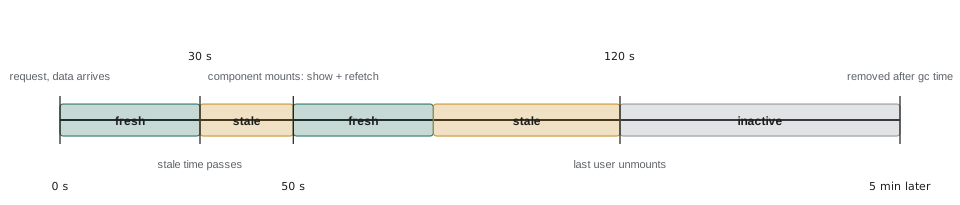
The example follows one query through a volunteer's visit, with a fake clock, and logs what the cache shows and whether it fetches.
const STALE = 30, GC = 300;   // seconds
let entry = null;              // { data, updatedAt, lastUsed }
let version = 0;

function visit(t, reason) {
  let shown, action;
  if (!entry || t - entry.lastUsed > GC) {
    shown = 'loading…'; action = 'fetch (nothing cached)';
    entry = { data: `list v${++version}`, updatedAt: t };
  } else if (t - entry.updatedAt < STALE) {
    shown = entry.data; action = 'none (fresh)';
  } else {
    shown = entry.data; action = 'show cached, refetch in background';
    entry = { data: `list v${++version}`, updatedAt: t };
  }
  entry.lastUsed = t;
  console.log(`${String(t).padStart(4)} s ${reason.padEnd(24)} shows: ${shown.padEnd(9)} action: ${action}`);
}

visit(0, 'open the shift list');
visit(12, 'back from a shift');
visit(50, 'back again');
visit(70, 'window regains focus');
visit(500, 'returns after lunch');0 s open the shift list shows: loading… action: fetch (nothing cached) 12 s back from a shift shows: list v1 action: none (fresh) 50 s back again shows: list v1 action: show cached, refetch in background 70 s window regains focus shows: list v2 action: none (fresh) 500 s returns after lunch shows: loading… action: fetch (nothing cached)
What this code does
visit decides what the cache does when the list is used at time t. Within the stale time the cached list is shown and nothing is fetched; after it, the cached list is still shown at once while a new version is fetched. When nothing has used the entry for longer than the garbage collection time, it is gone, so the volunteer returning after lunch sees a loading state again.
Keys and invalidation
After a sign-up, the counts in the shift list, the details of that shift and the list on My shifts are all out of date. Rather than updating each by hand, the portal tells the cache that those queries are stale, which is called invalidation. Any that are on screen are refetched straight away, and the others will be refetched when next used. Query keys are arrays arranged from general to specific, so that one call can invalidate a whole group: invalidating ['shifts'] matches ['shifts'], ['shifts', 'list', { area: 'kitchen' }] and ['shifts', 'detail', 's-101'], because each starts with 'shifts'.
const keys = [
  ['shifts', 'list', { area: 'all' }],
  ['shifts', 'list', { area: 'kitchen' }],
  ['shifts', 'detail', 's-101'],
  ['shifts', 'detail', 's-104'],
  ['me', 'shifts'],
  ['me', 'profile'],
];

const same = (a, b) => JSON.stringify(a) === JSON.stringify(b);
const startsWith = (key, prefix) => prefix.length <= key.length && prefix.every((part, i) => same(part, key[i]));

function invalidate(prefix) {
  const hit = keys.filter((k) => startsWith(k, prefix)).map((k) => JSON.stringify(k));
  console.log(`invalidate ${JSON.stringify(prefix)} -> ${hit.length} ${hit.length === 1 ? 'query' : 'queries'}`);
  for (const k of hit) console.log('   ', k);
}

invalidate(['shifts']);
invalidate(['shifts', 'detail', 's-101']);
invalidate(['me', 'shifts']);invalidate ["shifts"] -> 4 queries
["shifts","list",{"area":"all"}]
["shifts","list",{"area":"kitchen"}]
["shifts","detail","s-101"]
["shifts","detail","s-104"]
invalidate ["shifts","detail","s-101"] -> 1 query
["shifts","detail","s-101"]
invalidate ["me","shifts"] -> 1 query
["me","shifts"]What this code does
Each query key is an array that goes from general to specific, and startsWith checks whether a key begins with every part of a prefix, comparing parts by their JSON so that objects such as filters compare by value. Invalidating ['shifts'] therefore marks all four shift queries stale, while a full key marks only that one. After a sign-up the portal invalidates ['shifts'] and ['me', 'shifts'], and leaves the profile alone.
Retries
Requests from the youth garden often fail once and work the second time. A query cache retries failed requests automatically. TanStack Query's default in the browser is three retries, waiting longer before each one: one second, then two, then four, up to a limit of thirty seconds. Waiting longer each time, called exponential backoff, gives a struggling connection or server time to recover instead of hammering it. Some failures should not be retried at all: a 404 will not become a 200 by asking again, and a 422 means the request itself is wrong.
const retryDelay = (attempt) => Math.min(1000 * 2 ** attempt, 30_000);
const shouldRetry = (failures, error) => failures < 3 && !(error.status >= 400 && error.status < 500);

function simulate(label, results) {
  let t = 0, failures = 0;
  const log = [];
  for (const result of results) {
    if (result === 'ok') { log.push(`${t / 1000}s ok`); break; }
    const error = { status: result };
    log.push(`${t / 1000}s ${result === 0 ? 'network error' : result}`);
    if (!shouldRetry(failures, error)) { log.push('give up'); break; }
    t += retryDelay(failures);
    failures++;
  }
  console.log(label.padEnd(22), log.join(' -> '));
}

simulate('weak connection', [0, 0, 'ok']);
simulate('server down', [503, 503, 503, 503, 'ok']);
simulate('shift does not exist', [404, 'ok']);
console.log('delays:', [0, 1, 2, 3, 4, 5, 6].map(retryDelay).join(', '));weak connection 0s network error -> 1s network error -> 3s ok server down 0s 503 -> 1s 503 -> 3s 503 -> 7s 503 -> give up shift does not exist 0s 404 -> give up delays: 1000, 2000, 4000, 8000, 16000, 30000, 30000
What this code does
retryDelay doubles the wait after each failure, starting at one second and never exceeding thirty, which is TanStack Query's default formula. shouldRetry allows three retries and none for 4xx errors, which mean the request itself is wrong. The weak connection recovers on the third try after waiting three seconds in total, the server that stays down is given up after four attempts, and the missing shift is not retried at all.
TanStack Query
TanStack Query, formerly called React Query, does all of this and more. Version 5 is the current major version, with frequent minor releases. The portal creates one QueryClient, which holds the cache, and provides it to the whole tree with QueryClientProvider. Components then call useQuery with a key and a query function. It returns the data and the query's status, and re-renders the component when either changes.
// src/main.jsx (excerpt)
import { QueryClient, QueryClientProvider } from '@tanstack/react-query';

const queryClient = new QueryClient({
  defaultOptions: {
    queries: {
      staleTime: 30_000,
      retry: (failures, error) => failures < 3 && !(error.status >= 400 && error.status < 500),
    },
  },
});

createRoot(document.getElementById('root')).render(
  <StrictMode>
    <QueryClientProvider client={queryClient}>
      <App />
    </QueryClientProvider>
  </StrictMode>,
);
What this code does
The QueryClient holds the cache and the default options for every query: a stale time of thirty seconds and the retry rule from the example, which skips 4xx errors. QueryClientProvider makes the client available to every component below it, using context, which Lesson 10 explains. Each component then uses the same cache.
import { useQuery } from '@tanstack/react-query';
import { getShift } from '../api.js';

export function useShift(shiftId) {
  return useQuery({
    queryKey: ['shifts', 'detail', shiftId],
    queryFn: ({ signal }) => getShift(shiftId, { signal }),
  });
}

export function ShiftDetails({ shiftId }) {
  const { data: shift, isPending, isError, error, isFetching, refetch } = useShift(shiftId);

  if (isPending) return <p aria-busy="true">Loading the shift…</p>;
  if (isError) {
    return (
      <div role="alert">
        <p>{error.status === 404 ? 'This shift no longer exists.' : 'The shift could not be loaded.'}</p>
        {error.status !== 404 && <button type="button" onClick={() => refetch()}>Try again</button>}
      </div>
    );
  }
  return (
    <article>
      <h1>{shift.area}{isFetching && <span className="updating"> (updating)</span>}</h1>
      <p>{shift.day}, {shift.start} to {shift.end}: {shift.open} spaces left</p>
    </article>
  );
}
What this code does
useShift is a custom hook that wraps useQuery with the key and the function for one shift, so every component asks for a shift the same way. isPending is true only when there is no data yet, isError when the last attempt failed after its retries, and isFetching whenever a request is running, including background refreshes. The component shows a loading line, a specific error with a Try again button, or the shift with a quiet updating note.
The query key includes everything the query function depends on, here the shift's id. When shiftId changes, the key changes, so TanStack Query switches to the other shift's cache entry and fetches it if needed. This replaces the dependency array and the ignore flag from Lesson 5: responses for an old key can never overwrite the data for a new one, because they are stored under their own key.
Changing data with mutations
Reading is a query; creating, changing or deleting is a mutation. The useMutation hook wraps a function that changes data on the server and gives the component a mutate function to call, a pending flag and the error, if any. Its onSuccess option is where the portal invalidates the queries the change affected.
import { useMutation, useQueryClient } from '@tanstack/react-query';
import { signUp } from '../api.js';

export function useSignUp(shiftId) {
  const queryClient = useQueryClient();
  return useMutation({
    mutationFn: (details) => signUp(shiftId, details),
    onSuccess: () => {
      queryClient.invalidateQueries({ queryKey: ['shifts'] });
      queryClient.invalidateQueries({ queryKey: ['me', 'shifts'] });
    },
  });
}

export function SignUpButton({ shiftId, details }) {
  const mutation = useSignUp(shiftId);
  return (
    <>
      <button type="button" disabled={mutation.isPending} onClick={() => mutation.mutate(details)}>
        {mutation.isPending ? 'Signing up…' : 'Sign up'}
      </button>
      {mutation.isError && <p role="alert">{mutation.error.message}</p>}
      {mutation.isSuccess && <p role="status">You are signed up.</p>}
    </>
  );
}
What this code does
useSignUp wraps the API call in useMutation and, when the server confirms the sign-up, invalidates every shift query and the volunteer's own list. Queries on screen are refetched straight away, so the counts and My shifts update without anyone writing code for each screen. SignUpButton calls mutate with the details and shows the pending, error and success states from the mutation.
For the sign-up, Lucy wants the count to drop the moment the button is pressed, as on the old page. An optimistic update does this: before the request is sent, update the cached shift as if it had worked, keep the old value, and put the old value back if the request fails. TanStack Query supports this with the onMutate, onError and onSettled options, and a simpler form that renders the pending mutation's variables directly. Because a wrong optimistic count is confusing, the portal applies it only to the shift's own count and always invalidates afterwards, so that the real number from the server wins.
Pages of data
The volunteer's past shifts, on the My shifts page, can run to hundreds for long-serving volunteers. Theo's API returns them a page at a time with a cursor: each response has items and next, an opaque string to send for the following page, or null at the end. TanStack Query's useInfiniteQuery keeps all the pages fetched so far under one key and provides fetchNextPage and hasNextPage for a Show more button. The example shows the bookkeeping it does.
// A stand-in for GET /api/v1/me/shifts/past?cursor=...
const all = Array.from({ length: 7 }, (_, i) => `shift ${i + 1}`);
async function getPage(cursor) {
  const start = cursor ? Number(atob(cursor)) : 0;
  const items = all.slice(start, start + 3);
  const nextStart = start + items.length;
  return { items, next: nextStart < all.length ? btoa(String(nextStart)) : null };
}

const pages = [];
const hasNextPage = () => pages.length === 0 || pages.at(-1).next !== null;
async function fetchNextPage() {
  const page = await getPage(pages.at(-1)?.next ?? null);
  pages.push(page);
  const shown = pages.flatMap((p) => p.items);
  console.log(`page ${pages.length}: showing ${shown.length} (${shown.at(-1)}), next cursor: ${page.next ?? 'none'}`);
}

while (hasNextPage()) await fetchNextPage();
console.log('Show more button visible:', hasNextPage());page 1: showing 3 (shift 3), next cursor: Mw== page 2: showing 6 (shift 6), next cursor: Ng== page 3: showing 7 (shift 7), next cursor: none Show more button visible: false
What this code does
getPage imitates Theo's endpoint: it returns three items and a cursor for the next page, encoded so that the client treats it as an opaque string, and null after the last item. The pages array is what useInfiniteQuery keeps under one key, and flatMap joins the pages into the list the volunteer sees. hasNextPage is true until the last page's cursor is null, which is when the Show more button disappears.
Suspense and use
React has its own tool for loading states, Suspense. A component that is waiting for data can suspend, and the nearest Suspense boundary above it shows its fallback, such as a skeleton, until the data is ready. Errors are caught in the same way by an error boundary. This moves loading and error handling out of each component into the layout, where they can be designed once. TanStack Query offers useSuspenseQuery for this style, and since React 19 any component can read a promise with the use function, which suspends until the promise resolves. The promise must come from a cache or a loader, not be created during rendering, or a new promise would be made on every render.
import { Suspense, use } from 'react';

function ShiftSummary({ shiftPromise }) {
  const shift = use(shiftPromise);
  return <p>{shift.area}: {shift.open} spaces left</p>;
}

export function ShiftSummarySection({ shiftPromise }) {
  return (
    <Suspense fallback={<p className="skeleton" aria-busy="true">Loading…</p>}>
      <ShiftSummary shiftPromise={shiftPromise} />
    </Suspense>
  );
}
What this code does
ShiftSummary reads the shift from a promise with use, so it can be written as if the data were already there. While the promise is pending, the component suspends and the Suspense boundary shows the fallback. The promise is passed in from a loader or a cache, because a promise created inside the component would be new on every render.
The portal uses TanStack Query's ordinary hooks for most screens and starts the most important request early from the route loader with queryClient.ensureQueryData, so that the details page usually has its data the moment it renders. Server Components and frameworks offer still other ways to load data, but the principles in this lesson, keys, staleness, invalidation and retries, apply to all of them.
Common mistakes
MistakeServer data can be kept in useState like any other state.
InsteadIt is a copy of the server's state that can be out of date at any moment. Use a query cache that tracks freshness, refetching and invalidation.
MistakeA stale time of zero means data is never cached.
InsteadThe data is cached and shown at once; zero only means it is refetched in the background at every opportunity.
MistakeAfter a change, update every screen's data by hand.
InsteadInvalidate the affected query keys and let the cache refetch what is on screen.
MistakeFailed requests should always be retried.
InsteadRetry network errors and 5xx responses with backoff, not 4xx errors, which will fail again.
Mistakeuse(fetch(url)) inside a component is a neat way to load data.
InsteadIt creates a new promise on every render. Pass in a promise from a cache or loader.
Summary and key terms
- Server state belongs to the server and the page holds a possibly stale copy, so it needs caching, loading and error states, refreshing and retries.
- An API client wraps fetch in one place, passes AbortSignals and turns failures into errors carrying problem details.
- A query cache stores results under keys, shares in-flight requests and treats data as fresh for a stale time, then shows it while refetching in the background; unused entries are removed after the garbage collection time.
- Query keys are arrays from general to specific, and invalidating a prefix marks every matching query stale.
- Failed requests are retried with exponential backoff, except 4xx errors.
- TanStack Query 5 provides QueryClient, useQuery with isPending, isError and isFetching, useMutation with onSuccess for invalidation, optimistic updates and useInfiniteQuery for cursor pagination.
- The query key includes everything the query depends on, which prevents race conditions.
- Suspense shows a fallback while components suspend, and use reads a promise from a cache or loader.
- server state
- Data that belongs to a server and of which the page holds a copy that may be out of date.
- query cache
- A store of server responses kept under keys, with information about how fresh each one is.
- query key
- An array that identifies a query in the cache, arranged from general to specific.
- stale time
- How long cached data counts as fresh and is used without refetching.
- stale-while-revalidate
- Showing cached data immediately while fetching a newer version in the background.
- invalidation
- Marking cached queries as stale so that they are refetched.
- mutation
- A request that creates, changes or deletes data on the server.
- Suspense
- A React component that shows a fallback while components inside it are waiting for data or code.
Practice problems
Work each problem on paper first, then reveal the answer to check.
Why does fetching in effects make going back to the list show a loading state?
Show answer
Each component keeps its own copy, which is thrown away when it unmounts, so the data is fetched again.
What happens when two components ask for the same query key at the same time?
Show answer
The cache sends one request and both share the result.
Which queries does invalidating ['shifts'] affect?
Show answer
Every query whose key starts with 'shifts', such as lists and details.
Why should a 404 not be retried?
Show answer
The request is wrong for the server's data, so asking again will fail again.
What does isFetching tell a component that isPending does not?
Show answer
That a request is running even though data is already shown, such as a background refresh.
Try it yourself
Fresh, stale or gone
Complete decide(entry, now, staleTime, gcTime). entry is null or { updatedAt, lastUsed }, with times in seconds. Return 'fetch' when there is no entry or nothing has used it for more than gcTime (the data has been removed), 'use cache' when the data is younger than staleTime, and 'show and refetch' otherwise.
Use strict comparisons: data exactly staleTime seconds old is stale.
function decide(entry, now, staleTime, gcTime) {
  return 'fetch';
}

const entry = { updatedAt: 100, lastUsed: 160 };
for (const t of [110, 129, 130, 200, 460, 461]) console.log(t, decide(entry, t, 30, 300));
console.log('none', decide(null, 0, 30, 300));
Try it yourself
Invalidate by prefix
Complete matchesPrefix(key, prefix) and invalidate(cache, prefix). A key matches when the prefix is no longer than the key and every part of the prefix equals the part of the key in the same position, comparing parts with JSON.stringify so that objects compare by value.
invalidate sets stale: true on every matching entry of the cache array and returns how many it marked.
function matchesPrefix(key, prefix) {
  return false;
}

function invalidate(cache, prefix) {
  return 0;
}

const cache = [
  { key: ['shifts', 'list', { area: 'kitchen' }], stale: false },
  { key: ['shifts', 'list', { area: 'garden' }], stale: false },
  { key: ['shifts', 'detail', 's-101'], stale: false },
  { key: ['me', 'shifts'], stale: false },
];
console.log(invalidate(cache, ['shifts', 'list', { area: 'kitchen' }]));
console.log(invalidate(cache, ['shifts', 'list']));
console.log(invalidate(cache, ['me']));
console.log(invalidate(cache, ['me', 'shifts', 'past']));
console.log(cache.map((e) => (e.stale ? 'S' : '-')).join(''));
Lesson quiz · 5 questions
Score 60% or more to complete this lesson.
Create a free account to save your progress, take quizzes and earn a certificate.