
JS-220 · Lesson 10 of 12 · 29 min
Managing application state
▶ Video coming soon A video version of this lesson is on the way.
On Thursday, February 10, Lucy adds a request for the December hamper drive, when volunteers usually take several shifts at once. Instead of signing up for each shift separately, a volunteer should be able to add shifts to a plan as they browse, see the number of planned shifts in the header on every screen, review the plan on its own page and confirm all of them together. The plan must survive a page refresh, and it must never hold two shifts that overlap. "This is the first piece of state that does not belong to one screen," Gareth says. "The list adds to it, the header shows it, the review page changes it. Today is about deciding where state lives, and the tools React gives you when the answer is everywhere."
This lesson sorts the state in the portal into kinds and gives each kind its proper home. It sets out principles for structuring state so that it cannot contradict itself, introduces useReducer for state with many ways of changing, and context for sharing a value with a whole part of the tree without passing props through every level. It builds the plan from these two pieces, shows how external stores and libraries such as Zustand and Redux Toolkit fit in, and ends with keeping state across a page refresh.
Kinds of state
By this point the portal has several kinds of state, and much of the skill of managing state in React is recognizing which kind a piece of data is. Each kind has a natural home, and most bugs and most complicated code come from keeping data in the wrong one.
| Kind | Examples in the portal | Where it lives |
|---|---|---|
| Local UI state | Whether a card's details are expanded; which tab is open | useState in the component that uses it |
| Form state | What has been typed, touched fields, errors | Uncontrolled fields, useState or useActionState in the form |
| URL state | The shift being viewed; filters | The route and its search parameters |
| Server state | Shifts, counts, My shifts | The query cache (Lesson 9) |
| Shared client state | The plan; the volunteer's display preferences | useReducer and context, or an external store |
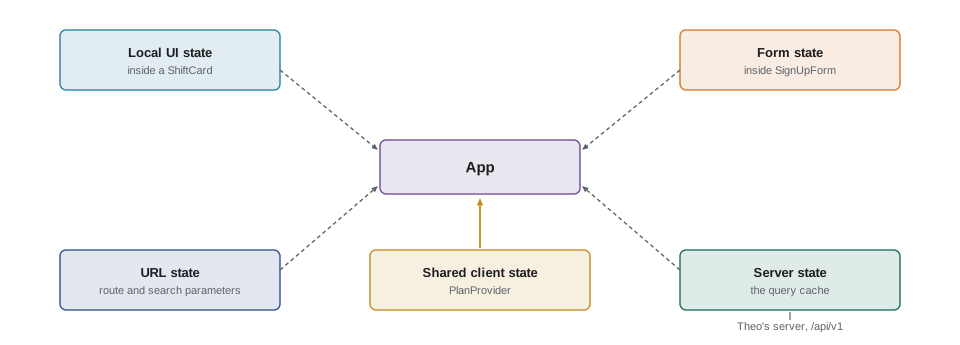
The table also shows why the plan is different from everything so far. It is not server data, because nothing is sent until the volunteer confirms. It is not URL state, because it should not change when the volunteer moves between screens. And it is not local, because three distant parts of the page need it.
Principles for structuring state
React's documentation gives a short list of principles for choosing what goes into state. They apply to every kind.
Do not store what you can calculate. The number of planned shifts is plan.length; the total hours are a sum. Calculating them during rendering means they can never be out of date. Do not duplicate. If the plan stores whole shift objects copied from the list, the counts in the plan go stale when the list refreshes. Store ids and look the shifts up. Avoid contradictions. State made of several booleans, such as isSending, isSent and hasError, allows impossible combinations, such as sent and failed at once. One status value with a few named possibilities cannot contradict itself. Group what changes together, and keep state flat rather than deeply nested, so that updates stay simple.
// Three booleans allow 8 combinations, but only 4 of them make sense.
const flags = ['isSending', 'isSent', 'hasError'];
let impossible = 0;
for (let n = 0; n < 8; n++) {
  const s = Object.fromEntries(flags.map((f, i) => [f, Boolean(n & (1 << i))]));
  const ok = [s.isSending, s.isSent, s.hasError].filter(Boolean).length <= 1;
  if (!ok) { impossible++; console.log('impossible:', flags.filter((f) => s[f]).join(' + ')); }
}
console.log(`${impossible} of 8 combinations make no sense`);

// One status value: every possible state is a real one.
const STATUSES = ['idle', 'sending', 'sent', 'error'];
function statusMessage(status) {
  switch (status) {
    case 'idle': return 'Review your plan, then confirm.';
    case 'sending': return 'Confirming your shifts…';
    case 'sent': return 'All shifts confirmed.';
    case 'error': return 'Something went wrong. Your plan is still saved.';
  }
}
for (const s of STATUSES) console.log(s.padEnd(8), statusMessage(s));impossible: isSending + isSent impossible: isSending + hasError impossible: isSent + hasError impossible: isSending + isSent + hasError 4 of 8 combinations make no sense idle Review your plan, then confirm. sending Confirming your shifts… sent All shifts confirmed. error Something went wrong. Your plan is still saved.
What this code does
The first part counts the combinations three independent booleans allow and lists the four in which more than one is true, which the interface would have no sensible way to show. The second part replaces them with a single status that can take only four values, each with a clear message. A switch over the status covers every case, and with TypeScript the compiler can check that none is forgotten.
Normalizing is the last principle, and it matters for lists. Instead of keeping shifts in an array and searching it with find, keep them in an object keyed by id, with a separate array for the order. Looking up a shift by id is then direct, an update touches one entry, and nothing is stored twice. The query cache already stores each shift's details under its own key, so the plan only needs ids.
const list = [
  { id: 's-101', area: 'Warehouse', start: 9, end: 12 },
  { id: 's-102', area: 'Community kitchen', start: 10, end: 14 },
  { id: 's-104', area: 'Youth garden', start: 13, end: 16 },
];

// Normalized: entities by id plus the order of ids.
const shifts = {
  byId: Object.fromEntries(list.map((s) => [s.id, s])),
  ids: list.map((s) => s.id),
};
const plan = ['s-104', 's-101'];   // the plan stores ids only

console.log('lookup:', shifts.byId['s-102'].area);
console.log('plan:', plan.map((id) => shifts.byId[id].area).join(', '));
const hours = plan.reduce((sum, id) => sum + shifts.byId[id].end - shifts.byId[id].start, 0);
console.log('planned hours (derived):', hours);

// An update replaces one entry; every view that looks it up sees the change.
const updated = { ...shifts, byId: { ...shifts.byId, 's-104': { ...shifts.byId['s-104'], area: 'Youth garden (beds)' } } };
console.log('plan after update:', plan.map((id) => updated.byId[id].area).join(', '));lookup: Community kitchen plan: Youth garden, Warehouse planned hours (derived): 6 plan after update: Youth garden (beds), Warehouse
What this code does
shifts.byId maps each id to its shift, and shifts.ids keeps the order, so a lookup is a property access rather than a search. The plan stores ids, so its display and its total hours are worked out from the current shifts every time and cannot go stale. Updating one shift replaces one entry, and the plan picks up the new name without being touched.
useReducer
The plan can change in several ways: add a shift, remove one, clear the plan, mark it as sending, record the result. With useState, each of these would be a handler that calls setPlan with a new value, spread across several components. useReducer gathers them in one place. A reducer is a pure function that takes the current state and an action, an object describing what happened, and returns the next state. Components dispatch actions instead of setting state, so they say what happened, such as { type: 'added', shiftId }, and the reducer decides what that means. This is the update function from Lesson 1, under its usual name.
const MAX = 4;

function planReducer(plan, action) {
  switch (action.type) {
    case 'added': {
      if (plan.ids.includes(action.shiftId)) return plan;
      if (plan.ids.length >= MAX) return { ...plan, notice: `A plan can hold ${MAX} shifts.` };
      if (action.overlapsWith) return { ...plan, notice: `That shift overlaps ${action.overlapsWith}.` };
      return { ...plan, ids: [...plan.ids, action.shiftId], notice: null };
    }
    case 'removed':
      return { ...plan, ids: plan.ids.filter((id) => id !== action.shiftId), notice: null };
    case 'cleared':
      return { ids: [], status: 'idle', notice: null };
    case 'confirm_started':
      return { ...plan, status: 'sending' };
    case 'confirm_succeeded':
      return { ids: [], status: 'sent', notice: null };
    case 'confirm_failed':
      return { ...plan, status: 'error' };
    default:
      throw new Error(`Unknown action: ${action.type}`);
  }
}

let plan = { ids: [], status: 'idle', notice: null };
const actions = [
  { type: 'added', shiftId: 's-101' },
  { type: 'added', shiftId: 's-104' },
  { type: 'added', shiftId: 's-101' },
  { type: 'added', shiftId: 's-102', overlapsWith: 's-101' },
  { type: 'removed', shiftId: 's-101' },
  { type: 'confirm_started' },
  { type: 'confirm_failed' },
];
for (const a of actions) {
  plan = planReducer(plan, a);
  console.log(a.type.padEnd(16), JSON.stringify(plan.ids), plan.status, plan.notice ?? '');
}added ["s-101"] idle added ["s-101","s-104"] idle added ["s-101","s-104"] idle added ["s-101","s-104"] idle That shift overlaps s-101. removed ["s-104"] idle confirm_started ["s-104"] sending confirm_failed ["s-104"] error
What this code does
planReducer handles every way the plan can change in one switch, and each case returns a new state without changing the old one. Adding ignores duplicates and sets a notice instead of adding when the plan is full or the shift overlaps one already planned. The loop dispatches a sequence of actions and logs the state after each, which is also how the reducer is tested.
Action types are written in the past tense, added rather than add, because an action records something that happened, not an order. An unknown action type throws, so that a typing mistake in a dispatch is caught immediately instead of being silently ignored.
import { useReducer } from 'react';

const initialPlan = { ids: [], status: 'idle', notice: null };

export function PlanPage({ shiftsById }) {
  const [plan, dispatch] = useReducer(planReducer, initialPlan);
  const hours = plan.ids.reduce((sum, id) => sum + shiftsById[id].hours, 0);

  return (
    <section aria-labelledby="plan-heading">
      <h1 id="plan-heading">Your plan</h1>
      <p>{plan.ids.length} shifts, {hours} hours</p>
      <ul>
        {plan.ids.map((id) => (
          <li key={id}>
            {shiftsById[id].area}{' '}
            <button type="button" onClick={() => dispatch({ type: 'removed', shiftId: id })}>Remove</button>
          </li>
        ))}
      </ul>
      {plan.notice && <p role="status">{plan.notice}</p>}
    </section>
  );
}
What this code does
useReducer takes the reducer and the initial state and returns the current state and a dispatch function. The Remove button dispatches an action describing what happened, and the reducer works out the new plan. The number of hours is derived during rendering from the ids and the shifts, so it is never stored.
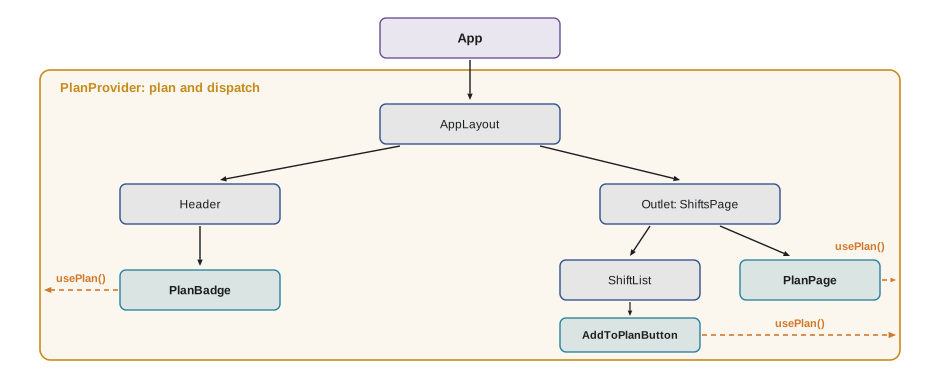
So far the plan lives in PlanPage, which is not enough: the shift list and the header need it too. Lifting it to App would work, but then App would pass plan and dispatch through the layout and the pages to every card. Context solves that.
Context
Context lets a component provide a value to every component below it in the tree, however deep, without passing it through the levels in between. It has three parts. createContext creates a context object, with a default value used when there is no provider. A provider wraps part of the tree and gives the context a value; since React 19, the context object itself can be rendered as the provider, <PlanContext value={...}>, instead of the older <PlanContext.Provider>. And any component below can read the nearest provider's value with useContext(PlanContext) or with use(PlanContext).
// src/plan/PlanContext.jsx
import { createContext, use, useReducer } from 'react';
import { planReducer, initialPlan } from './planReducer.js';

const PlanContext = createContext(null);

export function PlanProvider({ children }) {
  const [plan, dispatch] = useReducer(planReducer, initialPlan);
  return <PlanContext value={{ plan, dispatch }}>{children}</PlanContext>;
}

export function usePlan() {
  const value = use(PlanContext);
  if (value === null) throw new Error('usePlan must be used inside a PlanProvider');
  return value;
}
What this code does
PlanProvider owns the plan with useReducer and provides the state and dispatch through PlanContext, rendered directly as a provider as React 19 allows. usePlan is a custom hook that reads the context and throws a clear error if a component uses it outside the provider, where the default value is null. Components never import PlanContext itself, only PlanProvider and usePlan.
import { usePlan } from '../plan/PlanContext.jsx';

export function PlanBadge() {
  const { plan } = usePlan();
  if (plan.ids.length === 0) return null;
  return <span className="badge">{plan.ids.length} planned</span>;
}

export function AddToPlanButton({ shiftId }) {
  const { plan, dispatch } = usePlan();
  const inPlan = plan.ids.includes(shiftId);
  return (
    <button
      type="button"
      aria-pressed={inPlan}
      onClick={() => dispatch({ type: inPlan ? 'removed' : 'added', shiftId })}
    >
      {inPlan ? 'In your plan' : 'Add to plan'}
    </button>
  );
}
What this code does
PlanBadge in the header and AddToPlanButton on each shift card both call usePlan, however far apart they are in the tree. The badge shows the number of planned shifts, and the button dispatches added or removed depending on whether the shift is already planned. aria-pressed tells screen reader users that the button is a toggle and whether it is on.
Context is not a replacement for props. Props make the flow of data visible, and React's documentation suggests trying props and composition first. Context suits values that many components at different depths need: the signed-in volunteer, the color theme, the plan. Overusing it makes components depend on providers that may not be above them, which makes them harder to reuse and test.
There is one cost to keep in mind. When a provider's value changes, every component that reads that context renders again. With the plan that is fine, because few components read it. For a context read by hundreds of components, or one whose value changes many times a second, it is common to split it, for example providing dispatch in one context, since it never changes, and the state in another, or to use an external store with selectors.
External stores and selectors
Some state lives outside React altogether: in a small store module, in the browser (such as navigator.onLine), or in a library. React's useSyncExternalStore hook connects a component to such a store. It takes a subscribe function and a getSnapshot function, and renders the component again when the snapshot changes. Libraries such as Zustand and Redux Toolkit are built on it. Their main extra is selectors: a component asks for just the part of the state it uses, and it renders again only when that part changes.
function createStore(reducer, initial) {
  let state = initial;
  const listeners = new Set();
  return {
    getState: () => state,
    dispatch(action) { state = reducer(state, action); listeners.forEach((l) => l()); },
    subscribe(listener) { listeners.add(listener); return () => listeners.delete(listener); },
  };
}

// A component subscribed with a selector renders only when its selected value changes.
function connect(store, name, selector) {
  let selected = selector(store.getState());
  let renders = 1;
  store.subscribe(() => {
    const next = selector(store.getState());
    if (!Object.is(next, selected)) { selected = next; renders++; console.log(`  ${name} renders: ${JSON.stringify(next)}`); }
  });
  return () => renders;
}

const reducer = (s, a) => (a.type === 'added' ? { ...s, ids: [...s.ids, a.id] }
  : a.type === 'themeChanged' ? { ...s, theme: a.theme } : s);
const store = createStore(reducer, { ids: [], theme: 'light' });

const badge = connect(store, 'PlanBadge', (s) => s.ids.length);
const page = connect(store, 'ThemeToggle', (s) => s.theme);
for (const action of [{ type: 'added', id: 's-101' }, { type: 'themeChanged', theme: 'dark' }, { type: 'added', id: 's-104' }]) {
  console.log(action.type);
  store.dispatch(action);
}
console.log('PlanBadge rendered', badge(), 'times; ThemeToggle rendered', page(), 'times');added PlanBadge renders: 1 themeChanged ThemeToggle renders: "dark" added PlanBadge renders: 2 PlanBadge rendered 3 times; ThemeToggle rendered 2 times
What this code does
createStore is a minimal external store: it holds state, runs a reducer on each action and notifies its subscribers. connect imitates a component that uses a selector, which picks one value from the state and compares it with Object.is after each change. PlanBadge selects the number of planned shifts and ThemeToggle the theme, so each renders only for the actions that change its own value, three times and twice including their first render.
For the portal, Brightwater decides that React's own tools are enough: TanStack Query for server state, the router for URL state, and one reducer with context for the plan. Gareth's rule is to reach for a state library only when a real problem appears, such as many components needing different slices of a large, frequently changing state. Redux Toolkit is common in large codebases Mira may join later, and Zustand in smaller ones; both use the reducer and selector ideas from this lesson.
Keeping state across a refresh
The plan must survive a page refresh. The simplest way is to save it to localStorage whenever it changes and read it back when the provider starts. Three details matter. Reading can fail, in a private window or when storage is full, so every access is wrapped in try and catch, and the portal works without storage. Saved data can come from an older version of the portal, so it is saved with a version number and ignored if the version does not match. And the plan stores only shift ids, never names or contact details, which follows the rule Rosa set for the lunch counter tablet in Mira's first year: nothing personal stays in the browser.
// src/plan/storage.js
const KEY = 'hub-portal-plan';
const VERSION = 1;

export function loadPlan(fallback) {
  try {
    const saved = JSON.parse(localStorage.getItem(KEY) ?? 'null');
    if (saved?.version !== VERSION || !Array.isArray(saved.ids)) return fallback;
    return { ...fallback, ids: saved.ids.filter((id) => typeof id === 'string').slice(0, 4) };
  } catch {
    return fallback;
  }
}

export function savePlan(plan) {
  try {
    localStorage.setItem(KEY, JSON.stringify({ version: VERSION, ids: plan.ids }));
  } catch {
    // storage unavailable or full: the plan still works for this visit
  }
}
What this code does
loadPlan reads the saved plan, checks its version and shape, keeps only string ids and returns the fallback if anything is wrong or storage cannot be read. savePlan writes only the version and the ids, never anything personal, and ignores errors so that a full or blocked storage never breaks the page. In PlanProvider, useReducer receives loadPlan as its initializer and an effect calls savePlan whenever plan.ids changes.
In PlanProvider, the reducer's initial state comes from useReducer(planReducer, initialPlan, loadPlan), whose third argument is called once to produce the first state, and an effect with [plan.ids] as its dependency saves it. This is a genuine synchronization with something outside React, the browser's storage, so an effect is the right tool.
Common mistakes
MistakePut all state in one global store from the start.
InsteadGive each kind of state its natural home: local state in components, URL state in the router, server state in the query cache. Add a store only for shared client state that needs it.
MistakeStore derived values such as totals so they do not need recalculating.
InsteadCalculate them during rendering. Stored copies go stale.
MistakeisLoading, isSuccess and isError booleans describe a request well.
InsteadThey allow impossible combinations. Use one status value.
MistakeContext makes props unnecessary.
InsteadContext suits values many distant components need. Props keep the data flow visible and components reusable.
MistakeAnything can be saved in localStorage.
InsteadSave only what is needed, with a version, behind try and catch, and nothing personal.
Summary and key terms
- State comes in kinds, each with a natural home: local UI state in useState, form state in the form, URL state in the route and search parameters, server state in the query cache and shared client state in a reducer with context or an external store.
- Do not store what can be calculated, do not duplicate data, use one status value instead of contradictory booleans, group related state and normalize lists by id. useReducer gathers every way a piece of state can change into a pure reducer that takes the state and an action and returns the next state; components dispatch actions named in the past tense.
- Context provides a value to a whole part of the tree: createContext, a provider rendered as <Context value>, and useContext or use to read it, usually wrapped in a custom hook.
- Every consumer renders when the value changes, so contexts can be split. useSyncExternalStore connects components to external stores, and libraries such as Zustand and Redux Toolkit add selectors.
- State that must survive a refresh can be saved to localStorage with a version, behind try and catch, without personal data.
- shared client state
- State that exists only in the browser and is needed by several distant components, such as the plan.
- derived value
- A value calculated from state or props during rendering instead of being stored.
- normalized state
- State that stores each item once, in an object keyed by id, with references by id elsewhere.
- reducer
- A pure function that takes the current state and an action and returns the next state.
- action
- An object describing something that happened, with a type and any details, passed to a reducer.
- context
- React's way of providing a value to every component below a provider without passing props through each level.
- provider
- The component that gives a context its value for the part of the tree it wraps.
- selector
- A function that picks the part of a store's state a component needs, so it renders only when that part changes.
Practice problems
Work each problem on paper first, then reveal the answer to check.
Where should the filters for the shift list live, and why?
Show answer
In the address's search parameters, because they should be shareable and reachable with Back.
Why should the plan store shift ids rather than shift objects?
Show answer
Copies of shifts go stale; ids are looked up in the current data, so nothing is duplicated.
What does a reducer receive and return?
Show answer
The current state and an action; it returns the next state.
How does a component read the plan without props?
Show answer
With usePlan, which reads the PlanContext provided by PlanProvider above it.
Why is saving the plan to localStorage a good use of an effect?
Show answer
It synchronizes React state with something outside React, the browser's storage.
Try it yourself
A reducer for the plan
Complete planReducer(state, action). state is { ids, notice }. Handle three actions: added (add action.shiftId unless it is already there; if the plan already has 4 shifts, keep the ids and set notice to A plan can hold 4 shifts.), removed (remove the id) and cleared (no ids).
Every action that is handled sets notice to null unless it sets the message. Return the same state for a duplicate add, and throw Error('Unknown action: ' + type) for anything else.
function planReducer(state, action) {
  return state;
}

let s = { ids: [], notice: null };
const steps = [
  { type: 'added', shiftId: 'a' }, { type: 'added', shiftId: 'b' }, { type: 'added', shiftId: 'a' },
  { type: 'added', shiftId: 'c' }, { type: 'added', shiftId: 'd' }, { type: 'added', shiftId: 'e' },
  { type: 'removed', shiftId: 'b' }, { type: 'added', shiftId: 'e' }, { type: 'cleared' },
];
for (const a of steps) {
  const before = s;
  s = planReducer(s, a);
  console.log(`${a.type} ${a.shiftId ?? ''}`.padEnd(10), s.ids.join('') || '-', s.notice ?? '', s === before ? '(same)' : '');
}
try { planReducer(s, { type: 'add' }); } catch (e) { console.log(e.message); }
Try it yourself
Subscribe with a selector
Complete subscribeTo(store, selector, onChange). It should call selector(store.getState()) once to remember the current value, then subscribe to the store. Each time the store notifies, it selects again and calls onChange(next) only if the value differs from the remembered one by Object.is, then remembers it.
Return the unsubscribe function that store.subscribe returns.
function createStore(initial) {
  let state = initial;
  const listeners = new Set();
  return {
    getState: () => state,
    setState(patch) { state = { ...state, ...patch }; listeners.forEach((l) => l()); },
    subscribe(l) { listeners.add(l); return () => listeners.delete(l); },
  };
}

function subscribeTo(store, selector, onChange) {
  return () => {};
}

const store = createStore({ ids: [], theme: 'light' });
const stop = subscribeTo(store, (s) => s.ids.length, (n) => console.log('badge:', n));
subscribeTo(store, (s) => s.theme, (t) => console.log('theme:', t));
store.setState({ ids: ['s-101'] });
store.setState({ theme: 'dark' });
store.setState({ ids: ['s-101'] });
stop();
store.setState({ ids: ['s-101', 's-104'] });
store.setState({ theme: 'light' });
Lesson quiz · 5 questions
Score 60% or more to complete this lesson.
Create a free account to save your progress, take quizzes and earn a certificate.