
JS-220 · Lesson 11 of 12 · 31 min
Testing React components
▶ Video coming soon A video version of this lesson is on the way.
On Tuesday, February 15, two weeks before the pilot, Gareth asks how Mira will know the portal still works after the next change. In the autumn she added unit tests, Testing Library and Playwright to the counter page and the dashboard, so she knows the tools. "The tools are the same," Gareth says. "What changes with React is what you can test without a browser, and how to give a component everything it expects around it: the router, the query cache, the plan. And one rule matters more than any tool. Test what a volunteer can see and do, not how the component does it."
This lesson applies the testing ideas from JS-210 to React. It sorts the portal's code into what should be tested as plain functions, what as components and what end to end. It then sets up Vitest with React Testing Library, shows how to find elements by role and name, simulate a volunteer with user-event and wait for asynchronous changes, and how to supply providers and fake the server with Mock Service Worker. Several examples build small versions of these tools, so that their behavior is clear.
What to test where
The portal's code divides naturally into three layers, and each is tested in its own way. Most of the logic is in plain functions: the plan reducer, the validate function, toFieldErrors, the filter helpers, the query keys. They need no React at all, and their tests are the quickest to write and run. Components are tested by rendering them into a simulated page and interacting with them as a user would, which checks that the logic, the markup and the accessibility fit together. A handful of end-to-end tests with Playwright drive the built portal in real browsers against a test copy of Theo's API, checking the paths that must never break: finding a shift, signing up, canceling.
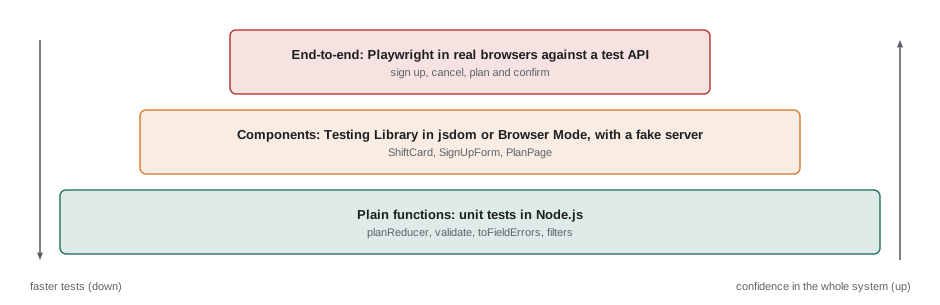
The more logic sits in plain functions, the easier the whole application is to test. That is a quiet benefit of the patterns in the previous lessons: a reducer, a validate function and a selector are all pure, so their tests are just inputs and expected outputs.
// The same tiny test runner idea as in JS-210, now checking the plan reducer.
const results = [];
const test = (name, fn) => { try { fn(); results.push(`  \u2713 ${name}`); } catch (e) { results.push(`  \u2717 ${name}: ${e.message}`); } };
const expect = (actual) => ({
  toEqual(expected) { if (JSON.stringify(actual) !== JSON.stringify(expected)) throw new Error(`expected ${JSON.stringify(expected)}, got ${JSON.stringify(actual)}`); },
  toBe(expected) { if (!Object.is(actual, expected)) throw new Error(`expected ${expected}, got ${actual}`); },
});

function planReducer(state, action) {
  switch (action.type) {
    case 'added':
      if (state.ids.includes(action.shiftId)) return state;
      if (state.ids.length >= 4) return { ...state, notice: 'A plan can hold 4 shifts.' };
      return { ids: [...state.ids, action.shiftId], notice: null };
    case 'removed':
      return { ids: state.ids.filter((id) => id !== action.shiftId), notice: null };
    default:
      throw new Error(`Unknown action: ${action.type}`);
  }
}
const empty = { ids: [], notice: null };

test('adds a shift', () => expect(planReducer(empty, { type: 'added', shiftId: 'a' }).ids).toEqual(['a']));
test('ignores a duplicate and returns the same state', () => {
  const s = planReducer(empty, { type: 'added', shiftId: 'a' });
  expect(planReducer(s, { type: 'added', shiftId: 'a' })).toBe(s);
});
test('refuses a fifth shift with a notice', () => {
  const full = { ids: ['a', 'b', 'c', 'd'], notice: null };
  expect(planReducer(full, { type: 'added', shiftId: 'e' })).toEqual({ ids: ['a', 'b', 'c', 'd'], notice: 'A plan can hold 4 shifts.' });
});
test('removing clears the notice', () => expect(planReducer({ ids: ['a'], notice: 'x' }, { type: 'removed', shiftId: 'a' }).notice).toBe(null));
console.log(results.join('\n'));✓ adds a shift ✓ ignores a duplicate and returns the same state ✓ refuses a fifth shift with a notice ✓ removing clears the notice
What this code does
test and expect are a stripped-down version of what Vitest provides: each test runs inside try and catch and records a tick or a cross. The four tests give the reducer a state and an action and check the result, including that a duplicate returns the very same object, which matters because React skips a render when the state does not change. No component, page or browser is involved, so tests like these run in milliseconds.
Setting up component tests
Component tests need a page to render into. In Node.js the usual answer is jsdom, a JavaScript implementation of the browser's DOM, which Vitest loads when a test file runs in its jsdom environment. Vitest's Browser Mode, stable since Vitest 4, runs the same tests in a real browser instead, at some cost in speed. Brightwater uses jsdom for most component tests and Browser Mode for the few that depend on real layout or focus behavior.
Three Testing Library packages do the rest. @testing-library/react renders a component and cleans up after each test. @testing-library/user-event simulates a person using the keyboard and mouse. @testing-library/jest-dom adds matchers such as toBeInTheDocument, toBeDisabled and toHaveAccessibleName, which make assertions read like descriptions of the page.
// vitest.config.js
import { defineConfig } from 'vitest/config';
import react from '@vitejs/plugin-react';

export default defineConfig({
  plugins: [react()],
  test: {
    environment: 'jsdom',
    setupFiles: ['./src/test/setup.js'],
    restoreMocks: true,
  },
});
What this code does
The configuration reuses Vite's React plugin so that JSX in test files is compiled the same way as in the application. environment: 'jsdom' gives every test a simulated page, and the setup file runs before each test file. restoreMocks puts any mocked functions back to their originals after each test, so that one test cannot affect the next.
Testing like a user
React Testing Library's guiding principle is that tests should resemble how the software is used. A volunteer does not know that the shift card has a state variable called expanded or that it calls dispatch. They see a heading, read some text, press a button labeled Add to plan and see the label change. A test that does the same keeps working when the component is rewritten, as long as the behavior is the same, and fails when the behavior breaks, which is exactly what a test should do.
// src/components/AddToPlanButton.test.jsx
import { render, screen } from '@testing-library/react';
import userEvent from '@testing-library/user-event';
import { describe, expect, test } from 'vitest';
import { PlanProvider } from '../plan/PlanContext.jsx';
import { AddToPlanButton, PlanBadge } from './PlanControls.jsx';

describe('AddToPlanButton', () => {
  test('adds the shift to the plan and shows it in the badge', async () => {
    const user = userEvent.setup();
    render(
      <PlanProvider>
        <PlanBadge />
        <AddToPlanButton shiftId="s-101" />
      </PlanProvider>,
    );

    const button = screen.getByRole('button', { name: 'Add to plan' });
    expect(button).toHaveAttribute('aria-pressed', 'false');
    expect(screen.queryByText(/planned/)).not.toBeInTheDocument();

    await user.click(button);

    expect(screen.getByRole('button', { name: 'In your plan' })).toHaveAttribute('aria-pressed', 'true');
    expect(screen.getByText('1 planned')).toBeInTheDocument();
  });
});
What this code does
The test renders the button and the badge inside a real PlanProvider, finds the button by its role and accessible name, and checks that the badge is absent at first. userEvent clicks the button the way a person would, with pointer and focus events, and the test then checks the new label and the badge's text. Nothing in the test refers to the reducer, the context or any state variable, so it survives any rewrite that keeps the behavior.
The screen object holds queries for the whole simulated page. Queries come in three families that differ in what they do when nothing, or more than one thing, matches. That difference decides which to use.
| Query | No match | One match | Several matches | Use for |
|---|---|---|---|---|
| getBy... | Throws | Returns it | Throws | Elements that must be there now |
| queryBy... | Returns null | Returns it | Throws | Checking that something is not there |
| findBy... | Rejects after a timeout | Resolves with it | Rejects | Elements that will appear after something asynchronous |
| getAllBy..., queryAllBy..., findAllBy... | Throw, return [] or reject | Return an array | Return an array | Lists |
Within each family, queries search by different things, and Testing Library recommends an order. ByRole comes first: it finds elements by their accessibility role, such as button, heading, link, checkbox or textbox, and their accessible name, the label a screen reader announces. ByLabelText suits form fields, ByText suits text that is not interactive, and ByTestId, which looks for a data-testid attribute, is a last resort, because users cannot see test ids. Using ByRole has a useful side effect: if a test cannot find the Sign up button by role and name, a screen reader user probably cannot find it either.
The example imitates getByRole and queryByRole over a simplified accessibility tree, a list of objects with a role and a name, to show exactly when each throws.
const page = [
  { role: 'heading', name: 'Open shifts', level: 1 },
  { role: 'button', name: 'Add to plan' },
  { role: 'button', name: 'Add to plan' },
  { role: 'link', name: 'My shifts' },
  { role: 'checkbox', name: 'Weekends only', checked: true },
];

const matches = (el, role, name) => el.role === role && (name === undefined || (name instanceof RegExp ? name.test(el.name) : el.name === name));
function queryByRole(role, { name } = {}) {
  const found = page.filter((el) => matches(el, role, name));
  if (found.length > 1) throw new Error(`Found ${found.length} elements with the role "${role}"${name ? ` and name "${name}"` : ''}`);
  return found[0] ?? null;
}
function getByRole(role, options) {
  const el = queryByRole(role, options);
  if (!el) throw new Error(`Unable to find an element with the role "${role}"${options?.name ? ` and name "${options.name}"` : ''}`);
  return el;
}

const attempt = (label, fn) => { try { console.log(label, '->', JSON.stringify(fn())); } catch (e) { console.log(label, '-> throws:', e.message); } };
attempt('getByRole heading', () => getByRole('heading'));
attempt('getByRole link /shifts/i', () => getByRole('link', { name: /shifts/i }));
attempt('getByRole button', () => getByRole('button', { name: 'Add to plan' }));
attempt('queryByRole alert', () => queryByRole('alert'));
attempt('getByRole alert', () => getByRole('alert'));getByRole heading -> {"role":"heading","name":"Open shifts","level":1}
getByRole link /shifts/i -> {"role":"link","name":"My shifts"}
getByRole button -> throws: Found 2 elements with the role "button" and name "Add to plan"
queryByRole alert -> null
getByRole alert -> throws: Unable to find an element with the role "alert"What this code does
queryByRole filters the tree by role and, if given, by name, which may be exact text or a regular expression, and throws if more than one element matches. getByRole does the same but also throws when nothing matches, with the kind of message Testing Library prints. Two buttons share the name Add to plan, so getByRole refuses to guess; in the real test, the button would be found within one card with the within helper.
Waiting for changes
Many changes in the portal are asynchronous: data arrives from the server, a mutation finishes, a notice appears after a delay. A test must wait for them without guessing a fixed time. findBy queries do this: they check repeatedly, every fifty milliseconds by default, until the element appears or a timeout passes, one second by default. waitFor does the same for any assertion. The example shows the polling idea with a page that shows its result after an uneven delay.
let pageText = ['Loading the shift…'];
setTimeout(() => { pageText = ['Warehouse', '3 spaces left']; }, 70);   // the response arrives after 70 ms

function findByText(text, { timeout = 1000, interval = 20 } = {}) {
  const started = Date.now();
  return new Promise((resolve, reject) => {
    (function check() {
      if (pageText.includes(text)) return resolve(text);
      if (Date.now() - started >= timeout) return reject(new Error(`Unable to find the text "${text}" within ${timeout} ms`));
      setTimeout(check, interval);
    })();
  });
}

const found = await findByText('3 spaces left');
console.log('found:', found);
try {
  await findByText('Full', { timeout: 100 });
} catch (e) {
  console.log('error:', e.message);
}found: 3 spaces left error: Unable to find the text "Full" within 100 ms
What this code does
findByText checks the page's text at once and then every 20 milliseconds, resolving as soon as the text appears and rejecting when the timeout passes. The shift's details arrive after 70 milliseconds, so the first search succeeds on a later check without the test needing to know the delay. The second search looks for text that never appears and fails with a clear message after its 100 millisecond timeout.
The common mistakes with asynchronous tests are the opposite of each other: asserting immediately with getBy, which fails because the data has not arrived yet, and adding fixed sleeps, which make tests slow and still flaky on a busy machine. Using findBy or waitFor avoids both. React also warns when state changes happen outside its act helper; Testing Library's render, user-event and async queries wrap their work in act, which is one more reason to use them rather than calling handlers directly.
Providers in tests
Most portal components expect things around them: the router, for links and parameters; the QueryClient, for data; the PlanProvider, for the plan. Rendering a component without them fails. Brightwater writes one render helper that wraps whatever is rendered in all the providers, with a fresh QueryClient for every test so that cached data cannot leak from one test to another, and with retries turned off so that a failing request fails at once instead of after seven seconds of backoff.
// src/test/render.jsx
import { render } from '@testing-library/react';
import { QueryClient, QueryClientProvider } from '@tanstack/react-query';
import { createMemoryRouter, RouterProvider } from 'react-router';
import { PlanProvider } from '../plan/PlanContext.jsx';

export function renderWithProviders(ui, { route = '/', path = '/' } = {}) {
  const queryClient = new QueryClient({ defaultOptions: { queries: { retry: false } } });
  const router = createMemoryRouter([{ path, element: ui }], { initialEntries: [route] });
  return render(
    <QueryClientProvider client={queryClient}>
      <PlanProvider>
        <RouterProvider router={router} />
      </PlanProvider>
    </QueryClientProvider>,
  );
}
What this code does
renderWithProviders creates a new QueryClient with retries off for each test, so tests start with an empty cache and fail fast. createMemoryRouter is a router that keeps its history in memory rather than in the address bar, and initialEntries sets the address the test starts at, so a details page can be rendered at /shifts/s-101 with path shifts/:shiftId. Every component test in the portal calls this helper instead of render.
Faking the server
Component tests must not call Theo's real server: it might be down, its data changes, and a test that signs a volunteer up would leave real sign-ups behind. One option is to replace the api module with a mock. Brightwater prefers Mock Service Worker, MSW, which intercepts requests at the network level, both in Node.js tests and in the browser, and answers them from handlers written in the test suite. The portal's own api.js and fetch code then run unchanged, so the tests also check the request addresses, headers and error handling.
// src/test/handlers.js
import { http, HttpResponse } from 'msw';

export const shifts = [
  { id: 's-101', area: 'Warehouse', day: 'Saturday', start: '9 a.m.', end: 'noon', open: 3 },
  { id: 's-102', area: 'Community kitchen', day: 'Saturday', start: '10 a.m.', end: '2 p.m.', open: 0 },
];

export const handlers = [
  http.get('/api/v1/shifts', () => HttpResponse.json({ items: shifts, next: null })),
  http.get('/api/v1/shifts/:id', ({ params }) => {
    const shift = shifts.find((s) => s.id === params.id);
    if (!shift) return HttpResponse.json({ title: 'Not found', status: 404 }, { status: 404 });
    return HttpResponse.json(shift);
  }),
  http.post('/api/v1/shifts/:id/signups', () => new HttpResponse(null, { status: 201 })),
];
What this code does
Each handler matches a method and a path, with dynamic segments like a router, and returns a response built with HttpResponse. The shift list and a shift's details come from a small fixed data set, an unknown id gives a 404 problem details body, and a sign-up returns 201. A test that needs a different answer, such as a 422 with field errors, replaces a handler for that test only with server.use.
The idea behind MSW is simple enough to imitate. The example routes fake requests to handlers by method and path, the way MSW does, and shows a test overriding one handler.
function matchPath(pattern, path) {
  const p = pattern.split('/').filter(Boolean), u = path.split('/').filter(Boolean);
  if (p.length !== u.length) return null;
  const params = {};
  return p.every((seg, i) => (seg.startsWith(':') ? ((params[seg.slice(1)] = u[i]), true) : seg === u[i])) ? params : null;
}

const baseHandlers = [
  { method: 'GET', path: '/api/v1/shifts/:id', resolve: ({ params }) => ({ status: 200, body: { id: params.id, open: 3 } }) },
  { method: 'POST', path: '/api/v1/shifts/:id/signups', resolve: () => ({ status: 201, body: null }) },
];
let overrides = [];

function fakeFetch(method, path) {
  for (const h of [...overrides, ...baseHandlers]) {
    const params = h.method === method ? matchPath(h.path, path) : null;
    if (params) return h.resolve({ params });
  }
  return { status: 500, body: { title: `No handler for ${method} ${path}` } };
}

console.log(JSON.stringify(fakeFetch('GET', '/api/v1/shifts/s-104')));
console.log(JSON.stringify(fakeFetch('POST', '/api/v1/shifts/s-104/signups')));
// One test needs the server to refuse the sign-up:
overrides = [{ method: 'POST', path: '/api/v1/shifts/:id/signups', resolve: () => ({ status: 422, body: { errors: [{ field: 'age16', message: 'Confirm that you are 16 or older.' }] } }) }];
console.log(JSON.stringify(fakeFetch('POST', '/api/v1/shifts/s-104/signups')));
overrides = [];   // reset after the test, as server.resetHandlers() does
console.log(JSON.stringify(fakeFetch('DELETE', '/api/v1/shifts/s-104')));{"status":200,"body":{"id":"s-104","open":3}}
{"status":201,"body":null}
{"status":422,"body":{"errors":[{"field":"age16","message":"Confirm that you are 16 or older."}]}}
{"status":500,"body":{"title":"No handler for DELETE /api/v1/shifts/s-104"}}What this code does
fakeFetch checks the override handlers first and then the base handlers, and answers with the first whose method and path match. The 422 override imitates server.use in MSW: one test makes the server refuse a sign-up, and the reset afterwards restores the normal handlers for the next test. A request with no handler gets a 500 response that names it; real MSW prints a warning for such requests by default, and Brightwater sets onUnhandledRequest to error so that they fail the test.
// src/components/SignUpForm.test.jsx
import { screen } from '@testing-library/react';
import userEvent from '@testing-library/user-event';
import { http, HttpResponse } from 'msw';
import { expect, test } from 'vitest';
import { server } from '../test/server.js';
import { renderWithProviders } from '../test/render.jsx';
import { SignUpForm } from './SignUpForm.jsx';

test('shows the server\'s error next to the age question', async () => {
  server.use(
    http.post('/api/v1/shifts/:id/signups', () =>
      HttpResponse.json({ title: 'Some details need attention', status: 422,
        errors: [{ field: 'age16', message: 'Confirm that you are 16 or older.' }] }, { status: 422 })),
  );
  const user = userEvent.setup();
  renderWithProviders(<SignUpForm shiftId="s-101" />);

  await user.type(screen.getByRole('textbox', { name: 'Full name' }), 'Ana Ferreira');
  await user.type(screen.getByRole('textbox', { name: 'Email' }), 'ana@example.com');
  await user.click(screen.getByRole('checkbox', { name: 'Youth garden' }));
  await user.click(screen.getByRole('checkbox', { name: 'I am 16 or older' }));
  await user.click(screen.getByRole('button', { name: 'Sign up' }));

  const age = await screen.findByRole('checkbox', { name: 'I am 16 or older' });
  expect(age).toHaveAttribute('aria-invalid', 'true');
  expect(age).toHaveAccessibleDescription('Confirm that you are 16 or older.');
});
What this code does
server.use replaces the sign-up handler for this test with one that returns a 422 problem details body. The test fills in the form with user-event, by finding each field by its role and label, and submits it. It then waits with findByRole for the form to update and checks that the age checkbox is marked invalid and described by the server's message, which tests the whole path from the response to the accessible error.
What not to test
Some tests cost more than they are worth. Testing implementation details, such as which state variables a component has, how many times a function was called internally or the exact class names, makes tests fail whenever the code is tidied, even when nothing a user sees has changed. Testing the library, for example that useState stores a value, adds nothing. Large snapshot tests, which save a component's whole output and fail when it changes, tend to be updated without being read; Brightwater allows small inline snapshots of exact text, such as a formatted date, and nothing bigger.
Accessibility deserves a word. Queries by role already check much of it. Automated checkers such as axe, used through vitest-axe or Playwright's accessibility integration, find more, such as missing labels and low contrast, in a few lines per test. They find perhaps a third of real problems, so Sana's manual review with a keyboard and a screen reader before the pilot stays on the plan.
Common mistakes
MistakeComponent tests should check the component's state.
InsteadTest what users can see and do: text, roles, names and the results of clicks and typing.
MistakegetByTestId is the most reliable query.
InsteadUsers cannot see test ids. Query by role and accessible name first; use test ids only when nothing else works.
MistakeUse getBy and then a fixed wait for data to arrive.
InsteadUse findBy or waitFor, which wait only as long as needed and fail with clear messages.
MistakeMock the api module in every test.
InsteadA network-level fake such as MSW lets the real API code run and checks requests and error handling too.
MistakeShare one QueryClient between tests.
InsteadCreate a fresh client with retries off for each test, so that cached data and retries cannot affect other tests.
Summary and key terms
- Test plain functions such as reducers, validation and selectors as unit tests, components with React Testing Library, and a few whole journeys end to end with Playwright; the more logic is in pure functions, the easier testing is.
- Vitest runs component tests in jsdom or, with Browser Mode, in a real browser, with @testing-library/react, user-event and jest-dom.
- Test as a user would: find elements by role and accessible name, interact with user-event and check what is visible. getBy throws when nothing or several things match, queryBy returns null when nothing matches, and findBy waits for an element to appear.
- Wait for asynchronous changes with findBy or waitFor, never fixed sleeps.
- Wrap components in their providers with a render helper that creates a fresh QueryClient with retries off and a memory router.
- Fake the server with Mock Service Worker handlers, overriding them per test with server.use.
- Avoid testing implementation details, the library itself and large snapshots, and add automated accessibility checks while keeping manual reviews.
- React Testing Library
- A library for testing React components by rendering them and interacting with them as a user would.
- jsdom
- A JavaScript implementation of the browser's DOM used to run component tests in Node.js.
- accessible name
- The name assistive technology announces for an element, such as a button's label or a field's label.
- user-event
- A Testing Library package that simulates real user interactions such as typing and clicking.
- findBy query
- A query that waits until a matching element appears, or fails after a timeout.
- render helper
- A test function that renders a component wrapped in all the providers it needs.
- Mock Service Worker
- A library that intercepts network requests in tests and the browser and answers them from handlers.
- implementation detail
- How a component works internally, as opposed to what users can see and do.
Practice problems
Work each problem on paper first, then reveal the answer to check.
Why test the plan reducer as a plain function?
Show answer
It is pure, so its tests are quick inputs and outputs that need no rendering.
Which query should you use to check that an error message is not shown?
Show answer
A queryBy query, which returns null when nothing matches.
Why is getByRole preferred to getByTestId?
Show answer
It finds elements the way users and assistive technology do, and it fails if the element is not accessible.
Why does the render helper create a new QueryClient for every test?
Show answer
So that cached data from one test cannot affect another.
How does a test make the fake server refuse a sign-up?
Show answer
It overrides the sign-up handler for that test with server.use.
Try it yourself
getAllBy, getBy and queryBy
Complete the three queries over the page array. queryAllByRole(role, name) returns every element with that role and, if name is given, that exact name. getByRole throws Error('Found N matches') when more than one matches and Error('No match') when none does; otherwise it returns the element. queryByRole returns null for no match, throws the same error for several, and returns the element otherwise.
Leave the printing code as it is.
const page = [
  { role: 'heading', name: 'Your plan' },
  { role: 'button', name: 'Remove' },
  { role: 'button', name: 'Remove' },
  { role: 'button', name: 'Confirm all shifts' },
  { role: 'status', name: '2 shifts, 6 hours' },
];

function queryAllByRole(role, name) { return []; }
function getByRole(role, name) { return null; }
function queryByRole(role, name) { return null; }

const run = (label, fn) => { try { const r = fn(); console.log(label, '->', r === null ? 'null' : Array.isArray(r) ? r.length : r.name); } catch (e) { console.log(label, '-> throws', e.message); } };
run('all buttons', () => queryAllByRole('button'));
run('all Remove', () => queryAllByRole('button', 'Remove'));
run('get Confirm', () => getByRole('button', 'Confirm all shifts'));
run('get Remove', () => getByRole('button', 'Remove'));
run('get alert', () => getByRole('alert'));
run('query alert', () => queryByRole('alert'));
run('query status', () => queryByRole('status'));
run('query button', () => queryByRole('button'));
Try it yourself
waitFor an assertion
Complete waitFor(assertion, { timeout, interval }). It calls assertion() straight away and then every interval milliseconds. As soon as a call does not throw, it resolves with that call's return value. If the assertion is still throwing when timeout milliseconds have passed, it rejects with the last error.
The test page changes after 60 milliseconds.
function waitFor(assertion, { timeout = 1000, interval = 10 } = {}) {
  return Promise.resolve(assertion());
}

let count = 'Loading';
setTimeout(() => { count = '3 spaces left'; }, 60);
const expectCount = (text) => () => { if (count !== text) throw new Error(`expected "${text}", page shows "${count}"`); return text; };

try {
  console.log('ok:', await waitFor(expectCount('3 spaces left'), { timeout: 500, interval: 15 }));
} catch (e) { console.log('failed:', e.message); }
try {
  console.log('ok:', await waitFor(expectCount('Full'), { timeout: 80, interval: 15 }));
} catch (e) { console.log('failed:', e.message); }
Lesson quiz · 5 questions
Score 60% or more to complete this lesson.
Create a free account to save your progress, take quizzes and earn a certificate.