
JS-210 · Lesson 6 of 12 · 29 min
Unit testing with Vitest and Jest
▶ Video coming soon A video version of this lesson is on the way.
On Thursday, November 4, Gareth asks Mira how she knows the counter page adds up an order correctly. "I tried a few orders on the tablet after each change," she says, "and checked them with a calculator." Gareth nods. "That is a test. It is just a slow one, and it lives in your head. Today we write those checks down as code, so they run in a second, every time, for everyone."
This lesson introduces unit tests: small automated checks of individual functions and modules. It explains what makes a good test, how test runners such as Vitest, Jest and Node.js's built-in node:test organize and run them, which assertions to use, how to test asynchronous code and errors, and what code coverage does and does not tell you. On the way, the first tests Mira writes for the counter page find a real bug.
What a unit test is
A test is code that runs other code and checks the result. A unit test checks one small unit, usually a function or a module, on its own, without a browser, a server or a database. Because units are small and isolated, unit tests run in milliseconds, and a project can have hundreds of them that all run every time a file is saved.
Most tests follow the same three steps, often called arrange, act, assert. Arrange the inputs the code needs. Act by calling the code. Assert that the result is what it should be. An assertion is a check that throws an error if it fails, and the test runner is the program that finds the tests, runs each one, catches those errors and reports which tests passed and which failed.
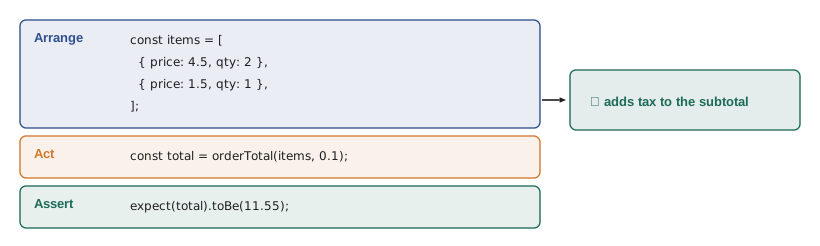
The best way to see what a test runner does is to write one. The next example is a complete, tiny test runner. test records a named test, expect returns an object with an assertion method, and run calls each test, catches failures and prints a report.
const tests = [];
function test(name, fn) { tests.push({ name, fn }); }
function expect(actual) {
  return {
    toBe(expected) {
      if (!Object.is(actual, expected)) throw new Error(`expected ${JSON.stringify(expected)}, received ${JSON.stringify(actual)}`);
    },
  };
}
function run() {
  let passed = 0;
  for (const t of tests) {
    try { t.fn(); passed++; console.log('  \u2713', t.name); }
    catch (err) { console.log('  \u2717', t.name, '-', err.message); }
  }
  console.log(`\n${passed} passed, ${tests.length - passed} failed`);
}

// The code under test.
function lineTotal(item) { return item.price * item.qty; }

test('one item', () => expect(lineTotal({ price: 4.5, qty: 1 })).toBe(4.5));
test('two of the same item', () => expect(lineTotal({ price: 4.5, qty: 2 })).toBe(9));
test('a quantity of zero', () => expect(lineTotal({ price: 4.5, qty: 0 })).toBe(0));
test('a deliberately wrong expectation', () => expect(lineTotal({ price: 1.5, qty: 3 })).toBe(4));
run();✓ one item ✓ two of the same item ✓ a quantity of zero ✗ a deliberately wrong expectation - expected 4, received 4.5 3 passed, 1 failed
What this code does
test stores each test's name and function, and expect wraps a value so that toBe can compare it with the expected one using Object.is, the same comparison Vitest and Jest use for toBe. run calls every test inside try and catch, so one failure does not stop the others, and prints a tick or a cross for each. The fourth test is wrong on purpose to show how a failure is reported.
Every real test runner is a more polished version of this. They find test files automatically, run them in parallel, show clear differences between expected and actual values, rerun only the tests affected by a change and integrate with editors and continuous integration. But underneath, a test is still a function that throws when something is wrong.
Three test runners
Three test runners cover almost all JavaScript projects today, and their tests look very similar.
| Vitest | Jest | node:test | |
|---|---|---|---|
| Made by | The Vite team | Originally Meta, now the OpenJS Foundation | The Node.js project |
| Current major version | 4 (October 2025) | 30 (June 2025) | Part of Node.js; stable since Node.js 20 |
| Installed with | npm install --save-dev vitest | npm install --save-dev jest | Nothing to install |
| TypeScript | Works directly, using the project's Vite setup | Needs a transform, such as ts-jest or Babel | Works with Node.js type stripping for erasable syntax |
| Browser-like tests | jsdom or happy-dom, or a real browser with Browser Mode | jsdom | Not built in |
| Best for | Projects that use Vite, and most new projects | Existing projects already on Jest, React Native | Small libraries and Node.js tools with no dependencies |
Vitest was written to be compatible with Jest's API: describe, test or it, expect and almost all of the same matchers. Code moves between them with few changes, which is why this lesson teaches them together. Brightwater uses Vitest in all three Food Hub projects, because the dashboard and the counter page already use Vite and riverside-data's few node:test tests convert easily. Vitest 4 also made its Browser Mode stable, which Lesson 8 uses.
A first real test file
Tests live in files next to the code or in a test folder, named so that the runner can find them: order.test.ts, or order.spec.ts. Mira's first file for the counter page tests orderTotal, the function that adds up an order and applies tax. The tests pass the tax rate in, using a round test rate of 10 in 100, so that every expected value is easy to work out by hand.
// src/order.test.ts
import { describe, expect, test } from 'vitest';
import { orderTotal } from './order';

describe('orderTotal', () => {
  test('an empty order costs nothing', () => {
    expect(orderTotal([], 0.1)).toBe(0);
  });

  test('adds tax to the subtotal', () => {
    const items = [
      { price: 4.5, qty: 2 },
      { price: 3, qty: 1 },
    ];
    expect(orderTotal(items, 0.1)).toBe(13.2);
  });

  test('rounds to the nearest cent', () => {
    expect(orderTotal([{ price: 0.35, qty: 3 }], 0.1)).toBe(1.16);
  });
});
What this code does
describe groups related tests under one name, and each test arranges an order, calls orderTotal and asserts the result. The third test checks rounding: three items at 35 cents make 1.05, plus 10 in 100 tax is exactly 1.155, which should round up to 1.16. The imports come from vitest; with Jest the same file works with the imports removed, because Jest provides them as globals.
Mira expects all three to pass. The third does not. To show what any test runner reports, here is the same test file run with node:test, which is built into Node.js and needs no installation.
node --test --test-reporter=spec✔ an empty order costs nothing (0.830564ms) ✔ adds tax to the subtotal (0.188622ms) ✖ rounds to the nearest cent (0.816947ms) ℹ tests 3 ℹ suites 0 ℹ pass 2 ℹ fail 1 ✖ failing tests: test at test/order.test.js:17:1 ✖ rounds to the nearest cent (0.816947ms) AssertionError [ERR_ASSERTION]: Expected values to be strictly equal: 1.15 !== 1.16
What this code does
The spec reporter prints a tick or a cross for each test, a summary and then the details of each failure. The assertion error shows the value that was expected and the value that was received, which is the first clue to the bug. The stack trace and timings are trimmed here.
The bug the test found
orderTotal computed the total as Math.round(subtotal × (1 + taxRate) × 100) ÷ 100, which looks right. The problem is that computers store most decimal fractions approximately. JavaScript numbers are binary floating-point numbers, and 0.35, like 0.1, has no exact binary form. The tiny errors usually cancel out, but sometimes they land a value just below a rounding boundary.
console.log(0.1 + 0.2);
console.log(0.35 * 3);
console.log(0.35 * 3 * 1.1);
console.log(Math.round(0.35 * 3 * 1.1 * 100) / 100, '<- should be 1.16');

// Working in whole cents avoids the problem.
const cents = Math.round(0.35 * 100) * 3;   // 105
console.log(cents, cents * 1.1, Math.round(cents * 1.1) / 100);0.30000000000000004 1.0499999999999998 1.1549999999999998 1.15 <- should be 1.16 105 115.50000000000001 1.16
What this code does
The first line shows the famous result that 0.1 plus 0.2 is not exactly 0.3 in binary floating point. The exact answer for the order is 1.155, but the computer gets 1.1549999999999998, so rounding gives 1.15. Converting each price to whole cents first gives 105 cents, and 105 times 1.1 lands just above 115.5, which rounds correctly to 116 cents.
The fix is to work in whole cents: convert each price to cents with Math.round, add the cents, apply the tax, round once and only then divide by 100. Mira changes orderTotal, runs the tests again and all three pass. The bug had been in the counter page since March, quietly undercharging by a cent on a few unlucky orders. No customer would ever notice, but Rosa's daily total would never quite match the till, and nobody would know why.
export function lineCents(item) {
  return Math.round(item.price * 100) * item.qty;
}

export function orderTotal(items, taxRate) {
  const subtotalCents = items.reduce((sum, item) => sum + lineCents(item), 0);
  return Math.round(subtotalCents * (1 + taxRate)) / 100;
}
What this code does
lineCents turns a price such as 4.5 into 450 cents before multiplying by the quantity, so the subtotal is an exact whole number. orderTotal applies the tax to that whole number, rounds to the nearest cent once and converts back to dollars at the very end. The function's inputs and output are unchanged, so nothing else in the counter page needs to change.
node --test --test-reporter=spec✔ an empty order costs nothing (0.893093ms) ✔ adds tax to the subtotal (0.225312ms) ✔ rounds to the nearest cent (0.131442ms) ℹ tests 3 ℹ suites 0 ℹ pass 3 ℹ fail 0
What this code does
After the fix, every test passes. The run takes a fraction of a second, so it can run on every save.
Gareth points out the lesson in the lesson. The rounding test was the one test Mira almost did not write, because the arithmetic seemed obvious. Edge cases, the inputs at the boundaries such as an empty list, a quantity of zero or a value that lands exactly on a rounding line, are where bugs live, and they are exactly the cases that a quick check by hand tends to skip.
Matchers
Vitest and Jest call the assertion methods on expect matchers. Choosing the right matcher matters, because the wrong one can pass when it should fail or fail for the wrong reason.
| Matcher | Passes when | Use for |
|---|---|---|
| toBe(x) | Object.is(actual, x) is true | Numbers, strings, booleans, and checking that two references are the same object |
| toEqual(x) | The values are deeply equal, property by property | Objects and arrays built fresh by the code |
| toStrictEqual(x) | Deeply equal, and undefined properties and classes match too | When the exact shape matters |
| toBeCloseTo(x, digits) | The numbers are equal to the given number of decimal places | Results of floating-point arithmetic |
| toContain(x) | An array or string contains x | Membership |
| toHaveLength(n) | length is n | Arrays and strings |
| toThrow(message) | The function throws, optionally with a matching message | Error handling |
| toBeNull(), toBeUndefined() | The value is null, or undefined | Missing values |
| .not | Reverses any matcher, as in expect(x).not.toBe(0) | Negative checks |
The difference between toBe and toEqual catches everyone once. toBe checks identity: two different objects with the same contents are not the same object, so toBe fails. toEqual compares the contents.
function isDeepEqual(a, b) {
  if (Object.is(a, b)) return true;
  if (typeof a !== 'object' || typeof b !== 'object' || a === null || b === null) return false;
  if (Array.isArray(a) !== Array.isArray(b)) return false;
  const keysA = Object.keys(a), keysB = Object.keys(b);
  if (keysA.length !== keysB.length) return false;
  return keysA.every((k) => Object.hasOwn(b, k) && isDeepEqual(a[k], b[k]));
}

function summarize(orders) { return { count: orders.length, areas: [...new Set(orders.map((o) => o.area))] }; }
const result = summarize([{ area: 'kitchen' }, { area: 'garden' }, { area: 'kitchen' }]);
const expected = { count: 3, areas: ['kitchen', 'garden'] };

console.log('toBe would pass:   ', Object.is(result, expected));
console.log('toEqual would pass:', isDeepEqual(result, expected));
console.log('order matters: ', isDeepEqual(result, { count: 3, areas: ['garden', 'kitchen'] }));toBe would pass: false toEqual would pass: true order matters: false
What this code does
isDeepEqual is a simple version of the comparison toEqual makes: it compares objects and arrays key by key and recursively, and everything else with Object.is. The result of summarize is a new object, so an identity check fails even though its contents match. Array order counts, so the last comparison fails.
For the counter page, money is now always rounded to whole cents, so toBe is the right matcher for totals. For a value that comes straight out of floating-point arithmetic, such as an average or a percentage of the day's orders, toBeCloseTo is the safe choice: expect(average).toBeCloseTo(4.17, 2) passes when the two agree to two decimal places.
Testing errors and asynchronous code
Some behavior is an error on purpose. When the counter page receives an item with a negative quantity, orderTotal should throw rather than produce a nonsense total, and a test should prove it. Because the error must happen inside expect, the test passes a function to expect rather than the result of calling one: expect(() => orderTotal(bad, 0.1)).toThrow('quantity').
Asynchronous code, such as a function that fetches today's shifts, returns a promise. A test for it is an async function that awaits the result before asserting. If a test forgets to await, the runner may finish the test before the promise settles, and a failing assertion is never seen. Both Vitest and Jest also offer expect(promise).resolves and .rejects for the same purpose.
const tests = [];
const test = (name, fn) => tests.push({ name, fn });
const expect = (actual) => ({
  toBe(e) { if (!Object.is(actual, e)) throw new Error(`expected ${e}, received ${actual}`); },
  toThrow(text) {
    try { actual(); } catch (err) {
      if (err.message.includes(text)) return;
      throw new Error(`threw "${err.message}", expected a message containing "${text}"`);
    }
    throw new Error('expected the function to throw');
  },
});
async function run() {
  for (const t of tests) {
    try { await t.fn(); console.log('\u2713', t.name); } catch (err) { console.log('\u2717', t.name, '-', err.message); }
  }
}

function lineCents(item) {
  if (item.qty < 0) throw new RangeError('quantity must not be negative');
  return Math.round(item.price * 100) * item.qty;
}
const fakeFetchShifts = (day) => new Promise((resolve) => setTimeout(() => resolve(day === 'Sat' ? 6 : 4), 10));

test('rejects a negative quantity', () => expect(() => lineCents({ price: 2, qty: -1 })).toThrow('negative'));
test('passing the result instead of a function fails', () => expect(lineCents({ price: 2, qty: 1 })).toThrow('negative'));
test('counts Saturday shifts', async () => expect(await fakeFetchShifts('Sat')).toBe(6));
test('a forgotten await checks a promise, not a number', async () => expect(fakeFetchShifts('Mon')).toBe(4));
run();✓ rejects a negative quantity ✗ passing the result instead of a function fails - threw "actual is not a function", expected a message containing "negative" ✓ counts Saturday shifts ✗ a forgotten await checks a promise, not a number - expected 4, received [object Promise]
What this code does
toThrow calls the function it is given and passes only if it throws an error whose message contains the expected text. The second test passes a number instead of a function, so the check itself fails with a confusing error, the mistake this matcher is famous for. The last two tests show that awaiting gives the real value, while forgetting await compares a promise with a number.
Organizing tests
describe blocks group tests by the unit or behavior they cover, and they can nest. Test names should read as sentences that describe behavior, such as 'rounds to the nearest cent', so that a failure report explains itself. Each test should check one behavior and should not depend on another test having run first; test runners may run tests in any order or in parallel.
When several tests need the same starting state, hooks set it up: beforeEach runs before every test in a describe block, afterEach after each one, and beforeAll and afterAll once for the block. A fresh state for every test is what keeps tests independent. For a table of inputs and expected outputs, test.each runs the same test body once per row.
import { describe, expect, test } from 'vitest';
import { lineCents } from './order';

describe('lineCents', () => {
  test.each([
    { price: 4.5, qty: 2, cents: 900 },
    { price: 0.35, qty: 3, cents: 105 },
    { price: 5.25, qty: 0, cents: 0 },
  ])('$qty at $price is $cents cents', ({ price, qty, cents }) => {
    expect(lineCents({ price, qty })).toBe(cents);
  });

  test('rejects a negative quantity', () => {
    expect(() => lineCents({ price: 2, qty: -1 })).toThrow('negative');
  });
});
What this code does
test.each runs the test once for every object in the table, and the dollar-sign placeholders in the name are filled in from each row, so the report shows three separate, readable test names. The last test passes a function to expect so that toThrow can catch the error. One describe block holds every test for lineCents.
npx vitest run RUN v4.1.2 /home/mira/code/counter-page
✓ src/order.test.ts (3 tests) 3ms
✓ src/line-cents.test.ts (4 tests) 2ms
Test Files 2 passed (2)
Tests 7 passed (7)
Start at 14:05:31
Duration 418msWhat this code does
vitest run runs every test once and exits, which is what scripts and continuous integration use; plain vitest stays running in watch mode and reruns affected tests whenever a file is saved. This is a representative example of Vitest's output for the counter page's two test files; durations and the time will differ on each run.
Code coverage
Code coverage measures which lines, branches and functions of the code ran during the tests. Vitest reports it with vitest run --coverage, using the coverage built into V8. Coverage is useful for finding code that no test touches at all, such as an error branch nobody thought to test.
It is a poor target, though. A line that ran is not a line that was checked: a test with no assertions can reach 100 coverage points out of 100 and prove nothing. Brightwater looks at coverage reports during review to spot untested branches, and does not set a required percentage. Lesson 12 shows a better measure of whether tests would catch a bug.
// Record which branches of a function run during the tests.
const hits = { empty: 0, normal: 0, negative: 0 };
function lineCents(item) {
  if (item.qty === 0) { hits.empty++; return 0; }
  if (item.qty < 0) { hits.negative++; throw new RangeError('quantity must not be negative'); }
  hits.normal++;
  return Math.round(item.price * 100) * item.qty;
}

// The tests Mira has so far.
lineCents({ price: 4.5, qty: 2 });
lineCents({ price: 0.35, qty: 3 });
lineCents({ price: 5.25, qty: 0 });

const branches = Object.entries(hits);
for (const [name, count] of branches) console.log(name.padEnd(9), count ? `ran ${count} time(s)` : 'NEVER RAN');
const covered = branches.filter(([, c]) => c > 0).length;
console.log(`Branch coverage: ${covered} of ${branches.length}`);empty ran 1 time(s) normal ran 2 time(s) negative NEVER RAN Branch coverage: 2 of 3
What this code does
Each branch of lineCents adds one to its own counter when it runs, which is a hand-made version of what a coverage tool records. After the three calls, the negative-quantity branch has never run, so the report shows a gap. That gap is useful information, but a count alone cannot say whether the tests that did run checked their results.
Common mistakes
MistakeA test that runs without errors proves the code is right.
InsteadOnly the assertions check anything. A test with no expect calls passes whatever the code does.
MistaketoBe works for objects with the same contents.
InsteadtoBe checks identity. Use toEqual to compare the contents of objects and arrays.
Mistakeexpect(fn()).toThrow() checks for an error.
InsteadPass a function: expect(() => fn()).toThrow(). Otherwise the error is thrown before expect sees it.
MistakeMoney can be stored as dollars in floating-point numbers and rounded at the end.
InsteadWork in whole cents, or use toBeCloseTo for values that really are approximate.
Mistake100 coverage points out of 100 means the code is fully tested.
InsteadCoverage shows what ran, not what was checked. Use it to find untested code, not as a goal.
Summary and key terms
- A unit test checks one small unit, such as a function, in isolation, by arranging inputs, acting and asserting the result.
- An assertion throws when it fails, and a test runner finds tests, runs them, catches failures and reports.
- Vitest, Jest and Node.js's built-in node:test share almost the same style; Vitest 4 and Jest 30 are current, and Brightwater uses Vitest.
- Test files are named *.test.ts or *.spec.ts and use describe, test and expect.
- Tests find edge cases a quick manual check misses, such as a floating-point total landing just below a rounding boundary; money should be handled in whole cents. toBe checks identity, toEqual deep equality and toBeCloseTo approximate numbers.
- Test errors by passing a function to toThrow, and await asynchronous code.
- Keep tests independent, with hooks for shared setup and test.each for tables of cases.
- Coverage shows which code ran, not whether it was checked.
- unit test
- An automated check of one small unit of code, such as a function, on its own.
- assertion
- A check that throws an error if a value is not what was expected.
- test runner
- A program that finds tests, runs them and reports which passed and failed.
- matcher
- An assertion method on expect, such as toBe or toEqual.
- arrange, act, assert
- The three steps of a typical test: set up, run the code, check the result.
- edge case
- An input at the boundary of what the code handles, such as an empty list.
- floating-point number
- A number stored in binary with limited precision, as all JavaScript numbers are.
- hook
- A function such as beforeEach that runs around tests to set up or clean up state.
- watch mode
- Running tests continuously and rerunning them when files change.
- code coverage
- A measure of which lines, branches and functions ran during the tests.
Practice problems
Work each problem on paper first, then reveal the answer to check.
Why did orderTotal return 1.15 for three items at 0.35 with 10 in 100 tax?
Show answer
Floating-point error made the exact 1.155 slightly less, so rounding went down.
Which matcher compares the contents of two arrays?
Show answer
toEqual.
Why must toThrow receive a function?
Show answer
The function must be called inside expect so the matcher can catch the error.
What is the difference between vitest and vitest run?
Show answer
vitest watches files and reruns tests; vitest run runs once and exits.
A function has 100 coverage points out of 100 but its tests contain no expect calls. What do they prove?
Show answer
Nothing except that the code ran without throwing.
Try it yourself
Compare deeply
Complete deepEqual(a, b) so that it works like the comparison behind toEqual. Arrays and plain objects are equal when they have the same keys and their values are deeply equal; everything else is compared with Object.is.
An array is never equal to an object, even an object with keys 0 and 1.
function deepEqual(a, b) {
  return a === b;
}

console.log(deepEqual({ count: 3, areas: ['kitchen', 'garden'] }, { count: 3, areas: ['kitchen', 'garden'] }));
console.log(deepEqual({ count: 3 }, { count: 3, extra: undefined }));
console.log(deepEqual([1, 2], { 0: 1, 1: 2 }));
console.log(deepEqual(NaN, NaN));
console.log(deepEqual({ shift: { day: 'Sat' } }, { shift: { day: 'Sun' } }));
Try it yourself
Write toThrow
Add a toThrow(text) matcher to expect. It should call actual as a function and do nothing if it throws an error whose message includes text.
It should throw Error('expected the function to throw') if the function does not throw, and Error('wrong message: ' + message) if it throws a different message.
function expect(actual) {
  return {
    toThrow(text) {
    },
  };
}

function check(name, fn) {
  try { fn(); console.log('pass', name); } catch (err) { console.log('fail', name, '-', err.message); }
}
const lineCents = (item) => { if (item.qty < 0) throw new RangeError('quantity must not be negative'); return item.qty * 100; };

check('negative quantity throws', () => expect(() => lineCents({ qty: -1 })).toThrow('negative'));
check('positive quantity does not throw', () => expect(() => lineCents({ qty: 1 })).toThrow('negative'));
check('different message', () => expect(() => lineCents({ qty: -1 })).toThrow('price'));
Lesson quiz · 5 questions
Score 60% or more to complete this lesson.
Create a free account to save your progress, take quizzes and earn a certificate.