
JS-210 · Lesson 11 of 12 · 27 min
Continuous integration for JavaScript
▶ Video coming soon A video version of this lesson is on the way.
By Tuesday, November 23, the counter page has a linter, a formatter, unit tests, DOM tests and end-to-end tests. Every one of them is optional, because each only runs when someone remembers to run it. "Last week I merged a change without running the browser tests," Gareth admits, "because they take a minute and I was sure it was fine. It was fine. Next time it won't be. Today the computer stops trusting us."
The computer in question is a continuous integration server. This lesson explains what continuous integration is, how GitHub Actions runs a workflow for every push and pull request, how to write a workflow for a JavaScript project step by step, how to test on several Node.js versions, how caching keeps runs fast, how to keep reports from failed runs, and how branch protection turns the checks into rules that every change must pass.
What continuous integration is
Continuous integration, or CI, is the practice of merging everyone's changes into the main branch often, at least daily, with an automated build and test of every change. The automation is the part people usually mean by CI: a server that, for every push and every pull request, checks out the code on a clean machine, installs the dependencies, and runs the same lint, format, type, test and build steps that developers run on their laptops. If any step fails, the change is marked as failing and the people involved are told within minutes.
Running the checks on a server rather than a laptop matters for three reasons. The machine is clean, so a change that only works because of something left on Mira's laptop fails there. The checks are the same for everyone, every time, so nobody can forget one. And the results are visible in the pull request, so the reviewer knows the change passes before reading a line of it.
The studio's repositories are on GitHub, so Brightwater uses GitHub Actions, the CI service built into GitHub. The same ideas apply to GitLab CI, Bitbucket Pipelines, CircleCI and others; only the file format differs. Mira added a first, one-step workflow in May that ran the type checker. This session replaces it with the full pipeline.
Workflows, jobs and steps
A GitHub Actions workflow is a YAML file in the repository's .github/workflows folder. It says when it runs, through triggers such as a push or a pull request, and what it runs, as one or more jobs. Each job runs on a fresh virtual machine called a runner, such as the latest Ubuntu Linux, and is a list of steps. A step either runs a shell command with run, or uses a ready-made action with uses, such as actions/checkout, which copies the repository onto the runner. Jobs run in parallel unless one says it needs another.
| Term | Meaning | In the counter page's workflow |
|---|---|---|
| Workflow | One automated process, defined in one YAML file | ci.yml |
| Trigger | The event that starts a workflow | push to main, and every pull request |
| Job | A group of steps that runs on one runner | quality, test, e2e |
| Runner | The machine a job runs on, fresh for every job | ubuntu-latest |
| Step | One command or action inside a job | npm ci, npm run lint |
| Action | A reusable step published by GitHub or others | actions/checkout, actions/setup-node |
| needs | Makes a job wait for others to succeed | e2e needs test |
| Matrix | Runs a job once for each combination of values | Node.js 26 and 27 |
| Artifact | A file kept after the run for people to download | The Playwright HTML report |
The counter page's workflow
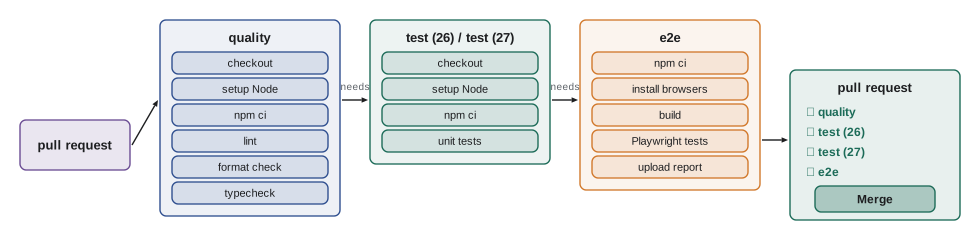
Mira's workflow has three jobs. The quality job runs the fast static checks. The test job runs the unit and DOM tests on two Node.js versions. The e2e job builds the page and runs the Playwright tests, and keeps the report when something fails.
name: CI

on:
  push:
    branches: [main]
  pull_request:

permissions:
  contents: read

concurrency:
  group: ci-${{ github.ref }}
  cancel-in-progress: true

jobs:
  quality:
    runs-on: ubuntu-latest
    steps:
      - uses: actions/checkout@v6
      - uses: actions/setup-node@v6
        with:
          node-version-file: .nvmrc
          cache: npm
      - run: npm ci
      - run: npm run lint -- --max-warnings 0
      - run: npm run format:check
      - run: npx tsc --noEmit

  test:
    needs: quality
    runs-on: ubuntu-latest
    strategy:
      matrix:
        node: [26, 27]
    steps:
      - uses: actions/checkout@v6
      - uses: actions/setup-node@v6
        with:
          node-version: ${{ matrix.node }}
          cache: npm
      - run: npm ci
      - run: npm test

  e2e:
    needs: test
    runs-on: ubuntu-latest
    steps:
      - uses: actions/checkout@v6
      - uses: actions/setup-node@v6
        with:
          node-version-file: .nvmrc
          cache: npm
      - run: npm ci
      - run: npx playwright install --with-deps
      - run: npm run test:e2e
        env:
          CI: true
      - uses: actions/upload-artifact@v4
        if: failure()
        with:
          name: playwright-report
          path: playwright-report/
          retention-days: 14
What this code does
The workflow runs on pushes to main and on every pull request, with read-only access to the repository, and cancels an older run of the same branch when a newer push arrives. Each job checks out the code, installs the Node.js version the project names, restores npm's download cache and installs exactly what the lock file says. The jobs then run the static checks, the tests on two Node.js versions and the browser tests, and the last job keeps the Playwright report for two weeks if anything failed.
A few details deserve a closer look. The double braces are GitHub's expressions, such as matrix.node for the current matrix value. permissions gives the workflow's token only the access it needs, here only reading the code, which limits the damage if a step is ever compromised. concurrency cancels a run that has been overtaken by a newer push to the same branch, which saves time when Mira pushes three small fixes in a row. And the CI: true environment variable is what the Playwright configuration in Lesson 9 checks to turn on retries and forbid test.only.
Jobs that depend on jobs
Jobs without needs run at the same time on separate runners. With needs, a job waits for the jobs it names and is skipped if any of them fail. Mira's order puts the fastest checks first: there is no point spending two minutes on browser tests if the code does not pass the linter. The next example simulates how GitHub schedules her three jobs.
const jobs = {
  quality: { needs: [], seconds: 40 },
  test: { needs: ['quality'], seconds: 55 },
  e2e: { needs: ['test'], seconds: 110 },
  audit: { needs: [], seconds: 20 },
};

function schedule(jobs, failing = new Set()) {
  const result = {};
  const finish = {};
  const order = Object.keys(jobs);
  while (Object.keys(result).length < order.length) {
    for (const name of order) {
      if (result[name]) continue;
      const deps = jobs[name].needs;
      if (!deps.every((d) => result[d])) continue;
      if (deps.some((d) => result[d] !== 'success')) { result[name] = 'skipped'; finish[name] = Math.max(0, ...deps.map((d) => finish[d])); continue; }
      const start = Math.max(0, ...deps.map((d) => finish[d]));
      finish[name] = start + jobs[name].seconds;
      result[name] = failing.has(name) ? 'failure' : 'success';
    }
  }
  return order.map((n) => `${n.padEnd(8)} ${result[n].padEnd(8)} done at ${String(finish[n]).padStart(3)} s`);
}

console.log(schedule(jobs).join('\n'));
console.log('--- if lint fails in quality:');
console.log(schedule(jobs, new Set(['quality'])).join('\n'));quality success done at 40 s test success done at 95 s e2e success done at 205 s audit success done at 20 s --- if lint fails in quality: quality failure done at 40 s test skipped done at 40 s e2e skipped done at 40 s audit success done at 20 s
What this code does
Each job lists the jobs it needs and roughly how long it takes. schedule repeatedly starts any job whose needs have all finished, marks it skipped if one of them did not succeed, and records when each job finishes. With no failures the workflow takes 205 seconds, because the three main jobs run one after another while audit runs alongside them; if quality fails, the later jobs are skipped and the run ends after 40 seconds.
A matrix of versions
A matrix runs the same job once for each combination of values. The counter page runs on one Node.js version in production, the tablet's browser runs the bundle and Node.js only runs the tools, so testing the tools on the two supported LTS lines is enough. riverside-data is a library that the dashboard's build and Theo's tools also use, so its matrix adds operating systems as well.
function expand(matrix) {
  return Object.entries(matrix).reduce(
    (combos, [key, values]) => combos.flatMap((combo) => values.map((v) => ({ ...combo, [key]: v }))),
    [{}],
  );
}

const counter = expand({ node: [26, 27] });
const library = expand({ node: [24, 26, 27], os: ['ubuntu-latest', 'windows-latest'] });
console.log('counter-page:', counter.length, 'jobs');
console.log('riverside-data:', library.length, 'jobs');
for (const combo of library) console.log(' ', JSON.stringify(combo));counter-page: 2 jobs
riverside-data: 6 jobs
{"node":24,"os":"ubuntu-latest"}
{"node":24,"os":"windows-latest"}
{"node":26,"os":"ubuntu-latest"}
{"node":26,"os":"windows-latest"}
{"node":27,"os":"ubuntu-latest"}
{"node":27,"os":"windows-latest"}What this code does
expand starts with one empty combination and, for each key in the matrix, replaces every combination with one copy per value. Two Node.js versions give two jobs, while three versions on two operating systems give six. GitHub Actions does the same expansion and runs the jobs in parallel, each with its own matrix values.
The node-version-file setting in the other jobs reads the version from a file called .nvmrc in the repository, which contains a single line such as 27. Developers' version managers read the same file, so a laptop, the quality job and the e2e job all use the same Node.js version, and changing it is a one-line pull request. The engines field in package.json, from Lesson 2, states the range the project supports.
Caching and speed
A fresh runner has an empty npm cache, so npm ci downloads every package on every run. setup-node's cache option saves npm's download cache at the end of a run and restores it at the start of the next, under a cache key built from a hash of package-lock.json. While the lock file is unchanged, the key is the same and the packages come from the cache; when the lock file changes, the key changes and a fresh cache is built. node_modules itself is not cached: npm ci always builds it cleanly from the cache, which is fast and avoids subtle problems.
function hash(text) {
  let h = 0x811c9dc5;
  for (let i = 0; i < text.length; i++) { h ^= text.charCodeAt(i); h = Math.imul(h, 0x01000193) >>> 0; }
  return h.toString(16).padStart(8, '0');
}
const cacheKey = (os, lockfile) => `node-cache-${os}-npm-${hash(lockfile)}`;

const saved = new Set();
function runCi(label, lockfile) {
  const key = cacheKey('Linux-x64', lockfile);
  const hit = saved.has(key);
  saved.add(key);
  console.log(label.padEnd(26), key, hit ? 'cache hit: about 8 s to install' : 'cache miss: about 35 s to install');
}

const lockV1 = '{"lockfileVersion":3,"packages":{"node_modules/vitest":{"version":"4.1.2"}}}';
const lockV2 = '{"lockfileVersion":3,"packages":{"node_modules/vitest":{"version":"4.1.3"}}}';
runCi('first run', lockV1);
runCi('next push, same lock file', lockV1);
runCi('after updating vitest', lockV2);
runCi('the push after that', lockV2);first run node-cache-Linux-x64-npm-bc5e1363 cache miss: about 35 s to install next push, same lock file node-cache-Linux-x64-npm-bc5e1363 cache hit: about 8 s to install after updating vitest node-cache-Linux-x64-npm-338da640 cache miss: about 35 s to install the push after that node-cache-Linux-x64-npm-338da640 cache hit: about 8 s to install
What this code does
The cache key combines the runner's operating system with a hash of the lock file, so it changes only when the exact dependencies change. The first run and the run after an update miss the cache and download packages; every other run restores them. The install times are illustrative, but the pattern, slow only when dependencies change, is what makes cached CI runs quick.
Gareth's target for the counter page is that the whole workflow finishes in under five minutes, because slow CI is CI that people start to work around. Besides caching, the ways to keep it fast are to put quick checks first, to run independent jobs in parallel, to run end-to-end tests only for the critical paths, and to use Playwright's sharding to split a large suite across several runners if it ever grows.
Artifacts and reports
When the e2e job fails, the most useful thing for Mira is the Playwright HTML report with its traces, but the runner is deleted when the job ends. The upload-artifact step copies the report folder into storage attached to the run, where anyone with access can download it from the run's page. The if: failure() condition uploads it only when a step has failed, and retention-days removes it after two weeks. Lint and test failures need no artifact, because their output in the job log is enough.
Branch protection: making the checks count
A failing check that can be ignored is only advice. Branch protection rules, or the newer rulesets, on the main branch turn it into a rule. Brightwater's rules for every Food Hub repository are the same: changes reach main only through a pull request, at least one other person must approve it, and the required status checks, quality, both test jobs and e2e, must pass on the latest commit. The merge button stays gray until they do.
function canMerge(pr, rules) {
  const reasons = [];
  for (const name of rules.requiredChecks) {
    const status = pr.checks[name];
    if (status === undefined) reasons.push(`${name} has not run`);
    else if (status !== 'success') reasons.push(`${name} is ${status}`);
  }
  if (pr.approvals < rules.approvals) reasons.push(`needs ${rules.approvals - pr.approvals} more approval(s)`);
  if (pr.behindMain && rules.upToDate) reasons.push('branch is behind main');
  return reasons.length ? 'blocked: ' + reasons.join('; ') : 'ready to merge';
}

const rules = { requiredChecks: ['quality', 'test (26)', 'test (27)', 'e2e'], approvals: 1, upToDate: true };
const prs = {
  'add remove button': { checks: { quality: 'success', 'test (26)': 'success', 'test (27)': 'success', e2e: 'success' }, approvals: 1, behindMain: false },
  'update vitest': { checks: { quality: 'success', 'test (26)': 'success', 'test (27)': 'failure' }, approvals: 1, behindMain: false },
  'new receipt layout': { checks: { quality: 'success', 'test (26)': 'success', 'test (27)': 'success', e2e: 'in_progress' }, approvals: 0, behindMain: true },
};
for (const [title, pr] of Object.entries(prs)) console.log(title.padEnd(20), canMerge(pr, rules));add remove button ready to merge update vitest blocked: test (27) is failure; e2e has not run new receipt layout blocked: e2e is in_progress; needs 1 more approval(s); branch is behind main
What this code does
canMerge applies the same kind of rules as branch protection: every required check must have run and succeeded, the pull request needs enough approvals and, with the up-to-date rule, the branch must include the latest main. Each blocked pull request gets every reason listed, as GitHub shows them under the merge button. Only the first pull request can be merged.
Two habits make this work in practice. Pull requests stay small, so that checks and reviews are quick. And when main itself breaks, perhaps because two changes that passed separately conflict, fixing it is the team's first job, before anything else is merged. A red main branch that everyone ignores is worse than no CI at all, because it teaches people that red does not matter.
Keeping dependencies up to date safely
CI also makes updating dependencies routine. Dependabot, built into GitHub, opens pull requests that update packages in package.json and the lock file, and actions in workflow files, on a schedule. Each update runs the full workflow, so a passing update is very likely safe, and a failing one shows exactly which package broke what. Brightwater groups minor and patch updates into one weekly pull request per repository, keeps major updates separate, and adds a short cooldown before proposing a brand-new release, for the supply-chain reasons in Lesson 2. A scheduled job runs npm audit weekly too.
# .github/dependabot.yml
version: 2
updates:
  - package-ecosystem: npm
    directory: /
    schedule:
      interval: weekly
    cooldown:
      default-days: 3
    groups:
      minor-and-patch:
        update-types: [minor, patch]
  - package-ecosystem: github-actions
    directory: /
    schedule:
      interval: weekly
What this code does
This file asks Dependabot to check the npm packages and the workflow actions once a week. Minor and patch updates for npm are grouped into a single pull request, while each major update gets its own, and no release is proposed until it has been out for three days. Every pull request Dependabot opens runs the CI workflow like any other.
Secrets
Some workflows need secrets, such as a token for deploying the built site to the Food Hub's web host. Secrets are stored in the repository's settings, never in the workflow file or the code, and are passed to a step through the secrets context in an expression, such as secrets.DEPLOY_TOKEN. GitHub hides their values in logs. For safety, secrets are not given to workflows triggered by pull requests from forks, and deployment runs only on pushes to main, after every check has passed. Theo looks after the counter page's deployment job, which is outside the scope of this block.
Common mistakes
MistakeCI is the server; the practice does not matter.
InsteadCI means merging small changes often with every change checked. A server that nobody waits for is not CI.
MistakeCache node_modules to make CI fast.
InsteadCache npm's download cache, keyed on the lock file, and let npm ci build node_modules cleanly.
MistakeRun every check in one long job.
InsteadSplit fast and slow checks into jobs, put the fast ones first and use needs so slow jobs only run when the basics pass.
MistakeA failing check can be merged if the change looks fine.
InsteadMake the checks required with branch protection, and fix a broken main first.
MistakePut the deployment token in the workflow file.
InsteadStore it as a repository secret and use it only in jobs that run on main.
Summary and key terms
- Continuous integration is the practice of merging small changes often, with every push and pull request built and tested automatically on a clean machine, so that the checks are the same for everyone and visible in the pull request.
- GitHub Actions runs workflows defined in YAML files in .github/workflows.
- A workflow has triggers, jobs that run on fresh runners and steps that run commands or use actions such as actions/checkout and actions/setup-node.
- Jobs run in parallel unless needs orders them; fast checks go first.
- A matrix runs a job for each combination of values, such as Node.js versions. node-version-file reads .nvmrc so CI and laptops agree.
- Caching npm's download cache, keyed on a hash of the lock file, keeps installs fast. upload-artifact keeps reports from failed runs. permissions should be minimal, and concurrency cancels overtaken runs.
- Branch protection makes checks and approvals required before merging.
- Dependabot proposes dependency updates that CI tests.
- Secrets live in repository settings and are used only where needed.
- continuous integration
- Merging changes often, with an automated build and test of every change.
- workflow
- An automated process in GitHub Actions, defined in a YAML file.
- trigger
- The event that starts a workflow, such as a push or a pull request.
- job
- A set of steps that runs on one runner.
- runner
- The fresh virtual machine a job runs on.
- step
- One command or action within a job.
- action
- A reusable step published for GitHub Actions, such as actions/checkout.
- matrix
- A way to run a job once for each combination of values.
- artifact
- A file saved from a run for people to download later.
- branch protection
- Repository rules that require checks and reviews before changes reach a branch.
Practice problems
Work each problem on paper first, then reveal the answer to check.
Why does CI run npm ci rather than npm install?
Show answer
It installs exactly what the lock file says on a clean machine and fails if the lock file is out of date.
A matrix has node: [24, 26, 27] and os: [ubuntu-latest, windows-latest]. How many jobs run?
Show answer
Six.
What happens to the e2e job if the quality job fails?
Show answer
It is skipped, because it needs test, which needs quality.
What makes the npm cache key change?
Show answer
A change to package-lock.json, because the key includes its hash.
How does branch protection stop a failing change from reaching main?
Show answer
It makes the checks required, so the pull request cannot be merged until they pass.
Try it yourself
Expand a matrix with exclusions
Complete expandMatrix(matrix, exclude) so that it returns every combination of the matrix values, in the same order as GitHub Actions, then removes any combination that matches an object in exclude.
A combination matches an exclusion when every key in the exclusion has the same value in the combination.
function expandMatrix(matrix, exclude = []) {
  return [];
}

const jobs = expandMatrix(
  { node: [24, 26, 27], os: ['ubuntu', 'windows'] },
  [{ node: 24, os: 'windows' }],
);
console.log(jobs.length);
for (const j of jobs) console.log(j.node, j.os);
console.log(expandMatrix({ browser: ['chromium', 'webkit'] }).map((j) => j.browser).join(', '));
Try it yourself
Which checks block the merge?
Complete blockingChecks(checks, required) so that it returns the names of the required checks that would stop a merge, sorted alphabetically: those that are missing, and those whose status is anything other than 'success' or 'skipped'.
GitHub treats a required check that was skipped because of an if condition as passing, so 'skipped' does not block. Checks that are not required never block.
function blockingChecks(checks, required) {
  return required.filter((name) => checks[name] === 'failure');
}

const required = ['quality', 'test (26)', 'test (27)', 'e2e'];
console.log(blockingChecks({ quality: 'success', 'test (26)': 'success', 'test (27)': 'success', e2e: 'success' }, required));
console.log(blockingChecks({ quality: 'success', 'test (26)': 'failure', 'test (27)': 'timed_out', audit: 'failure' }, required));
console.log(blockingChecks({ quality: 'success', 'test (26)': 'skipped', 'test (27)': 'success', e2e: 'in_progress' }, required));
Lesson quiz · 5 questions
Score 60% or more to complete this lesson.
Create a free account to save your progress, take quizzes and earn a certificate.