
JS-210 · Lesson 5 of 12 · 25 min
Formatting with Prettier
▶ Video coming soon A video version of this lesson is on the way.
On Tuesday, November 2, Gareth shows Mira a pull request from the summer. Theo had fixed one line in the dashboard's API client, but the change showed forty lines as modified. His editor had re-indented the file with tabs, changed every double quote to a single quote and wrapped two long lines differently from the rest of the file. "The fix is in there somewhere," Gareth says. "It took me ten minutes to find it. Arguing about layout and reading layout changes is time nobody gets back. Today we hand that job to a machine."
The machine is Prettier, the most widely used code formatter for JavaScript, TypeScript, CSS, HTML, JSON, YAML and Markdown. This lesson explains what a formatter does and how it differs from a linter, Prettier's few options, how to check formatting without changing files, and how to make Prettier and ESLint work together.
What a formatter does
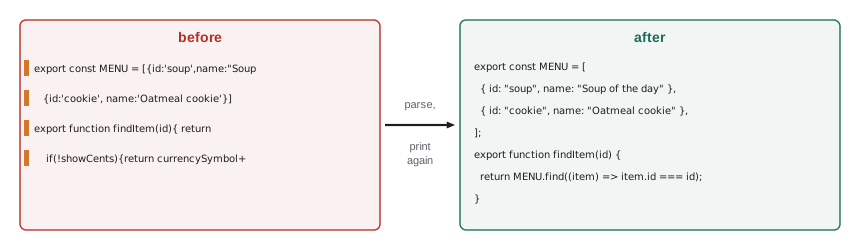
A code formatter rewrites source code into one consistent layout: indentation, spacing, line breaks, quotes, semicolons and trailing commas. It does not change what the code does. Prettier works by parsing the code into a syntax tree, throwing away the original layout completely and printing the tree again by its own rules. That is why two people's code comes out identical however differently they typed it.
Mira tries it on a file from the counter page written in a hurry. The code works, but every line is laid out differently.
export const MENU = [{id:'soup',name:"Soup of the day",price:4.5},{id:'sandwich',name:"Sandwich",price:5.25},
   {id:'cookie', name:'Oatmeal cookie', price: 1.5}]

export function findItem(id){ return MENU.find(item=>item.id===id) }

export function formatPrice(amount,currencySymbol='',showCents=true){
    if(!showCents){return currencySymbol+Math.round(amount)}
    return currencySymbol+amount.toFixed(2)
}
What this code does
The menu items are crammed onto two lines with mixed quote styles, spacing varies from one line to the next and some statements end without semicolons. JavaScript accepts all of it, but every reader has to work harder. This is the file before Prettier.
npx prettier --check src
npx prettier --write src/menu.jsChecking formatting... [warn] src/menu.js [warn] Code style issues found in the above file. Run Prettier with --write to fix.
What this code does
The --check option reads files and reports those that are not formatted, without changing them, and exits with a failure code if any are found. The --write option rewrites the files in place. This output is from the lesson's copy of the counter page, where only menu.js needed formatting.
export const MENU = [
  { id: "soup", name: "Soup of the day", price: 4.5 },
  { id: "sandwich", name: "Sandwich", price: 5.25 },
  { id: "cookie", name: "Oatmeal cookie", price: 1.5 },
];

export function findItem(id) {
  return MENU.find((item) => item.id === id);
}

export function formatPrice(amount, currencySymbol = "", showCents = true) {
  if (!showCents) {
    return currencySymbol + Math.round(amount);
  }
  return currencySymbol + amount.toFixed(2);
}
What this code does
Prettier put each menu item on its own line because the array no longer fitted on one, used double quotes everywhere, added spaces around operators and inside braces, added the missing semicolons and a trailing comma after the last item. It also put parentheses around the single arrow function parameter. Nothing about what the code does has changed.
Formatter or linter?
A linter and a formatter both read code without running it, and both can rewrite files, so they are easy to confuse. The difference is what they care about. A formatter cares only about layout, and it has an opinion about every character of it. A linter cares about meaning: unused variables, risky comparisons, code that can never run. Prettier will never tell you that a variable is unused, and ESLint should not be arguing about where a line breaks.
| Prettier (formatter) | ESLint (linter) | |
|---|---|---|
| Cares about | Layout: spaces, line breaks, quotes, commas | Meaning: bugs, risky patterns, team rules |
| Changes code | Always, for every file it formats | Only for rules with a safe fix, with --fix |
| Options | A few, by design | Hundreds of rules, each configurable |
| Can change behavior | Never | Never with a safe fix; the rules only report |
| Typical use | Format on save; check in CI | Underline in the editor; check in CI |
ESLint used to include many layout rules, such as rules for indentation and quotes, and teams that used both tools found them fighting: Prettier would format a line one way and ESLint would complain. ESLint has since deprecated its layout rules and moved them to a separate community package, so the recommended configuration no longer contains any. If a project turns on layout rules from an older shared configuration, the eslint-config-prettier package switches off every rule that could conflict with Prettier, and goes last in the configuration array.
Why one style matters
Code is read far more often than it is written. When every file in a project has the same layout, readers stop noticing the layout and see the logic. More practically for Brightwater, consistent formatting keeps diffs small. A diff is the list of lines that changed between two versions of a file, and it is what a reviewer reads in a pull request. If formatting changes are mixed with real changes, the real ones are hard to find, as Theo's forty-line fix showed.
function changedLines(before, after) {
  const a = before.split('\n'), b = after.split('\n');
  let changed = 0;
  for (let i = 0; i < Math.max(a.length, b.length); i++) if (a[i] !== b[i]) changed++;
  return changed;
}

const original = [
  'export async function getShifts(day) {',
  '  const res = await fetch(`/api/v1/shifts?day=${day}`);',
  '  if (!res.ok) throw new Error("Request failed");',
  '  return res.json();',
  '}',
].join('\n');

// Theo's real fix: check the status code with a clearer message.
const fixOnly = original.replace('throw new Error("Request failed")', 'throw new Error(`Shifts request failed: ${res.status}`)');
// The same fix, saved by an editor that also changed quotes and indentation.
const fixWithNoise = fixOnly.replaceAll('  ', '\t').replaceAll('"', "'");

console.log('fix only:            ', changedLines(original, fixOnly), 'line changed');
console.log('fix plus reformatting:', changedLines(original, fixWithNoise), 'lines changed');fix only: 1 line changed fix plus reformatting: 3 lines changed
What this code does
changedLines compares two versions of a file line by line and counts the lines that differ, a rough version of what a diff shows a reviewer. The fix on its own changes one line. The same fix saved by an editor with different settings also changes indentation and quotes, and the reviewer now has to inspect every line to find the one that matters.
With Prettier on every developer's computer and checked in continuous integration, the layout of a file only changes when the code changes, and a one-line fix is a one-line diff again.
Prettier's options
Prettier is deliberately opinionated: it has very few options, so that teams spend no time debating them. The defaults are a reasonable style, and most projects change one or two at most. Options go in a file called .prettierrc, written in JSON, at the root of the project.
| Option | Default | Meaning |
|---|---|---|
| printWidth | 80 | The line length Prettier tries to stay within |
| tabWidth | 2 | Spaces per indentation level |
| useTabs | false | Indent with tabs instead of spaces |
| semi | true | Add semicolons at the ends of statements |
| singleQuote | false | Use single quotes for strings |
| trailingComma | "all" | Add trailing commas wherever they are allowed in multi-line lists |
| bracketSpacing | true | Put spaces inside object braces: { a: 1 } |
| arrowParens | "always" | Put parentheses around a single arrow function parameter |
| endOfLine | "lf" | Line endings; keeps files the same on Windows and Mac |
Brightwater keeps the defaults with one exception that the studio agreed years ago: single quotes in JavaScript and TypeScript. The whole configuration is three lines.
{
  "singleQuote": true
}
What this code does
This .prettierrc changes one option and keeps every other default. Prettier applies singleQuote to JavaScript and TypeScript strings, while JSON keeps double quotes because the JSON format requires them. With this file in the project, everyone's editor and the CI check use the same style.
npx prettier --single-quote src/menu.jsexport const MENU = [
{ id: 'soup', name: 'Soup of the day', price: 4.5 },
{ id: 'sandwich', name: 'Sandwich', price: 5.25 },
{ id: 'cookie', name: 'Oatmeal cookie', price: 1.5 },
];What this code does
Running Prettier without --write prints the formatted file instead of changing it, which is a quick way to see what an option does. Here --single-quote has the same effect as the .prettierrc setting. Only the first lines of the output are shown.
A .prettierignore file lists files Prettier should skip, in the same format as .gitignore. Prettier already skips node_modules and files listed in .gitignore, so most projects only add generated files such as the lock file, the build folder and test reports.
# .prettierignore
dist/
coverage/
playwright-report/
package-lock.json
What this code does
Each line is a path or pattern Prettier will not format. The build output and the test reports are generated by tools and are never edited by hand, and the lock file is written by npm in its own format. Formatting them would only create pointless changes.
How Prettier decides where to break a line
Prettier's central rule is simple to state: print each piece of code on one line if it fits within printWidth, and otherwise break it into several lines in a standard way. For a function call, that means putting each argument on its own line, indented, with a trailing comma. For an object or array, it means one entry per line. The next example applies that rule to function calls.
function printCall(name, args, width = 80, indent = '') {
  const oneLine = `${indent}${name}(${args.join(', ')});`;
  if (oneLine.length <= width) return oneLine;
  const inner = args.map((a) => `${indent}  ${a},`).join('\n');
  return `${indent}${name}(\n${inner}\n${indent});`;
}

console.log(printCall('addOrder', ['soup', '2']));
console.log(printCall('scheduleVolunteer', ["'Ana Ruiz'", "'Community kitchen'", "'2027-11-20T11:30'", "{ notify: true }"]));
console.log(printCall('addOrder', ['soup', '2', 'cookie', '1'], 30, ' '));addOrder(soup, 2);
scheduleVolunteer(
'Ana Ruiz',
'Community kitchen',
'2027-11-20T11:30',
{ notify: true },
);
addOrder(
soup,
2,
cookie,
1,
);What this code does
printCall first tries the whole call on one line and keeps it if it fits within the width. Otherwise it puts each argument on its own indented line with a trailing comma, the layout Prettier uses. The third call shows the same rule with a narrow width of 30, which forces a break even for a short call.
Real code nests: an object inside an argument inside a call inside a return. Prettier tries the outermost group on one line first, and breaks it if necessary, then tries each inner group in the same way. The result is predictable, and after a week of using it most developers stop thinking about layout at all.
Prettier keeps a few choices of the writer's. It keeps blank lines between statements, up to one in a row, so paragraphs of code stay separate. It keeps an object on several lines if the writer put a line break after the opening brace, a rule Prettier has followed for years and that the objectWrap option, added in version 3.5, can turn off. And it never changes comments, except to indent them.
// Trailing commas make a one-line addition a one-line diff.
const withoutTrailing = ['const AREAS = [', "  'kitchen',", "  'garden'", '];'];
const withTrailing = ['const AREAS = [', "  'kitchen',", "  'garden',", '];'];

function addItem(lines, item, trailing) {
  const out = lines.slice(0, -1);
  if (!trailing) out[out.length - 1] += ',';
  out.push(`  ${item}${trailing ? ',' : ''}`, '];');
  return out;
}
function diff(a, b) {
  const lines = [];
  const n = Math.max(a.length, b.length);
  for (let i = 0; i < n; i++) {
    if (a[i] === b[i]) continue;
    if (a[i] !== undefined && b.includes(a[i]) === false) lines.push('- ' + a[i]);
    if (b[i] !== undefined && a.includes(b[i]) === false) lines.push('+ ' + b[i]);
  }
  return lines;
}

console.log('Without trailing commas:');
console.log(diff(withoutTrailing, addItem(withoutTrailing, "'grocery'", false)).join('\n'));
console.log('With trailing commas:');
console.log(diff(withTrailing, addItem(withTrailing, "'grocery'", true)).join('\n'));Without trailing commas: - 'garden' + 'garden', + 'grocery' With trailing commas: + 'grocery',
What this code does
addItem adds one entry to a list written one item per line, either with or without a trailing comma after the last item. Without the comma, the old last line must change to gain one, so the diff shows a removed line and two added lines. With trailing commas, adding an item adds exactly one line, which is why Prettier's default is to use them everywhere they are allowed.
A good formatter has two properties that make it safe to run automatically. It must not change behavior, and it must be idempotent: formatting code that is already formatted must change nothing. If formatting twice gave a different result from formatting once, every save would create a new diff. The toy formatter below has both properties for the small set of statements it understands.
function format(line) {
  return line
    .trim()
    .replace(/\s*([=+*\/-])\s*/g, ' $1 ')
    .replace(/\s*,\s*/g, ', ')
    .replace(/\s+/g, ' ')
    .replace(/;?$/, ';');
}

const messy = ['let total=price*qty', '  const tip =  total*0.1;', 'log(total,tip)'];
for (const line of messy) {
  const once = format(line);
  const twice = format(once);
  console.log(once.padEnd(26), once === twice ? 'stable' : 'CHANGED AGAIN');
}let total = price * qty; stable const tip = total * 0.1; stable log(total, tip); stable
What this code does
format trims a line, puts single spaces around arithmetic operators and the equals sign, puts one space after each comma, collapses repeated spaces and makes sure the line ends with a semicolon. The loop formats each line twice and checks that the second pass changes nothing. That property, called idempotence, is what lets editors format on every save without creating endless changes.
Prettier in everyday work
Like the linter, Prettier is most useful when nobody has to remember to run it.
- Format on save. The Prettier extension for Visual Studio Code formats each file as it is saved. Brightwater commits a .vscode/settings.json that turns this on for every project, so new developers get it automatically.
- A check in CI. npm run format:check runs prettier --check . in continuous integration and fails the build if any file is not formatted. It never changes files on the server.
- One formatting commit. When Prettier is added to an old project, format everything in a single commit that does nothing else, so that later history is not mixed with layout changes. Git can be told to skip that commit when showing who last changed each line.
- Pinned version. Prettier is a devDependency with a version in the lock file, because a new version can format a few things differently. Upgrading is a small, separate pull request.
{
  "editor.formatOnSave": true,
  "editor.defaultFormatter": "esbenp.prettier-vscode",
  "editor.codeActionsOnSave": {
    "source.fixAll.eslint": "explicit"
  }
}
What this code does
These Visual Studio Code settings turn on format on save with the Prettier extension and also apply ESLint's safe fixes on save. Committing them in the project's .vscode folder means every developer who opens the project gets the same behavior. The two tools run one after the other and do not overlap, because ESLint's configuration has no layout rules.
Prettier is the default choice, but not the only one. Biome is a single fast tool, written in Rust, that combines a formatter compatible with most of Prettier's output and a linter. Some teams use it instead of Prettier and ESLint. Brightwater stays with Prettier and ESLint because their plugins cover TypeScript, accessibility and Playwright, but the ideas in this lesson apply to any formatter.
Prettier 3.9, released on June 27, 2026, is the version Brightwater pins at the start of the block. Like most Prettier releases, it mainly improved how particular languages are parsed and printed, with Markdown and YAML handled by new parsers, rather than changing the style of existing JavaScript.
Common mistakes
MistakeA formatter finds bugs.
InsteadIt changes only layout. Use a linter for bugs and risky patterns.
MistakePrettier and ESLint can both enforce indentation.
InsteadLet Prettier own layout. Keep layout rules out of ESLint, or turn them off with eslint-config-prettier.
Mistakeprettier --check fixes files on the server.
Instead--check only reports and fails; --write changes files.
MistakeEach developer can choose their own Prettier settings.
InsteadCommit one .prettierrc and pin the version, so everyone and CI produce the same output.
MistakeReformat files as you go, a few at a time.
InsteadFormat the whole project once in a separate commit, then keep it formatted.
Summary and key terms
- A code formatter rewrites code into one consistent layout without changing what it does.
- Prettier parses the code, discards the original layout and prints the syntax tree by its own rules, so the output depends only on the code.
- A formatter handles layout; a linter handles meaning; ESLint's own layout rules are deprecated, and eslint-config-prettier turns off any that conflict.
- Consistent formatting keeps diffs small, so reviewers see only real changes.
- Prettier is opinionated and has few options, set in .prettierrc; its defaults include printWidth 80, two-space indentation, semicolons, double quotes and trailing commas everywhere they are allowed.
- It prints a group on one line if it fits and otherwise breaks it into one item per line. --check reports unformatted files and fails, --write changes them.
- Use format on save in the editor, a format check in CI, one formatting commit when adopting it and a pinned version.
- code formatter
- A tool that rewrites code into a consistent layout without changing its behavior.
- Prettier
- An opinionated code formatter for JavaScript, TypeScript, CSS, HTML, JSON, YAML and Markdown.
- opinionated
- Having strong defaults and few options, so that choices are already made.
- printWidth
- The line length Prettier tries to keep code within.
- trailing comma
- A comma after the last item of a multi-line list, which keeps additions to one line in a diff.
- diff
- The set of lines that changed between two versions of a file.
- format on save
- An editor setting that runs the formatter each time a file is saved.
- eslint-config-prettier
- A shared ESLint configuration that turns off rules that conflict with Prettier.
Practice problems
Work each problem on paper first, then reveal the answer to check.
What is the difference between prettier --check and prettier --write?
Show answer
--check reports unformatted files and exits with a failure; --write rewrites them.
Why does Prettier add a trailing comma after the last item in a multi-line array?
Show answer
So that adding an item later changes only one line in the diff.
Which tool should report an unused variable, and which should fix indentation?
Show answer
ESLint reports the unused variable; Prettier fixes indentation.
Why should Prettier be added to an old project in one separate commit?
Show answer
So that layout changes are not mixed with real changes in later history and reviews.
Which option makes Prettier use single quotes in JavaScript?
Show answer
"singleQuote": true in .prettierrc.
Try it yourself
Wrap a long call
Complete printCall(name, args, width) so that it prints the call on one line, such as addOrder(soup, 2);, if that fits within width characters.
If it does not fit, print the name and an opening parenthesis, then each argument on its own line indented by two spaces and followed by a comma, then ); on the last line.
function printCall(name, args, width) {
  return `${name}(${args.join(', ')});`;
}

console.log(printCall('addOrder', ['soup', '2'], 80));
console.log(printCall('notifyVolunteer', ["'Ana Ruiz'", "'kitchen'", "'Saturday 11:30'"], 40));
Try it yourself
Use one quote style
Complete preferSingle(code) so that every string in double quotes becomes a string in single quotes, as Prettier does with singleQuote: true.
Prettier keeps double quotes when a string contains a single quote, to avoid escaping it, so do the same. You can assume strings do not contain escaped quotes.
function preferSingle(code) {
  return code;
}

console.log(preferSingle('const area = "kitchen";'));
console.log(preferSingle('log("Rosa\'s counter", "open");'));
console.log(preferSingle("const ok = 'already single';"));
Lesson quiz · 5 questions
Score 60% or more to complete this lesson.
Create a free account to save your progress, take quizzes and earn a certificate.